
Power Page WEB API Step by Step

You can use Power Pages Web API to achieve CRUD operation from Power Page. Folow these steps.
Step 1 : Create Site Settings
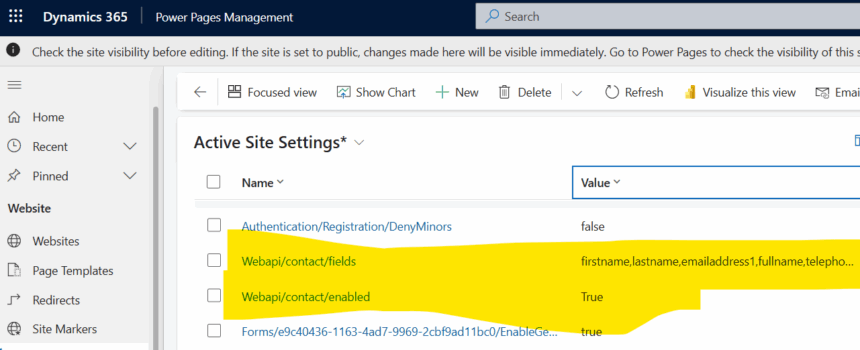
Create below site settings for enabling contact entity for Power Page WEB API interaction.
NOTE :
- Replace the entity logical name for your requirement, Here contact table is used.
- To allow all fields use * else specify columns logical names with comma separated to restrict or limit.
| Site Settings | Example | Value | Extra |
|---|---|---|---|
| Webapi/ /disableodatafilter | Webapi/contact/disableodatafilter | True | |
| Webapi/ /enabled | Webapi/contact/enabled | True | |
| Webapi/ /fields | Webapi/contact/fields | firstname,lastname | attr1,attr2,attr3 / * |
| Webapi/error/innererror | Webapi/error/innererror | True |
Step 2 : Define Table Permission
Create a Web Role, Create a Table Permission for contact table (use your table for your case) and assign to the user who you want to enable WEB API Access.
STEP 3 : Use Helper Script For API Calls
keep this script in a webfile or include in the same power page page where your HTML controls available.
 // Web API ajax wrapper
    (function (webapi, $) {

      function safeAjax(ajaxOptions) {
        var deferredAjax = $.Deferred();

        shell.getTokenDeferred().done(function (token) {

          // Add headers for ajax
          if (!ajaxOptions.headers) {
            ajaxOptions.headers = {};
          }
          ajaxOptions.headers["__RequestVerificationToken"] = token;

          $.ajax(ajaxOptions)
            .done(function (data, textStatus, jqXHR) {
              validateLoginSession(
                data,
                textStatus,
                jqXHR,
                deferredAjax.resolve
              );
            })
            .fail(deferredAjax.reject);

        }).fail(function () {
          // Token failure
          deferredAjax.rejectWith(this, arguments);
        });

        return deferredAjax.promise();
      }

      webapi.safeAjax = safeAjax;

    })(window.webapi = window.webapi || {}, jQuery);
Step 4 : Use Script for CRUD
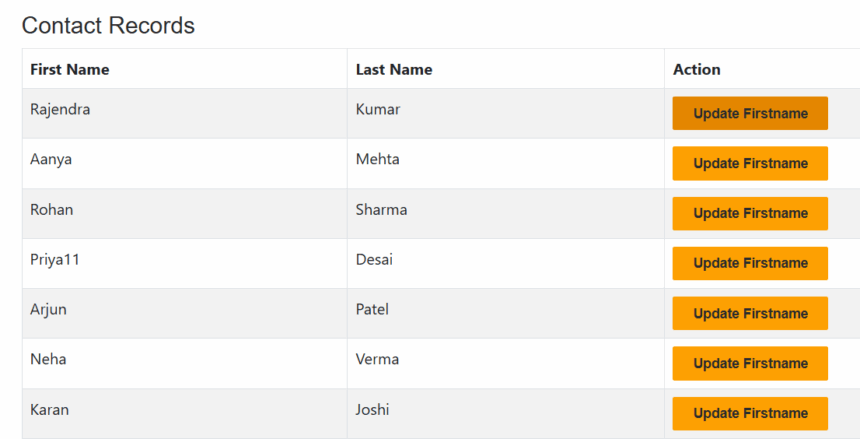
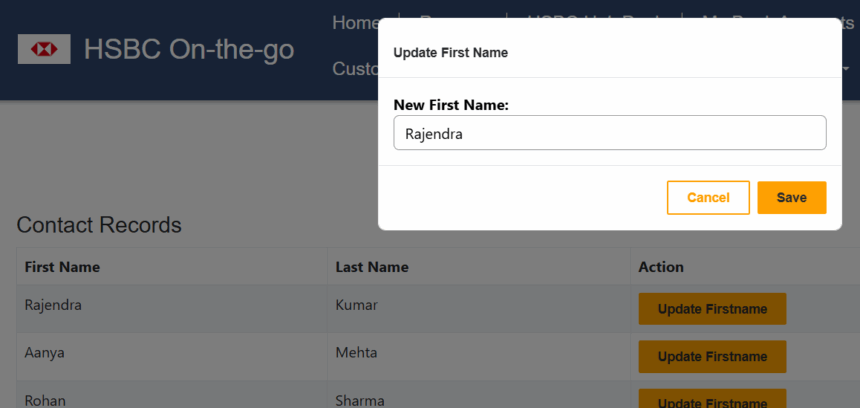
The below script uses the above script on the same page and Retrieves or loads contact records in a table and allow updates using a dialog.
<script>
$(function () {
 // Web API ajax wrapper
    (function (webapi, $) {

      function safeAjax(ajaxOptions) {
        var deferredAjax = $.Deferred();

        shell.getTokenDeferred().done(function (token) {

          // Add headers for ajax
          if (!ajaxOptions.headers) {
            ajaxOptions.headers = {};
          }
          ajaxOptions.headers["__RequestVerificationToken"] = token;

          $.ajax(ajaxOptions)
            .done(function (data, textStatus, jqXHR) {
              validateLoginSession(
                data,
                textStatus,
                jqXHR,
                deferredAjax.resolve
              );
            })
            .fail(deferredAjax.reject);

        }).fail(function () {
          // Token failure
          deferredAjax.rejectWith(this, arguments);
        });

        return deferredAjax.promise();
      }

      webapi.safeAjax = safeAjax;

    })(window.webapi = window.webapi || {}, jQuery);
// ---------------------------------------
// FETCH CONTACT DATA FROM DATAVERSE
// ---------------------------------------
function loadContacts() {
webapi.safeAjax({
type: "GET",
url: "/_api/contacts?$select=firstname,lastname,contactid",
contentType: "application/json",
datatype: "json"
}).done(function (data) {
let rows = "";
if (data.value && data.value.length > 0) {
data.value.forEach(function (c) {
rows += `
<tr>
<td>${c.firstname || ""}</td>
<td>${c.lastname || ""}</td>
<td>
<button
class="btn btn-sm btn-primary update-btn"
data-id="${c.contactid}"
data-firstname="${c.firstname || ""}">
Update Firstname
</button>
</td>
</tr>
`;
});
} else {
rows = `<tr><td colspan="3">No contacts found</td></tr>`;
}
$("#contactsTableBody").html(rows);
})
.fail(function (xhr, status, error) {
console.error("Error loading contacts:", error);
});
}
// ---------------------------------------
// OPEN POPUP WHEN CLICK UPDATE BUTTON
// ---------------------------------------
$(document).on("click", ".update-btn", function () {
let id = $(this).data("id");
let firstname = $(this).data("firstname");
$("#contactId").val(id);
$("#newFirstname").val(firstname);
$("#updateModal").modal("show");
});
// ---------------------------------------
// SAVE UPDATED FIRSTNAME
// ---------------------------------------
$("#saveUpdateBtn").click(function () {
let id = $("#contactId").val();
let newName = $("#newFirstname").val();
webapi.safeAjax({
type: "PATCH",
url: "/_api/contacts(" + id + ")",
contentType: "application/json",
data: JSON.stringify({ firstname: newName })
})
.done(function () {
$("#updateModal").modal("hide");
loadContacts(); // Refresh table
})
.fail(function (xhr) {
console.log("Update error:", xhr.responseText);
});
});
// Load on page load
loadContacts();
});
</script>
<div id="in3ynv" class="row sectionBlockLayout text-start" style="display: flex; flex-wrap: wrap; margin: 0px; min-height: auto; padding: 8px;">
<div class="container" id="iw0vug" style="padding: 0px; display: flex; flex-wrap: wrap;"><div class="col-lg-12 columnBlockLayout" style="flex-grow: 1; display: flex; flex-direction: column; min-width: 250px;">
<div class="container mt-3">
<h3>Contact Records</h3>
<table class="table table-striped table-bordered">
<thead>
<tr>
<th>First Name</th>
<th>Last Name</th>
<th>Action</th>
</tr>
</thead>
<tbody id="contactsTableBody">
<tr>
<td colspan="3">Loading...</td>
</tr>
</tbody>
</table>
</div>
</div></div>
</div>
<!-- ================================
POPUP MODAL (Bootstrap)
================================ -->
<div class="modal fade" id="updateModal" tabindex="-1" aria-hidden="true">
<div class="modal-dialog">
<div class="modal-content">
<div class="modal-header">
<h5 class="modal-title">Update First Name</h5>
<button type="button" class="btn-close" data-bs-dismiss="modal"></button>
</div>
<div class="modal-body">
<input type="hidden" id="contactId" />
<label>New First Name:</label>
<input type="text" id="newFirstname" class="form-control" />
</div>
<div class="modal-footer">
<button class="btn btn-secondary" data-bs-dismiss="modal">Cancel</button>
<button class="btn btn-primary" id="saveUpdateBtn">Save</button>
</div>
</div>
</div>
</div>
The FInal Output
Hope It helps.








