

How to Become a Dynamics 365 Developer from Scratch: A Complete Roadmap (2026 Guide)
Introduction
Enterprise applications are at the heart of modern businesses. From managing customer relationships and sales pipelines to automating workflows and delivering personalized customer experiences, organizations rely heavily on business applications to stay competitive.
One of the most in-demand platforms powering this transformation is Microsoft Dynamics 365.
Whether you’re a B.Tech graduate, MCA student, software developer, Power Platform enthusiast, or someone looking to transition into enterprise application development, becoming a Dynamics 365 Developer can open the door to a rewarding and future-proof career.
In this comprehensive roadmap, you’ll learn:
- What a Dynamics 365 Developer does
- Skills you need to master
- Technologies to learn
- Certifications that matter
- Real-world projects to build
- Career opportunities
- Salary insights
- Common mistakes to avoid
- A step-by-step learning roadmap to land your first Dynamics 365 Developer job
Let’s get started.
What Is Microsoft Dynamics 365?
Microsoft Dynamics 365 is a suite of intelligent business applications that combines Customer Relationship Management (CRM) and Enterprise Resource Planning (ERP) capabilities.
Organizations use Dynamics 365 to streamline business operations, improve customer engagement, automate processes, and integrate data across departments.
The Dynamics 365 ecosystem includes applications such as:
- Dynamics 365 Sales
- Dynamics 365 Customer Service
- Dynamics 365 Field Service
- Dynamics 365 Customer Insights
- Dynamics 365 Marketing
- Dynamics 365 Finance
- Dynamics 365 Supply Chain Management
- Dynamics 365 Business Central
As a developer, your primary focus is often on customizing and extending Dynamics 365 Customer Engagement (CE) applications using Microsoft’s Power Platform and development tools.
Who Is a Dynamics 365 Developer?
A Dynamics 365 Developer designs, customizes, extends, and integrates Microsoft Dynamics 365 applications to meet business requirements.
Unlike traditional software developers who build applications from scratch, Dynamics 365 Developers enhance enterprise solutions by:
- Customizing forms and views
- Extending Dataverse
- Writing plugins and custom workflows
- Building integrations
- Developing JavaScript client-side functionality
- Creating Power Automate flows
- Building Power Apps
- Integrating Azure services
- Optimizing application performance
In short, they bridge business processes with technical solutions.
Why Choose Dynamics 365 Development in 2026?
The demand for Dynamics 365 professionals continues to grow because organizations are accelerating their digital transformation initiatives.
Key Advantages
High Industry Demand
Companies across manufacturing, healthcare, retail, banking, logistics, education, insurance, telecommunications, and government sectors use Dynamics 365 extensively.
Attractive Salary Packages
Dynamics 365 Developers are considered specialized professionals, making them highly valuable in the enterprise software market.
Global Career Opportunities
Dynamics 365 skills are recognized worldwide, creating opportunities to work with multinational companies, consulting firms, Microsoft partners, and remote teams.
Strong Microsoft Ecosystem
Dynamics 365 integrates seamlessly with:
- Power Platform
- Microsoft 365
- Azure
- Microsoft Teams
- Copilot
- Power BI
- SharePoint
Learning Dynamics 365 also strengthens your expertise across the broader Microsoft ecosystem.
AI-Powered Future
Microsoft continues to invest heavily in AI features such as Copilot, intelligent automation, predictive analytics, and generative AI, making Dynamics 365 a future-ready platform.
Skills Required to Become a Dynamics 365 Developer
Many beginners think Dynamics 365 is only about CRM customization. In reality, modern developers need expertise across multiple technologies.
1. CRM Fundamentals
Start by understanding:
- Leads
- Contacts
- Accounts
- Opportunities
- Cases
- Activities
- Business Process Flows
- Customer Journey
Without understanding business processes, writing code alone isn’t enough.
2. Microsoft Dataverse
Dataverse is the foundation of Dynamics 365.
Learn:
- Tables
- Columns
- Relationships
- Choices
- Business Rules
- Calculated Columns
- Rollup Columns
- Security
- Auditing
- Duplicate Detection
Dataverse knowledge is essential for every Dynamics 365 Developer.
3. Power Platform
Modern Dynamics development relies heavily on Power Platform.
Master:
- Power Apps
- Model-driven Apps
- Power Automate
- Power Pages
- Copilot Studio
Power Platform skills dramatically increase your employability.
4. JavaScript
JavaScript is widely used for client-side customization.
You’ll use it for:
- Form scripting
- Field validation
- Business logic
- Ribbon commands
- Custom events
- API calls
A solid understanding of modern JavaScript is highly recommended.
5. C# and .NET
Most server-side customizations use C#.
Important topics include:
- Object-Oriented Programming
- Classes
- Interfaces
- Exception Handling
- LINQ
- Asynchronous Programming
6. Plugins
Plugins are custom business logic executed on the server.
Learn:
- Plugin Registration
- Execution Pipeline
- Images
- Depth
- Secure Configuration
- Tracing
Plugin development is one of the most frequently tested interview topics.
7. Web API & REST
Dynamics 365 exposes APIs for integrations.
Learn:
- REST APIs
- OData
- CRUD Operations
- Authentication
- JSON
API integration is a critical enterprise skill.
8. Azure Basics
Modern enterprise applications often integrate with Azure services.
Recommended topics:
- Azure Functions
- Logic Apps
- Service Bus
- Storage Accounts
- Azure Key Vault
- Azure DevOps
9. Git & Azure DevOps
Version control is an essential part of enterprise development.
Understand:
- Git repositories
- Branching strategies
- Pull requests
- CI/CD pipelines
10. Application Lifecycle Management (ALM)
Every Dynamics developer should understand:
- Managed Solutions
- Unmanaged Solutions
- Environment Variables
- Connection References
- Deployment Pipelines
ALM knowledge differentiates experienced developers from beginners.
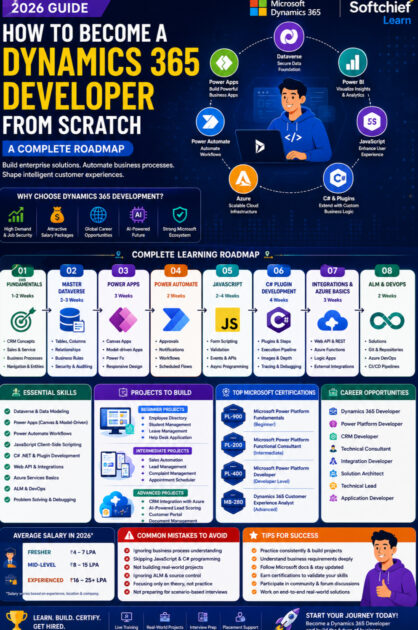
Complete Learning Roadmap
Phase 1: Learn CRM Fundamentals (1–2 Weeks)
Topics:
- CRM concepts
- Business processes
- Sales lifecycle
- Customer service
- Dynamics navigation
Goal:
Understand how businesses use Dynamics 365.
Phase 2: Master Dataverse (2–3 Weeks)
Learn:
- Tables
- Forms
- Views
- Security
- Relationships
- Business Rules
Build:
- Employee Management System
- Student Management App
Phase 3: Learn Power Apps (3 Weeks)
Build:
- Leave Management System
- Expense Tracker
- Inventory Management
Skills:
- Canvas Apps
- Model-driven Apps
- Power Fx
- Responsive Design
Phase 4: Learn Power Automate (2 Weeks)
Build workflows for:
- Approvals
- Notifications
- Email Automation
- Record Creation
- Scheduled Processes
Phase 5: Learn JavaScript (2–4 Weeks)
Practice:
- Form events
- API calls
- Async programming
- Validation
Phase 6: Learn C# Plugin Development (4 Weeks)
Build plugins for:
- Auto Number Generation
- Duplicate Detection
- Data Validation
- Business Calculations
Phase 7: Learn Integrations
Topics:
- REST API
- Web API
- Azure Functions
- External APIs
Projects:
- Dynamics + SAP
- Dynamics + ERP
- Dynamics + Payment Gateway
Phase 8: Learn ALM & DevOps
Understand:
- Solution deployment
- Git
- Azure DevOps
- CI/CD
Recommended Microsoft Certifications
A certification validates your skills and demonstrates your commitment to employers.
Beginner
- PL-900: Microsoft Power Platform Fundamentals
Intermediate
- PL-200: Microsoft Power Platform Functional Consultant
Developer
- PL-400: Microsoft Power Platform Developer
Advanced
- MB-280: Dynamics 365 Customer Experience Analyst (or current role-based certification aligned with your specialization)
Choose certifications that align with your career goals and always combine them with practical experience.
Projects Every Dynamics 365 Developer Should Build
Hands-on projects are one of the strongest indicators of job readiness.
Beginner Projects
- Leave Management
- Student Management
- Help Desk
- Employee Directory
Intermediate Projects
- Sales Automation
- Lead Management
- Complaint Management
- Appointment Scheduler
Advanced Projects
- CRM Integration with Azure
- AI-Powered Lead Scoring
- Customer Portal
- Document Management
- Workflow Automation
Document your projects, explain the business problem, and showcase the technologies you used.
Common Interview Questions
Be prepared to answer questions such as:
- What is Dataverse?
- Explain Plugins.
- What is Power Platform?
- Difference between Pre-operation and Post-operation plugins?
- What is the execution pipeline?
- What are Business Rules?
- Explain Managed Solutions.
- What is a Connection Reference?
- Difference between JavaScript and Plugins?
- Explain ALM in Dynamics 365.
Practice explaining concepts in simple language and back them up with examples from your projects.
Salary Expectations
Salaries vary depending on experience, location, and employer.
Fresher
Strong opportunities exist for candidates with practical project experience and relevant certifications.
Mid-Level
Professionals with two to five years of experience often work on customizations, integrations, and enterprise implementations.
Senior
Experienced developers can progress into Solution Architect, Technical Lead, or Consulting roles with broader responsibilities.
Rather than focusing solely on salary figures, prioritize building expertise and solving real business problems.
Common Mistakes Beginners Make
Avoid these common pitfalls:
- Learning only theory without building projects.
- Ignoring Power Platform and focusing only on CRM customization.
- Skipping JavaScript and C#.
- Not understanding business processes.
- Neglecting ALM and source control.
- Relying only on certifications without practical skills.
- Failing to prepare for scenario-based interviews.
Why Learn Dynamics 365 with Softchief Learn?
At Softchief Learn, we focus on practical, industry-oriented training that prepares you for real enterprise projects.
Our programs include:
- Live instructor-led sessions
- Lifetime access to recordings
- Real-world implementation projects
- Hands-on plugin and integration development
- Resume building support
- Mock interviews
- Placement assistance
- Community support
- Updated curriculum aligned with the latest Microsoft technologies and AI innovations
Our goal is to help you become confident in applying your skills in real-world business environments.
Conclusion
Becoming a Dynamics 365 Developer is one of the most rewarding career choices for professionals interested in enterprise technology. The platform combines business applications, cloud services, low-code development, automation, and AI into a powerful ecosystem used by organizations around the world.
Success in this field doesn’t come from memorizing concepts—it comes from building practical solutions, understanding business requirements, mastering the Microsoft ecosystem, and continuously learning as the platform evolves.
Start with CRM fundamentals, master Dataverse and Power Platform, strengthen your programming skills with JavaScript and C#, build meaningful projects, earn relevant Microsoft certifications, and prepare thoroughly for interviews.
With dedication, hands-on experience, and a structured roadmap, you can build a successful and long-lasting career as a Microsoft Dynamics 365 Developer.










