
C# Full Stack: How to Prevent Stale Browser Data After a Successful Backend Update

Introduction
Consider a business application where an employee updates a customer’s contact information.
The user changes the phone number, clicks Save, and receives a successful response from the backend. The database contains the new value. The API returns HTTP 200 OK.
Everything appears to have worked correctly.
However, when the employee returns to the customer list, the old phone number is still displayed.
They refresh the page. Sometimes the updated information appears. Sometimes it does not. In other cases, navigating to another screen and returning to the same record still displays outdated information.
This is a frustrating problem in full-stack application development because the backend operation has succeeded, but the frontend is not showing the latest application state.
For C# developers working with ASP.NET Core, Web APIs, JavaScript, React, Angular, or Blazor, this is an important architectural issue to understand.
The problem is not always browser caching. It can also originate from frontend state management, HTTP response caching, service workers, CDN layers, asynchronous processing, or database consistency.
A successful backend update does not automatically guarantee that every representation of that data in the browser has been refreshed.
In this article, we will examine why stale browser data occurs, how to diagnose it, and how to design reliable solutions using C#, ASP.NET Core, HTTP caching strategies, JavaScript, and frontend state management.
The goal is to understand the complete request and response lifecycle rather than simply forcing the browser to reload the page.
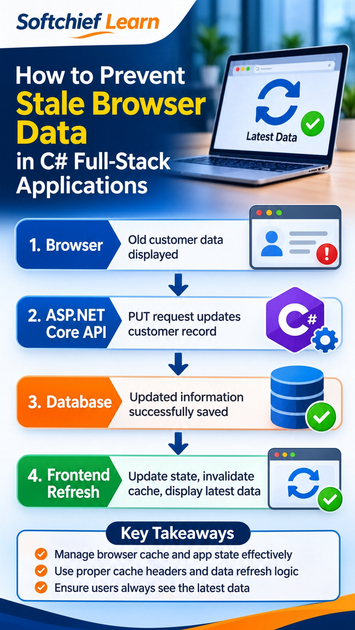
1. Understanding Stale Browser Data in Full-Stack Applications
Stale browser data refers to information displayed or reused by the frontend that no longer represents the current state of the backend.
In a typical C# full-stack application, the data travels through several layers.
Consider this architecture:
Browser → Frontend Application → ASP.NET Core Web API → Business Service → Database
When a user updates a record, the application normally performs the following operations:
- The user modifies information in the browser.
- The frontend sends a PUT or PATCH request.
- The ASP.NET Core API receives the request.
- The backend validates the input.
- The business service applies the required changes.
- The database transaction commits successfully.
- The API returns a successful response.
- The frontend updates its displayed information.
The issue occurs when the last step does not correctly reflect the committed backend state.
For example, the database contains:
{
  "customerId": 101,
  "customerName": "Rahul Sharma",
  "phoneNumber": "9876543210"
}
The user updates the phone number.
The database now contains:
{
  "customerId": 101,
  "customerName": "Rahul Sharma",
  "phoneNumber": "9123456780"
}
But the browser still displays:
{
  "customerId": 101,
  "customerName": "Rahul Sharma",
  "phoneNumber": "9876543210"
}
The backend and frontend are now showing two different versions of the same business record.
This is a data consistency problem across application layers.
2. Why Does the Browser Continue Showing Old Data?
Before implementing a fix, developers need to identify which layer is responsible.
There are several common causes.
2.1 Browser HTTP caching
Browsers can store HTTP responses and reuse them according to the caching directives provided by the server.
For example, consider a GET API response containing customer information.
If the response includes:
Cache-Control: public, max-age=300A browser or an eligible intermediary cache can reuse that response while it is considered fresh.
If the customer record changes during that period, a subsequent request might still receive the cached representation.
This is one reason why developers should understand HTTP caching rather than assume that every API request retrieves the latest database value.
2.2 Frontend state management
This is one of the most frequently overlooked causes.
Consider a React application.
The frontend retrieves customer information and stores it in component state.
const [customer, setCustomer] = useState(null);The component displays the customer details.
Later, another function sends an update request to the backend.
The backend successfully updates the database, but the original component state is never changed.
The browser continues rendering the previous value because React renders from its current state, not directly from the database.
The same architectural issue can occur in Angular services, Redux stores, query caches, and Blazor component state.
2.3 API response caching
Caching can exist beyond the browser.
An application might use:
- ASP.NET Core Response Caching.
- ASP.NET Core Output Caching.
- Redis.
- In-memory caching.
- Reverse proxies.
- API gateways.
- CDN infrastructure.
Even if the database contains the latest information, an API might return a previously cached response.
Developers should identify whether the stale representation originates from the frontend, API, or an intermediate caching layer.
2.4 Service worker caching
Progressive Web Applications can use service workers to intercept network requests.
A service worker might return a cached response instead of contacting the server.
This is useful for offline experiences and performance optimization, but an incorrect caching strategy can cause users to see outdated business information.
For example, a service worker configured with a cache-first strategy for frequently changing API data can continue serving an older response.
2.5 Asynchronous backend processing
Not every successful HTTP response means that all downstream operations have completed.
Consider an application that accepts an order update and publishes a message to Azure Service Bus for further processing.
The API might return HTTP 202 Accepted after accepting the operation.
A background worker processes the message later.
If the frontend immediately requests the updated order, the downstream database or read model might not yet reflect the completed operation.
This is an eventual consistency scenario, not necessarily a browser cache problem.
The frontend must understand whether the backend operation is synchronous or asynchronous.
2.6 Multiple frontend components maintaining separate data
Imagine an application containing:
- Customer details page.
- Customer search page.
- Dashboard summary.
- Recent customer activity component.
All four components might maintain their own copy of customer information.
When one component updates a record, the others might continue displaying older values.
This is a state synchronization problem.
The application needs a clear strategy for updating or invalidating the relevant data across components.
3. First Diagnose the Problem Before Changing Code
Identifying the source of stale browser data requires examining browser requests, API responses, frontend state, and server-side caching.
One of the most important practices in full-stack development is identifying where the inconsistency originates.
Do not immediately disable browser caching or reload the entire application.
Start with browser developer tools.
Step 1: Inspect the Network tab
Open Chrome or Edge Developer Tools.
Navigate to the Network tab and perform the update operation.
Inspect the following requests:
PUT or PATCH request
Check:
- Request URL.
- Request payload.
- HTTP status code.
- Response body.
- Response duration.
GET request
After the update, inspect the request that retrieves the updated record.
Check:
- Whether the GET request was actually sent.
- Whether the response came from memory cache or disk cache.
- Whether a service worker handled the request.
- Whether the response contains the latest value.
- Whether the response includes Cache-Control, ETag, Age, or related headers.
If the GET response contains the old value, investigate the API and caching layers.
If the GET response contains the new value but the screen still displays the old value, investigate frontend state management and rendering.
This distinction saves significant troubleshooting time.
Step 2: Inspect HTTP response headers
Consider the following response:
HTTP/1.1 200 OK
Content-Type: application/json
Cache-Control: public, max-age=300
The response is eligible for caching under the specified rules.
For frequently changing user-specific business information, this configuration may be inappropriate.
For data that must always be revalidated before reuse, consider:
Cache-Control: private, no-cacheFor sensitive information that should not be stored in caches:
Cache-Control: no-storeThese directives are not interchangeable.
no-cachepermits storage but requires validation before reuse.no-storeinstructs caches not to store the response.privateprevents shared caches from storing the response.
The correct choice depends on the sensitivity and freshness requirements of the data.
Step 3: Compare the database and API response
Use the same record identifier to compare:
- Database value.
- API response value.
- Frontend state value.
- Value currently displayed in the browser.
This gives the development team a clear picture of where the inconsistency starts.
Step 4: Inspect frontend state
If the API returns the correct data, check whether the frontend updates its local state after the successful operation.
A successful HTTP response does not automatically update every component that uses the same record.
Step 5: Inspect caching infrastructure
If the API itself returns outdated data, investigate:
- ASP.NET Core Output Caching.
- Redis cache entries.
- Reverse proxy configuration.
- CDN caching rules.
- Service worker strategies.
- Database read replicas.
- Asynchronous event processing.
The objective is to identify the actual source instead of applying a workaround at the wrong layer.
4. Solution 1: Configure HTTP Cache-Control Correctly in ASP.NET Core
ASP.NET Core developers should explicitly decide how API responses need to be cached.
For business information that should not be stored in the browser or shared caches, a controller can return an appropriate Cache-Control header.
Consider a customer API.
[ApiController]
[Route("api/customers")]
public class CustomersController : ControllerBase
{
    private readonly ICustomerService _customerService;

    public CustomersController(
        ICustomerService customerService)
    {
        _customerService = customerService;
    }

    [HttpGet("{id}")]
    public async Task<IActionResult> GetCustomer(int id)
    {
        var customer = await _customerService
            .GetCustomerByIdAsync(id);

        if (customer == null)
        {
            return NotFound();
        }

        Response.Headers.CacheControl =
            "private, no-store";

        return Ok(customer);
    }
}
Here, the API instructs caches not to store the customer response.
This is appropriate when the business requirement calls for preventing storage of potentially sensitive customer information.
For less sensitive information that can be stored privately but must be revalidated before reuse, private, no-cache may be more appropriate.
Do not apply no-store indiscriminately to every endpoint. It can reduce caching benefits and increase unnecessary network traffic.
When should developers use these headers?
| Requirement | Suggested directive |
|---|---|
| Sensitive customer or account data | private, no-store |
| Private data requiring revalidation | private, no-cache |
| Public static content | public, max-age=... |
| Versioned static assets | Long max-age with immutable, when URLs are content-versioned |
Correct HTTP cache configuration is the first step toward predictable data freshness.
5. Solution 2: Refresh Frontend State After a Successful Backend Update
Proper frontend state management ensures that stale browser data is replaced with the latest representation returned by the backend.
Even when HTTP caching is correctly configured, frontend state still needs to be updated.
Consider a React component.
The application retrieves a customer record and stores it in state.
After updating the record, the component must update that state using the latest server response.
Example: Updating React state after a successful API call
const updateCustomer = async (customerId, payload) => {
    const response = await fetch(
        `/api/customers/${customerId}`,
        {
            method: "PUT",
            headers: {
                "Content-Type": "application/json"
            },
            body: JSON.stringify(payload)
        }
    );

    if (!response.ok) {
        throw new Error("Customer update failed");
    }

    const updatedCustomer = await response.json();

    setCustomer(updatedCustomer);
};
This example assumes the PUT endpoint returns the updated customer representation.
The important part is:
setCustomer(updatedCustomer);The component receives the updated backend representation and React renders the new state.
If the API returns 204 No Content, there is no response body to parse. In that case, either update the local state from the submitted values when safe or issue a GET request to retrieve the authoritative representation.
What if multiple components display the same customer?
Updating one component’s state is not sufficient when several components maintain independent copies of the same data.
Consider a larger application.
The customer details page, dashboard, and search results might all use the same customer record.
In that situation, developers should consider a shared state-management or query-caching strategy.
The objective is to ensure that every relevant consumer knows that the customer data has changed.
6. Solution 3: Invalidate Frontend Query Caches
Modern frontend applications frequently use query libraries to manage server data.
For example, an application might use TanStack Query.
Instead of manually managing every API response, the frontend maintains a query cache.
When a mutation succeeds, the corresponding query can be invalidated.
Example:
const updateCustomer = useMutation({
    mutationFn: updateCustomerApi,

    onSuccess: (updatedCustomer) => {
        queryClient.setQueryData(
            ["customer", updatedCustomer.customerId],
            updatedCustomer
        );

        queryClient.invalidateQueries({
            queryKey: ["customers"]
        });
    }
});
What happens here?
- The update operation completes successfully.
- The updated customer is written into the individual customer query cache.
- The customer list query is invalidated.
- Active queries can retrieve the latest information according to the query library’s refetch behavior.
This is particularly useful when multiple screens depend on the same backend data.
The exact invalidation strategy should match the application’s query keys and data relationships.
Avoid invalidating every query after every mutation. Invalidate the data that is actually affected.
7. Solution 4: Use ETags for HTTP Cache Revalidation
ETags provide another useful mechanism for controlling data freshness.
An ETag is an HTTP validator associated with a particular representation of a resource.
Consider a customer API response.
HTTP/1.1 200 OK
Content-Type: application/json
ETag: "customer-101-v5"
Cache-Control: private, no-cache
The browser or another compliant cache can retain the representation and its ETag.
On a subsequent request, it can send:
GET /api/customers/101 HTTP/1.1
If-None-Match: "customer-101-v5"
The server evaluates the validator against the current representation.
If the resource has not changed, the server can return:
HTTP/1.1 304 Not Modified
ETag: "customer-101-v5"
The client can reuse its stored representation.
If the resource has changed, the server returns the new representation with HTTP 200 and an updated ETag.
Why is this useful?
ETags can reduce unnecessary data transfer while allowing clients to verify whether their stored representation remains valid.
However, an ETag is not itself a cache invalidation mechanism.
It is a validation mechanism.
The server must generate and evaluate validators correctly, and authorization must be performed before returning resource metadata or representations.
For business applications, a version number or concurrency token can be used as part of the validator strategy.
Also distinguish an ETag used for cache revalidation from optimistic concurrency control used to prevent lost updates.
8. Solution 5: Handle Service Worker and Progressive Web App Caching
Service workers can make web applications faster and support offline experiences.
However, they introduce another caching layer that developers must understand.
Consider this simplified service worker strategy:
self.addEventListener("fetch", event => {
    if (
        event.request.url.includes("/api/customers")
    ) {
        event.respondWith(
            caches.match(event.request).then(cached => {
                return cached || fetch(event.request);
            })
        );
    }
});
This example uses a cache-first approach.
If an old customer response exists in the cache, the service worker can return it without contacting the backend.
For frequently changing business data, this can create stale browser data after backend updates.
A better approach is to choose a caching strategy based on the resource.
For example:
- Static images and versioned assets can use long-lived caching.
- Frequently changing API responses should use appropriate network and revalidation strategies.
- Sensitive authenticated data should not be placed into an inappropriate persistent cache.
- Offline data should have explicit synchronization and conflict-handling rules.
When implementing service workers, make sure cache entries are invalidated or updated after relevant business operations.
Also inspect whether the request was intercepted by the service worker when troubleshooting.
9. Solution 6: Invalidate ASP.NET Core Output Cache When Data Changes
Frontend caching is not the only concern.
ASP.NET Core applications can use server-side output caching to reduce repeated response generation.
However, when a business record changes, the corresponding cached response might need to be invalidated.
ASP.NET Core Output Caching supports cache policies, tags, and programmatic eviction.
For example, a cache policy can associate customer responses with a tag.
builder.Services.AddOutputCache(options =>
{
    options.AddPolicy("CustomerCache", policy =>
        policy.Expire(TimeSpan.FromMinutes(5))
              .Tag("customers"));
});
Register the middleware:
app.UseOutputCache();A GET endpoint can then use the policy:
[HttpGet("{id}")]
[OutputCache(PolicyName = "CustomerCache")]
public async Task<IActionResult> GetCustomer(int id)
{
    var customer = await _customerService
        .GetCustomerByIdAsync(id);

    if (customer == null)
    {
        return NotFound();
    }

    return Ok(customer);
}
After a successful update, the application can evict the associated cache tag.
await _outputCacheStore.EvictByTagAsync(
    "customers",
    cancellationToken
);
The exact dependency injection and method placement depend on the application version and architecture. The cache store must be registered and made available to the service performing the invalidation.
Important architectural consideration
Do not assume that ASP.NET Core Output Cache automatically invalidates itself when the database changes.
The application needs an explicit invalidation strategy.
Also, avoid output-caching personalized or authorization-sensitive responses with a shared cache policy. Cache variation and authorization boundaries must be designed carefully.
For frequently updated customer data, consider whether caching the endpoint is necessary at all.
10. Solution 7: Understand Asynchronous Updates and Eventual Consistency
Sometimes the browser is not stale because of caching.
The backend operation might not have finished propagating through the entire system.
Consider this enterprise workflow:
- The frontend submits an order update.
- ASP.NET Core validates the request.
- The backend commits the transaction.
- The application publishes an event to Azure Service Bus.
- A background worker processes the event.
- A reporting database or read model is updated.
- The dashboard retrieves the updated information.
If the frontend reads from the reporting database before the background worker completes, it can receive an older representation.
This is a common characteristic of eventually consistent architectures.
How should developers handle this?
First, define the meaning of the API response.
- HTTP 200 OK can indicate that the synchronous operation completed successfully.
- HTTP 202 Accepted indicates that the operation has been accepted for processing, but completion might happen later.
For asynchronous workflows, the application can return an operation identifier.
The frontend can then:
- Display a processing status.
- Poll an operation-status endpoint.
- Wait for the operation to complete.
- Retrieve the updated resource.
- Refresh the relevant frontend state.
For workflows that support real-time updates, SignalR can also notify connected clients when processing has completed.
The important point is that the frontend should not treat an accepted background operation as proof that every downstream read model is already updated.
11. Real-World Scenario: Customer Management Application
Let’s combine these concepts in a practical C# full-stack scenario.
An organization develops a customer management application using:
- ASP.NET Core Web API.
- Entity Framework Core.
- SQL Server.
- React frontend.
- TanStack Query for server-state management.
The application allows employees to update customer information.
The problem
An employee changes a customer’s phone number.
The API returns HTTP 200.
The SQL Server record contains the new phone number.
However, the customer list still shows the previous value.
The development team initially suspects an Entity Framework Core issue.
Instead of changing the database code, they investigate the complete application flow.
Investigation
Step 1: Verify the database
The database contains the updated phone number.
The update transaction completed successfully.
Step 2: Inspect the API response
The PUT request returns HTTP 200, but the frontend is not using the returned representation.
Step 3: Inspect the GET request
The GET endpoint returns the updated record when called directly.
This indicates that the backend data retrieval path is working correctly.
Step 4: Inspect frontend state
The React component continues displaying data from an earlier query result.
The query cache has not been updated or invalidated.
Solution
The development team updates the mutation handling logic.
After the successful update:
- The individual customer query is updated using the server response.
- The customer list query is invalidated.
- Active dependent queries retrieve fresh data as appropriate.
- The API caching policy is reviewed to ensure business data is not being served from an inappropriate cache.
Result
The customer details screen and customer list now reflect the updated information without requiring a full browser refresh.
This is a better solution than repeatedly forcing users to reload the application.
12. How to Test Whether Your Fix Actually Works
A solution should be verified under realistic conditions.
Developers should not consider the issue resolved simply because the updated value appears once during testing.
Use the following test scenarios.
Test 1: Update and immediately retrieve
- Open a customer record.
- Change a field.
- Submit the update.
- Retrieve the same record immediately.
- Verify that the updated value is displayed.
Test 2: Update from another browser session
- Open the same record in two browser sessions.
- Update the record in the first session.
- Retrieve the record in the second session.
- Verify whether the second session receives the latest value according to the application’s refresh or synchronization strategy.
Test 3: Test browser cache behavior
Inspect the Network tab.
Verify:
- Cache-Control response headers.
- ETag values.
- Conditional request headers.
- HTTP status codes.
- Whether responses originate from a service worker.
- Whether the browser uses memory or disk cache.
Test 4: Test multiple frontend components
Update a customer record and verify that all relevant screens reflect the expected state.
Test 5: Test concurrent updates
Open the same record in two sessions.
Update it from both sessions and verify that the application handles concurrent changes correctly.
This is where optimistic concurrency techniques, such as SQL Server rowversion and EF Core concurrency tokens, become important.
Preventing stale browser data and preventing lost database updates are related but different engineering concerns.
13. Common Mistakes Developers Should Avoid
Mistake 1: Refreshing the entire browser after every update.
This can hide the actual problem and create unnecessary network requests and poor user experience.
Prefer targeted state updates and query invalidation.
Mistake 2: Disabling all caching.
Caching improves application performance. The objective is not to remove caching everywhere but to apply the correct strategy to each resource.
Mistake 3: Assuming HTTP 200 means the frontend is updated.
A successful API response does not automatically update React state, Angular services, Redux stores, or Blazor components.
Mistake 4: Updating only one component.
Other screens might still use outdated copies of the same data.
Design a shared state synchronization strategy.
Mistake 5: Ignoring service workers and CDN layers.
A correct ASP.NET Core API can still be surrounded by caching infrastructure that returns outdated content.
Mistake 6: Confusing eventual consistency with browser caching.
If background processing or replicated read models are involved, the correct solution may require workflow-status handling rather than cache invalidation.
Mistake 7: Using no-store for every API response.
This can unnecessarily reduce caching efficiency. Apply caching directives according to security and freshness requirements.
14. Full-Stack Developer Checklist
Preventing stale browser data requires coordination between backend caching policies and frontend data synchronization.
Before releasing a C# full-stack application, review the following areas.
Backend
- Confirm that database transactions commit successfully.
- Return the correct updated resource representation.
- Define appropriate HTTP Cache-Control headers.
- Review ASP.NET Core Response and Output Caching.
- Implement cache invalidation where necessary.
- Consider ETags and concurrency tokens where appropriate.
- Handle asynchronous workflows explicitly.
Frontend
- Update local state after successful mutations.
- Invalidate relevant query caches.
- Synchronize shared data across components.
- Handle API failures without displaying false success.
- Review service worker caching strategies.
- Avoid unnecessary full-page reloads.
Testing and monitoring
- Inspect browser Network requests.
- Compare API responses with displayed data.
- Test multiple browser sessions.
- Test concurrent updates.
- Verify cache headers and conditional requests.
- Test asynchronous processing scenarios.
Conclusion
Preventing stale browser data after a successful backend update is not simply a matter of refreshing a webpage.
It requires understanding how data moves between the database, ASP.NET Core API, HTTP caching layers, frontend state, and browser storage.
A well-designed C# full-stack application should have a clear strategy for maintaining data freshness without sacrificing application performance.
Developers should know when to update local state, when to invalidate query caches, when to use HTTP cache-control directives, when ETags are useful, and when the actual problem is eventual consistency.
These are practical engineering skills that become increasingly important as applications grow from simple CRUD systems into complex enterprise platforms.
The difference between a working application and a reliable production application often comes down to how well developers understand the interaction between its frontend and backend.
Don’t just build applications that successfully save data. Build applications that consistently show users the correct data.
Strengthen Your C# Full-Stack Development Skills with Softchief Learn
Are you learning C#, ASP.NET Core, Web API development, or modern full-stack application architecture?
Building enterprise applications requires more than writing controller methods and connecting a database. Developers need to understand how frontend applications communicate with backend services, how data is managed across application layers, and how to troubleshoot real-world performance and consistency issues.
At Softchief Learn, our Microsoft technology training focuses on connecting programming concepts with practical implementation scenarios.
Explore our C# Full-Stack training programme to strengthen your skills in C#, .NET, ASP.NET Core, Web API, database integration, and modern application development.
Interested in developing practical full-stack skills? Connect with Softchief Learn to explore upcoming training batches and learning opportunities.
Frequently Asked Questions
1. Why does the browser show old data after a successful API update?
The browser may display old data because of HTTP caching, frontend state that was not updated, query-cache entries, service workers, CDN caching, or asynchronous backend processing. Developers should inspect the actual GET response and frontend state to identify the source.
2. Does HTTP 200 OK guarantee that the browser displays updated data?
No. HTTP 200 indicates that the HTTP request was successfully handled. It does not automatically update frontend component state, invalidate query caches, or refresh other screens.
3. How can ASP.NET Core prevent stale API responses?
Developers can configure appropriate Cache-Control headers, use conditional requests with ETags, and implement explicit cache invalidation when server-side output caching is used.
4. What is the difference between no-cache and no-store?
no-cache allows a response to be stored but requires validation before it is reused. no-store instructs caches not to store the response.
5. How do React developers prevent stale data after a PUT request?
They can update component state using the latest API response and invalidate relevant query-cache entries using a library such as TanStack Query.
6. Can service workers cause stale API data?
Yes. A service worker can intercept requests and return cached responses. An inappropriate cache-first strategy for frequently changing API data can result in outdated information being displayed.
7. What is the role of ETags in preventing stale data?
ETags allow clients to validate whether a stored representation is still current. The server compares the supplied validator with the current resource representation and returns either a fresh response or HTTP 304 Not Modified.
8. Is stale browser data the same as a database concurrency problem?
No. Stale browser data concerns outdated representations displayed or reused by the frontend. Database concurrency problems concern conflicting updates and lost changes. Both should be addressed in a reliable full-stack architecture.
Developers looking to strengthen their practical C# and .NET development skills can explore the C# Full-Stack Training Programmes at Softchief Learn. Explore upcoming batches and develop the skills required to build modern, enterprise-ready applications.