
Automating Employee Onboarding Using Power Platform: A Complete Enterprise Guide
Introduction
The first few days of an employee’s journey play a critical role in shaping their experience with an organisation. A smooth onboarding process increases employee engagement, improves productivity and reduces early attrition. However, many organisations still rely on manual emails, spreadsheets, paper forms and disconnected systems to manage onboarding activities.
These traditional processes often result in delays, missed tasks, compliance risks and poor employee experiences.
Microsoft Power Platform is changing how organisations approach employee onboarding by enabling HR teams to automate repetitive tasks, digitise workflows and create intelligent employee experiences—all with minimal coding.
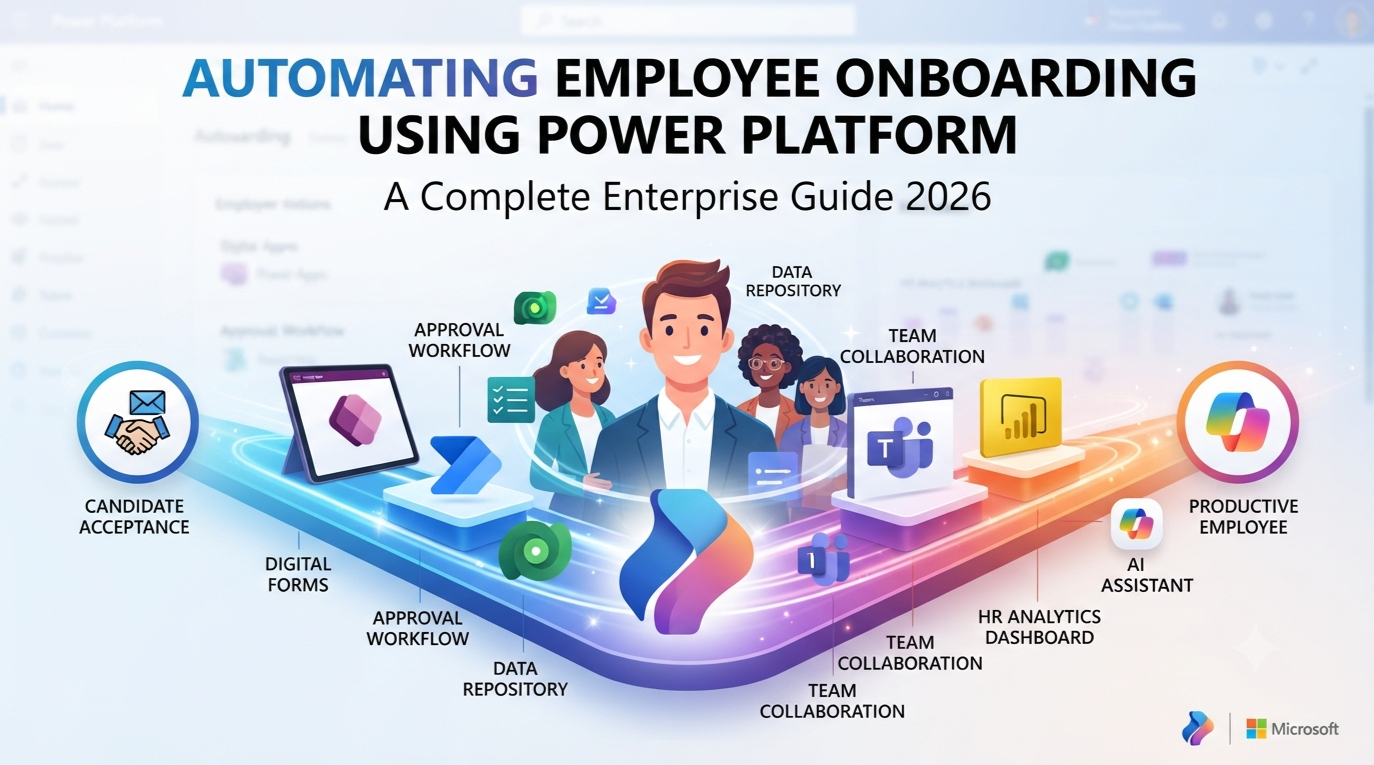
Using Power Apps, Power Automate, Microsoft Dataverse, Power BI, Microsoft Teams, SharePoint and Microsoft Copilot, businesses can build a fully automated onboarding solution that is scalable, secure and user-friendly.
In this comprehensive guide, you’ll learn how Power Platform transforms employee onboarding, explore real-world implementation scenarios and discover best practices for building enterprise-grade HR automation solutions.
Why Employee Onboarding Matters
Employee onboarding is much more than collecting documents and issuing laptops.
A successful onboarding process helps new employees:
- Understand company culture
- Complete required documentation
- Access business applications
- Meet their managers and teams
- Learn organizational policies
- Complete mandatory training
- Become productive more quickly
Research consistently shows that organisations with effective onboarding programs experience:
- Higher employee satisfaction
- Improved retention rates
- Faster productivity
- Better compliance
- Reduced administrative workload
- Stronger employee engagement
Automation ensures these benefits are delivered consistently across the organisation.
Challenges with Traditional Employee Onboarding
Many HR departments continue to use manual processes that create unnecessary complexity.
Common challenges include:
- Paper-based forms
- Email approvals
- Spreadsheet tracking
- Delayed document verification
- Manual IT requests
- Inconsistent onboarding experiences
- Lost documents
- Missed compliance deadlines
- Lack of progress visibility
- Poor communication between departments
These inefficiencies consume valuable HR time and negatively affect the experience of new employees.
What is Microsoft Power Platform?
Microsoft Power Platform is a suite of low-code development tools that enables organisations to automate processes, build applications, analyse data and create AI-powered business solutions.
The platform includes:
- Power Apps
- Power Automate
- Microsoft Dataverse
- Power BI
- Power Pages
- Microsoft Copilot Studio
- AI Builder
Together, these services help organizations digitize HR operations without requiring extensive software development.
How Power Platform Automates Employee Onboarding
A typical onboarding workflow can be automated from the moment a candidate accepts an offer until they complete probation.
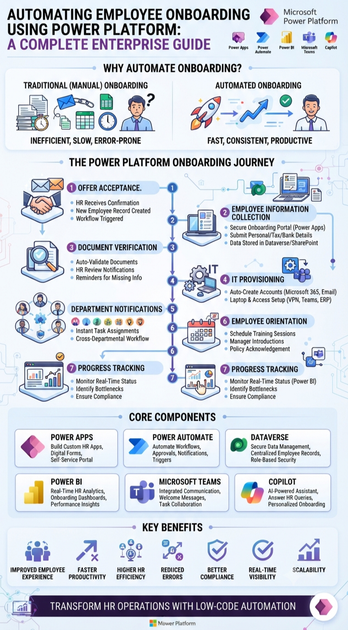
The process generally follows these stages:
Step 1: Offer Acceptance
Once a candidate accepts the offer:
- HR receives confirmation.
- A new employee record is created.
- The onboarding workflow begins automatically.
Step 2: Employee Information Collection
Power Apps provides a secure onboarding portal where employees can submit:
- Personal information
- Emergency contacts
- Tax details
- Bank account information
- Educational qualifications
- Identity documents
- Address proof
All information is securely stored in Microsoft Dataverse or SharePoint.
Step 3: Document Verification
Power Automate automatically:
- Validates submitted documents
- Notifies HR for review
- Sends reminders for missing documents
- Updates onboarding status
This eliminates manual email follow-ups.
Step 4: IT Provisioning
The workflow automatically creates requests for:
- Microsoft 365 accounts
- Email setup
- Laptop allocation
- VPN access
- Microsoft Teams access
- ERP access
- CRM access
- Identity management
IT teams receive instant notifications with all required employee information.
Step 5: Department Notifications
Relevant departments receive automated notifications.
Examples include:
HR
↓
IT
↓
Finance
↓
Facilities
↓
Security
↓
Reporting Manager
↓
Learning & Development
Each department completes assigned onboarding tasks within predefined timelines.
Step 6: Employee Orientation
Power Platform can schedule:
- Orientation sessions
- Manager introductions
- Compliance training
- Product training
- Policy acknowledgement
- Welcome meetings
Employees receive calendar invitations automatically.
Step 7: Progress Tracking
Managers and HR teams monitor onboarding progress through interactive dashboards built with Power BI.
They can instantly identify:
- Pending approvals
- Missing documents
- Delayed tasks
- Training completion
- Employee readiness
Core Power Platform Components
Power Apps
Power Apps acts as the primary onboarding application.
Features include:
- Employee registration
- Document upload
- Digital forms
- Self-service portal
- Mobile accessibility
- Manager approvals
- HR dashboard
Employees can complete onboarding from any device.
Power Automate
Power Automate handles workflow automation.
Typical automations include:
- Approval workflows
- Email notifications
- Reminder messages
- Document validation
- Microsoft Teams notifications
- Calendar invitations
- Task assignments
- Escalation processes
This significantly reduces manual HR effort.
Microsoft Dataverse
Dataverse serves as the secure central repository for onboarding information.
It stores:
- Employee profiles
- Department details
- Approval status
- Document history
- Equipment allocation
- Training records
Dataverse also provides enterprise-grade security and role-based access.
Power BI
Power BI delivers real-time HR analytics.
Dashboards can display:
- Employees onboarded
- Pending approvals
- Average onboarding duration
- Department-wise onboarding status
- Compliance completion
- Training progress
- Equipment allocation status
HR leaders gain complete visibility into onboarding performance.
Microsoft Teams Integration
Power Platform integrates seamlessly with Microsoft Teams.
Automated capabilities include:
- Welcome messages
- Team invitations
- Manager notifications
- HR announcements
- Task assignments
- Meeting scheduling
Employees experience a connected digital workplace from day one.
Microsoft Copilot
Microsoft Copilot introduces AI-powered assistance into onboarding.
Employees can ask questions such as:
- How do I apply for leave?
- Where can I download HR policies?
- How do I access Microsoft Teams?
- Who is my reporting manager?
- Where can I complete mandatory training?
- How do I submit expense claims?
Copilot provides instant, context-aware responses, reducing the burden on HR support teams.
Business Benefits of Automated Employee Onboarding
Improved Employee Experience
Employees enjoy a seamless, guided onboarding journey without excessive paperwork or delays.
Faster Onboarding
Automation significantly reduces onboarding time by eliminating repetitive manual tasks.
Higher HR Productivity
HR professionals spend less time on administration and more time supporting employee engagement and strategic initiatives.
Reduced Errors
Automated workflows minimise mistakes caused by manual data entry and fragmented communication.
Better Compliance
Organisations can ensure mandatory documentation, policy acknowledgements and compliance training are completed on time.
Real-Time Visibility
Managers and HR teams can monitor onboarding progress through live dashboards and reports.
Scalability
Whether onboarding five employees or five hundred, Power Platform scales efficiently to meet organisational needs.
Real-World Business Scenario
Imagine a multinational IT company hiring 150 employees every month.
Before automation:
- HR manually emailed forms.
- Employees submitted paper documents.
- IT received onboarding requests through emails.
- Managers tracked progress using spreadsheets.
- Delays were common.
- New employees often waited days for system access.
After implementing Power Platform:
- Offer acceptance triggered automated onboarding.
- Employees completed digital forms through Power Apps.
- Documents were securely uploaded and verified.
- Power Automate assigned tasks to HR, IT and Finance.
- Microsoft Teams sent welcome messages automatically.
- Power BI dashboards tracked onboarding progress in real time.
- Microsoft Copilot answered common HR questions instantly.
The organisation reduced onboarding time from several days to just a few hours while dramatically improving employee satisfaction.
Advanced AI Features for HR Automation
As Microsoft continues to enhance Power Platform with AI capabilities, organisations can leverage:
- AI-generated onboarding checklists
- Intelligent document processing with AI Builder
- Resume and document extraction
- Automated compliance verification
- Employee sentiment analysis
- Predictive employee retention insights
- Conversational HR assistants
- Personalised onboarding journeys using Copilot
These innovations create a more engaging and intelligent onboarding experience.
Best Practices for Building Employee Onboarding Solutions
Understand HR Processes
Map every onboarding activity before building automation.
Include:
- HR
- IT
- Finance
- Security
- Facilities
- Compliance
- Learning & Development
Standardize Workflows
Create consistent onboarding processes across departments and locations to ensure a uniform employee experience.
Secure Employee Data
Protect sensitive employee information using:
- Microsoft Entra ID authentication
- Role-based security
- Data encryption
- Microsoft Dataverse security roles
- Audit logging
Security and privacy should be integrated from the start.
Build Mobile-Friendly Applications
Employees should be able to complete onboarding tasks from smartphones, tablets or laptops without compromising functionality.
Monitor Performance
Use Power BI to measure:
- Average onboarding time
- Task completion rates
- Approval delays
- Compliance metrics
- Employee satisfaction
- Process bottlenecks
Continuous monitoring helps improve onboarding efficiency over time.
Future of Employee Onboarding with AI
Employee onboarding is evolving from a manual administrative process into an intelligent digital experience.
Future innovations include:
- Autonomous HR agents
- AI-driven onboarding recommendations
- Voice-enabled HR assistants
- Intelligent workflow optimization
- Predictive workforce analytics
- Hyper-personalised onboarding experiences
- Digital employee companions
- End-to-end AI-powered HR operations
Organisations adopting these technologies will create more engaging workplaces while improving operational efficiency.
Skills Every Power Platform Professional Should Learn
Professionals building HR automation solutions should develop expertise in:
- Microsoft Power Apps
- Power Automate
- Microsoft Dataverse
- Power BI
- Power Pages
- Microsoft Copilot Studio
- AI Builder
- SharePoint Integration
- Microsoft Teams Integration
- Microsoft Entra ID
- Dynamics 365 Human Resources
- Azure Logic Apps
- Solution Architecture
- Low-Code Development
These skills are increasingly in demand across modern digital transformation projects.
Conclusion
Automating employee onboarding using Microsoft Power Platform enables organisations to replace slow, paper-based processes with intelligent, digital workflows that enhance both efficiency and employee satisfaction.
By combining Power Apps, Power Automate, Microsoft Dataverse, Power BI, Microsoft Teams and Microsoft Copilot, businesses can create a connected onboarding experience that reduces manual effort, strengthens compliance and accelerates productivity from the very first day.
As AI and low-code technologies continue to evolve, automated onboarding will become a standard capability within modern HR departments. Organisations that invest in Power Platform today will be better equipped to attract talent, improve operational excellence and build a more engaged workforce.
Whether you’re an HR professional, Power Platform developer, business analyst or IT consultant, mastering employee onboarding automation is a valuable step toward delivering impactful digital transformation solutions.









