25 Power Automate Flows That Can Save You 10 Hours Every Week

Introduction
Imagine arriving at work on Monday morning and discovering that most of your repetitive tasks have already been completed automatically.
- No copying data between systems.
- No downloading email attachments manually.
- No sending repetitive follow-up emails.
- No updating spreadsheets all day.
This is exactly what organizations worldwide are achieving using Microsoft Power Automate.
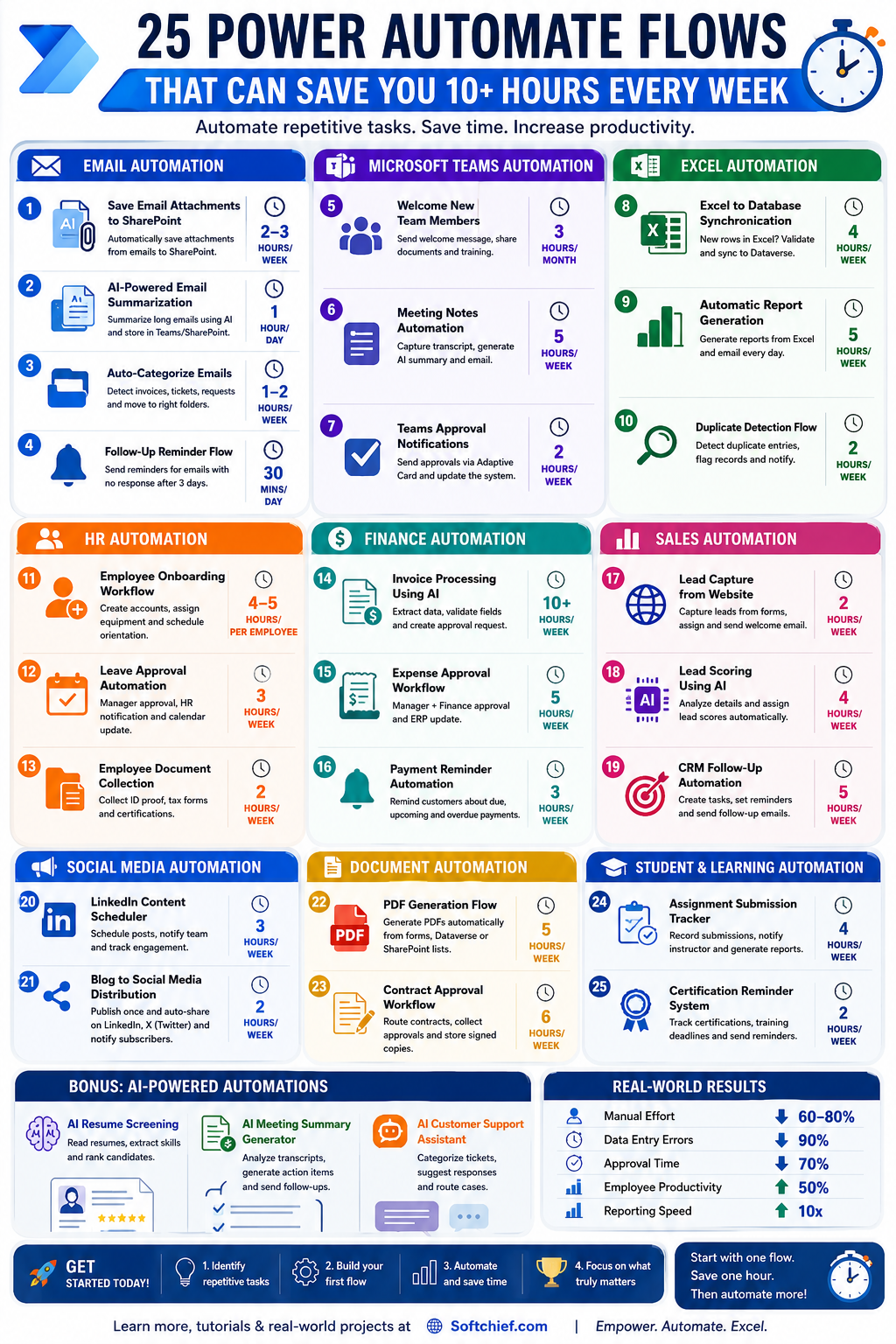
Whether you’re a student, business analyst, HR professional, project manager, developer, or business owner, automation can save hours every week while reducing human errors.
In this article, you’ll discover 25 practical Power Automate flows that can collectively save 10+ hours every week.
Why Power Automate?
Power Automate enables you to automate repetitive tasks across Microsoft 365, SharePoint, Outlook, Teams, Excel, Dataverse, Dynamics 365, Salesforce, SAP, and hundreds of other applications.
Benefits
✅ Save time
✅ Reduce manual work
✅ Improve accuracy
✅ Increase productivity
✅ Focus on high-value work
Email Automation Flows
1. Automatically Save Email Attachments to SharePoint
Problem
Employees spend significant time downloading and organizing attachments.
Solution
Whenever an email arrives with an attachment:
- Download attachment automatically
- Save to SharePoint
- Create folder if needed
- Notify team
Time Saved
2-3 hours/week
2. AI-Powered Email Summarization
Problem
Managers receive hundreds of emails daily.
Solution
When an important email arrives:
- Send content to AI
- Generate summary
- Store summary in Teams or SharePoint
Time Saved
1 hour/day
3. Auto-Categorize Emails
Automatically:
- Detect invoices
- Detect customer requests
- Detect support tickets
- Move to appropriate folders
Time Saved
1-2 hours/week
4. Follow-Up Reminder Flow
When an email receives no response after 3 days:
- Send reminder automatically
- Notify sender
Time Saved
30 minutes/day
Microsoft Teams Automation
5. Welcome New Team Members
When a new employee joins:
- Send welcome message
- Share onboarding documents
- Assign training resources
Time Saved
3 hours/month
6. Meeting Notes Automation
After Teams meeting:
- Capture transcript
- Generate AI summary
- Email participants
Time Saved
5 hours/week
7. Teams Approval Notifications
When approval is needed:
- Send Adaptive Card
- Approve from Teams
- Update system automatically
Time Saved
2 hours/week
Excel Automation
8. Excel to Database Synchronization
When rows are added:
- Validate data
- Insert into Dataverse
- Notify stakeholders
Time Saved
4 hours/week
9. Automatic Report Generation
Every morning:
- Read Excel
- Create report
- Email management
Time Saved
5 hours/week
10. Duplicate Detection Flow
Automatically:
- Detect duplicate entries
- Flag records
- Notify owner
Time Saved
2 hours/week
HR Automation
11. Employee Onboarding Workflow
When HR creates employee record:
- Create accounts
- Assign equipment
- Schedule orientation
Time Saved
4-5 hours per employee
12. Leave Approval Automation
Employee submits leave request:
- Manager approval
- HR notification
- Calendar update
Time Saved
3 hours/week
13. Employee Document Collection
Automatically collect:
- ID proof
- Tax forms
- Certifications
Time Saved
2 hours/week
Finance Automation
14. Invoice Processing Using AI
When invoice arrives:
- Extract data
- Validate fields
- Create approval request
Time Saved
10+ hours/week
15. Expense Approval Workflow
Employees upload receipts:
- Manager approval
- Finance approval
- ERP update
Time Saved
5 hours/week
16. Payment Reminder Automation
Automatically remind customers about:
- Due invoices
- Upcoming payments
- Overdue balances
Time Saved
3 hours/week
Sales Automation
17. Lead Capture from Website
When a form is submitted:
- Create lead
- Assign salesperson
- Send welcome email
Time Saved
2 hours/week
18. Lead Scoring Using AI
Analyze:
- Job title
- Company size
- Industry
Assign lead score automatically.
Time Saved
4 hours/week
19. CRM Follow-Up Automation
Automatically create:
- Tasks
- Reminders
- Follow-up emails
Time Saved
5 hours/week
Social Media Automation
20. LinkedIn Content Scheduler
Create content once and automatically:
- Schedule posts
- Notify team
- Track engagement
Time Saved
3 hours/week
21. Blog to Social Media Distribution
Publish blog once.
Automatically:
- Create LinkedIn post
- Create Twitter/X post
- Notify subscribers
Time Saved
2 hours/week
Document Automation
22. PDF Generation Flow
Generate PDFs automatically from:
- Forms
- Dataverse
- SharePoint lists
Time Saved
5 hours/week
23. Contract Approval Workflow
Automatically:
- Route contracts
- Collect approvals
- Store signed copies
Time Saved
6 hours/week
Student & Learning Automation
24. Assignment Submission Tracker
When students submit assignments:
- Record submission
- Notify instructor
- Generate reports
Time Saved
4 hours/week
25. Certification Reminder System
Track:
- Microsoft Certifications
- Training deadlines
- Renewal schedules
Send reminders automatically.
Time Saved
2 hours/week
Bonus: AI-Powered Power Automate Flows
The biggest productivity gains now come from combining Power Automate with AI.
Examples:
AI Resume Screening
- Read resumes
- Extract skills
- Rank candidates
AI Meeting Summary Generator
- Analyze meeting transcripts
- Generate action items
- Send follow-up emails
AI Customer Support Assistant
- Categorize tickets
- Suggest responses
- Route cases
Real-World Results
Organizations implementing these automations commonly achieve:
| Metric | Improvement |
|---|---|
| Manual Effort | ↓ 60-80% |
| Data Entry Errors | ↓ 90% |
| Approval Time | ↓ 70% |
| Employee Productivity | ↑ 50% |
| Reporting Speed | ↑ 10x |
Getting Started
If you’re new to Power Automate:
Beginner Projects
- Save Email Attachments
- Leave Approval Workflow
- Teams Notifications
- Excel Automation
- Lead Capture Flow
Intermediate Projects
- Employee Onboarding
- Invoice Processing
- Document Generation
- CRM Integration
Advanced Projects
- AI Resume Screening
- AI Email Summarization
- Intelligent Lead Scoring
- Multi-System Enterprise Automation
Final Thoughts
The future of work belongs to professionals who know how to automate repetitive tasks.
The good news is that you don’t need to be a developer to start using Power Automate.
Start with one flow.
Save one hour.
Then automate another process.
Within a few months, you could be saving 10+ hours every week, reducing errors, and becoming one of the most valuable automation experts in your organization.
Learn More
For step-by-step tutorials, Power Platform training, interview preparation, and real-world Power Automate projects, visit:
Which of these 25 flows would save you the most time? Let me know in the comments!