

Creating AI-Powered Power Apps Using Azure OpenAI (2026 Guide)
Introduction
Artificial Intelligence is rapidly transforming the way businesses build applications. Traditional business apps required users to manually search for information, complete repetitive forms and follow rigid workflows. Today, thanks to Azure OpenAI and Microsoft Power Apps, organisations can create intelligent applications that understand natural language, generate content, answer questions and automate complex business processes.
The combination of Microsoft’s low-code Power Platform and Azure OpenAI enables businesses to deliver enterprise-grade AI experiences without developing complex machine learning models from scratch.
Whether you’re building an employee self-service portal, customer support application, HR solution or sales management system, integrating Azure OpenAI into Power Apps can dramatically improve productivity and user experience.
In this comprehensive guide, we’ll explore how to build AI-powered Power Apps using Azure OpenAI, the architecture, implementation methods, real-world use cases, best practices and why this technology is shaping the future of enterprise applications.
What is Microsoft Power Apps?
Microsoft Power Apps is a low-code development platform that enables organisations to quickly build custom business applications without extensive coding.
Using Power Apps, businesses can create applications for:
- Customer Relationship Management (CRM)
- Employee management
- Leave management
- Asset tracking
- Inspection apps
- Inventory management
- Sales automation
- Healthcare solutions
- Education portals
- Field service operations
Power Apps integrates seamlessly with Microsoft 365, Dynamics 365, SharePoint, Dataverse, SQL Server and hundreds of other business systems.
What is Azure OpenAI?
Azure OpenAI is Microsoft’s enterprise AI service that provides secure access to advanced large language models through the Azure cloud.
It enables organisations to build AI capabilities such as:
- Intelligent chat assistants
- Content generation
- Document summarisation
- Language translation
- Code generation
- Knowledge search
- Question answering
- Text classification
- Data extraction
- Sentiment analysis
Because Azure OpenAI runs within the Azure ecosystem, organisations benefit from enterprise-grade security, compliance and scalability.
Why Combine Power Apps with Azure OpenAI?
Power Apps excels at building business applications, while Azure OpenAI brings conversational intelligence and advanced language understanding.
Together they enable applications that can:
- Understand natural language
- Generate responses instantly
- Automate repetitive tasks
- Analyse business data
- Assist employees with decision-making
- Improve customer experiences
- Reduce manual effort
This combination transforms traditional business applications into intelligent AI assistants.
Solution Architecture
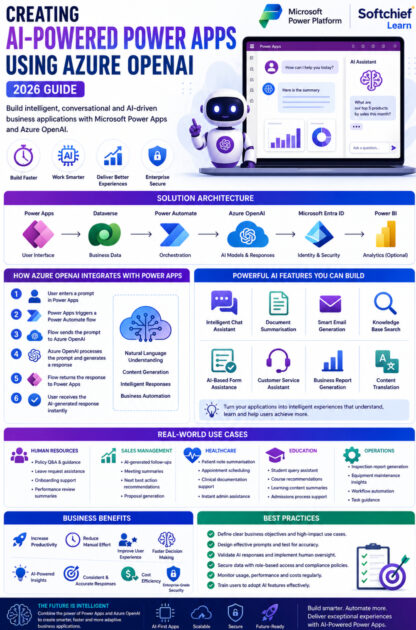
A typical AI-powered Power Apps solution includes the following components:
Power Apps
Provides the user interface where users interact with the application.
Dataverse
Stores business data such as customers, employees, products and transactions.
Power Automate
Acts as the orchestration layer, connecting Power Apps with Azure OpenAI and other services.
Azure OpenAI
Processes prompts, generates responses and performs AI-driven tasks.
Microsoft Entra ID
Manages authentication, identity and secure access to enterprise resources.
Power BI (Optional)
Visualises AI-generated insights through interactive dashboards and reports.
How Azure OpenAI Integrates with Power Apps
There are several ways to integrate Azure OpenAI into Power Apps.
Method 1: Power Automate Flow
This is the most common approach.
Process:
- User enters a prompt in Power Apps.
- Power Apps triggers a Power Automate flow.
- The flow sends the prompt to Azure OpenAI.
- Azure OpenAI generates a response.
- Power Automate returns the response to Power Apps.
- The user receives an AI-generated answer within the app.
This method requires minimal coding and is ideal for most business scenarios.
Method 2: Custom Connector
A Custom Connector allows Power Apps to communicate directly with Azure OpenAI APIs.
Benefits include:
- Faster response times
- Reusable connections
- Centralised API management
- Better scalability
This approach is suitable for enterprise applications with advanced integration requirements.
Method 3: AI Builder and Copilot Integration
For common AI scenarios, organisations can combine:
- AI Builder
- Microsoft Copilot
- Power Apps
- Azure OpenAI
This enables rapid development with built-in AI capabilities while extending functionality with Azure OpenAI where needed.
Popular AI Features You Can Build
1. Intelligent Chat Assistant
Users can ask questions such as:
- What is our leave policy?
- Show pending approvals.
- Explain this invoice.
- Find customer information.
- Recommend suitable products.
The AI provides context-aware responses based on business data and configured knowledge sources.
2. Document Summarisation
Users upload documents such as:
- Contracts
- Policies
- Reports
- Meeting notes
- Invoices
Azure OpenAI automatically generates concise summaries, saving valuable time for employees.
3. Smart Email Generation
Sales and support teams can generate:
- Customer follow-ups
- Meeting invitations
- Proposal emails
- Service updates
- Complaint responses
Users review and personalise the generated content before sending.
4. Knowledge Base Search
Employees often spend time searching through internal documentation.
AI enables users to ask questions in natural language, such as:
“What is our reimbursement policy?”
The application retrieves and presents the most relevant information instantly.
5. AI-Based Form Assistance
Instead of manually completing lengthy forms, users receive:
- Auto-generated suggestions
- Field recommendations
- Text improvements
- Error detection
- Intelligent validations
This improves data quality and speeds up form completion.
6. Customer Service Assistant
Customer support applications can use Azure OpenAI to:
- Suggest responses
- Summarise customer conversations
- Recommend troubleshooting steps
- Escalate complex issues
- Generate service notes
This enables support teams to respond more efficiently and consistently.
7. Business Report Generation
Executives can request reports using natural language, such as:
“Generate a summary of monthly sales performance.”
The application compiles relevant data and produces a clear, AI-generated business summary.
Real-World Use Cases
Human Resources
An HR application allows employees to:
- Ask policy questions
- Generate leave requests
- Summarise performance reviews
- Receive onboarding guidance
AI reduces the workload on HR teams while improving employee self-service.
Sales Management
Sales representatives use AI-powered Power Apps to:
- Generate follow-up emails
- Summarise customer meetings
- Recommend next actions
- Retrieve account information
- Prepare sales proposals
This increases productivity and improves customer engagement.
Healthcare
Healthcare organisations use AI-powered applications to:
- Summarise patient notes
- Assist with appointment scheduling
- Generate clinical documentation
- Answer administrative questions
Medical professionals spend less time on paperwork and more time with patients.
Education
Educational institutions build Power Apps that:
- Answer student queries
- Generate course recommendations
- Summarise learning materials
- Support admissions processes
This enhances the student experience while reducing administrative effort.
Benefits of AI-Powered Power Apps
| Feature | Business Benefit |
|---|---|
| Natural Language Processing | Easier user interaction |
| Content Generation | Faster communication and documentation |
| Automation | Reduced manual effort |
| Intelligent Search | Faster access to business information |
| AI Assistance | Improved employee productivity |
| Personalisation | Better customer and employee experiences |
| Low-Code Development | Faster application delivery |
| Enterprise Security | Secure AI deployment within Azure |
Best Practices for Building AI-Powered Power Apps
Define Clear Business Objectives
Identify processes where AI can deliver measurable value, such as customer support, document handling or employee self-service.
Protect Sensitive Data
Use Microsoft Entra ID, role-based access control and data loss prevention policies to safeguard enterprise information.
Design Effective Prompts
Well-crafted prompts produce more accurate and useful AI responses. Test and refine prompts regularly to improve output quality.
Validate AI Responses
Implement human review for critical decisions, legal documents and customer-facing communications to ensure accuracy and compliance.
Optimise Performance
Reduce unnecessary API calls, cache frequent responses where appropriate and monitor application performance to provide a smooth user experience.
Monitor Usage and Costs
Track Azure OpenAI consumption, user adoption and application performance to optimise resource usage and maintain cost efficiency.
Common Challenges
While AI-powered Power Apps provide significant advantages, organisations should consider:
Data Privacy
Ensure confidential information is protected and handled according to organisational policies.
Prompt Engineering
The quality of AI responses depends heavily on the clarity and specificity of prompts.
User Adoption
Provide training so users understand how to work effectively with AI-generated content.
Governance
Establish policies for responsible AI use, auditing and ongoing monitoring.
The Future of AI-Powered Power Apps
Microsoft continues to invest in AI across the Power Platform ecosystem. Future advancements are expected to include:
- Autonomous AI agents within Power Apps.
- Voice-driven application interactions.
- Real-time multilingual support.
- Advanced predictive analytics.
- AI-generated workflows.
- Context-aware business recommendations.
- Deeper integration with Microsoft Fabric and Azure AI Foundry.
These innovations will enable organisations to create even more intelligent, adaptive and personalised business applications.
Conclusion
The integration of Azure OpenAI with Microsoft Power Apps marks a significant step forward in enterprise application development. By combining low-code capabilities with advanced artificial intelligence, organisations can build smarter applications that automate repetitive tasks, enhance decision-making and deliver exceptional user experiences.
From intelligent chat assistants and document summarisation to AI-powered email generation and knowledge search, the possibilities are extensive. Businesses that adopt AI-powered Power Apps today will be well positioned to improve efficiency, reduce operational costs and accelerate digital transformation in 2026 and beyond.
Whether you’re a developer, IT professional or business leader, now is the ideal time to explore how Azure OpenAI can unlock the next generation of intelligent business applications.










