

Building a Complete Business Application Using C#, Azure, and Power Platform (2026 Guide)
Introduction
Modern businesses need applications that are scalable, secure, intelligent and capable of adapting to rapidly changing business requirements. Traditional software development often involves long development cycles, multiple technologies and complex integrations. However, by combining C#, ASP.NET Core, Microsoft Azure and the Microsoft Power Platform, developers can build enterprise-grade business applications faster than ever before.
This powerful technology stack combines the flexibility of professional coding with the speed of low-code development, enabling organisations to create comprehensive business solutions that integrate seamlessly with Microsoft 365, Dynamics 365, Azure AI and hundreds of third-party services.
In this guide, we’ll explore how to build a complete business application using C#, Azure and Power Platform, including architecture, development workflow, AI integration, deployment strategies, best practices and real-world business scenarios.
Why Choose C#, Azure and Power Platform?
Each technology plays a unique role in creating modern enterprise applications.
C# and ASP.NET Core
Ideal for building:
- Enterprise APIs
- Business logic
- Authentication
- Custom integrations
- High-performance web applications
- Backend services
Microsoft Azure
Provides:
- Cloud hosting
- Databases
- Serverless computing
- Artificial Intelligence
- Identity management
- Monitoring
- Security
- Scalability
Microsoft Power Platform
Enables:
- Low-code application development
- Workflow automation
- Business intelligence
- Customer portals
- AI-powered business solutions
Together, these technologies create a complete enterprise development ecosystem.
Sample Business Scenario
Imagine a company wants to build an Employee Management System.
The application should allow employees to:
- Submit leave requests
- View payslips
- Update profiles
- Request equipment
- Track attendance
- Access company policies
Managers should be able to:
- Approve requests
- Monitor employee performance
- View dashboards
- Receive notifications
- Generate reports
This is an ideal use case for combining C#, Azure and Power Platform.
Solution Architecture
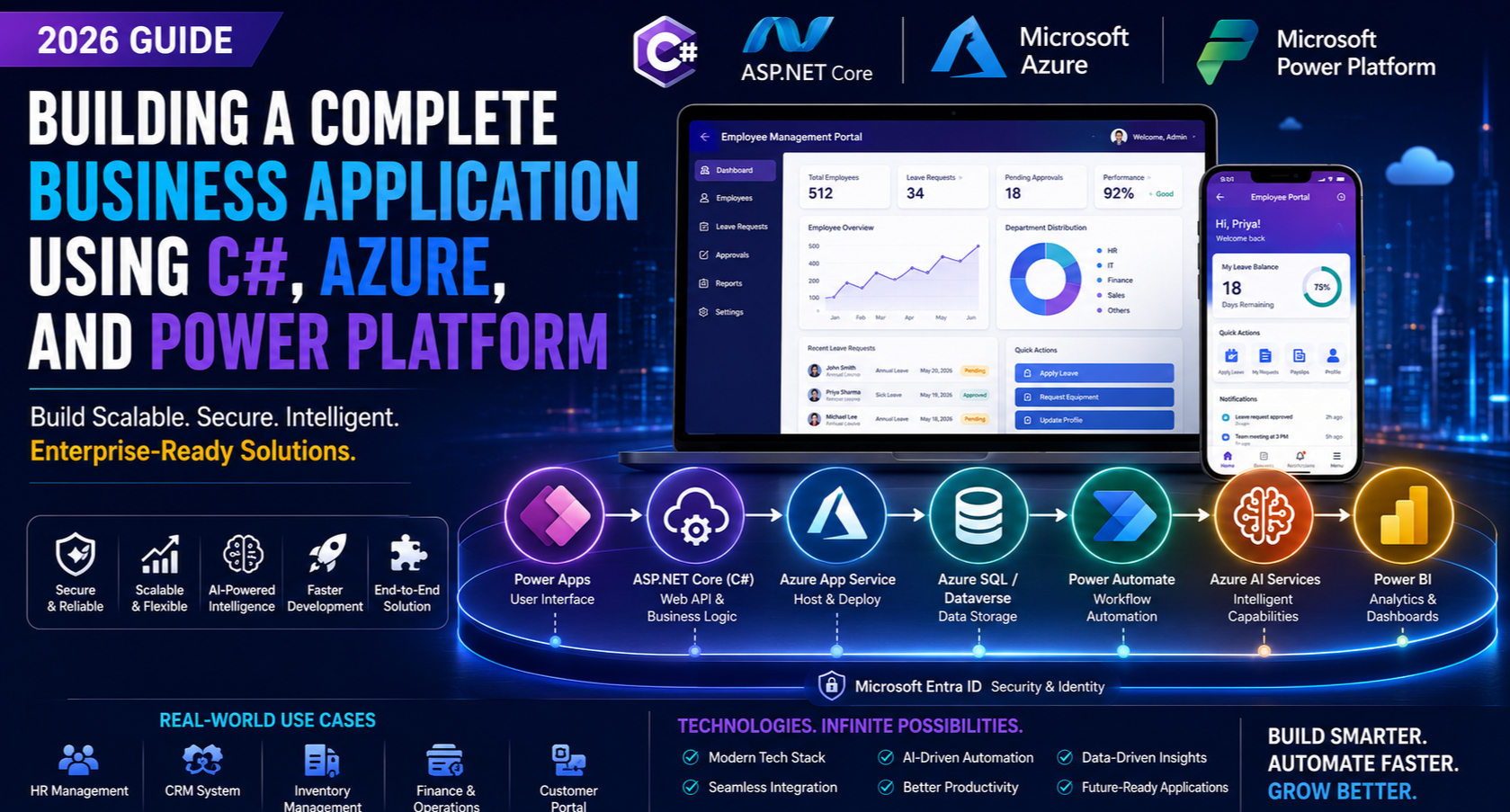
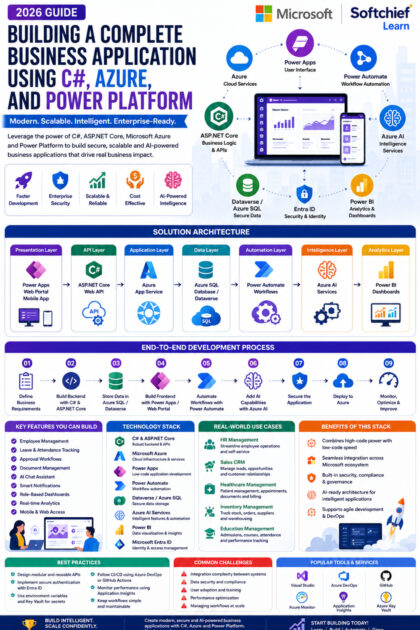
A modern enterprise application typically includes the following layers:
Power Apps / Web Portal
          │
          ▼
ASP.NET Core Web API (C#)
          │
          ▼
Azure App Service
          │
          ▼
Azure SQL Database / Dataverse
          │
          ▼
Power Automate
          │
          ▼
Azure AI Services
          │
          ▼
Power BI Dashboards
Architecture Components
Power Apps
Provides mobile and web interfaces for employees and managers.
ASP.NET Core API
Handles business logic, validation and secure data access.
Azure App Service
Hosts the application with automatic scaling and high availability.
Azure SQL Database or Dataverse
Stores application data securely.
Power Automate
Automates approvals, notifications and business workflows.
Azure AI Services
Adds intelligent capabilities such as document analysis, chat assistants and content generation.
Power BI
Visualises operational data through interactive dashboards.
Step 1: Design the Business Requirements
Before development begins, identify:
- User roles
- Business processes
- Approval workflows
- Security requirements
- Reporting needs
- Integration points
- Compliance requirements
Clear planning ensures the application aligns with business objectives.
Step 2: Build the Backend with ASP.NET Core
The backend manages:
- User authentication
- Business rules
- CRUD operations
- API endpoints
- Database interactions
- Error handling
- Logging
Typical API modules include:
- Employee API
- Leave API
- Department API
- Notification API
- Reporting API
Using RESTful APIs ensures seamless communication between frontend applications and backend services.
Step 3: Store Data in Azure SQL or Dataverse
The choice of database depends on the application’s requirements.
Azure SQL Database
Suitable for:
- Complex relational data
- Custom applications
- Large datasets
- High-performance queries
Microsoft Dataverse
Ideal for:
- Power Apps
- Dynamics 365
- Business rules
- Role-based security
- Low-code solutions
Many enterprise applications combine both platforms to leverage their respective strengths.
Step 4: Develop the User Interface
Developers can create the frontend using:
Power Apps
Best suited for:
- Internal business applications
- Mobile apps
- Employee self-service
- Rapid development
ASP.NET Core MVC or Blazor
Ideal for:
- Public-facing portals
- Custom enterprise websites
- Advanced user interfaces
- Highly customised experiences
This hybrid approach offers flexibility for both internal and external users.
Step 5: Automate Business Processes
Power Automate simplifies workflow automation.
Examples include:
- Leave approvals
- Email notifications
- Document generation
- Manager reminders
- Teams notifications
- Invoice approvals
- Customer onboarding
Automation reduces manual effort and improves operational efficiency.
Step 6: Add Artificial Intelligence
Modern business applications increasingly incorporate AI capabilities.
Examples include:
AI Chat Assistant
Employees ask:
“How many leave days do I have remaining?”
The assistant retrieves and presents the relevant information.
Document Processing
Employees upload invoices or forms.
Azure AI extracts:
- Names
- Dates
- Invoice numbers
- Amounts
- Key business data
This eliminates manual data entry.
Intelligent Email Generation
Managers can automatically generate:
- Approval emails
- Offer letters
- Meeting invitations
- Customer communications
AI ensures consistent, professional messaging.
Knowledge Search
Users ask questions in natural language and receive accurate answers based on organisational knowledge and business data.
Step 7: Secure the Application
Enterprise security is essential.
Recommended technologies include:
- Microsoft Entra ID
- OAuth 2.0
- Role-based access control (RBAC)
- Azure Key Vault
- HTTPS encryption
- Multi-factor authentication (MFA)
These features help protect sensitive business information and meet compliance requirements.
Step 8: Deploy to Azure
Deployment typically involves:
- Azure App Service
- Azure SQL Database
- Azure Storage
- Azure Functions
- Azure Monitor
- Application Insights
Benefits include:
- High availability
- Automatic scaling
- Disaster recovery
- Centralised monitoring
- Simplified maintenance
Step 9: Monitor and Optimise
After deployment, continuously monitor:
- Application performance
- API response times
- User activity
- Security events
- Workflow execution
- Resource utilisation
Azure Monitor and Application Insights provide valuable operational insights for ongoing optimisation.
Real-World Business Applications
Human Resources Management
Features:
- Leave management
- Employee records
- Attendance tracking
- Recruitment workflows
- Performance reviews
- Self-service portal
Sales CRM
Capabilities include:
- Lead management
- Opportunity tracking
- Customer communication
- Sales forecasting
- AI-generated proposals
- Approval workflows
Healthcare Management
Supports:
- Appointment scheduling
- Patient records
- Document management
- Billing workflows
- Reporting dashboards
Inventory Management
Enables:
- Stock tracking
- Purchase approvals
- Supplier management
- Warehouse operations
- Barcode integration
Education Management
Provides:
- Student admissions
- Course enrolment
- Attendance tracking
- Learning resources
- Examination management
Benefits of This Technology Stack
| Technology | Benefit |
|---|---|
| C# & ASP.NET Core | Robust and scalable backend development |
| Azure | Secure cloud infrastructure with automatic scaling |
| Power Apps | Rapid low-code application development |
| Power Automate | Workflow automation and approvals |
| Dataverse | Secure business data management |
| Azure AI Services | Intelligent automation and AI features |
| Power BI | Interactive reporting and analytics |
| Microsoft 365 Integration | Seamless collaboration across Microsoft tools |
Best Practices
To build successful enterprise applications:
- Design modular and reusable APIs.
- Separate business logic from presentation layers.
- Use secure authentication and role-based access control.
- Store secrets in Azure Key Vault.
- Implement CI/CD pipelines with Azure DevOps or GitHub Actions.
- Keep workflows simple and maintainable.
- Validate AI-generated content before use.
- Monitor performance and optimise regularly.
Common Challenges
Integration Complexity
Connecting multiple enterprise systems requires careful planning and consistent API design.
Data Security
Protect sensitive information with encryption, access controls and governance policies.
User Adoption
Provide training and documentation to help employees use new applications effectively.
Performance
Optimise database queries, API calls and workflows to ensure a responsive user experience.
Future Trends
The future of enterprise application development is increasingly AI-driven.
Emerging trends include:
- Autonomous AI agents
- Natural language application development
- AI-assisted coding
- Predictive business automation
- Intelligent process orchestration
- Voice-enabled enterprise applications
- Deep integration with Microsoft Fabric and Azure AI Foundry
These innovations will continue to accelerate digital transformation and improve operational efficiency.
Conclusion
Building a complete business application using C#, Azure and Microsoft Power Platform enables organisations to combine the power of professional software development with the speed of low-code innovation. C# and ASP.NET Core provide a solid foundation for enterprise-grade APIs and business logic, Azure delivers a secure and scalable cloud platform and Power Platform accelerates application development, automation and analytics.
By integrating AI capabilities, workflow automation and modern cloud services, businesses can create intelligent applications that improve productivity, enhance customer experiences and support long-term growth. Whether you’re developing an HR system, CRM solution, inventory platform or customer portal, this technology stack offers the flexibility, scalability and security needed for modern enterprise applications in 2026 and beyond.










