
Upgrade-Safe Business Central Extensions That Reduce Update Risk
Introduction
A Business Central update can turn a small customization into a costly repair if the extension depends on fragile assumptions. A feature may work today, yet break when an event changes, an integration relies on an old field, or a data migration misses existing records.
Upgrade safety isn’t a setting you switch on once. It comes from sound design, planned data changes, repeatable tests, and clear release steps. Use this framework to reduce update risk, and check Microsoft Learn for current guidance that matches your Business Central version and deployment type.
Design upgrade-safe Business Central extensions
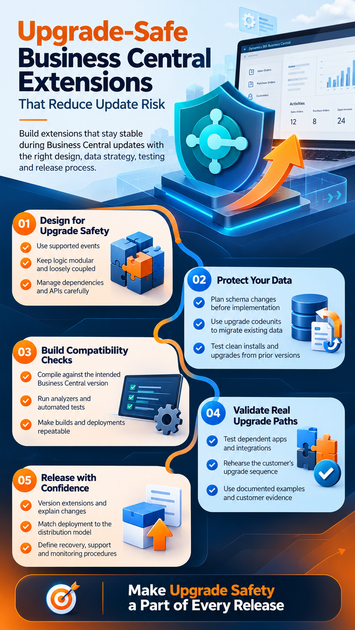
The way you structure an extension affects how much work a platform change can cause. Keep custom behavior separate from Microsoft’s base application, and make each part’s purpose clear.
Use supported events instead of changing standard code
Event subscribers let you add behavior through published events without editing Microsoft’s application code. That separation makes your changes easier to maintain when the base application receives an update.
Still, an event can change or become unavailable. Review the current event documentation for your target version, and test the subscriber after relevant updates. Don’t assume that code will behave the same just because it still compiles.
Keep custom logic modular and loosely coupled
Give each extension a clear scope, such as a specific workflow or integration. Smaller, focused modules make it easier to find which part needs attention when a change causes a problem.
Document dependencies and avoid relying on internal details that Microsoft doesn’t publish as extension points. Keep business rules in the right extension or codeunit, rather than burying them inside unrelated integration code. Well-defined interfaces also help separate changes from the rest of the system.
Treat dependencies and APIs as design choices
An extension’s dependencies affect its upgrade path. Add only the apps and libraries it needs, and check their versions before planning a release.
Public procedures and API contracts need the same care. Other extensions or external systems may depend on their names, inputs, and results. Before changing a contract, check who uses it and plan how those users will move to the new version.
Protect data during Business Central extension upgrades
A successful code deployment doesn’t prove that existing business data is safe. Changes to tables, fields, or stored values can affect records, reports, integrations, and other apps. Plan data work before changing the extension.
Plan schema changes before implementation
Adding a field may require a value for records that already exist. Renaming or removing a field can affect stored data and anything that reads it. Before coding, identify the affected tables, reports, integrations, and dependent extensions.
Decide what should happen to each affected value. For example, a renamed field may need its old value copied into a replacement field. Make the plan clear enough that the team can check the result after the upgrade.
Use upgrade codeunits to migrate existing data
Microsoft’s extension upgrade guidance describes upgrade codeunits as the place for AL logic that moves or transforms data between extension versions. Use checks to confirm that the starting data meets your assumptions, then validate that the migration worked.
Prevent upgrade logic from applying the same change twice. Microsoft documents upgrade tags as one way to track completed upgrade steps; version data may also suit some designs. If you use multiple upgrade codeunits, don’t rely on a set order for them to run.
Keep source data until you’ve verified the migrated records and related business flows. A deployment can finish while a data issue remains, so include checks for both the new values and records that should stay unchanged.
Test clean installs and upgrades from prior versions
A clean install starts without existing extension data. An upgrade starts with customer records, settings, and history that may have accumulated over time. Passing a fresh-install test doesn’t show that migration logic works.
Test realistic starting versions and data conditions. Include empty tables, typical records, and edge cases such as blank source values or values already present in the new field. This helps reveal unsafe assumptions before they affect a live environment.
Build compatibility checks into your Business Central extension release
Repeatable checks can catch issues before a package reaches production. Build them into the team’s normal development and release work, using tools that fit the target Business Central version.
Compile against the intended Business Central version
Compile with symbols and dependency versions that match the environments customers use. A build against a different application version may not reveal an event, API, or dependency issue that appears in the customer’s environment.
Check Microsoft’s release plans and compatibility information before choosing a release date. If customers use more than one supported version, include those versions in the build and test plan where practical.
Run analyzers and automated tests on each change
AL code analyzers can flag code-quality and extension-rule issues. Microsoft’s AL code analysis documentation explains how to run analyzers in the AL development workflow.
Automated AL tests can catch regressions in key business rules. Run them as part of each change, and use Microsoft Learn’s current guidance for Business Central test automation. An analyzer or passing test suite doesn’t replace testing an upgrade with existing data.
Make builds and deployments repeatable
Keep source code and build settings in version control. Document how the team compiles, packages, and validates each release so another developer can repeat the process and compare results.
For AL project automation, review Microsoft’s AL-Go for GitHub overview. It describes Microsoft-provided templates and workflows for tasks such as builds, testing, and deployment. Shape any pipeline around your repository, team roles, and release process.
Validate the extension against real upgrade paths
Compilation checks only part of compatibility. Test the extension with the application, dependencies, integrations, and data conditions found in the environments it’s meant to support.
Test dependent apps and integrations together
Keep an inventory of dependent extensions and external services. Include important APIs, permissions, reports, and end-to-end business flows in your test plan, since a change in one app can affect another.
After relevant updates, test the workflows customers use most. For example, verify that a posted document still updates related records and that an integration can still read the fields it needs. These checks can catch issues that isolated unit tests miss.
Rehearse the customer’s upgrade sequence
Recreate the order customers will follow, including relevant application updates, dependent app updates, and extension data migrations. SaaS and on-premises deployments can have different upgrade and deployment requirements, so use current Microsoft documentation for the specific environment.
Check each stage, not only the final result. Confirm that the new extension installs or updates, that data changes complete, and that users can finish core business tasks afterward.
Use documented examples and customer evidence
Microsoft’s upgrade guidance includes an example that copies an old customer field into a replacement field. It checks that the target is blank and uses an upgrade tag to prevent the same migration from running again. The example shows how a focused data check and a record of completed work can help protect an upgrade.
For your own extension, record the versions and data conditions you tested. Customer evidence can add useful context, but only use published examples that clearly match the upgrade practice you describe.
Release updates with clear ownership and recovery plans
A safe upgrade also depends on what happens around deployment. Administrators need clear release details, and the team needs to know who will respond if a check fails.
Version extensions and explain changes
Use consistent extension versioning and release notes. Describe breaking changes, dependency updates, data transformations, and any customer action required. Clear notes help administrators judge what will change before they schedule an update.
Assign an owner to review the notes and answer support questions. Include the affected extension version and the Business Central versions tested, so teams can match the release to their environment.
Match deployment to the distribution model
AppSource apps, per-tenant extensions, and other supported delivery paths may have different review and deployment steps. Confirm the current Microsoft requirements for your distribution model before packaging or publishing a release.
Document who approves and deploys each package. The process should reflect how customers receive updates, not just how developers test them.
Define recovery, support, and monitoring procedures
Before release, name the person who owns deployment, escalation, and customer updates. Set checks for expected behavior, such as successful data validation and completion of core business flows.
Don’t assume every update can be rolled back in the same way. Available recovery steps can depend on the deployment model and whether data has changed. Verify the options in current Microsoft documentation, and decide how the team will respond if a migration or business check fails.
Conclusion: make upgrade safety part of every release
Upgrade-safe Business Central extensions start with supported extension points and clear boundaries. They also need deliberate data migrations, version-matched builds, automated checks, and tests that follow the customer’s real upgrade path.
Before release, confirm that the extension compiles against target versions, migration logic has been tested on existing data, dependent apps and integrations still work, and an owner has a recovery plan. Use current Microsoft Learn guidance for AL development, extension upgrades, testing, and deployment, then make those checks a standard part of every release.









