
Business Central Customisation Strategy: Build for Fit, Scale, and Easier Upgrades
Introduction
A sales order takes three extra steps because the system doesn’t match the way your team works. Adding a custom field may seem like an easy fix, but every change can add upkeep and make future updates harder.
A sound Business Central customization strategy starts with a business outcome. Use standard features where they fit, then reserve custom development for gaps with clear value.
The right approach covers more than code. It connects process review, Business Central extensions, AL development, governance, testing, and a Business Central upgrade strategy that accounts for change over time.
Business Central customization strategy starts with measurable needs
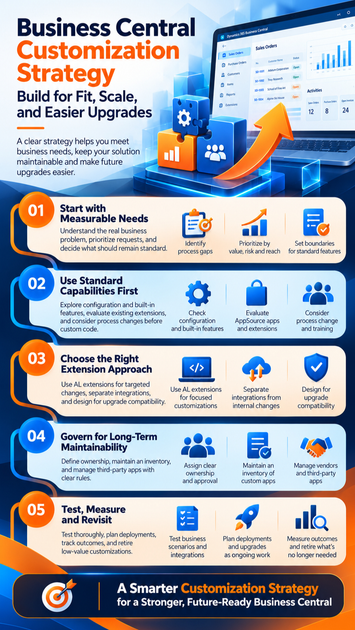
A feature request describes a solution someone wants. It doesn’t always explain the problem that solution needs to solve. Start by documenting the work, the people involved, and the result the business needs.
Identify the process gap behind each request
Map the current workflow and describe the desired outcome. Note which users and teams are affected, where delays or errors occur, and which standard Business Central features you’ve checked.
Separate business needs from habits carried over from a legacy system. If staff request a familiar screen or extra approval step, ask whether it supports a real control or simply repeats an old process.
Prioritize changes by value, risk, and reach
Compare each request by business impact, number of users, build effort, compliance needs, and ongoing support. A small change that affects a regulated finance process may deserve more scrutiny than a larger change used by one team.
Record the decision, accountable owner, success measure, and review date. This gives the team a clear reason for the change and a way to judge whether it still earns its place.
Set boundaries for what should remain standard
A legal requirement or a feature that sets your business apart may justify custom work. A preference for a familiar layout may not, especially if configuration or training can address it.
Before approving code, document which process changes users can accept. That makes the trade-off clear and can reduce the number of changes the solution must support.
Use standard Business Central capabilities before custom code
A standard-first approach can keep support simpler while still meeting real operating needs. Check what the product can do before deciding that development is the answer.
Check configuration and built-in features first
Review setup, permissions, workflows, reports, and other relevant features. Test the proposed process in a sandbox with realistic cases, including exceptions such as a blocked order or a reversed entry.
Microsoft’s Business Central product updates describe released and planned capabilities. The page notes that new roadmap details move to Microsoft’s AI at Work roadmap starting in September 2026, so check current product information before planning a change.
Evaluate extensions before modifying the application
Extensions add functionality while keeping it separate from the base application. Microsoft’s AL development overview describes extensions as additions to existing objects.
Compare Microsoft or AppSource apps with custom apps. Check publisher support, licensing, version compatibility, data access, and who will own updates and support. Microsoft’s extension scope guidance explains that app types have different deployment and upgrade behavior.
Treat process change as a valid solution
A workflow adjustment, user training, or a revised internal procedure may solve the problem without new software. Compare the choices before committing:
| Option | Best fit |
|---|---|
| Standard feature | The process already matches Business Central |
| Configuration | A setting or permission can close the gap |
| Third-party app | A supported app meets the need |
| Process change | The current method can adapt safely |
| Custom development | A valuable requirement remains unmet |
Choose an extension approach that protects maintainability
The technical choice should fit the size of the gap, required integrations, and long-term support plan. No extension pattern guarantees easy upgrades, so design decisions need to account for future versions.
Use AL extensions for targeted application changes
AL extensions can add fields, pages, reports, and behavior without directly changing the base application. Use supported extension points and event-based patterns where they fit, then consult Microsoft’s AL documentation for implementation details.
Keep each change focused on a documented need. A narrow extension is easier to test and explain than a broad app that mixes unrelated requests.
Separate integrations from internal customization
Some needs belong in Business Central; others connect it to another system. Consider Business Central APIs or an integration platform when data must move between applications, rather than building every connection into an in-app extension.
Set rules for data ownership and error handling. Decide who monitors failed transfers, protects credentials, reviews access, and supports each connected system.
Design for upgrade compatibility from the start
Limit dependencies and document assumptions about events, data, and other apps. Check each app against the target Business Central version, and plan time for testing and fixes.
Microsoft’s update information can help teams track product changes, but compatibility still needs validation in your own environment. Treat upgrade readiness as ongoing work, not a promise made at launch.
Govern customization so quality doesn’t depend on memory
Clear ownership helps teams make consistent choices as staff, vendors, and needs change. Governance should guide decisions without turning every small update into a long approval chain.
Assign clear ownership and approval
Define who can request, assess, approve, build, test, and support a change. Include business and technical owners in the review, with security or compliance input when the request affects sensitive data or controls.
Set approval rules based on risk. A report layout change may need a lighter review than an update to posting logic or user permissions.
Maintain an inventory of custom apps and decisions
Track each app’s purpose, owner, dependencies, supported version, business impact, and retirement criteria. Link technical notes to the original request and acceptance criteria.
This record helps a new team understand why the app exists and what it must keep doing. It also makes it easier to spot custom work that has lost its owner or business value.
Manage vendors and third-party apps deliberately
Before adopting an app, check its publisher support, update practices, compatibility details, data access, and exit options. Confirm who handles incidents and whether your team can retrieve its data if the app is removed.
Document these details alongside your own apps. That creates one reliable view of what the Business Central environment depends on.
Test, measure, and revisit customizations over time
A customization strategy continues after deployment. Test the change in context, watch how people use it, and review whether it still solves the original problem.
Test business scenarios and integrations
Write expected results before testing. Cover normal and exception cases, then add functional, regression, permission, data, and integration tests based on the change’s risk.
Use a sandbox with representative test data. Confirm that users can perform the work they need and that connected systems handle failures as expected.
Plan deployments and upgrades as ongoing work
Review product updates and app compatibility before each planned deployment. Set the deployment order, prepare a rollback plan, and tell affected users what will change and when.
Use Microsoft’s current update guidance rather than relying on fixed assumptions about timing. Test the upgrade path in a sandbox before applying changes to production.
Measure outcomes and retire low-value customizations
Choose measures tied to the original business case, such as processing time, error rates, user adoption, or manual work avoided. Compare results with a baseline your team records before deployment.
Schedule regular reviews and confirm each customization still has an active owner. If it no longer delivers value, remove it through a controlled process and update the app inventory.
Conclusion
A useful Business Central customization strategy begins with a documented process gap, compares standard and custom options, and weighs the full cost of ownership. Use supported extension approaches, assign clear owners, and test changes before release.
For each request, document the need, compare alternatives, set success criteria, test the result, and schedule a review. Start with your highest-impact process gap. The strongest strategy is the one that supports business outcomes without making future change harder.









