
Enterprise Microsoft Technology Stack: Design a Connected, Governable Platform
Introduction
When Microsoft tools support email, cloud hosting, security, and business apps, disconnected setups can create extra work and gaps in oversight. An enterprise Microsoft technology stack connects those services around shared business goals. This guide explains its main layers, how they work together, and what to assess before choosing products. There’s no required configuration: business needs, existing systems, licensing, and regulations shape the right mix.
How the Enterprise Microsoft Technology Stack Connects to Business Outcomes
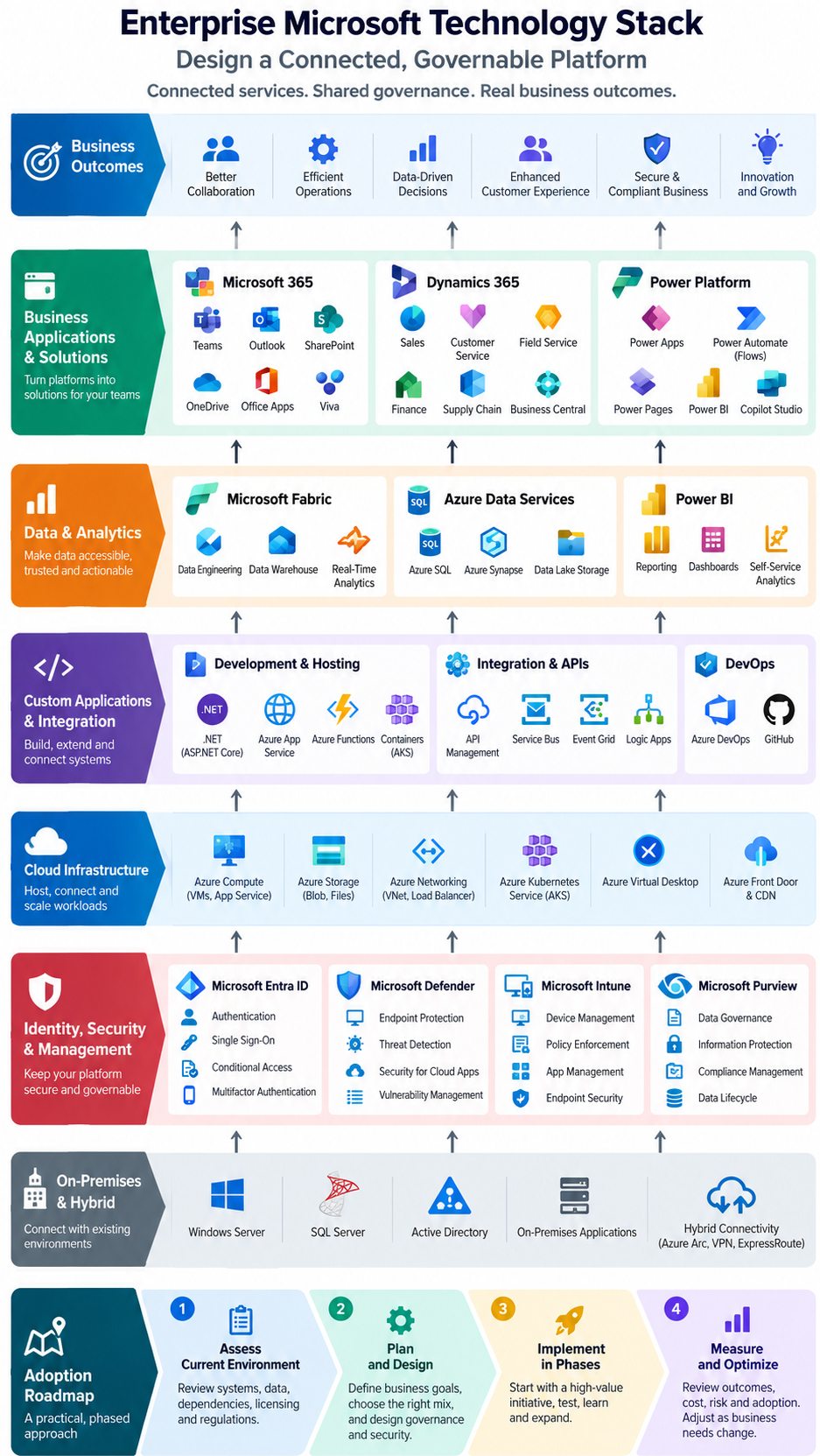
An enterprise Microsoft technology stack is a set of platforms and services designed to work together, not a fixed bundle. Integration can support common identity controls, collaboration, data access, security, and administration. The aim is to connect capabilities to useful business results, rather than collect products without a clear purpose.
Map the stack to business outcomes
Start by naming the work your organization needs to improve. Employee collaboration may call for shared content and communication tools, while secure access may depend on identity and device policies. Process automation, analytics, and application delivery each have different needs, so link every planned capability to a clear goal.
This approach also helps teams compare options. For example, a department that needs faster approval of routine requests may need a workflow, not a new enterprise application. Set the expected result first, then assess which services fit.
Choose a cloud, hybrid, or on-premises mix
Many organizations combine Microsoft cloud services with existing systems such as Windows Server and SQL Server. A hybrid design may be needed when applications depend on local infrastructure, data must remain in a certain region, or a workload needs low-latency access to nearby systems.
These choices affect identity, network links, data movement, and support. Microsoft’s Cloud Adoption Framework provides guidance for planning Azure adoption, preparing landing zones, migrating workloads, and governing cloud services. Use it to shape an architecture around your organization’s constraints.
Separate core platforms from optional products
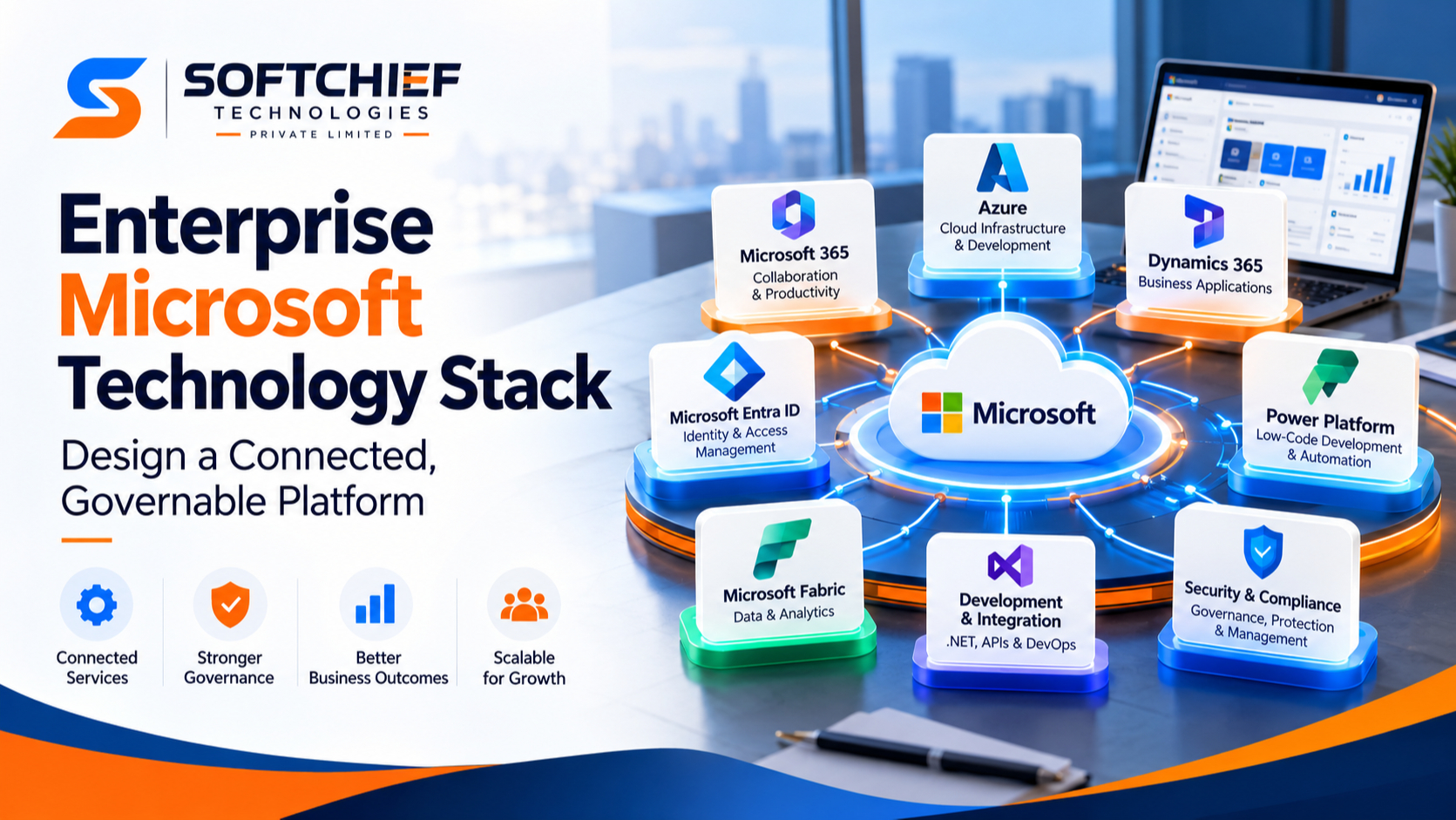
Microsoft 365, Azure, and Microsoft Entra ID often form the base of an enterprise setup. Microsoft 365 supports workplace tools, Azure provides cloud infrastructure and platform services, and Entra ID manages cloud identity and access. Their roles overlap through connected services, but each solves a different set of needs.
Other products depend on the workload. An organization may add Dynamics 365 for business applications or Microsoft Fabric for analytics, for example. Availability and features vary by license, tenant setup, and configuration, so check current Microsoft licensing documents before planning a rollout.
Microsoft 365 and Azure Provide the Core Enterprise Foundation
Microsoft 365 and Azure cover different parts of the technology stack. Microsoft 365 supports daily work and collaboration, while Azure provides services to host, connect, and build applications. Together, they can connect employee tools with business systems and cloud workloads.
Use Microsoft 365 to support work and collaboration
Teams supports meetings and communication; SharePoint and OneDrive support shared and personal file storage; Exchange provides email and calendar services. These services can link day-to-day work with documents and conversations, though not every organization needs all of them.
Good setup matters as much as product choice. Teams need clear rules for where files belong, how access is granted, and who manages each service. Plan administration and user training alongside deployment.
Use Azure to host and extend business workloads
Azure offers infrastructure services such as virtual machines, storage, and networking, as well as platform services for building and running applications. Organizations can use these services to host new systems, move some workloads from local data centers, or add capacity to existing applications.
The right design depends on each workload. A legacy system may need a virtual machine, while a new application may fit an Azure app service. Review security, cost, reliability, and support needs before deciding how to host it.
Connect Microsoft cloud services with existing environments
Cloud services still need to work with local applications and data. Architecture teams should map identity links, network paths, application dependencies, and the flow of sensitive data. They also need a plan for monitoring and support across both cloud and local systems.
Microsoft Learn’s Azure architecture and identity guidance outlines identity patterns, including hybrid connections with on-premises Active Directory. Use current architecture guidance to compare patterns with your needs, rather than treating one design as suitable for every environment.
Identity, Security, and Management Make the Stack Governable
Identity and security policies affect Microsoft 365, Azure, and connected business applications. Products can provide controls, but they don’t replace clear policies, correct setup, or assigned operational ownership. Teams need to know who reviews access, responds to alerts, and updates policies as business needs change.
Make Microsoft Entra ID the identity foundation
Microsoft Entra ID manages cloud identity and access for users, devices, and apps. It supports authentication and single sign-on, which can reduce the need for users to manage separate credentials across supported services. Multifactor authentication adds a sign-in check beyond a password.
Conditional Access can apply rules based on signals such as user, device, or location. For example, a policy may require multifactor authentication before a user reaches a service. Microsoft’s Conditional Access overview explains policy options and licensing needs. Test policies carefully to avoid blocking legitimate work.
Apply security controls across users, devices, and workloads
Microsoft Defender products can help protect endpoints and detect threats across supported services. Microsoft Sentinel can support security monitoring and incident response. Which tools fit depends on the organization’s risks, current security products, staff skills, and response processes.
Connect security alerts to an owned process. Teams need agreed steps for reviewing alerts, containing threats, and recording decisions. A tool without routine monitoring and response may leave important issues unnoticed.
Govern devices, data, and compliance centrally
Microsoft Intune can manage supported devices and apply settings for access and protection. Microsoft Purview offers capabilities for data governance, information protection, and compliance. Together with identity controls, these tools can help enforce rules for access to devices and sensitive information.
Policies should match actual data risks and regulatory duties. Define how teams classify, share, retain, and protect information before setting controls. Review the product scope and required licenses, then test policies with users and device types in use.
Data, Business Applications, and Automation Turn Platforms Into Solutions
Data and business applications turn foundational services into tools for specific teams. Architecture choices should account for data quality, system connections, ownership, and user needs. A platform decision made without those details can add complexity without solving the underlying problem.
Build analytics around the organization’s data needs
Microsoft Fabric and Azure data services can support data engineering, analytics, and reporting. The best fit depends on current data platforms, workload needs, governance rules, and the skills available to run the system. Map data sources and owners before choosing services.
Also decide how reports will be used and maintained. Teams need agreed definitions for key measures, access rules, and processes for correcting data issues. These basics help people trust what they see.
Extend business processes with Dynamics 365 and Power Platform
Dynamics 365 offers business applications for areas such as sales and customer service. Power Platform can support low-code apps, workflows, and analytics. For example, a team might build an approval workflow that routes a request to the right manager and records its status.
Treat low-code tools as part of application governance. Set rules for data access, app ownership, testing, and support. This helps useful team-built apps remain manageable as more people rely on them.
Integrate custom applications and development workflows
Organizations can build custom solutions with .NET and host them using Azure application services. APIs and other integration patterns can connect those apps with Microsoft services and existing systems. Choose interfaces based on security, data needs, and how often systems must exchange information.
Development teams may use GitHub or Azure DevOps for source control, planning, and delivery, depending on organizational standards. Set clear review and release practices so changes can be tested before they reach users. Include operations staff in design discussions early.
A Practical Roadmap Helps Enterprises Adopt the Stack Responsibly
A Microsoft technology stack is easier to manage when teams introduce it in stages. Each stage should reflect business priorities, architecture, staff skills, cost, security, and licensing. Microsoft’s Cloud Adoption Framework offers guidance for planning, preparing, governing, securing, and managing Azure adoption.
Assess the current environment before selecting services
Inventory applications, infrastructure, identity systems, data sources, contracts, and support skills. Record dependencies, including workloads that rely on local servers or older authentication methods. Check regulatory obligations and data-location rules before moving information or services.
This review helps teams find risks and avoid duplicate tools. It also shows which systems need a gradual transition and which can connect to cloud services with less change.
Prioritize a phased implementation
Choose a high-value initiative that your team can manage. Depending on business needs, a starting point might be stronger identity controls, a collaboration change, or one targeted workflow. Define its boundaries and owners before launch.
Use the first effort to learn how policies, training, support, and integrations work in practice. Apply those lessons to later phases instead of rolling out every platform at once.
Measure outcomes and review cost, risk, and adoption
Set success measures before deployment. These may include service reliability, staff adoption, process time, or security goals, using your organization’s own baseline. Review results with business and technical owners.
Track ongoing costs, license use, support needs, and policy changes as the stack grows. Revisit design decisions when workloads, rules, or business priorities change. This keeps the platform aligned with actual needs.
Conclusion: Build the Stack Around Outcomes, Integration, and Governance
The enterprise Microsoft technology stack is modular. Microsoft 365 and Azure often provide core capabilities, while identity, security, and management connect services across the organization. Data platforms, business apps, and automation should meet specific team needs, not expand the stack without a purpose.
Start with one business outcome, assess the systems and rules around it, then select a manageable first phase. Review the results, costs, risks, and user adoption before expanding. Use current Microsoft Learn architecture guidance and licensing documents to validate each design choice.









