
Azure Production Architecture Checklist: Launch with Clear Reliability and Recovery Targets

Introduction
An Azure workload can run well in testing and still fail when real users arrive. An Azure production architecture must handle service failures, protect data, scale with demand, and give the operations team clear ways to spot and fix problems.
Use this checklist to review decisions before launch, including identity, networking, recovery, deployment, monitoring, and cost. The right design depends on what the workload must do, the risks your business can accept, and the budget available.
The checklist draws on Microsoft’s Azure Well-Architected Framework and Azure Architecture Center. Use them to find design gaps, weigh trade-offs, and decide which fixes matter most before production.
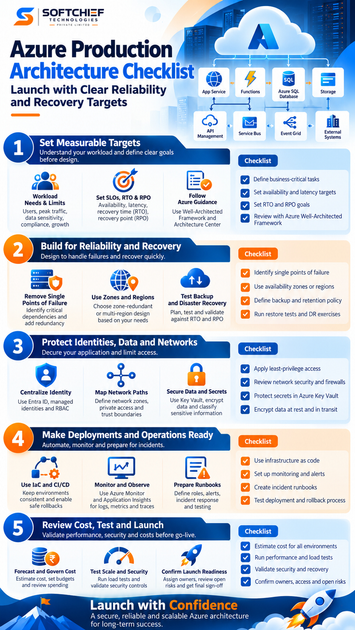
Use the Azure Production Architecture Checklist to set measurable targets
Define workload needs and limits
Start with the people and processes that depend on the workload. Record expected user numbers, traffic peaks, data sensitivity, compliance needs, external services, and plans for growth. Identify business-critical tasks and how long each can be unavailable.
These details shape service choices and the work needed to run them. A public app with sharp traffic peaks may need different scaling rules than an internal tool used during office hours.
Set availability, latency, RTO, and RPO goals
Write down measurable service objectives. Availability and latency targets describe the user experience; recovery time objective (RTO) sets the longest acceptable time to restore service. Recovery point objective (RPO) sets how much recent data the business can afford to lose.
For example, a team might set an RTO of two hours and an RPO of 15 minutes. Treat those as workload-specific targets, not default Azure settings. Check that the chosen services and budget can support the goals.
Review the design against Azure guidance
Use the Well-Architected Framework’s five pillars as a review map: reliability, security, cost optimization, operational excellence, and performance efficiency. Each pillar prompts a different question, from “Can we restore the workload?” to “Can we handle peak demand?”
The Azure Architecture Center offers reference designs, patterns, and service guidance. Compare its examples with your own requirements, then record why your design differs where needed.
Build an Azure architecture that can recover from failure
Find avoidable single points of failure
Trace a user request through compute, data stores, networking, and outside services. Ask what happens if each part stops responding. One database, network path, or vendor dependency can bring down the full service.
Use redundancy or health-based traffic routing where it fits the workload. Also plan for errors in application code: retries, timeouts, and graceful failure can keep a small issue from spreading.
Choose zones and regions for a reason
Availability zones can help a workload stay available during a local datacenter outage. A multi-region design can address wider regional failures, but it adds cost, data movement, and more work for the team. Microsoft’s guidance on availability zones and regions explains these trade-offs.
Choose the pattern that meets your recovery goals and risk tolerance. A zone-redundant design with backups in another region may fit many workloads; not every app needs active service in two regions.
Test backups and disaster recovery
Define which data and systems need backups, how long to keep them, and who owns restoration. Confirm that backups are protected and that the team can access recovery tools during an outage.
Schedule restore tests and disaster recovery exercises. Compare measured recovery times and data loss with the documented RTO and RPO. Microsoft’s disaster recovery guidance stresses tested, documented plans that cover the workload as a whole.
Protect identities, data, and network boundaries
Centralize identity and limit access
Use managed identities when Azure services need to access other resources. Apply role-based access control (RBAC) so each person and service has only the permissions needed for its work.
Review access on a regular schedule and limit always-on administrator rights. Keep production access separate from development and test access, with stronger checks for sensitive tasks.
Map network paths and trust boundaries
Draw the traffic paths between users, services, data stores, and outside systems. Decide which connections need private access, how to separate network zones, and which inbound and outbound paths to allow.
Restrict administrative access to approved paths and users. Choose Azure network controls based on the workload’s threat model rather than adding services without a clear purpose.
Protect secrets, keys, and data
Keep passwords, tokens, and certificates out of source code and plain configuration files. Azure Key Vault can store secrets and keys where it fits your design; set access rules and renewal plans for what it holds.
Encrypt data in transit and at rest, and classify data by sensitivity. Document how long each data type must remain and how teams will delete it when that time ends.
Make deployments repeatable and operations observable
Keep infrastructure and releases consistent
Use infrastructure as code (IaC) and version-controlled settings to make changes repeatable and reviewable. Keep separate stages for testing and production, and require approvals where the risk calls for them.
Plan how to roll back a release or restore service if a change fails. Practice that process before relying on it during an incident.
Monitor the service and its dependencies
Set up logs, metrics, traces, and dashboards that answer practical questions: Is the app healthy? Are requests slow? Is a dependency failing? Use Azure Monitor and Application Insights where they match your needs.
Build alerts around service objectives and user impact, not every minor metric change. Include dependency health and Azure platform status in your monitoring plan. Microsoft’s Azure monitoring guidance covers data collection, alerting, and ownership.
Prepare incident roles and runbooks
Name the team that owns each alert and define how incidents move to the next level of support. Write runbooks for common problems, such as a failed deployment, database outage, or regional disruption.
After an incident, review what happened and update the system or instructions. Check runbooks on a regular basis so they match the current design and team roles.
Close the Azure Production Architecture Checklist with a launch review
Forecast and govern Azure spending
Estimate costs during normal and peak use. Include redundancy, data transfer, monitoring, backups, and nonproduction environments so the forecast reflects the full workload.
Use Azure Cost Management to set budgets, review spending, and investigate changes. Assign costs to teams or services where possible. Avoid cost cuts that break the availability, security, or recovery targets.
Test scale, security, and failure cases
Run load tests that reflect expected traffic, including peak periods. Check that the workload scales as planned and meets its latency goals. Validate security controls and test recovery steps against the stated RTO and RPO.
Test likely failure modes, such as a stopped service or lost connection to a dependency. Use safe test environments first, then plan any production tests with clear limits and owners.
Confirm launch ownership and open risks
Before go-live, check that support teams know their roles and can reach the systems they own. Confirm the essentials:
- Named owners for alerts, incidents, and recovery
- Correct production access and separation from nonproduction
- Tested backups and documented restore steps
- Working dashboards, alerts, and notification routes
- Reviewed deployment, rollback, and support plans
- Open risks recorded with owners and due dates
Do not leave an unresolved risk without a decision-maker. The team should know whether to fix it before launch, accept it, or delay release.
Keep production readiness current
Production readiness is ongoing work, not a one-time sign-off. Set measurable goals, match resilience to those goals, protect identities and data, automate changes, monitor user impact, and review costs.
Schedule the next architecture review as the workload changes. New users, threats, dependencies, or business needs can make yesterday’s design a poor fit. Revisit the checklist, assign the highest-impact fixes, and keep the production plan current.









