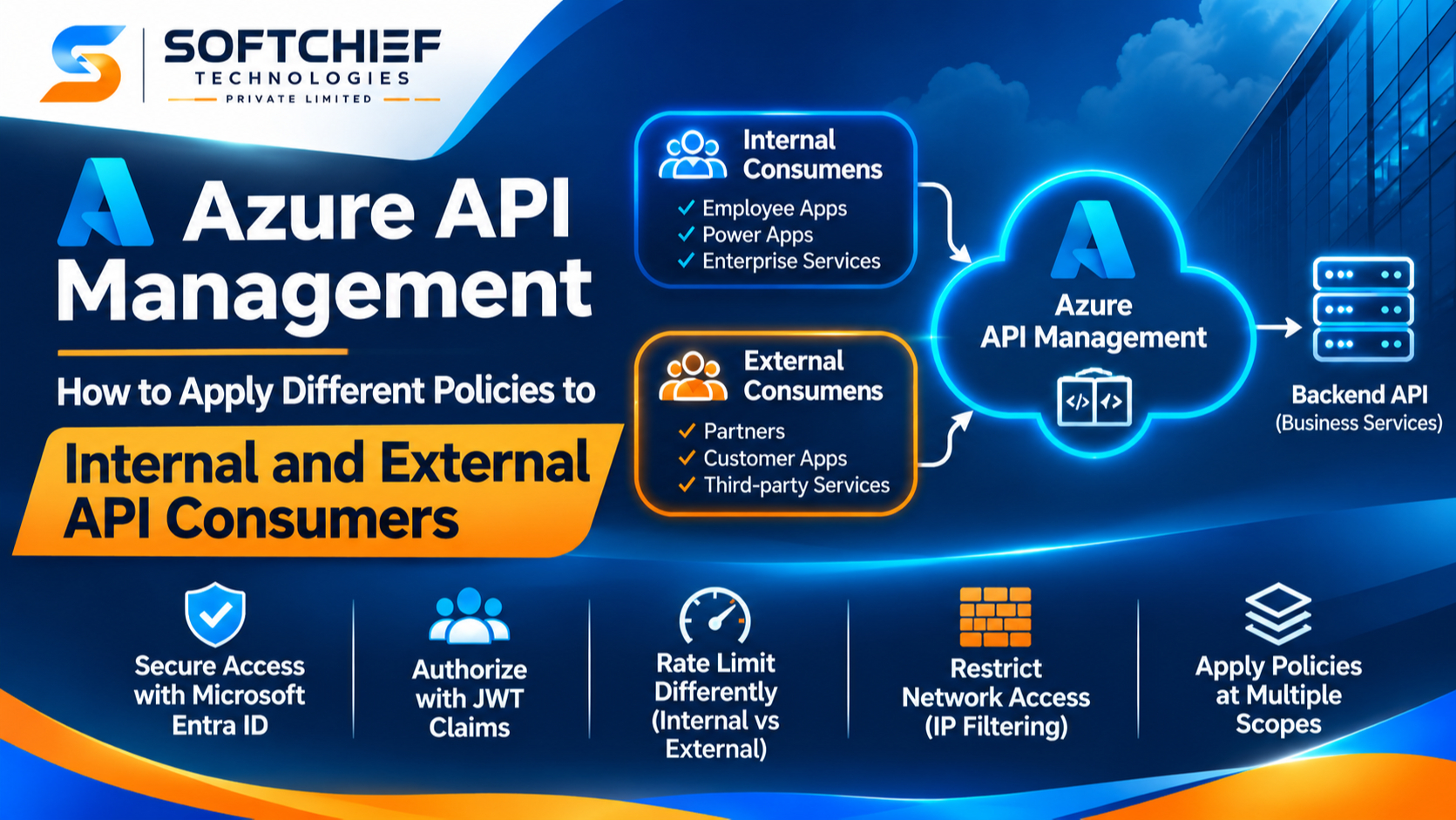
Azure API Management: How to Apply Different Policies to Internal and External API Consumers
Introduction: One API, Different Security Requirements
Azure API Management Security is a critical consideration when organizations expose enterprise APIs to internal applications, external partners and third-party consumers. Using Azure API Management policies, Microsoft Entra ID, JWT authentication, rate limiting and IP filtering, organizations can implement controlled, secure and scalable API access for different consumer groups.
Consider an enterprise application that exposes customer, order and inventory APIs through Azure API Management.
The organization has two categories of consumers.
Internal consumers:
- Employee-facing business applications.
- Internal Power Apps and custom applications.
- Backend services running within the organization’s Azure environment.
- Internal integration services communicating with Dynamics 365 or other enterprise systems.
External consumers:
- Business partners.
- Third-party applications.
- Customer-facing mobile applications.
- External vendors integrating with enterprise services.
Both categories need access to the same business capabilities. However, they should not necessarily receive identical access privileges.
An internal application might require higher API throughput, access to additional business operations and a different authorization model. An external partner might require restricted operations, stricter rate limits, additional request validation and tighter monitoring.
This creates an important architectural question:
How can we expose the same backend API to different consumers while applying different security, traffic management and request-processing rules without duplicating the entire API implementation?
Azure API Management (APIM) provides a policy-based approach to solving this problem.
Instead of developing separate API implementations for every consumer, we can use policy scopes, Microsoft Entra ID authentication, JWT claim validation, subscription management, rate limiting and request transformation to control how different consumers interact with the API.
In this article, we will build an enterprise-oriented implementation and examine the architectural decisions behind it.
We will cover:
- Designing an API architecture for internal and external consumers.
- Understanding Azure API Management policy execution.
- Using Microsoft Entra ID and JWT claims for consumer authentication.
- Applying different policies at product scope.
- Configuring different rate limits for internal and external applications.
- Controlling API access using subscription management.
- Testing the implementation.
- Identifying common production issues and security considerations.
The objective is not simply to make an API accessible. It is to make the API secure, manageable, scalable and operationally predictable.
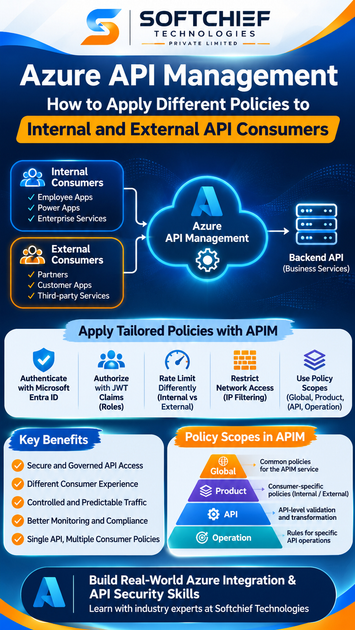
1. Understanding the Architecture: Why Different Consumer Policies Matter
A well-designed Azure API Management Security architecture separates authentication, authorization, traffic management and network restrictions while maintaining a common API implementation.
Let’s consider a practical business scenario.
An organization has developed an Order Management API that provides the following operations:
| API Operation | Purpose |
|---|---|
| GET /orders | Retrieve orders |
| GET /orders/{id} | Retrieve a specific order |
| POST /orders | Create an order |
| PUT /orders/{id} | Update an order |
| DELETE /orders/{id} | Cancel or delete an order |
The organization wants to expose this API to internal applications and external business partners.
However, the access requirements are different.
Internal application requirements
Internal applications are trusted enterprise applications, but they must still authenticate and authorize themselves.
The organization may require:
- Authentication through Microsoft Entra ID.
- Access to approved internal API operations.
- Higher request throughput.
- Application-specific authorization.
- Monitoring based on application identity.
- Secure communication with the backend.
External partner requirements
External partners operate outside the organization’s administrative boundary.
Their requirements may include:
- Strong token validation.
- Explicit partner authorization.
- Lower request limits.
- Restricted API operations.
- Additional request validation.
- Monitoring by partner subscription.
- Protection against unexpected traffic spikes.
The important point is that internal and external applications should not be distinguished simply because they come from different IP addresses.
Network location is not a reliable identity mechanism.
An internal application could be compromised, and an external application could connect through an approved private network.
Therefore, the architecture should establish consumer identity through authentication and authorization, while using network restrictions as an additional security layer where appropriate.
Proposed architecture
The following architecture uses Azure API Management as the central API gateway.
             INTERNAL CONSUMERS
       ┌──────────────────────────┐
       │ Internal Web Application│
       │ Power Apps / Services    │
       │ Enterprise Applications │
       └────────────┬─────────────┘
                    │
                    │ Microsoft Entra ID Token
                    ▼
              ┌──────────────┐
              │ Azure API    │
              │ Management   │
              │              │
              │ Internal     │
              │ Product      │
              └──────┬───────┘
                     │
                     │
                     ▼
             ┌───────────────┐
             │ Common API    │
             │ Policy Layer  │
             │               │
             │ JWT Validation│
             │ Authorization │
             │ Traffic Rules │
             └───────┬───────┘
                     │
                     ▼
             ┌───────────────┐
             │ Order         │
             │ Management    │
             │ Backend API   │
             └───────────────┘

              EXTERNAL CONSUMERS
       ┌──────────────────────────┐
       │ Partner Applications    │
       │ Customer Applications   │
       │ Third-party Services    │
       └────────────┬─────────────┘
                    │
                    │ Microsoft Entra ID Token
                    ▼
              ┌──────────────┐
              │ Azure API    │
              │ Management   │
              │              │
              │ External     │
              │ Partner      │
              │ Product      │
              └──────┬───────┘
                     │
                     ▼
              Common API
              Policy Layer
                     │
                     ▼
              Order Management
              Backend API
This is a logical architecture. Both consumer groups access the same published API, but their product associations and policy configurations determine their access characteristics.
The backend does not need separate implementations merely because the consumers have different requirements.
Architecture principle: Separate consumer access policies from business API implementation wherever possible.
This improves maintainability and allows security and traffic-management requirements to evolve without unnecessarily modifying the backend application.
2. Understanding Azure API Management Policy Execution
Before implementing different policies, it is important to understand how Azure API Management evaluates them.
An APIM policy is an XML-based configuration containing statements that execute during API request and response processing.
A policy definition has four main sections:
| Section | Responsibility |
|---|---|
| inbound | Validates and modifies incoming requests |
| backend | Controls forwarding to the backend service |
| outbound | Processes responses before returning them |
| on-error | Handles errors generated during policy execution |
The general structure looks like this:
<policies>

    <inbound>
        <!-- Authentication, authorization,
             validation and rate limiting -->
    </inbound>

    <backend>
        <!-- Backend request processing -->
        <base />
    </backend>

    <outbound>
        <!-- Response processing -->
        <base />
    </outbound>

    <on-error>
        <!-- Error handling -->
        <base />
    </on-error>

</policies>
Understanding policy scopes
Azure API Management supports multiple policy scopes.
| Scope | Application |
|---|---|
| Global | Applies across the APIM service |
| Workspace | Applies to APIs within a workspace |
| Product | Applies to APIs accessed through an associated product subscription |
| API | Applies to all operations within an API |
| Operation | Applies to an individual API operation |
This scope hierarchy is extremely important when implementing different consumer policies.
For example:
- Global scope can contain common security and governance policies.
- API scope can contain API-specific validation.
- Internal product scope can contain internal application restrictions.
- External product scope can contain partner-specific restrictions.
- Operation scope can contain additional rules for sensitive operations.
One important implementation detail is the <base /> element.
It controls where the parent scope’s policies are inherited into the current policy section.
For example:
<inbound>

    <base />

    <!-- Additional API-specific policies -->

</inbound>
Here, inherited policies execute before the additional policies at this scope.
If <base /> is removed, parent policies are not inherited through that section.
For enterprise deployments, this can create security gaps if common authentication, validation or monitoring policies are unintentionally bypassed.
Also note that APIM policy inheritance is not an automatic guarantee that every product policy applies to every request. The subscription used to access the API matters.
In particular, API-scoped, all-APIs and built-in all-access subscriptions have special behavior and do not receive product-scoped policies in the same way as product subscriptions.
Therefore, the subscription model must be part of the architecture design, not an afterthought.
3. Designing Internal and External API Products
A practical way to separate consumer-specific behavior is to create two APIM products.
Product 1: Internal Enterprise API
This product is intended for approved internal applications.
Example configuration:
- Product name: Internal-Enterprise-API
- Subscription required: Yes
- Approval: Restricted to approved internal applications
- Authentication: Microsoft Entra ID
- Rate limit: Higher threshold
- Authorization: Internal application role
Product 2: External Partner API
This product is intended for approved external partners.
Example configuration:
- Product name: External-Partner-API
- Subscription required: Yes
- Approval: Manual approval
- Authentication: Microsoft Entra ID
- Rate limit: Lower threshold
- Authorization: Partner application role
The products provide a way to organize API access, subscriptions and consumer-specific policy configurations.
Why not create two separate APIs?
Creating separate APIs for internal and external consumers may appear straightforward.
However, it can introduce several maintenance problems:
- The same business operation may need to be maintained in multiple API definitions.
- Security policy changes may need to be repeated.
- API versioning becomes more complicated.
- Monitoring and governance become fragmented.
- Different API definitions can gradually behave differently.
Using separate products allows us to maintain a shared API definition while applying different product-level policies.
There are exceptions. If the internal and external interfaces have fundamentally different data contracts, operations or security boundaries, separate API façades may be appropriate.
The design should follow the actual business and security requirements.
4. Implementing Authentication Using Microsoft Entra ID
Before applying different policies, we need to establish who is calling the API.
A subscription key alone is not sufficient for this purpose.
An APIM subscription key identifies a subscription. It does not independently establish the identity of a human user or prove that a calling application is authorized to perform a business operation.
For enterprise authentication, Microsoft Entra ID can issue access tokens to applications using OAuth 2.0 flows.
The calling application obtains an access token and sends it to APIM using the HTTP Authorization header.
Example:
GET /orders HTTP/1.1
Host: api.contoso.com
Authorization: Bearer eyJhbGciOi...
Ocp-Apim-Subscription-Key: <subscription-key>
APIM can validate the JWT before forwarding the request.
What should APIM validate?
At a minimum, the API gateway should validate:
- Token signature.
- Token issuer.
- Token audience.
- Token expiration.
- Required application roles or claims.
The audience must identify the intended API resource.
The issuer must correspond to the expected Microsoft Entra tenant or configured identity provider.
The application should receive only the permissions required for its intended use.
Example: JWT validation for internal applications
Suppose internal applications receive an application role named:
Internal.Api
The internal product policy can validate that role.
<policies>

    <inbound>

        <base />

        <validate-jwt
            header-name="Authorization"
            require-scheme="Bearer"
            failed-validation-httpcode="401"
            failed-validation-error-message="Invalid or unauthorized access token">

            <openid-config
                url="https://login.microsoftonline.com/<TENANT-ID>/v2.0/.well-known/openid-configuration" />

            <audiences>
                <audience>api://<API-APPLICATION-ID></audience>
            </audiences>

            <required-claims>
                <claim name="roles" match="any">
                    <value>Internal.Api</value>
                </claim>
            </required-claims>

        </validate-jwt>

    </inbound>

    <backend>
        <base />
    </backend>

    <outbound>
        <base />
    </outbound>

    <on-error>
        <base />
    </on-error>

</policies>
Replace the tenant ID and API application ID with the actual values from your Microsoft Entra configuration.
The application registration must define the corresponding app role, and the approved internal client applications must be assigned that role.
Example: JWT validation for external partners
Now consider an external partner application.
It receives a different application role:
Partner.Api
The external product policy can validate that role.
<policies>

    <inbound>

        <base />

        <validate-jwt
            header-name="Authorization"
            require-scheme="Bearer"
            failed-validation-httpcode="401"
            failed-validation-error-message="Invalid partner access token">

            <openid-config
                url="https://login.microsoftonline.com/<TENANT-ID>/v2.0/.well-known/openid-configuration" />

            <audiences>
                <audience>api://<API-APPLICATION-ID></audience>
            </audiences>

            <required-claims>
                <claim name="roles" match="any">
                    <value>Partner.Api</value>
                </claim>
            </required-claims>

        </validate-jwt>

    </inbound>

    <backend>
        <base />
    </backend>

    <outbound>
        <base />
    </outbound>

    <on-error>
        <base />
    </on-error>

</policies>
Both policies validate tokens intended for the same API resource, but they require different application roles.
This creates an authorization boundary between the two consumer categories.
Important implementation consideration: The application roles must be configured and assigned correctly in Microsoft Entra ID. Do not assume that merely adding a claim check in APIM creates an authorization permission. The identity provider must issue the appropriate claim to an authorized client.
For external partners using their own identity tenants, a separate trust design may be required. Depending on the business model, this could involve a multi-tenant application, an appropriate federated identity configuration or another approved identity integration. Do not blindly replace the expected issuer with an unrestricted issuer.
5. Applying Different Rate Limits to Internal and External Consumers
One of the most common requirements in enterprise API management is controlling the number of requests made by different consumers.
Imagine the following situation:
An internal application processes thousands of orders every hour.
At the same time, an external partner application retrieves order information through the same API.
If both applications receive identical traffic limits, the internal business process may be unnecessarily restricted, or external consumers may generate excessive traffic.
APIM provides the rate-limit-by-key policy to control request frequency based on a selected counter key.
For this example, assume the following requirements:
| Consumer | Allowed requests | Renewal period |
|---|---|---|
| Internal applications | 1,200 | 60 seconds |
| External partners | 120 | 60 seconds |
These are illustrative thresholds. Production values should be established using backend capacity, workload testing, business SLAs and expected traffic patterns.
Internal product rate-limiting policy
Add the following policy to the Internal-Enterprise-API product.
<policies>

    <inbound>

        <base />

        <rate-limit-by-key
            calls="1200"
            renewal-period="60"
            counter-key="@(context.Subscription.Id)" />

    </inbound>

    <backend>
        <base />
    </backend>

    <outbound>
        <base />
    </outbound>

    <on-error>
        <base />
    </on-error>

</policies>
The policy counts calls using the subscription ID.
This means the rate limit is associated with the APIM subscription rather than being shared across every consumer using the product.
External partner rate-limiting policy
For the External-Partner-API product, configure:
<policies>

    <inbound>

        <base />

        <rate-limit-by-key
            calls="120"
            renewal-period="60"
            counter-key="@(context.Subscription.Id)" />

    </inbound>

    <backend>
        <base />
    </backend>

    <outbound>
        <base />
    </outbound>

    <on-error>
        <base />
    </on-error>

</policies>
Now external subscriptions receive a lower request threshold.
When the limit is exceeded, APIM rejects further requests during the applicable renewal period with HTTP 429.
Why use subscription ID as the counter key?
Consider a partner organization with multiple applications.
If the counter key is based only on the product name, all partner applications may share the same counter.
Using the subscription ID provides an individual counter for each APIM subscription.
However, this design also requires subscription governance.
If one partner creates several independent subscriptions, they may receive several independent counters.
If the business requirement is to enforce a shared limit across every application belonging to the same partner, use a stable partner identifier as the counter key, obtained from a trusted and validated identity context.
Never use an unvalidated request header such as X-Partner-ID as the sole source of a security-sensitive counter key. A caller could manipulate it.
Production consideration: Rate limits are traffic-control mechanisms, not complete protection against distributed attacks. Combine them with authentication, quotas where appropriate, backend capacity controls, network security and monitoring.
6. Restricting Internal and External Network Access
Authentication and network security solve different problems.
Authentication establishes the caller’s identity.
Network restrictions control where requests are permitted to originate.
For example, an organization may want internal applications to access an API only from approved corporate network egress ranges.
APIM supports the ip-filter policy for restricting caller IP addresses.
Example:
<policies>

    <inbound>

        <base />

        <ip-filter action="allow">

            <address-range
                from="10.20.0.0"
                to="10.20.0.255" />

        </ip-filter>

    </inbound>

    <backend>
        <base />
    </backend>

    <outbound>
        <base />
    </outbound>

    <on-error>
        <base />
    </on-error>

</policies>
The example permits requests from the specified IPv4 range.
However, this should only be used when the gateway sees a reliable client source IP.
For applications accessing APIM through proxies, load balancers or other network intermediaries, verify which address APIM actually evaluates.
Do not assume that an internal RFC1918 address will automatically be visible at the gateway.
For external partners, IP allowlisting can be added when partners have stable egress addresses.
But IP filtering should be treated as an additional control, not as a replacement for token validation.
When should network restrictions be used?
| Requirement | Recommended control |
|---|---|
| Verify application identity | Microsoft Entra ID and JWT validation |
| Restrict application permissions | Application roles and authorization |
| Restrict request frequency | Rate limiting |
| Restrict network origin | IP filtering or network architecture |
| Protect backend connectivity | Private networking and appropriate backend controls |
| Protect sensitive operations | Operation-level authorization |
The correct combination depends on the threat model and deployment architecture.
7. Applying Policies at Different Levels: A Practical Architecture
A well-designed APIM implementation should avoid duplicating common policies across every product.
Instead, divide the policy responsibilities into layers.
Global policy layer
Use global scope for genuinely universal controls.
Examples:
- Common request correlation.
- Standard security headers.
- Common observability configuration.
- Organization-wide baseline rules.
Be careful when putting consumer-specific authentication requirements at global scope. Internal and external consumers may have different trust configurations.
API policy layer
Use API scope for controls applicable to all consumers of a particular API.
Examples:
- API-specific JWT validation.
- Request schema validation.
- API-specific request transformation.
- Backend routing.
Product policy layer
Use product scope for differences between consumer categories.
Examples:
- Internal versus external authorization requirements.
- Different rate limits.
- Product-specific restrictions.
- Different consumer access rules.
Operation policy layer
Use operation scope for additional restrictions on sensitive endpoints.
For example:
A partner may be allowed to retrieve orders but not cancel them.
A DELETE operation can require additional authorization checks or be excluded from the partner-facing product’s permitted API surface.
Remember that product association alone should not be treated as a complete business authorization system. The backend should still enforce critical business permissions, especially where access depends on the actual user, record ownership or organizational data boundaries.
Recommended policy distribution
| Policy requirement | Recommended scope |
|---|---|
| Organization-wide baseline | Global |
| API-specific JWT validation | API |
| Internal application role validation | Internal product |
| External partner role validation | External product |
| Internal rate limit | Internal product |
| External rate limit | External product |
| Sensitive operation authorization | Operation and backend |
| Common error handling | Appropriate shared scopes |
This layered model improves readability, reuse and governance.
8. Handling Errors and Producing Consistent API Responses
Security and traffic policies can reject requests before they reach the backend.
For example:
- Missing JWT.
- Invalid JWT signature.
- Expired token.
- Incorrect audience.
- Missing application role.
- Rate limit exceeded.
- Caller IP not permitted.
These errors should be handled predictably.
APIM provides the on-error section to process policy execution failures.
Example:
<policies>

    <inbound>
        <base />
    </inbound>

    <backend>
        <base />
    </backend>

    <outbound>
        <base />
    </outbound>

    <on-error>

        <set-header
            name="X-APIM-Error-Source"
            exists-action="override">

            <value>@(context.LastError.Source)</value>

        </set-header>

        <set-header
            name="X-Correlation-ID"
            exists-action="override">

            <value>@(context.RequestId.ToString())</value>

        </set-header>

    </on-error>

</policies>
The policy exposes selected diagnostic information and a request correlation identifier.
In production, do not expose raw internal exception details, token validation information or sensitive backend configuration to external consumers.
A better approach is to:
- Return a consistent error contract.
- Log detailed diagnostic information internally.
- Include a correlation identifier.
- Avoid logging access tokens, secrets and sensitive personal information.
- Use appropriate HTTP status codes.
For example:
| Scenario | HTTP Status |
|---|---|
| Missing or invalid authentication | 401 |
| Authenticated but unauthorized | 403 |
| Rate limit exceeded | 429 |
| Invalid request | 400 |
| Backend service unavailable | 503 |
The on-error section should complement normal HTTP error handling, not indiscriminately replace every error with the same response.
9. Securing Communication Between APIM and the Backend
A common architectural mistake is to secure the public-facing APIM endpoint while leaving backend authentication insufficiently protected.
Consider this flow:
External Application
        |
        | JWT
        ▼
Azure API Management
        |
        | Backend Authentication
        ▼
Azure App Service / Function
        |
        ▼
Database or Enterprise System
The backend must not automatically trust a request merely because it arrived through APIM.
Where supported by the backend, configure authentication between APIM and the backend.
Azure API Management supports managed identity authentication through the authentication-managed-identity policy.
Example:
<policies>

    <inbound>
        <base />
    </inbound>

    <backend>

        <authentication-managed-identity
            resource="api://<BACKEND-APPLICATION-ID>" />

        <base />

    </backend>

    <outbound>
        <base />
    </outbound>

    <on-error>
        <base />
    </on-error>

</policies>
Before using this configuration:
- Enable a system-assigned or user-assigned managed identity for APIM.
- Grant that identity the required permissions on the backend.
- Configure the correct audience/resource.
- Ensure the backend validates the incoming token.
- Verify the selected gateway supports the required identity configuration.
This removes the need to store a long-lived backend client secret in the policy.
Managed identity tokens are acquired and cached by the APIM policy.
Important: If the backend needs to know the original end user’s identity rather than APIM’s identity, a separate delegated authorization or on-behalf-of design may be required. APIM’s managed identity represents the gateway when it calls the backend; it does not automatically preserve the original user’s delegated identity.
10. Testing the Internal and External Consumer Scenarios
A policy implementation is incomplete until it has been tested against realistic consumer scenarios.
Let’s consider a practical test matrix.
| Test | Internal Consumer | External Consumer | Expected Result |
|---|---|---|---|
| Valid JWT with correct role | Yes | Yes | 200 |
| Missing JWT | Yes | Yes | 401 |
| Invalid token signature | Yes | Yes | 401 |
| Wrong audience | Yes | Yes | 401 |
| Missing required role | Yes | Yes | 401 with the illustrated validation configuration |
| Request within rate limit | Yes | Yes | Request proceeds |
| Request exceeding rate limit | 1,201st request within window | 121st request within window | 429 |
| Unapproved network IP | Where IP filtering applies | Where IP filtering applies | 403 |
| Missing APIM subscription key | If subscription is required | If subscription is required | Rejected by APIM |
The expected status codes are illustrative and should be verified against the effective policy configuration and gateway behavior.
Test using Postman
Create two separate Postman environments:
Environment 1: Internal Application
APIM_URL
INTERNAL_ACCESS_TOKEN
INTERNAL_SUBSCRIPTION_KEY
Environment 2: External Partner
APIM_URL
PARTNER_ACCESS_TOKEN
PARTNER_SUBSCRIPTION_KEY
For each environment, configure the request:
GET {{APIM_URL}}/orders
Authorization: Bearer {{ACCESS_TOKEN}}
Ocp-Apim-Subscription-Key: {{SUBSCRIPTION_KEY}}
Run the same request using both environments.
Verify:
- Whether the token is accepted.
- Whether the correct application role is present.
- Whether the correct product policy is executed.
- Whether rate limits are independent.
- Whether unauthorized consumers are rejected.
- Whether the backend receives only approved requests.
For more advanced testing, automate the scenarios using a CI/CD pipeline and include negative security tests.
Do not test only successful requests. Invalid tokens, unauthorized roles, excessive traffic and incorrect subscription configurations are often where architectural weaknesses become visible.
11. Common Mistakes When Implementing Different APIM Policies
Even when the XML configuration appears correct, several architectural mistakes can undermine the implementation.
Mistake 1: Using subscription keys as the only authentication mechanism
Subscription keys identify subscriptions. They do not independently prove the identity of an application or user.
Better approach: Use Microsoft Entra ID or another approved identity provider, validate tokens and enforce authorization.
Mistake 2: Forgetting the <base /> element
A product policy without the required inheritance may unintentionally bypass policies configured at parent scopes.
Better approach: Review policy inheritance and use the APIM effective policy view before deployment.
Mistake 3: Applying IP filtering as the primary security control
IP addresses do not establish application identity.
Better approach: Use identity-based authorization with network restrictions as an additional layer.
Mistake 4: Using one rate limit for every consumer
Different applications have different workloads and business requirements.
Better approach: Configure rate limits based on consumer type, subscription and backend capacity.
Mistake 5: Assuming product policies apply to every subscription
API-scoped and all-APIs subscriptions have special policy behavior.
Better approach: Define the subscription model and verify how each request is associated with a product.
Mistake 6: Trusting consumer-supplied headers
A caller can manipulate headers such as:
X-Consumer-Type: InternalSuch a header must never be the sole basis for granting internal privileges.
Better approach: Derive authorization from validated identity claims and trusted APIM configuration.
Mistake 7: Securing only the gateway
If the backend remains directly accessible, a caller might bypass the intended APIM controls.
Better approach: Restrict backend network access where appropriate and require backend authentication.
Mistake 8: Exposing internal errors
Detailed exception messages can disclose sensitive infrastructure information.
Better approach: Return controlled error responses and retain detailed diagnostics in secured logging systems.
12. Production Architecture: Additional Considerations
A production-ready APIM implementation needs more than a few policy statements.
Consider the following additional areas.
API versioning
Use API versioning to introduce controlled changes without unexpectedly breaking existing partner integrations.
For example:
/api/v1/orders
/api/v2/orders
Policy fragments
If multiple APIs require the same security or monitoring configuration, consider reusable policy fragments.
This reduces duplication and simplifies policy maintenance.
However, reusable fragments should be designed carefully, with clearly defined responsibilities and documented dependencies.
Named values and secret management
Avoid hardcoding secrets, credentials or environment-specific configuration directly into policy XML.
Use APIM named values and secure integration with Azure Key Vault where appropriate.
Monitoring and observability
Monitor:
- Total API requests.
- HTTP 401 and 403 responses.
- HTTP 429 responses.
- Backend response time.
- Gateway latency.
- Failed backend calls.
- Consumer-level traffic.
- Unexpected traffic spikes.
Use Azure Monitor and Application Insights integration where supported by your APIM architecture.
Infrastructure as Code
Do not treat production policies as manual portal-only configuration.
Store policy XML and APIM configuration in source control.
Use an appropriate deployment mechanism such as Bicep, ARM templates or Terraform.
A typical deployment flow is:
Developer Updates Policy
          |
          ▼
Source Control
          |
          ▼
Pull Request Review
          |
          ▼
Automated Validation
          |
          ▼
Development APIM
          |
          ▼
Integration Testing
          |
          ▼
Production Approval
          |
          ▼
Production APIM
This creates a controlled deployment process and makes policy changes easier to review, audit and roll back.
13. When Should You Use Different Products, Different APIs or Separate APIM Instances?
This is an important architecture decision.
Not every internal-versus-external requirement should be solved using product policies alone.
| Architecture Choice | Suitable Scenario |
|---|---|
| Same API with different products | Same business contract, different consumer policies |
| Same API with different operation policies | Additional restrictions on selected operations |
| Separate API façades | Different contracts, data exposure or business capabilities |
| Separate APIM instances | Strong administrative, regulatory or operational isolation requirements |
| Separate gateways or network topologies | Different connectivity and network security requirements |
For example, an organization might expose order retrieval to external partners but keep customer financial details exclusively available to internal applications.
If the data and operation boundaries are substantially different, the architecture should explicitly separate those capabilities rather than relying only on different rate limits or product subscriptions.
The objective is to establish security boundaries that are understandable, testable and enforceable.
14. Final Architecture Recommendation
For the Order Management scenario, the recommended starting design is:
| Component | Responsibility |
|---|---|
| Microsoft Entra ID | Application authentication and token issuance |
| Azure API Management | Central API gateway |
| Internal API Product | Internal consumer access management |
| External API Product | External partner access management |
| JWT validation | Token and application-role validation |
| Rate-limit-by-key | Consumer-specific traffic control |
| IP filtering | Additional network restriction where required |
| Managed identity | Secure APIM-to-backend authentication |
| Azure Monitor | Operational monitoring |
| Source control and CI/CD | Controlled policy deployment |
This design provides a common API platform without requiring separate implementations for every consumer category.
More importantly, it establishes a clear separation between identity, authorization, traffic management, network restrictions and backend security.
That separation is what makes the solution maintainable as the number of APIs, applications and external integrations increases.
Conclusion
Applying different policies to internal and external API consumers is not simply an XML configuration exercise.
It is an architectural decision involving identity, authorization, network security, traffic management, API governance and operational monitoring.
Azure API Management provides the flexibility to implement these requirements through policy scopes, product associations, JWT validation, rate limiting, IP filtering and backend authentication.
However, the effectiveness of the solution depends on how these capabilities are combined.
A production-ready implementation should ensure that:
- Every consumer has a verifiable identity.
- Access is granted through explicit authorization.
- Internal and external traffic requirements are separated.
- Policy inheritance is understood and tested.
- Backend services are not exposed through unintended access paths.
- Security and operational events are monitored.
- Policy changes are deployed through a controlled process.
For Azure developers and integration professionals, understanding these concepts is essential when designing enterprise API platforms.
The real value of Azure API Management is not merely publishing an API. It is creating a governed and secure integration layer that can support multiple applications, partners and business systems without compromising the organization’s security requirements.
Want to Build Enterprise-Ready Azure Integration Solutions?
Implementing Azure API Management Security requires a combination of identity validation, consumer-specific policies, backend protection and continuous monitoring.
Understanding Azure API Management policies is one part of becoming a capable Azure developer or integration professional.
Real-world projects also require practical knowledge of:
- Azure Functions and serverless integration.
- Azure Service Bus and asynchronous messaging.
- Azure API Management and API security.
- Microsoft Entra ID and application authentication.
- Azure integration architecture.
- C# and .NET backend development.
- Enterprise application integration patterns.
At Softchief Learn, we focus on practical Microsoft technology learning, helping freshers and working professionals understand how enterprise solutions are designed, developed and implemented.
If you want to strengthen your Azure development and integration skills, explore our training programs.
Join Softchief Community – Technical Webinars and Events
For course enquiries and guidance, connect with our training team through Softchief Learn.