
Dataverse vs SQL Server: Which Database Should You Learn?
Introduction
Choosing between Dataverse and SQL Server can shape your next job, project, or certification plan. Both store business data, but they create very different development experiences. Dataverse works closely with Power Apps, Power Automate, and Dynamics 365. SQL Server offers a mature database platform for applications, analytics, reporting, and data engineering.
The right choice depends on your career goal, preferred tools, data needs, and desired level of control. Dataverse can help you build business apps quickly. SQL Server gives you stronger database skills that transfer across many platforms.
Dataverse and SQL Server Solve Different Data Problems
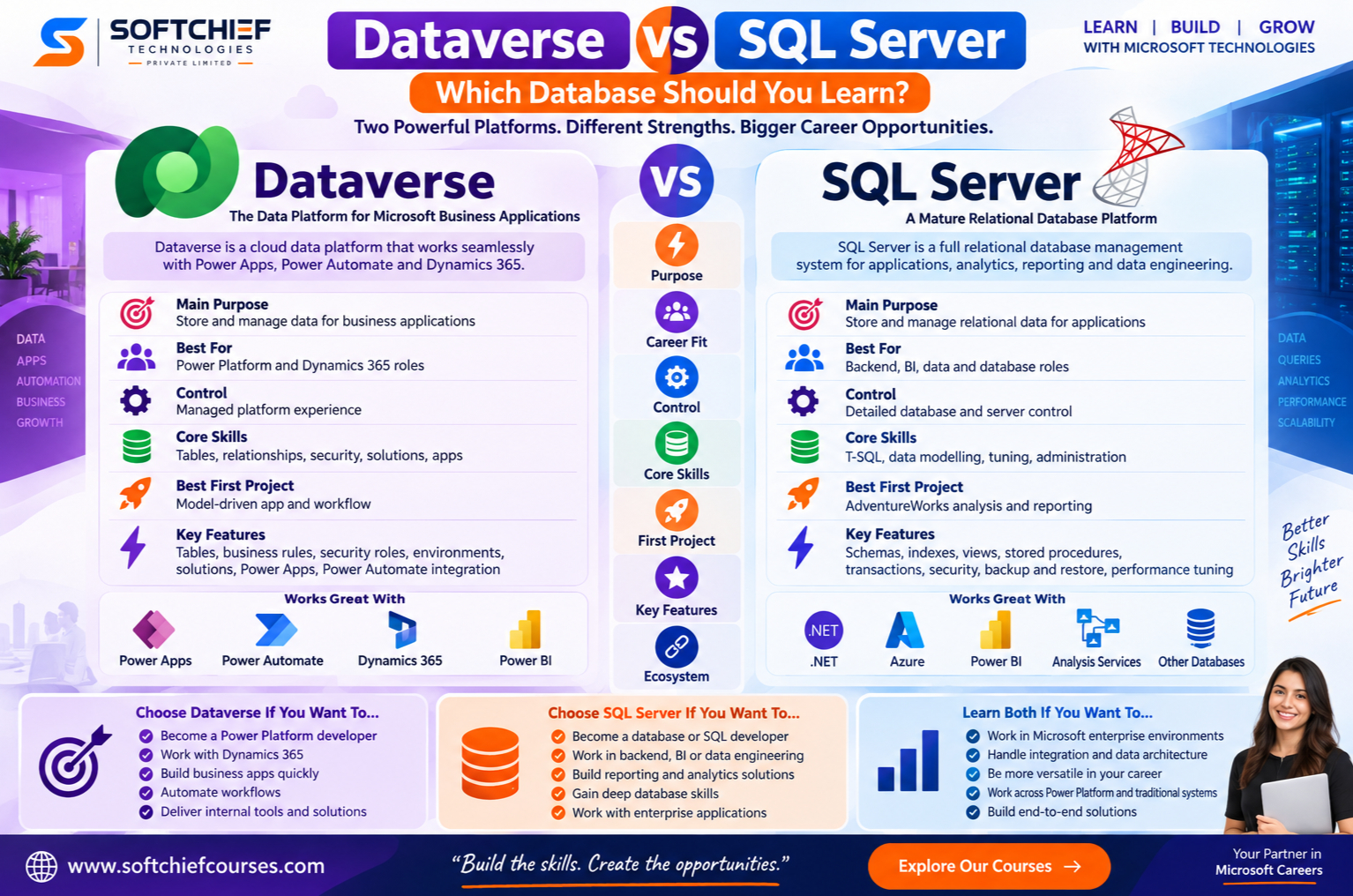
Dataverse is a cloud data platform for business applications. SQL Server is a full relational database management system. They can work together, but they are not direct substitutes in every project.
Dataverse connects data to Microsoft business tools
Dataverse provides tables, columns, relationships, business rules, security roles, environments, and solutions. These features connect with Power Apps, Power Automate, Power BI, and Dynamics 365.
A Power Platform developer can create a table, add a form, set access rules, and build a workflow without managing database servers. Microsoft Learn’s Dataverse documentation is a useful source for table design, security, administration, and platform terms.
SQL Server gives you direct database control
SQL Server includes schemas, tables, indexes, views, stored procedures, transactions, constraints, permissions, backup and restore tools, and performance controls. T-SQL lets you query, change, and manage relational data with precision.
This deeper control takes more study, but the skills transfer well. Microsoft Learn’s SQL Server and T-SQL material covers the core language and administration tasks.
Dataverse uses managed infrastructure
Dataverse stores data on Microsoft-managed infrastructure, but it does not offer the same database administration model as SQL Server. You do not receive unrestricted access to server settings, indexes, or every query plan.
Dataverse provides a platform abstraction. SQL Server exposes more control over schemas, queries, indexes, configuration, and workload tuning.
Dataverse Offers a Faster Path to Business Apps
Dataverse is often the better first choice for internal tools, workflow automation, CRM extensions, and Microsoft business applications. It reduces the amount of infrastructure you need to build and maintain.
Power Apps developers can build around Dataverse
Dataverse supports both model-driven apps and canvas apps. Tables, forms, views, relationships, and security roles provide much of the structure that a custom application would need.
A useful first project is a case-management app. Create related customer, case, and task tables, assign role-based access, then add a Power Automate approval workflow. This exercise teaches more than creating a single table.
Built-in features reduce repeated work
Choice columns, lookup relationships, business rules, auditing, record-level security, managed solutions, and environment-based deployment help you build governed apps. These features matter when the goal is to deliver a working business service rather than create a database platform.
Dataverse still needs sound data modelling. Learn keys, relationships, normalisation, permissions, ownership models, delegation limits, environment planning, solution management, and data integration. Low-code tools do not remove the need for good database habits.
SQL Server Builds Transferable Database Skills
SQL Server is a stronger foundation for backend development, business intelligence, data analysis, and database engineering. It requires more effort at the start, but gives you a wider technical base.
T-SQL works across many database roles
You will practise SELECT statements, filters, joins, aggregates, subqueries, common table expressions, window functions, data changes, transactions, and error handling. These ideas also apply to Azure SQL Database, PostgreSQL, MySQL, and Oracle, although syntax and features differ.
Use Microsoft’s AdventureWorks sample database for practice. It gives you sales, product, customer, and staff data for joins, reports, schema work, and query exercises.
SQL Server exposes performance and reliability
SQL Server lets you study indexes, execution plans, statistics, query tuning, locking, isolation levels, partitioning, backups, restores, high availability, and disaster recovery. These topics explain how databases behave under real workloads.
Microsoft Learn provides material on execution plans, indexes, transactions, and backup and restore. SQL Server is not always faster than Dataverse. Results depend on the workload, design, configuration, and access pattern.
Dataverse vs SQL Server Depends on Your Career Goal
Your target role should guide the first platform you study. The best choice is usually the one linked to the projects you want to build at work.
Choose Dataverse for Power Platform roles
Start with Dataverse if you want to become a Power Platform developer, functional consultant, Dynamics 365 consultant, business applications developer, or workflow automation specialist. Pair it with Power Apps, Power Automate, Power BI, security, solution management, and basic relational modelling.
A model-driven case app, approval workflow, or Power BI report connected to Dataverse can form a useful portfolio project. Document each table, relationship, security role, and solution component.
Choose SQL Server for data and backend roles
Start with SQL Server if you want to become a database developer, SQL developer, backend developer, BI developer, data engineer, or database administrator. Add T-SQL, data modelling, performance tuning, ETL or ELT, reporting, and one programming language.
SQL Server fits APIs, line-of-business systems, reporting databases, warehouses, integrations, and enterprise applications. It also gives you a stronger base for learning other relational systems.
Learn both for Microsoft enterprise work
Dataverse and SQL Server often appear in the same organisation. Teams may connect them for reporting, migration, synchronisation, integration, or wider data architecture.
A practical sequence is to learn SQL and relational ideas first, then add Dataverse. If your immediate job involves Power Platform delivery, reverse that order and study SQL soon after.
Compare Learning Curve, Control, and Cost
Dataverse often produces a visible result sooner. SQL Server takes longer but offers more technical depth and control.
Dataverse starts faster but adds platform concepts
You can create tables and apps through Power Platform tools, yet you still need to understand environments, solutions, security roles, licensing, connectors, delegation, and platform limits. Build a small model-driven app and record every design decision.
SQL Server takes longer and teaches more depth
SQL Server expects knowledge of relational theory, schema design, query writing, transactions, indexing, security, and administration. Start with AdventureWorks, then progress from joins and aggregates to indexes and execution plans.
Costs vary for both platforms. Licensing, edition, deployment method, users, capacity, environments, infrastructure, and related Microsoft services all affect the total. Check current Microsoft licensing, Power Platform licensing, Azure SQL, and SQL Server pricing pages before making a work or training decision.
Use a Clear Learning Decision
Your first project can settle the choice better than a long feature comparison. Choose the platform that matches the problem you want to solve this month.
Start with Dataverse for rapid business delivery
Build Dataverse first if you want to automate Microsoft 365 or Dynamics 365 processes, customise CRM work, or create internal apps quickly. Begin with related tables, security roles, a workflow, and a simple report.
This route suits people who enjoy business processes and visual app building. Add SQL basics as your projects grow.
Start with SQL Server for strong foundations
Choose SQL Server first if you want advanced SQL, backend work, reporting systems, database design, or data engineering. Design a normalised sales database, write reports, create indexes, and compare execution plans.
This route suits people who want to understand what happens inside a database. It also supports later work with Dataverse.
Follow a combined roadmap
Study relational concepts and SQL first. Then learn SQL Server querying and data modelling, followed by Dataverse tables and relationships, Power Apps, Power Automate, security, governance, integration, and reporting.
Measure progress by whether you can design a schema, write multi-table queries, explain primary and foreign keys, configure Dataverse security, build an app, automate a process, and document deployment choices.
Dataverse vs SQL Server: The Learning Recommendation
| Area | Dataverse | SQL Server |
|---|---|---|
| Main purpose | Business apps and governed data | Relational applications and data systems |
| Best for | Power Platform and Dynamics 365 roles | Backend, BI, data, and database roles |
| Control | Managed platform experience | Detailed database and server control |
| Core skills | Tables, security, solutions, apps | T-SQL, modelling, tuning, administration |
| Best first project | Model-driven app and workflow | AdventureWorks analysis and reporting |
Choose Dataverse first for Power Apps, Dynamics 365, workflow automation, and rapid business app delivery. Choose SQL Server first for database depth, T-SQL, backend systems, BI, data engineering, or administration. Learn both if you want broad Microsoft enterprise skills.
Dataverse learners still benefit from SQL, relational modelling, security, and integration knowledge. SQL Server learners can add Dataverse later and work more effectively on Power Platform projects.
Conclusion
The best database to learn depends on the problems you want to solve. Start a Dataverse project if your goal is Power Platform work. Complete a SQL Server and T-SQL project with AdventureWorks if you want strong database foundations.
Both paths are useful, but they lead to different strengths. Dataverse helps you deliver governed business apps quickly. SQL Server teaches database skills that travel across roles and platforms.









