
How AI Is Changing Microsoft Careers: Why Every Power Platform and Dynamics 365 Professional Must Upskill (2026 Guide)
Introduction
Artificial Intelligence (AI) is no longer a futuristic concept—it’s becoming a core part of Microsoft’s ecosystem. From Microsoft Copilot and Copilot Studio to Azure OpenAI Service, AI Builder, and intelligent automation, Microsoft is embedding AI into almost every enterprise product.
For professionals working with Microsoft Power Platform and Dynamics 365, this shift is creating exciting opportunities. The demand is no longer just for developers who can build applications or customize CRM systems. Employers are increasingly looking for professionals who can integrate AI into business processes, automate decision-making, and deliver intelligent business solutions.
The key question is no longer:
“Will AI replace Power Platform or Dynamics 365 professionals?”
Instead, the real question is:
“How quickly can you learn AI to stay ahead in your Microsoft career?”
In this guide, we’ll explore how AI is transforming Microsoft careers, the new skills employers expect, and how you can future-proof your career between 2026 and 2030.
The Microsoft AI Revolution
Microsoft has invested billions of dollars in Artificial Intelligence, making AI a central part of its technology strategy.
Today, AI capabilities are integrated into products such as:
- Microsoft Power Platform
- Dynamics 365
- Microsoft 365
- Azure
- Microsoft Fabric
- GitHub Copilot
- Copilot Studio
- Azure OpenAI Service
- AI Builder
This means that professionals working in the Microsoft ecosystem are increasingly expected to understand AI concepts—not necessarily as AI researchers, but as solution builders who can apply AI to solve business problems.
How AI Is Transforming Microsoft Careers
Traditional Microsoft development focused on building applications, automating workflows, and managing business data.
Today, organizations expect professionals to create intelligent business applications that can:
- Understand natural language
- Generate content
- Analyze documents
- Summarize emails
- Answer customer queries
- Predict business trends
- Automate decision-making
- Assist employees using AI copilots
As a result, Microsoft professionals are moving from application development to AI-powered solution development.
AI Is Not Replacing Developers—It’s Changing Their Role
One of the biggest misconceptions is that AI will eliminate developer jobs.
In reality, AI is handling repetitive tasks such as:
- Code suggestions
- Documentation generation
- Formula creation
- Basic testing
- Data summarization
- Workflow recommendations
However, AI still depends on skilled professionals to:
- Understand business requirements
- Design enterprise solutions
- Ensure security and compliance
- Integrate multiple systems
- Optimize performance
- Govern AI responsibly
- Customize business applications
Human expertise remains essential.
Why Power Platform Professionals Must Upskill
Microsoft Power Platform has evolved far beyond a low-code development platform.
Today’s Power Platform Developers are expected to combine:
- Business process automation
- Low-code development
- Cloud services
- APIs
- AI capabilities
Modern Power Platform projects increasingly include AI features such as:
AI-Powered Forms
Extract information from invoices, receipts, and business documents.
Intelligent Chatbots
Build conversational AI using Copilot Studio.
Smart Approvals
Generate AI-powered summaries before managers approve requests.
Document Automation
Automatically classify, summarize, and process documents.
Email Intelligence
Generate responses and summarize conversations using AI.
Organizations value developers who can deliver these capabilities.
Why Dynamics 365 Professionals Must Upskill
Dynamics 365 is becoming an AI-first business application platform.
Microsoft continues to introduce intelligent capabilities across:
- Dynamics 365 Sales
- Customer Service
- Customer Insights
- Field Service
- Finance
- Supply Chain Management
Examples include:
- AI-generated sales emails
- Opportunity summaries
- Predictive lead scoring
- Customer sentiment analysis
- Intelligent case routing
- AI-powered knowledge suggestions
- Forecasting
- Sales coaching
Dynamics 365 professionals who understand these features will be better positioned to lead digital transformation initiatives.
The Rise of Microsoft Copilot
Microsoft Copilot is changing how organizations interact with business applications.
Instead of navigating multiple screens, users can simply ask questions in natural language.
Examples:
- “Show me all opportunities closing this month.”
- “Create a customer follow-up email.”
- “Summarize today’s support cases.”
- “Generate a sales report.”
- “Recommend the next best action.”
Professionals who understand Copilot customization and integration are becoming increasingly valuable.
Copilot Studio: A Must-Learn Skill
Copilot Studio enables organizations to build custom AI assistants without creating everything from scratch.
With Copilot Studio, developers can:
- Build enterprise chatbots
- Connect to business systems
- Automate conversations
- Trigger Power Automate workflows
- Integrate with Dynamics 365
- Connect to Dataverse
- Use Azure OpenAI
- Extend copilots with custom actions
Learning Copilot Studio is becoming an important skill for Microsoft consultants.
Azure OpenAI Is Becoming a Competitive Advantage
Azure OpenAI allows organizations to securely integrate advanced AI models into enterprise applications.
Microsoft professionals can use it to:
- Generate reports
- Summarize customer interactions
- Build AI assistants
- Classify documents
- Analyze business data
- Improve customer service
- Automate knowledge retrieval
Understanding Azure OpenAI can significantly enhance the value of your Microsoft solutions.
AI Builder Is Making Business Automation Smarter
AI Builder enables Power Platform users to add AI capabilities with minimal code.
Common use cases include:
- Invoice processing
- Form recognition
- Object detection
- Sentiment analysis
- Text classification
- Prediction models
Combining AI Builder with Power Automate allows businesses to automate increasingly complex workflows.
Skills Every Microsoft Professional Should Learn
To remain competitive, focus on building expertise in the following areas:
Microsoft Power Platform
- Power Apps
- Power Automate
- Power BI
- Power Pages
- Dataverse
Dynamics 365
- Sales
- Customer Service
- Marketing
- Business Process Flows
- Plugins
- Security
Artificial Intelligence
- Microsoft Copilot
- Copilot Studio
- Azure OpenAI
- AI Builder
- Prompt Engineering
- Responsible AI concepts
Cloud
- Azure Functions
- Azure Storage
- API Management
- Azure Logic Apps
- Azure Identity
Development
- C#
- JavaScript
- REST APIs
- SQL Server
- Git
A combination of these skills prepares you for modern enterprise projects.
New Career Opportunities Emerging with AI
As AI adoption increases, new job roles are emerging across the Microsoft ecosystem.
Popular career paths include:
- AI-Powered Power Platform Developer
- Dynamics 365 AI Consultant
- Copilot Studio Developer
- Microsoft AI Solutions Engineer
- Azure OpenAI Developer
- Intelligent Automation Consultant
- AI Integration Specialist
- Enterprise Automation Consultant
- Microsoft Solution Architect
- Business Applications AI Consultant
These roles blend traditional Microsoft expertise with AI capabilities.
Certifications That Complement AI Skills
A structured certification roadmap can help validate your expertise.
Foundation
- PL-900 – Power Platform Fundamentals
- AZ-900 – Azure Fundamentals
Intermediate
- PL-400 – Power Platform Developer Associate
- AZ-204 – Azure Developer Associate
- PL-200 – Power Platform Functional Consultant
Advanced Learning
In addition to certifications, explore:
- Microsoft Learn AI modules
- Copilot Studio learning paths
- Azure OpenAI documentation
- Real-world AI implementation projects
Hands-on experience remains the most valuable credential.
Real-World Business Scenarios
Here are examples of how AI is enhancing Microsoft solutions:
Sales Team
A sales representative asks Copilot to summarize customer interactions and generate a personalized follow-up email.
HR Department
Power Automate uses AI Builder to extract candidate information from resumes and route applications automatically.
Customer Service
A Copilot chatbot resolves common support questions and escalates complex issues with AI-generated case summaries.
Finance Team
AI automatically extracts invoice data, validates information, and initiates approval workflows.
Field Service
Technicians receive AI-generated maintenance recommendations based on historical service records.
These are the types of solutions organizations increasingly expect Microsoft professionals to deliver.
Common Mistakes Professionals Should Avoid
To stay relevant in the AI era, avoid:
- Ignoring AI because you’re comfortable with existing skills
- Relying only on low-code knowledge
- Skipping Azure fundamentals
- Avoiding programming concepts
- Depending solely on certifications
- Not building AI-powered projects
- Failing to stay updated with Microsoft releases
Continuous learning is essential.
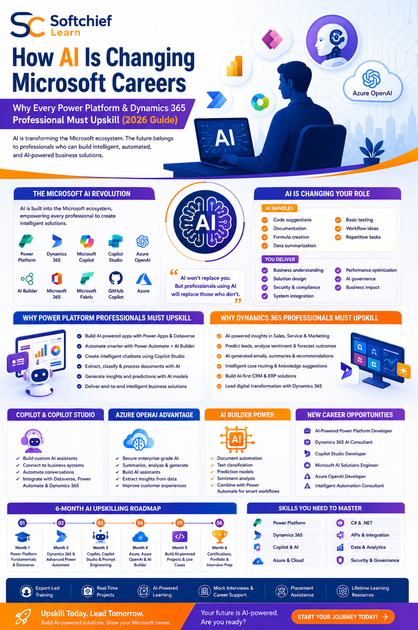
A 6-Month AI Upskilling Roadmap
| Month | Focus Area |
|---|---|
| Month 1 | Master Power Platform Fundamentals and Dataverse |
| Month 2 | Learn Dynamics 365 and Advanced Power Automate |
| Month 3 | Explore Microsoft Copilot, Copilot Studio, and Prompt Engineering |
| Month 4 | Learn Azure Fundamentals, Azure OpenAI, and AI Builder |
| Month 5 | Build AI-powered Power Platform and Dynamics 365 projects |
| Month 6 | Prepare for certifications, portfolio development, and interview practice |
By the end of this roadmap, you’ll have both technical expertise and practical AI experience.
Career Outlook (2026–2030)
Organizations are investing heavily in:
- Enterprise AI
- Business Process Automation
- Intelligent CRM
- AI-powered ERP
- Cloud Computing
- Digital Transformation
This creates strong opportunities for professionals who combine Microsoft expertise with AI knowledge.
Potential career paths include:
- Microsoft Consultant
- Power Platform Developer
- Dynamics 365 Consultant
- Azure Developer
- AI Solutions Engineer
- Solution Architect
- Enterprise Automation Consultant
Professionals who continuously upskill are likely to remain highly competitive in the evolving job market.
Frequently Asked Questions (FAQs)
1. Will AI replace Power Platform Developers?
No. AI is expected to automate repetitive tasks, but Power Platform Developers will continue to design solutions, integrate systems, govern business processes, and customize enterprise applications.
2. Should Dynamics 365 professionals learn AI?
Yes. AI capabilities are becoming deeply integrated into Dynamics 365 applications, making AI knowledge increasingly valuable for consultants and developers.
3. Is Copilot Studio worth learning?
Absolutely. Copilot Studio enables organizations to build custom AI assistants and automate business interactions, making it a highly relevant skill in the Microsoft ecosystem.
4. Do I need programming knowledge to work with AI in Microsoft technologies?
Basic programming skills in C#, JavaScript, SQL, and APIs remain valuable, especially for advanced customization, integrations, and enterprise-grade AI solutions.
5. How can I future-proof my Microsoft career?
Focus on continuous learning. Strengthen your knowledge of Power Platform, Dynamics 365, Azure, Copilot Studio, Azure OpenAI, AI Builder, cloud technologies, and real-world business problem-solving.
Final Thoughts
Artificial Intelligence is reshaping the Microsoft ecosystem, but it is not reducing the need for skilled professionals. Instead, it is expanding the role of Power Platform Developers, Dynamics 365 Consultants, and Azure Developers by enabling them to build smarter, faster, and more intelligent business solutions.
Professionals who embrace AI, invest in practical learning, and continuously adapt to Microsoft’s evolving technologies will be well-positioned for long-term career growth. The future belongs not to those who fear AI, but to those who learn how to use it effectively.
Why Learn AI-Powered Microsoft Technologies with Softchief Learn?
At Softchief Learn, we help students, freshers, developers, and working professionals build future-ready skills in Microsoft’s AI-powered ecosystem.
Our industry-focused training includes:
- Microsoft Power Platform
- Microsoft Dynamics 365 CE
- Microsoft Azure
- Copilot Studio
- Azure OpenAI Integration
- AI Builder
- C# .NET Full Stack Development
- Real-Time Industry Projects
- Resume Building & Portfolio Guidance
- Mock Interviews
- Placement Assistance
- Lifetime Learning Resources
Our expert-led programs are designed to prepare learners not only for Microsoft certifications but also for the practical challenges of implementing AI-driven enterprise solutions.
Conclusion
The future of Microsoft careers is being shaped by Artificial Intelligence, automation, and cloud technologies. Power Platform and Dynamics 365 professionals who expand their skills beyond traditional development into AI, Copilot, Azure OpenAI, and intelligent automation will be better equipped to lead digital transformation initiatives.
Now is the ideal time to invest in upskilling. By combining Microsoft technologies with AI expertise, practical projects, and continuous learning, you can build a rewarding, future-proof career that remains relevant well beyond 2030.









