
Minimal APIs vs Controllers in ASP.NET Core 10: Choosing the Right Approach for Modern Web Application Development
Introduction
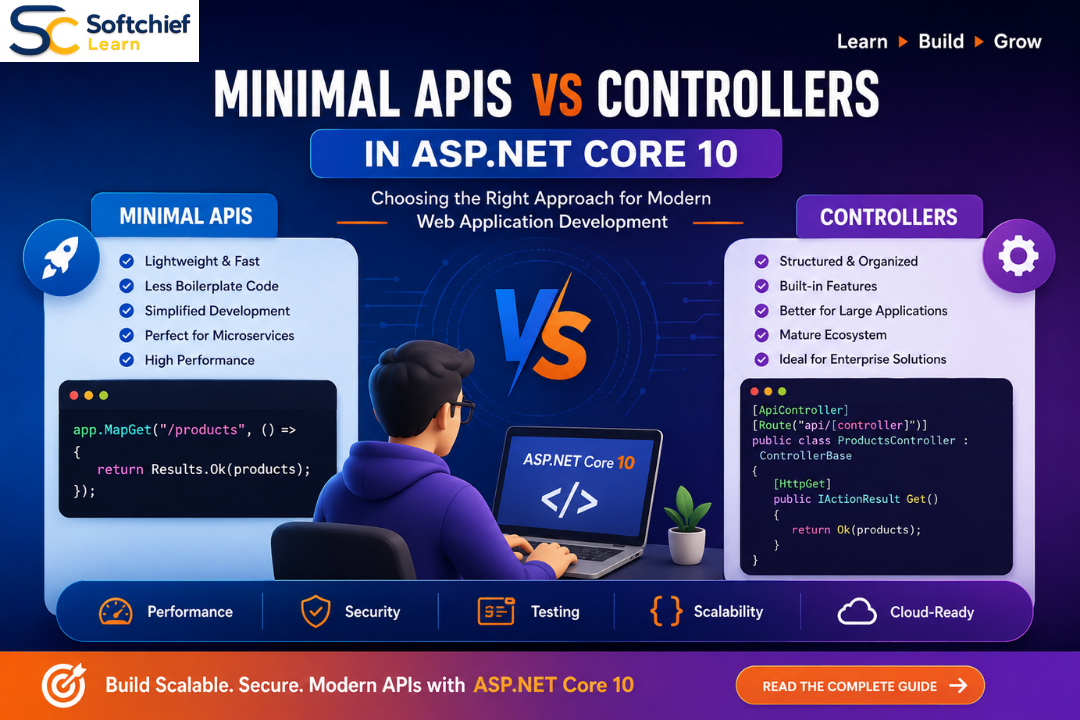
Modern application development requires APIs that are fast, scalable, secure and easy to maintain. With the evolution of ASP.NET Core, Microsoft has introduced multiple approaches for building HTTP APIs, giving developers more flexibility in designing backend services.
Traditionally, ASP.NET Core developers built Web APIs using the Controller-based approach, which follows the well-established Model-View-Controller (MVC) pattern. However, since the introduction of Minimal APIs in ASP.NET Core 6, Microsoft has provided a lightweight approach for building APIs with less boilerplate code and simplified application architecture.
With ASP.NET Core 10, both Minimal APIs and Controllers have matured significantly. Developers now have powerful options for building enterprise applications, microservices, cloud-native solutions and high-performance APIs.
But the important question remains:
Should you use Minimal APIs or Controllers for your ASP.NET Core 10 application?
The answer depends on factors such as application complexity, team structure, scalability requirements, testing needs and architectural goals.
In this comprehensive guide, we will compare Minimal APIs vs Controllers in ASP.NET Core 10, explore their differences, advantages, limitations and real-world use cases to help developers make the right architectural decision.
Understanding ASP.NET Core API Development
ASP.NET Core is Microsoft’s cross-platform framework for building modern web applications, APIs and cloud-native solutions.
Developers use ASP.NET Core to build:
- REST APIs
- Microservices
- Web applications
- Enterprise applications
- Cloud-based services
- IoT backends
- Mobile application APIs
- Real-time applications
ASP.NET Core provides multiple ways to expose HTTP endpoints:
- Controller-based APIs
- Minimal APIs
- gRPC services
- SignalR real-time communication
Among these, Minimal APIs and Controllers are the most commonly used approaches for REST API development.
What are Controllers in ASP.NET Core?
Controllers are the traditional approach for building Web APIs in ASP.NET Core.
A controller is a class that handles HTTP requests and returns responses.
Controllers typically contain:
- Routing definitions
- Business operation endpoints
- Dependency injection
- Model validation
- Authorization rules
- Exception handling
- Response formatting
Example:
[ApiController]
[Route("api/products")]
public class ProductsController : ControllerBase
{
    [HttpGet]
    public IActionResult GetProducts()
    {
        return Ok(products);
    }
}
This approach follows the MVC architectural pattern and has been widely adopted in enterprise applications.
What are Minimal APIs in ASP.NET Core?
Minimal APIs were introduced to simplify API development by reducing unnecessary code and configuration.
Instead of creating controllers and action methods, developers define endpoints directly in the application startup code.
Example:
var builder = WebApplication.CreateBuilder(args);

var app = builder.Build();

app.MapGet("/products", () =>
{
    return products;
});

app.Run();
Minimal APIs focus on:
- Simplicity
- Performance
- Faster development
- Lightweight services
- Cloud-native architectures
They are especially popular for microservices and smaller API workloads.
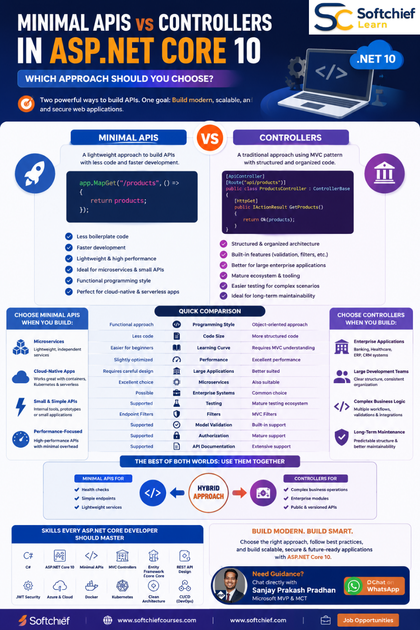
Minimal APIs vs Controllers: Quick Comparison
| Feature | Minimal APIs | Controllers |
|---|---|---|
| Programming Style | Functional approach | Object-oriented approach |
| Code Size | Less boilerplate | More structured code |
| Learning Curve | Easier for beginners | Requires MVC understanding |
| Performance | Slightly optimized | Excellent performance |
| Large Applications | Requires careful design | Better suited |
| Microservices | Excellent choice | Also suitable |
| Enterprise Systems | Possible | Common choice |
| Testing | Supported | Mature testing ecosystem |
| Filters | Endpoint filters | MVC filters |
| Model Validation | Supported | Built-in support |
| Authorization | Supported | Mature support |
| Versioning | Supported | Extensive support |
1. Performance Comparison
Performance is one of the most discussed topics when comparing Minimal APIs and Controllers.
Minimal APIs have a slightly lower overhead because they avoid some MVC pipeline features.
Advantages include:
- Faster endpoint execution
- Reduced abstraction layers
- Lower memory allocation
- Lightweight request processing
However, the performance difference is usually small for most business applications.
A well-designed Controller-based API can easily handle enterprise-level workloads.
Real-world consideration:
For a high-volume microservice processing millions of requests:
Minimal APIs may provide additional efficiency.
For a complex business application:
The architectural benefits of Controllers often outweigh the minor performance difference.
2. Code Simplicity and Developer Productivity
One of the biggest advantages of Minimal APIs is reduced complexity.
Controller-based API:
[HttpGet("{id}")]
public IActionResult GetCustomer(int id)
{
    var customer = service.GetCustomer(id);

    return Ok(customer);
}
Minimal API:
app.MapGet("/customers/{id}",
(int id, CustomerService service) =>
{
    return service.GetCustomer(id);
});
Minimal APIs reduce:
- Files
- Classes
- Configuration
- Boilerplate code
This makes them attractive for developers building:
- Small APIs
- Internal services
- Prototypes
- Cloud functions
3. Application Architecture
Architecture is where Controllers often have an advantage.
Large enterprise applications usually require:
- Clear separation of responsibilities
- Multiple development teams
- Complex business workflows
- Extensive testing
- Long-term maintenance
Controllers naturally support:
- Clean Architecture
- Domain-Driven Design
- CQRS
- Repository patterns
- Dependency injection patterns
Example enterprise structure:
API Layer
 |
Controllers
 |
Application Services
 |
Domain Layer
 |
Infrastructure Layer
Minimal APIs can also support these architectures but require stronger discipline from developers.
4. Dependency Injection
Both approaches fully support ASP.NET Core Dependency Injection.
Controller example:
public class OrdersController : ControllerBase
{
    private readonly IOrderService service;

    public OrdersController(IOrderService service)
    {
        this.service = service;
    }
}
Minimal API example:
app.MapGet("/orders",
(IOrderService service) =>
{
    return service.GetOrders();
});
Both approaches provide clean integration with services.
5. Model Validation
Controllers provide built-in validation capabilities.
Example:
public class Customer
{
    [Required]
    public string Name {get;set;}
}
With:
[ApiController]ASP.NET Core automatically validates models.
Minimal APIs support validation using:
- Endpoint filters
- FluentValidation
- Custom validation logic
Controllers currently provide a more mature validation experience for complex applications.
6. Security and Authorization
Security is critical for enterprise APIs.
Both approaches support:
- Authentication
- Authorization
- JWT tokens
- OAuth 2.0
- OpenID Connect
- Microsoft Entra ID integration
Controller example:
[Authorize]
public class OrdersController : ControllerBase
{

}
Minimal API:
app.MapGet("/orders",
()
=> results)
.RequireAuthorization();
Both provide enterprise-grade security capabilities.
7. API Documentation with Swagger and OpenAPI
Modern APIs require documentation.
Both Minimal APIs and Controllers support:
- Swagger UI
- OpenAPI specifications
- API testing
- Client generation
ASP.NET Core 10 continues improving OpenAPI support, making API documentation easier for developers.
8. Testing Considerations
Controllers have a long-established testing ecosystem.
Developers commonly use:
- Unit testing
- Integration testing
- Mocking frameworks
- Test servers
Minimal APIs are also testable using:
- WebApplicationFactory
- Integration testing
- Endpoint testing
For large teams, Controllers may provide clearer testing organization.
When Should You Choose Minimal APIs?
Minimal APIs are ideal for:
1. Microservices
Example:
- Payment service
- Notification service
- Authentication service
These services often have limited business logic and require fast development.
2. Small APIs
Examples:
- Internal tools
- Mobile backend services
- Proof-of-concept applications
3. Cloud-Native Applications
Minimal APIs work well with:
- Azure Functions
- Containers
- Kubernetes
- Serverless architectures
4. Performance-Focused Applications
Applications requiring lightweight request processing can benefit from Minimal APIs.
When Should You Choose Controllers?
Controllers remain the preferred choice for:
1. Enterprise Applications
Examples:
- Banking systems
- Healthcare platforms
- ERP solutions
- CRM applications
2. Large Development Teams
Controllers provide:
- Clear organization
- Consistent structure
- Easier onboarding
3. Complex Business Logic
Applications with:
- Many workflows
- Complex validation
- Multiple integrations
benefit from controller architecture.
4. Long-Term Maintenance
Large applications often run for many years.
Controllers provide predictable organization and maintainability.
Can You Use Minimal APIs and Controllers Together?
Yes.
ASP.NET Core supports a hybrid approach.
For example:
Use Minimal APIs for:
- Simple endpoints
- Health checks
- Lightweight services
Use Controllers for:
- Complex business operations
- Enterprise modules
- Public APIs
Example:
Application

 |
 |-- Minimal APIs
 |      |
 |      Health Checks
 |
 |-- Controllers
        |
        Customer Management
        Order Processing
This approach provides flexibility.
Best Practices for Minimal APIs in ASP.NET Core 10
Organize Endpoints Properly
Avoid putting hundreds of endpoints in Program.cs.
Use endpoint groups:
app.MapGroup("/api/products");Separate Business Logic
Do not place business rules directly inside endpoints.
Use:
- Services
- Application layers
- Domain models
Use Endpoint Filters
For:
- Validation
- Logging
- Security checks
Implement Proper Error Handling
Use:
- Global exception handling
- Problem Details
- Structured logging
Best Practices for Controllers in ASP.NET Core 10
Keep Controllers Lightweight
Controllers should handle HTTP communication, not business logic.
Avoid:
- Database queries directly
- Complex calculations
- Large methods
Use Dependency Injection
Inject services instead of creating objects manually.
Follow REST API Principles
Use proper:
- HTTP verbs
- Status codes
- Resource naming
Apply API Versioning
Support future changes without breaking clients.
Real-World Example: E-Commerce Platform
Consider an online shopping platform.
Minimal APIs could handle:
- Product search
- Health monitoring
- Simple lookup services
Controllers could handle:
- Order processing
- Customer management
- Payment workflows
- Returns management
A hybrid architecture provides the best balance between simplicity and maintainability.
Future of API Development with ASP.NET Core 10
ASP.NET Core continues moving toward modern cloud-native development.
Future trends include:
- AI-assisted API development
- Cloud-native microservices
- Serverless APIs
- Native AOT improvements
- Improved OpenAPI tooling
- Distributed application development
- Container-first architectures
- Intelligent API monitoring
Developers who understand both Minimal APIs and Controllers will be better prepared for modern enterprise application development.
Skills ASP.NET Core Developers Should Master
To become a modern .NET backend developer, professionals should learn:
- C#
- ASP.NET Core 10
- Minimal APIs
- MVC Controllers
- Entity Framework Core
- REST API Design
- Dependency Injection
- Authentication and Authorization
- JWT Security
- Microsoft Entra ID
- Docker
- Kubernetes
- Azure App Service
- Azure Kubernetes Service
- Azure DevOps
- Microservices Architecture
- Clean Architecture
- Cloud-Native Development
Conclusion
The choice between Minimal APIs and Controllers in ASP.NET Core 10 is not about finding one universal winner. Both approaches are powerful and designed for different application scenarios.
Minimal APIs provide simplicity, speed and lightweight development, making them excellent for microservices, small APIs and cloud-native applications.
Controllers provide structure, organization and enterprise-level capabilities, making them ideal for complex applications with large teams and long-term maintenance requirements.
For modern .NET developers, understanding both approaches is essential. The best solution often depends on application complexity, business requirements and architectural goals.
By choosing the right API development approach, organizations can build applications that are scalable, maintainable and ready for the future of cloud-native software development.









