
How Business Central Simplifies Inventory Management: A Complete Guide for Modern Businesses
Introduction
Inventory is one of the most valuable assets for businesses involved in manufacturing, retail, wholesale, distribution and e-commerce. Maintaining the right inventory levels is essential for meeting customer demand, reducing operational costs and maximizing profitability. However, managing inventory manually using spreadsheets or disconnected systems often leads to stock shortages, excess inventory, delayed deliveries and costly business decisions.
As businesses grow, inventory management becomes increasingly complex. Organizations must track products across multiple warehouses, manage purchase orders, monitor stock movements, forecast future demand and ensure accurate financial reporting—all while maintaining operational efficiency.
This is where Microsoft Dynamics 365 Business Central transforms inventory management.
Business Central provides an intelligent, cloud-based ERP solution that enables organizations to automate inventory processes, gain real-time visibility into stock levels and make data-driven decisions using AI-powered insights and integrated business intelligence.
Whether you are a business owner, inventory manager, supply chain professional or Microsoft Dynamics consultant, understanding how Business Central simplifies inventory management can help your organization improve efficiency, reduce costs and deliver exceptional customer experiences.
In this comprehensive guide, we’ll explore the powerful inventory management capabilities of Microsoft Dynamics 365 Business Central and why it has become one of the most trusted ERP solutions for growing businesses.
What is Microsoft Dynamics 365 Business Central?
Microsoft Dynamics 365 Business Central is a comprehensive cloud-based Enterprise Resource Planning (ERP) solution designed for small and medium-sized businesses as well as rapidly growing enterprises.
It brings together multiple business functions into a single integrated platform, including:
- Finance
- Sales
- Purchasing
- Inventory
- Warehouse Management
- Supply Chain
- Manufacturing
- Project Management
- Customer Service
- Reporting and Analytics
Instead of relying on multiple disconnected applications, Business Central provides a unified system that improves collaboration, visibility and operational control.
Why Inventory Management is Critical
Effective inventory management directly impacts customer satisfaction, operational efficiency and business profitability.
A well-managed inventory system helps organizations:
- Prevent stock shortages
- Reduce excess inventory
- Improve order fulfillment
- Minimize storage costs
- Increase inventory turnover
- Enhance customer satisfaction
- Improve financial planning
- Support business growth
Without accurate inventory management, businesses risk losing sales, increasing operational expenses and making poor purchasing decisions.
Common Inventory Management Challenges
Many organizations still struggle with manual inventory processes.
Common problems include:
- Spreadsheet-based tracking
- Duplicate inventory records
- Inaccurate stock levels
- Overstocking
- Stockouts
- Manual purchase planning
- Delayed warehouse updates
- Limited visibility across locations
- Slow inventory audits
- Poor demand forecasting
These challenges become even more significant as businesses expand into multiple warehouses, sales channels or geographic regions.
How Business Central Simplifies Inventory Management
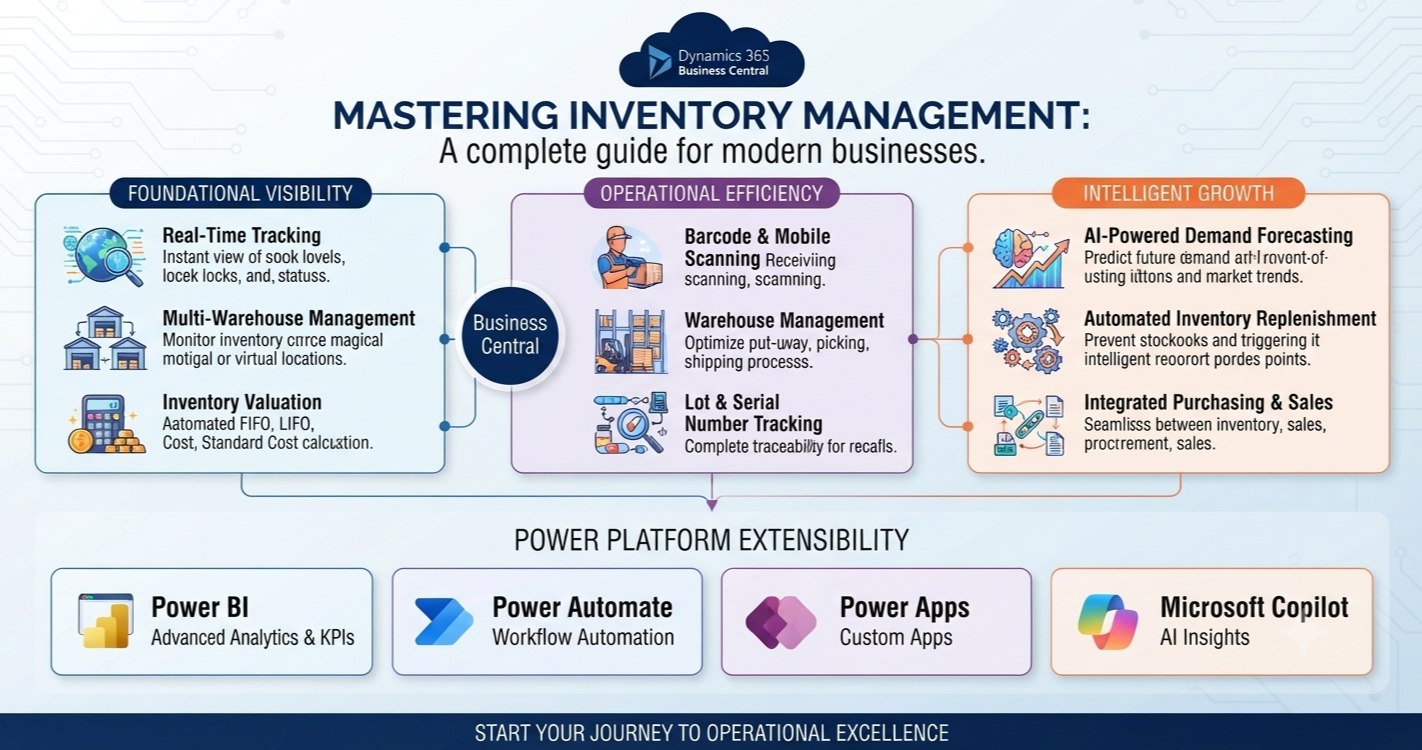
Business Central centralizes inventory information and automates key inventory processes, giving organizations complete visibility into their stock operations.
Let’s explore its core capabilities.
1. Real-Time Inventory Visibility
One of the biggest advantages of Business Central is real-time inventory tracking.
Businesses can instantly view:
- Available inventory
- Reserved inventory
- Inventory in transit
- Inventory by warehouse
- Inventory by location
- Inventory by lot
- Inventory by serial number
Decision-makers no longer need to wait for manual reports or physical stock checks to understand inventory levels.
Real-time visibility enables faster and more accurate business decisions.
2. Multi-Warehouse Management
Organizations operating multiple warehouses often face challenges in tracking inventory across locations.
Business Central allows businesses to manage:
- Regional warehouses
- Distribution centers
- Retail stores
- Manufacturing facilities
- Third-party warehouses
Users can monitor inventory availability across all locations from a single platform.
This improves stock allocation and reduces unnecessary transfers.
3. Automated Inventory Replenishment
Running out of stock can result in lost sales and dissatisfied customers.
Business Central helps prevent stock shortages through automated replenishment.
The system analyses:
- Current stock levels
- Sales history
- Demand trends
- Lead times
- Safety stock levels
Based on predefined rules, it recommends purchase orders before inventory reaches critical levels.
This reduces manual planning and improves procurement efficiency.
4. AI-Powered Demand Forecasting
Demand forecasting is one of the most valuable capabilities within Business Central.
Using historical sales data and intelligent analytics, the system predicts future demand.
AI considers factors such as:
- Seasonal trends
- Sales history
- Customer purchasing patterns
- Product demand
- Market behaviour
More accurate forecasting enables organizations to:
- Reduce overstocking
- Avoid stock shortages
- Improve purchasing decisions
- Optimize warehouse space
5. Barcode and Mobile Scanning
Business Central supports barcode technology for faster inventory operations.
Warehouse staff can use barcode scanners or mobile devices to:
- Receive inventory
- Pick products
- Pack orders
- Perform inventory counts
- Track inventory movements
Barcode automation improves accuracy while reducing manual entry errors.
6. Lot and Serial Number Tracking
Industries such as healthcare, food manufacturing, pharmaceuticals and electronics require complete product traceability.
Business Central supports:
- Lot tracking
- Serial number tracking
- Expiration dates
- Warranty tracking
- Recall management
This enhances compliance and enables businesses to quickly identify affected products when necessary.
7. Warehouse Management
Business Central includes comprehensive warehouse management capabilities.
Organizations can manage:
- Put-away processes
- Picking
- Packing
- Shipping
- Bin management
- Warehouse transfers
- Inventory movement
Warehouse operations become faster, more organized and highly efficient.
8. Inventory Valuation
Accurate inventory valuation is essential for financial reporting.
Business Central supports multiple valuation methods, including:
- FIFO (First In, First Out)
- LIFO (where applicable based on accounting policies and local regulations)
- Average Cost
- Standard Cost
- Specific Identification
The system automatically calculates inventory values and updates financial records, reducing manual accounting effort.
9. Purchase Order Integration
Inventory management is fully integrated with purchasing.
When inventory falls below reorder levels, Business Central can:
- Recommend purchase orders
- Create procurement suggestions
- Track supplier deliveries
- Update inventory automatically upon receipt
This improves procurement planning and supplier collaboration.
10. Sales Order Integration
Business Central connects inventory directly with sales.
Sales teams can instantly view:
- Available inventory
- Expected replenishment dates
- Reserved stock
- Alternative products
This enables more accurate customer commitments and reduces order fulfillment issues.
11. Manufacturing Integration
Manufacturers benefit from seamless integration between inventory and production.
Business Central manages:
- Raw materials
- Components
- Bills of Materials (BOM)
- Production orders
- Work-in-progress inventory
- Finished goods
Production planning becomes more efficient with accurate inventory visibility.
12. Inventory Reporting and Analytics
Business Central provides powerful reporting capabilities through built-in dashboards and Power BI integration.
Organizations can monitor:
- Inventory turnover
- Slow-moving items
- Fast-selling products
- Stock valuation
- Purchase trends
- Warehouse performance
- Order fulfillment rates
These insights support strategic inventory planning and continuous improvement.
Business Benefits of Business Central Inventory Management
Organizations implementing Business Central experience numerous benefits.
Improved Inventory Accuracy
Real-time updates and automated processes significantly reduce inventory discrepancies.
Lower Inventory Costs
Better forecasting and replenishment reduce excess stock and storage expenses.
Faster Order Fulfillment
Accurate inventory availability enables quicker and more reliable customer deliveries.
Better Decision-Making
Real-time dashboards provide managers with the insights needed to make informed purchasing and inventory decisions.
Increased Productivity
Automation reduces manual work, allowing employees to focus on higher-value activities.
Enhanced Customer Satisfaction
Reliable inventory availability leads to fewer stockouts, timely deliveries and improved customer experiences.
Real-World Business Scenario
Imagine a wholesale distribution company managing inventory across five regional warehouses.
Before implementing Business Central:
- Inventory was tracked using spreadsheets.
- Warehouse updates were delayed.
- Purchase orders were created manually.
- Stock shortages were common.
- Excess inventory tied up working capital.
After implementing Business Central:
- Inventory updates became real-time.
- Automated replenishment reduced stock shortages.
- Warehouse staff used barcode scanners for receiving and picking.
- AI forecasting improved purchasing accuracy.
- Power BI dashboards provided complete inventory visibility.
The organization reduced inventory carrying costs, improved order fulfillment and significantly increased operational efficiency.
Integration with Microsoft Power Platform
Business Central integrates seamlessly with Microsoft Power Platform.
Organizations can extend inventory management using:
Power Automate
Automate:
- Purchase approvals
- Low-stock notifications
- Vendor communications
- Inventory alerts
Power Apps
Develop custom inventory applications for:
- Mobile warehouse operations
- Inventory audits
- Asset management
- Field inventory tracking
Power BI
Create advanced dashboards for:
- Inventory KPIs
- Warehouse analytics
- Procurement performance
- Demand forecasting
Microsoft Copilot
Copilot enables users to ask natural language questions such as:
- Which products are running low?
- What inventory should we reorder this week?
- Which warehouse has the highest stock?
- Which products are slow moving?
- What was our inventory turnover last quarter?
This conversational approach makes inventory insights accessible to users across the organization.
Best Practices for Successful Inventory Management
To maximize the benefits of Business Central, organizations should:
- Maintain accurate item master data.
- Use standardized product naming conventions.
- Define reorder points and safety stock levels.
- Regularly perform inventory cycle counts.
- Enable barcode scanning where appropriate.
- Integrate purchasing, sales and warehouse processes.
- Monitor inventory KPIs using Power BI.
- Train users on inventory workflows and reporting.
- Review demand forecasts regularly and adjust planning parameters as business needs evolve.
- Continuously optimize warehouse layouts and processes.
Future of Inventory Management with Business Central
Microsoft continues to enhance Business Central with intelligent capabilities.
Future innovations include:
- AI-powered autonomous inventory planning
- Predictive replenishment
- Digital warehouse assistants
- IoT-enabled inventory monitoring
- AI-driven supplier recommendations
- Robotic warehouse integration
- Advanced sustainability reporting
- Deeper Microsoft Fabric integration
These innovations will enable organizations to create smarter, more resilient supply chains.
Skills Every Business Central Professional Should Learn
Professionals working with Business Central inventory management should build expertise in:
- Microsoft Dynamics 365 Business Central
- Inventory Management
- Warehouse Management
- Supply Chain Management
- Purchasing
- Manufacturing
- Power BI
- Power Automate
- Microsoft Copilot
- Microsoft Dataverse
- Business Central Administration
- ERP Implementation
- AI for Business Applications
- Inventory Analytics
- Business Process Optimization
These skills are highly valuable for ERP consultants, supply chain professionals and digital transformation specialists.
Conclusion
Microsoft Dynamics 365 Business Central simplifies inventory management by combining automation, real-time visibility, AI-powered forecasting and seamless integration across purchasing, sales, warehousing and finance. It replaces fragmented, manual processes with an intelligent ERP platform that helps organizations improve inventory accuracy, optimize stock levels and respond quickly to changing business demands.
Whether you’re managing a single warehouse or a complex multi-location supply chain, Business Central provides the tools needed to streamline operations, reduce costs and enhance customer satisfaction.
As businesses continue to embrace digital transformation, adopting Business Central for inventory management is more than a technology upgrade—it’s a strategic investment in operational excellence and long-term growth.









