
Microsoft Copilot vs ChatGPT: Choose the Right AI Assistant for Your Work
Introduction
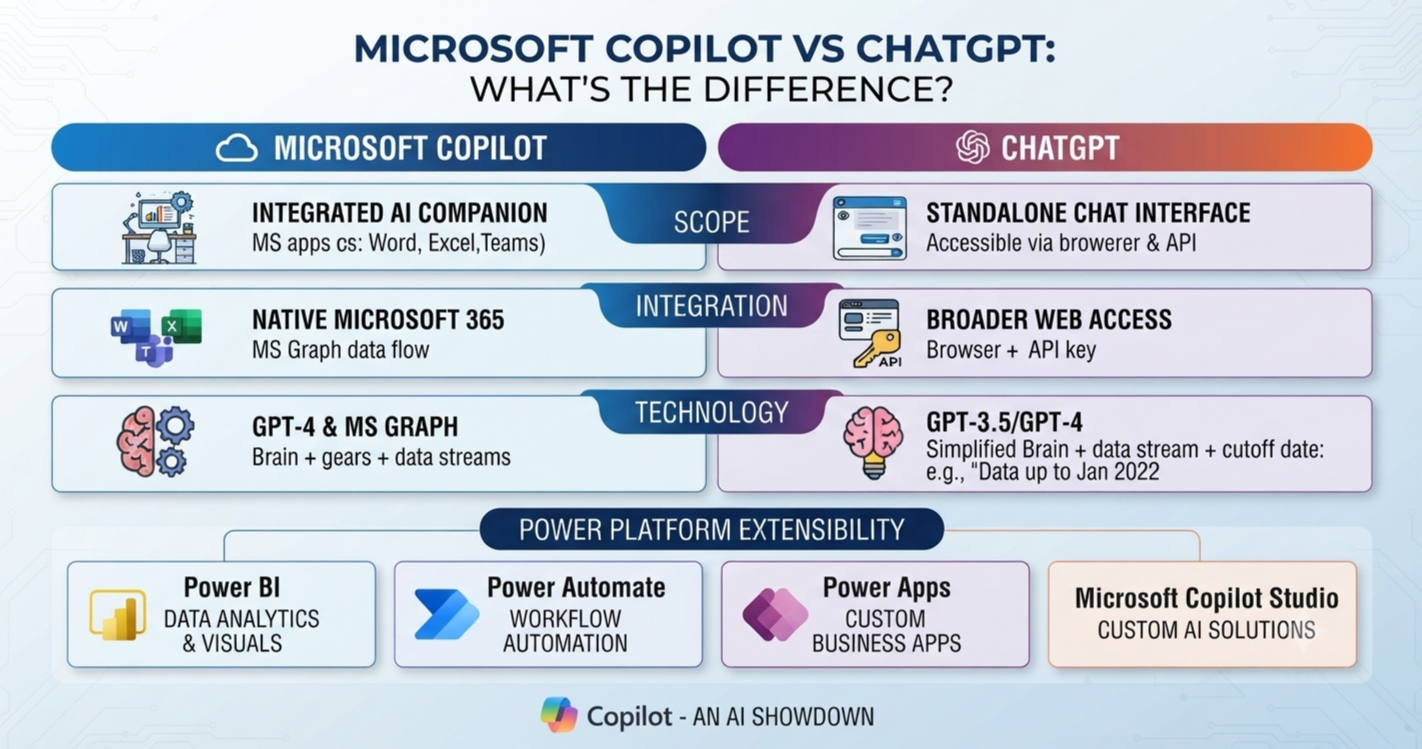
Microsoft Copilot and ChatGPT can both write, summarise, research, brainstorm, analyse files, and answer questions. The better choice depends on where your work happens and which data the assistant can access.
Copilot is closely tied to Microsoft products and workplace accounts. ChatGPT is a standalone AI workspace from OpenAI, with its own models, tools, files, and integrations. This guide compares their features, data access, privacy, pricing, administration, and best uses.
Product names matter. Microsoft Copilot covers general web and consumer use, while Microsoft 365 Copilot supports workplace apps. GitHub Copilot focuses on coding, and Security Copilot supports cyber security work. These are separate products. ChatGPT has Free, Plus, Business, and Enterprise plans, though models, tools, limits, and prices can change.
Microsoft Copilot vs ChatGPT: The Core Difference Is Context
A generative AI assistant creates text, images, code, or analysis from a user request. Both products use large language models, which are systems trained to predict and produce useful responses. Their results also depend on grounding, meaning the use of trusted data or sources to support an answer.
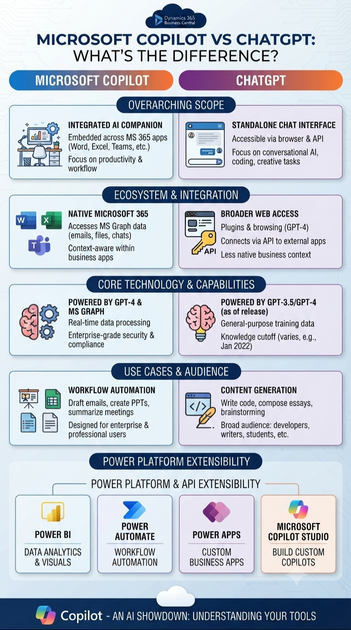
Copilot is built around Microsoft services such as Windows, Edge, Bing, Word, Excel, PowerPoint, Outlook, and Teams. Microsoft 365 Copilot may use authorised files, emails, calendars, chats, meetings, and documents through Microsoft Graph. Access depends on licences, permissions, tenant settings, and company policy.
ChatGPT uses a direct conversation interface. Depending on the plan, it may support web search, file analysis, image generation, voice, data analysis, projects, custom GPTs, connectors, and advanced research tools. This makes it useful for writing, tutoring, coding, research, and data work across different software platforms.
| Area | Microsoft Copilot | ChatGPT |
|---|---|---|
| Main audience | Microsoft users and organisations | Individuals, teams, and businesses |
| Main strength | In-app Microsoft 365 context | Flexible general-purpose assistance |
| Data access | Microsoft account and approved work data | Conversation, uploaded files, and approved connectors |
| Customisation | Microsoft tools and organisation settings | Projects, custom GPTs, instructions, and business controls |
| Administration | Microsoft identity, tenant, and security controls | Business and Enterprise workspace controls |
| Pricing | Free features plus paid Microsoft licences | Free and paid OpenAI plans |
Neither assistant is always more intelligent. A Copilot prompt that summarises a permitted Teams meeting has useful meeting context. ChatGPT would need the user to upload the transcript or provide a connector with access. Both tools can produce wrong or incomplete answers, so review remains essential.
Copilot Has the Edge for Microsoft 365 Workflows
Copilot reduces friction inside Microsoft apps
Microsoft 365 Copilot can help draft and rewrite Word documents, summarise Outlook threads, interpret Excel data, and create PowerPoint drafts. It may also support meeting recaps and follow-up tasks in Teams. Available actions differ by app, subscription, account type, and rollout status.
The main benefit is less copying and pasting between separate tools. A user can start with an email, meeting, spreadsheet, or document and continue in the same application. Generated formulas, calculations, citations, slide content, and business messages still need careful checking.
Before buying a dedicated licence, list the repetitive tasks employees perform in Microsoft 365. If the main need is email summaries or document drafting, measure the time saved on those tasks first.
Microsoft Graph can add workplace context
Microsoft 365 Copilot may work with authorised content from email, documents, calendars, meetings, chats, and other services. It does not automatically bypass existing permissions. A user’s access to their own files is different from access to wider organisational information.
Poor permissions can affect both safety and answer quality. Overshared files, duplicate documents, old policies, and unclear ownership may expose information or lead to unreliable results. Test Copilot with representative data before a broad rollout.
Copilot fits Microsoft-based collaboration
A team might ask Copilot to summarise an approved Teams meeting and draft follow-up messages. Another employee could create a first Word draft from an existing business document or build a PowerPoint outline from approved company material.
For each proposed use, record the Microsoft app, data source, required permission, human review step, and expected time saving. This turns a general AI purchase into a measurable workplace test.
ChatGPT Offers Broader Standalone Flexibility
ChatGPT supports varied personal and professional tasks
ChatGPT can help with editing, summaries, brainstorming, tutoring, translation, coding, research plans, file review, structured extraction, and data analysis. Users can improve a response through several short exchanges rather than writing one perfect prompt.
A useful prompt gives six details: the role, objective, context, constraints, output format, and quality criteria. For example, ask for a plain-English summary, cite the supplied pages, show assumptions, and flag missing information.
Check important claims, calculations, citations, legal guidance, medical information, and business recommendations independently. Available models and tools vary by plan, region, and current OpenAI product changes.
Custom workflows improve consistency
ChatGPT may support custom GPTs, projects, reusable instructions, uploaded files, and organisation-level settings. These features can create repeatable workflows without removing the need for review.
A content team could build a brief process with its brand voice, audience, keyword targets, and output structure. An analyst could upload a CSV and request the method, assumptions, errors, and charts. A developer could ask ChatGPT to explain code changes, write tests, and list unresolved risks.
Use five to ten real but non-sensitive tasks to compare results before adopting the tool across a team. Score accuracy, clarity, speed, consistency, and ease of correction.
ChatGPT suits mixed software environments
A standalone assistant can help freelancers, students, researchers, consultants, and creators who work across many platforms. It can handle approved PDFs, text files, images, datasets, and code in one workspace.
Connectors and external integrations may depend on the plan, region, administrator settings, and product availability. Avoid uploading confidential information unless the account’s privacy, retention, and business controls meet your requirements.
Privacy and Governance Shape the Business Choice
Compare account controls before sharing data
Consumer and business plans can have different data-use terms, retention rules, training controls, encryption options, identity features, audit tools, and regional processing settings. Microsoft 365 relies on tenant controls, while ChatGPT Business and Enterprise provide separate workspace controls.
Review data classification, retention, access permissions, single sign-on, multifactor authentication, audit logs, administrator settings, and regulatory duties. Check current Microsoft and OpenAI documentation before handling customer, employee, financial, health, or legal data.
Better data produces better answers
AI cannot fix disorganised source material. Outdated documents, duplicate files, unclear ownership, and excessive access can reduce usefulness or create exposure. Finding a document also does not prove that its contents are correct.
IT, security, legal, compliance, and business teams should review enterprise AI plans together. Human approval is needed for external messages, financial analysis, HR decisions, legal documents, regulated work, customer content, and production code. Where policy allows, keep records of prompts, outputs, sources, and approvals.
Pricing and Features Can Change the Verdict
Compare value, not only subscription cost
Both products offer free and paid access, but model choices, message limits, file tools, image features, priority access, and account requirements can change. Some Microsoft users may already have basic Copilot access through an existing account, while Microsoft 365 Copilot may require an extra licence.
ChatGPT paid plans may provide higher limits and advanced tools, but availability differs by plan. Check the current Microsoft and OpenAI pricing pages before publication or purchase. Estimate monthly use and compare the value of time saved.
Organisations must count deployment costs
Businesses should assess per-user fees, existing Microsoft commitments, tenant setup, identity management, procurement, training, support, security review, data cleaning, and ongoing testing. Adding AI to an existing Microsoft environment may reduce setup work, while a separate platform may offer more flexibility.
A controlled pilot gives better evidence than a large purchase. Set goals such as fewer hours spent on meeting notes, faster document creation, or improved code review. Review accuracy and risk alongside usage numbers.
| Task | Copilot | ChatGPT |
|---|---|---|
| Microsoft email and meetings | Strong native support, plan-dependent | Usually needs supplied files or integration |
| Web research | Available in some Copilot experiences | Available in supported ChatGPT plans |
| File analysis | Strong with approved Microsoft files | Strong with uploaded files and datasets |
| Spreadsheet work | Excel integration, plan-dependent | Data analysis and uploaded sheets |
| Presentations | PowerPoint integration, plan-dependent | Drafts and content planning |
| Coding | Separate GitHub Copilot product | General coding support |
| Custom assistants | Microsoft configuration options | Custom GPTs and projects, plan-dependent |
| Enterprise controls | Microsoft tenant administration | Business and Enterprise administration |
Verify model names, prices, limits, tool access, regional availability, and integrations before publishing a comparison.
Choose Copilot for Microsoft-Centred Work and ChatGPT for Flexible Workflows
Copilot usually fits teams that spend most of their day in Word, Excel, PowerPoint, Outlook, Teams, SharePoint, and related Microsoft services. It suits organisations that need in-app help, meeting summaries, document access, and Microsoft identity controls.
ChatGPT usually fits freelancers, students, creators, researchers, and mixed-platform teams. It works well for broad writing, research, coding, file analysis, ideation, and reusable custom workflows. Business users should choose the right organisational plan before handling sensitive material.
A hybrid approach can work when different teams have different needs. Use Copilot for approved Microsoft 365 collaboration, email, meetings, and documents. Use ChatGPT for cross-platform research, content development, coding, and structured analysis where company policy permits.
Run five to ten representative tasks through both tools. Score accuracy, context handling, speed, ease of use, security fit, and total cost. Set clear rules for moving data between systems, including prohibited information, retention expectations, and review duties.
Conclusion: The Right Choice Follows the Workflow
The central difference in Microsoft Copilot vs ChatGPT is context. Copilot is designed for Microsoft-centred productivity and workplace data, while ChatGPT offers a flexible AI workspace for tasks across files, software, research, coding, and creative work.
Choose Copilot when your work lives in Microsoft 365. Choose ChatGPT when you need broad, cross-platform assistance. Consider both when teams have different requirements.
Before buying, verify current pricing, plan features, model access, privacy terms, usage limits, and integration support through official Microsoft and OpenAI sources. The best assistant is the one that fits your data, tools, permissions, and daily work.









