
Power Apps: Model-Driven Apps vs Canvas Apps – Choose the Right First Skill
Introduction
A first Power Apps choice can shape the tools, ideas, and projects you meet for weeks. Model-driven apps and canvas apps both belong to Microsoft Power Platform, but they solve different development problems.
Model-driven apps put structured business data, Dataverse, security, and processes first. Canvas apps put visual control, flexible layouts, and task-based user experiences first.
The best choice depends on architecture, design freedom, learning difficulty, use cases, and career goals. It also helps to know how both approaches can work together in one solution.
Choose the Power Apps type that matches your problem
Before choosing what to learn, define the application you want to build. The better starting point depends on data complexity, user needs, customisation, and your preferred type of work.
Model-driven apps start with business data and processes
Model-driven apps use Microsoft Dataverse tables, columns, relationships, forms, views, charts, and dashboards. The app experience grows from this data model and the settings applied to its components.
You configure the system rather than draw every screen. This makes the approach a strong fit for applications where users manage records and follow set processes.
Canvas apps start with the user experience
Canvas apps open with a blank design surface. You decide where screens, controls, buttons, galleries, forms, menus, and other elements appear.
Power Fx formulas control behaviour, data updates, visibility, and navigation. Canvas apps can also connect to Dataverse, SharePoint, Microsoft 365, SQL Server, Excel, and many other supported sources.
Both app types use Power Platform services
Both approaches can work with Power Automate, Dataverse, Power BI, connectors, environments, solutions, governance, and security settings. Shared knowledge makes it easier to switch between them later.
Microsoft Learn describes model-driven apps as data-model driven, while canvas apps provide greater control over layout and controls. Its model-driven app overview gives the official comparison.
Learn model-driven apps first when business systems are your goal
Model-driven apps often suit learners who want to build CRM systems, operations tools, case management apps, or compliance solutions. They teach how organisations structure information and control access to it.
Dataverse supports scalable business applications
Dataverse uses tables, columns, choices, and relationships to organise business data. You can connect customers to cases, employees to requests, or products to orders without repeating the same information.
You’ll also meet ownership, business units, auditing, and security roles. These concepts take time to learn, but they support reliable data and controlled access as an app grows.
Built-in components reduce design work
Forms collect and display records, while views help users find the right information. Charts, dashboards, command bars, business rules, and business process flows add useful features through configuration.
That built-in structure lets you create a working business app without designing every screen from scratch. It also gives users a familiar experience across model-driven apps.
Model-driven apps suit process-heavy work
Common examples include sales pipelines, customer service cases, employee onboarding, service operations, and internal request tracking. A team might use an app to assign cases, set priorities, record actions, and move work through defined stages.
These examples are starting points, not universal templates. Confirm the real business requirement, data rules, security needs, and approval process before building.
Learn canvas apps first when interface control matters most
Canvas apps appeal to learners who want quick visual results. They work well when the app must guide users through a focused task rather than expose a large set of related records.
Canvas apps give you direct control
You can arrange galleries, forms, buttons, containers, icons, and menus around the user’s task. Themes, variables, collections, components, and Power Fx formulas help shape the experience.
This feels closer to front-end development than data configuration. It suits people interested in user interface design, mobile-friendly tools, and simple departmental apps.
Connectors support many data sources
A canvas app can use Dataverse, SharePoint, Microsoft 365, SQL Server, Excel, and other services through connectors. Check current Microsoft connector and licensing documentation before choosing a data source.
You also need to understand permissions, data types, connector limits, and delegation. Microsoft’s delegation guidance explains why non-delegable formulas may process only the first 500 records by default, or up to 2,000 after a setting change.
Flexibility creates more decisions
You must design navigation, validation, responsive layouts, accessibility, and screen consistency yourself. Complex formulas can become hard to test, while poor data loading can slow the app.
Use clear names for controls and variables. Keep screens focused, build reusable components, document important formulas, and test with realistic data volumes.
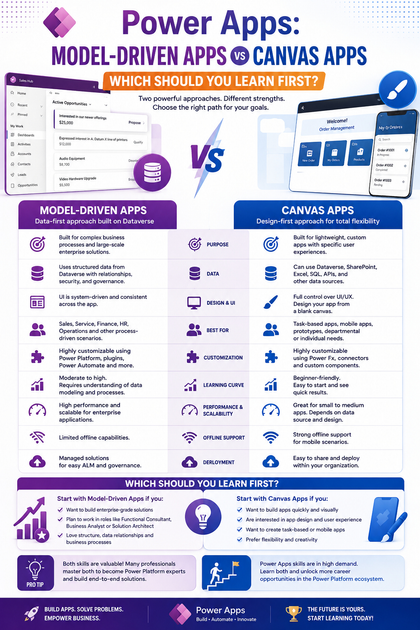
Compare the skills each Power Apps path develops
Both app types build useful Power Platform skills, but they place your attention in different areas. This comparison can help you match the first path to your working style.
| Area | Model-driven apps | Canvas apps |
|---|---|---|
| Architecture | Dataverse and configured components | Screens, controls, formulas, and data sources |
| Primary data source | Dataverse | Dataverse plus supported connectors |
| Design control | Guided by tables, forms, and views | Detailed control over layout and interaction |
| Security | Dataverse roles, ownership, and business units | App sharing plus data-source permissions |
| Automation | Business rules, flows, and process stages | Power Fx, flows, and custom interactions |
| Common uses | CRM, cases, sales, operations | Task apps, mobile tools, custom front ends |
Model-driven apps build data and process skills
You’ll practise relational data modelling, Dataverse administration, security roles, forms, views, business rules, solutions, and environment management. These skills suit functional consultants, business analysts, administrators, and solution architects.
The main challenge comes early: a weak data model causes problems later. Spend time understanding relationships and access requirements before adjusting the user interface.
Canvas apps build interface and formula skills
Canvas learning focuses on Power Fx, screen design, responsive layouts, component libraries, data integration, performance, and accessibility. These skills help app makers and low-code developers create clear front ends.
You’ll see results quickly, which can make the first few projects feel rewarding. The trade-off is that every design choice becomes your responsibility.
Shared skills make switching easier
Both paths require requirements gathering, environment knowledge, connectors, Power Automate, solutions, governance, security, testing, and application lifecycle management. Dataverse knowledge is especially valuable when you later combine both app types.
Learning one approach does not lock you into one career path. It gives you a base for the other.
Use your goals and first project to decide what to learn first
There is no universal winner in the model-driven apps vs canvas apps choice. Consider your background, target role, available data, preferred work style, and the users you want to support.
Start with model-driven apps for data-centred work
Choose this path if you want to build CRM, case management, operations, compliance, or other Dataverse-heavy systems. Begin with tables, relationships, forms, views, security roles, business rules, process flows, and solutions.
A small request-tracking app makes a useful first project. It can include request records, owners, statuses, priority choices, and a simple approval process.
Start with canvas apps for task-centred work
Choose canvas apps for custom interfaces, mobile workflows, team tools, visual dashboards, or apps that combine several data sources. Begin with controls, galleries, forms, Power Fx, navigation, variables, collections, delegation, responsive design, and accessibility.
A useful first project could help staff submit a site inspection, check stock, or report a maintenance issue. Keep the task narrow enough to finish and test.
Test your choice with proven material
Use a Microsoft Learn sample, such as the documented Northwind Traders example, or a genuine workplace requirement. Avoid building a complex app without a clear user and measurable need.
Set success checks for data quality, usability, security, performance, and maintenance. A finished small app teaches more than an ambitious prototype that never reaches users.
Build a learning sequence that connects both app types
Your long-term goal should include both model-driven and canvas development. They address different user needs, and many Power Platform solutions use them together.
Follow a canvas-first sequence
Learn environments and connectors, then build a small canvas app. Practise Power Fx, delegation, form handling, and responsive design before connecting the app to Dataverse.
Add a Power Automate flow for an alert or approval. Then study model-driven forms, views, security, solutions, and business processes.
Follow a model-driven-first sequence
Start with Dataverse data modelling. Create tables and relationships, configure forms and views, apply security roles and business rules, and build a model-driven app.
Once the core records work well, add a canvas app for a specialised or mobile-focused task. This approach keeps the main data and process rules in one place.
Combine both approaches in one solution
An organisation might use a model-driven app for customer records and case management, then use a canvas app for field updates or quick staff requests. Both apps can share Dataverse data while applying the same security rules.
Use solutions, reusable components, testing, documentation, and governance from the start. Check permissions and data behaviour in development, test, and production environments.
Conclusion
Model-driven apps are the stronger first choice when structured data, security, and business processes matter most. Canvas apps are the better starting point when visual customisation, flexible layouts, and focused tasks lead the design.
Keep these points in mind:
- Choose model-driven apps for Dataverse-centred business systems.
- Choose canvas apps for custom user experiences and task tools.
- Learn Dataverse, Power Fx, Power Automate, connectors, solutions, and governance.
- Test your choice with a real requirement or documented Microsoft sample.
- Learn both approaches to support a wider range of Power Platform projects.
Select one small project, build it from start to finish, and record the key decisions. Then recreate or extend that solution with the other Power Apps approach.









