Power Platform ALM: Manage Connection References Across Environments Without Deployment Breaks
Introduction
A solution can import successfully and still fail when a flow runs. A missing connection reference, an incorrect mapping, or an unusable target connection can stop a flow from reaching its data. Power Platform ALM works best when moving a solution includes more than exporting and importing a package.
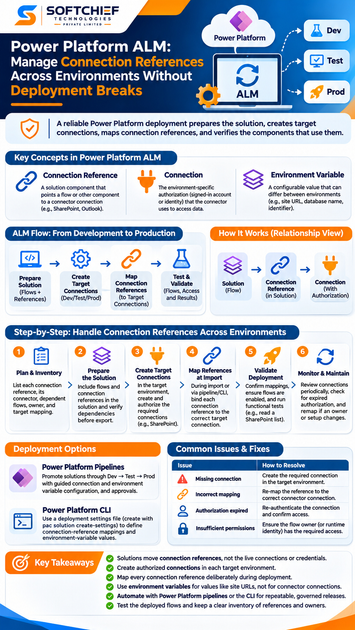
A connection reference is a solution component that points a flow or other solution-aware component to a connector connection. The connection itself holds the authorized account or identity, and it must be available in each environment. A dependable deployment prepares the solution, creates target connections, maps references, then checks the components that use them.
Credentials and user consent don’t travel inside a solution. Microsoft Learn documents connection references, solution imports, Power Platform pipelines, and Power Platform CLI deployment settings. Use those resources alongside a clear record of each environment’s connections and configuration.
Understand what Power Platform ALM moves between environments
Solutions carry components, including flows and connection references, between environments. They don’t package the live connector connections those components need to run. That distinction guides every deployment decision.
Separate connection references from connections
A connection reference is a solution component that points to a connection for a specific connector. A flow in a solution uses references to link its actions to connectors such as SharePoint or Outlook.
The connection is the environment-specific authorization, such as a signed-in user’s access to SharePoint. Microsoft’s connection reference documentation explains how solution flows bind to these references. A target environment needs a suitable connection before its dependent flow can run.
Distinguish connection references from environment variables
Connection references answer: which connector connection should this component use? Environment variables hold values that may change between environments, such as a site URL, database name, or identifier.
You may deploy both kinds of configuration in one release, but they solve different problems. For example, a flow might use a SharePoint connection reference for authentication and an environment variable for the target site address. Keep those settings separate in your deployment plan.
Identify the components that depend on each reference
Review the solution’s flows and other solution-aware components before release. Check each component’s connector dependencies and confirm which connection reference it uses. Canvas apps handle connections differently from flows, so check their data sources rather than assuming every app uses references in the same way.
Record each reference’s logical name, connector, dependent components, and intended target connection. This inventory helps your team spot missing connections and resolve failures without guessing.
Prepare connection references before exporting
Good deployment practice starts in the development environment. Keep related flows and references in the solution you intend to release, then check their dependencies before export.
Add flows and references to the right solution
A flow that sits outside your release solution can leave behind dependencies that aren’t clear when you export. Add the flow and its required references to the intended solution, and check the component list before packaging it.
Microsoft notes that flows added to a solution may still use direct connections until they’re updated to use connection references. Review flow details and any warnings, then confirm the right references appear in the solution.
Use clear names and keep a connection inventory
Choose names that show a reference’s connector and purpose, such as “SharePoint – Service Requests.” Don’t put credentials, personal details, or environment-specific secrets in a display name.
Maintain an inventory with each reference name, connector, dependent flows, connection owner or identity, and target-environment mapping. Clear records make it easier for a teammate to select the correct connection during a release.
Choose ownership and identity with care
A target connection must be authorized and usable by the flow owner or runtime context. Microsoft notes that the person enabling a flow needs to own or have permission to use its connections. A connection can be shared where supported, but connector rules and authentication types affect what is possible.
Decide who creates and maintains production connections before release. Service accounts or service principals may fit some connectors and policies, but support isn’t universal. Check connector requirements and your organization’s identity rules first.
Map connection references during Power Platform ALM deployments
A Dev-to-Test-to-Prod release follows the same basic pattern at each stage: prepare the target environment, provide its connections, then validate the deployed components. An import prompt or pipeline may help collect mappings, but the team still needs to select the right identity and connection.
Create and authorize target connections
Before import or activation, create the required connections in the target environment. Sign in with the intended identity and complete any required authentication or consent steps. A development connection won’t supply credentials for Test or Production.
During a manual import, Microsoft’s solution import guidance says you may be prompted to select connections for references. If a required connection doesn’t exist yet, create it before proceeding.
Bind each reference to the intended connection
For every reference, select a connection that uses the matching connector and fits the target environment. In Test, this might mean a test service account; in Production, it may mean a managed organizational identity permitted by that connector.
A successful import confirms that the package was accepted, not that every flow can run. Check the reference mapping and whether the connection owner or flow owner has the needed access.
Keep connection mappings separate from environment values
Use connection references for connector connections. Use environment variables for changing values such as a SharePoint site URL or an API endpoint. A deployment may need both, so track them separately for Development, Test, and Production.
This record helps prevent a common mix-up: changing the site address won’t fix a connection that lacks authorization, and remapping a connection won’t correct a stale endpoint. Review each setting for its own purpose.
Automate repeatable deployments with pipelines or the CLI
Automation can reduce manual mapping mistakes when each target’s configuration stays explicit. Choose a deployment method that fits your approval process, then check Microsoft Learn for current options and syntax before changing a release workflow.
Use Power Platform pipelines for governed promotion
Pipelines support promotion through defined stages and can prompt for or validate target connections and environment variables. Admins can set the deployment path, while makers provide or select connections they can use. Teams can add approvals where their process requires them.
Microsoft’s Power Platform pipelines overview describes deploying solutions alongside target configuration, including connections, references, and environment variables. Record who selected or approved the mappings and review the deployment result before promoting the same solution to the next stage.
Use a deployment settings file with the CLI
For an automated import, a deployment settings file can hold target-specific connection-reference mappings and environment-variable values. The Power Platform CLI can generate a starting file with pac solution create-settings; review and fill it with the values for the target environment.
Microsoft’s CLI solution command reference documents the settings-file option for pac solution import. Keep separate settings for environments where values differ. Treat these files as configuration, not as a place to store passwords or other credentials.
Review configuration as part of release control
Before deployment, confirm the target environment, solution version, connection IDs, connector IDs, and environment-variable values. Keep configuration changes reviewable and restrict access to files that reveal internal environment details.
The release record should show which settings file or pipeline configuration was used and who approved it. Recheck the file whenever a connection is replaced or an environment changes.
Validate deployments and prevent connection-reference failures
Finish a deployment by checking what runs in the target environment. Import status alone won’t reveal every problem with authorization, ownership, or connector support.
Check mappings and flow status after import
Review each reference and confirm it points to the intended target connection. Then check dependent flows for errors and confirm they’re enabled as expected. Run an approved functional test that exercises the connectors the flow needs.
For example, a flow that reads a SharePoint list should be tested against the target site, not only checked for an enabled status. Confirm that the result matches the expected environment.
Troubleshoot mapping and authorization problems
Common causes include a missing connection, a reference mapped to the wrong account, expired authorization, insufficient permissions, or a connector identity limitation. Check the connection’s status first, then the reference mapping, then the dependent component’s configuration.
If a flow can’t be enabled, check whether the person enabling it owns or can use all its connections. Microsoft’s connection-reference documentation describes permission and sharing requirements, which can vary with the authentication type.
Add ownership and drift checks to ALM operations
Review connections on a schedule and when owners change roles or leave the organization. Compare actual mappings with your environment records, and watch for expired authorization or changed target values.
Document how to replace a connection, remap affected references, and retest dependent flows. That gives the team a clear recovery path when an identity or connector setup changes.
Conclusion
Moving a Power Platform solution doesn’t move its connection credentials or consent. Prepare usable connections in each target environment, map every connection reference deliberately, and test the components that depend on them.
Keep an inventory of references and owners, separate connection mappings from environment-variable values, and automate deployment settings where that fits your process. Before every promotion, verify the target and its configuration, then run a functional check. That final step turns a successful import into a deployment ready to use.