
100 Microsoft Power Platform Interview Questions and Answers to Crack Your First Job (2026 Edition)
Introduction
The demand for Microsoft Power Platform Developers has reached an all-time high in 2026. Organizations across healthcare, banking, manufacturing, retail, logistics, education, and government are rapidly adopting Microsoft’s low-code platform to automate processes, build business applications, analyze data, and develop AI-powered solutions.
Whether you’re a fresher, final-year student, software developer, or someone transitioning into Microsoft technologies, preparing for interviews is the first step toward landing your dream job.
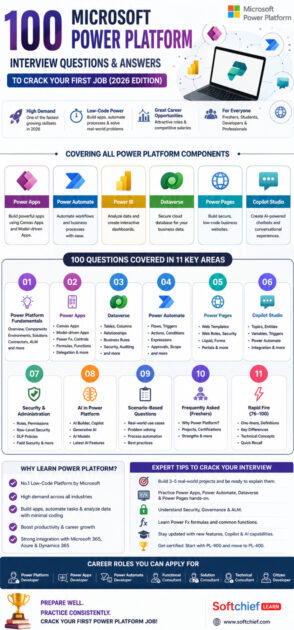
This comprehensive guide contains 100 carefully selected Power Platform interview questions with concise, interview-ready answers that are frequently asked by companies hiring for:
- Microsoft Power Platform Developer
- Power Apps Developer
- Power Automate Developer
- Dynamics 365 Developer
- Citizen Developer
- Solution Consultant
- Functional Consultant
- Technical Consultant
Let’s get started.
Section 1: Power Platform Fundamentals
1. What is Microsoft Power Platform?
Answer:
Microsoft Power Platform is a suite of low-code tools used to build applications, automate workflows, analyze data, create websites, and build AI-powered chatbots.
2. What products are included in Power Platform?
Answer:
- Power Apps
- Power Automate
- Power BI
- Power Pages
- Copilot Studio
- Microsoft Dataverse
3. What is Low-Code Development?
Answer:
Low-code development allows users to build applications with minimal coding using visual designers, drag-and-drop components, and pre-built connectors.
4. Why do companies use Power Platform?
Answer:
Because it enables faster application development, reduces development cost, improves productivity, and integrates seamlessly with Microsoft 365 and Dynamics 365.
5. What is Microsoft Dataverse?
Answer:
Dataverse is Microsoft’s secure cloud database that stores business data for Power Platform and Dynamics 365 applications.
6. What are Connectors?
Answer:
Connectors allow Power Platform to communicate with external services like SharePoint, SQL Server, Outlook, Salesforce, Azure, SAP, and hundreds of other applications.
7. What is an Environment?
Answer:
An Environment is a workspace where Power Platform resources like apps, flows, Dataverse tables, and solutions are stored.
8. Difference between Production and Sandbox Environment?
Answer:
Production is used for live business applications.
Sandbox is used for development, testing, and training.
9. What is a Solution?
Answer:
A Solution is a container that groups Power Platform components for deployment between environments.
10. What is ALM?
Answer:
Application Lifecycle Management (ALM) manages development, testing, deployment, version control, and maintenance of applications.
Section 2: Power Apps Interview Questions
11. What is Power Apps?
Answer:
Power Apps is Microsoft’s low-code platform used to build web and mobile business applications.
12. Types of Power Apps?
Answer:
- Canvas Apps
- Model-driven Apps
- Power Pages
13. Difference between Canvas App and Model-driven App?
Answer:
Canvas Apps provide full UI customization.
Model-driven Apps automatically generate the interface based on Dataverse tables.
14. What are Galleries?
Answer:
Galleries display collections of records in a scrollable list.
15. What are Forms?
Answer:
Forms display, create, and edit records.
16. Difference between Display Form and Edit Form?
Answer:
Display Form shows data.
Edit Form allows users to modify data.
17. What is Patch()?
Answer:
Patch() updates or creates records without using forms.
18. What is Collect()?
Answer:
Collect() adds records to a collection.
19. What is ClearCollect()?
Answer:
It clears an existing collection and loads new data.
20. What is Filter()?
Answer:
Returns records matching specified conditions.
21. Difference between Filter() and Search()?
Answer:
Filter uses logical conditions.
Search looks for text within specified columns.
22. What is LookUp()?
Answer:
Returns the first matching record.
23. What are Variables?
Answer:
Variables temporarily store values during app execution.
24. Types of Variables?
Answer:
- Global
- Context
- Collections
25. What is Delegation?
Answer:
Delegation sends data processing to the data source instead of processing locally.
Section 3: Dataverse Interview Questions
26. What is a Table?
Answer:
A table stores business data in Dataverse.
27. What is a Column?
Answer:
A column stores individual data values.
28. Types of Columns?
Answer:
- Text
- Number
- Date
- Choice
- Lookup
- Currency
- Yes/No
- Image
- File
29. What is a Lookup?
Answer:
A Lookup creates relationships between tables.
30. Types of Relationships?
Answer:
- One-to-Many
- Many-to-One
- Many-to-Many
31. What is Business Rule?
Answer:
Business Rules apply validations without writing code.
32. What are Choices?
Answer:
Choices provide predefined selectable values.
33. What is an Alternate Key?
Answer:
An Alternate Key uniquely identifies records besides the primary key.
34. What is Auditing?
Answer:
Auditing tracks changes made to records.
35. What is Security Role?
Answer:
Security Roles control user permissions.
Section 4: Power Automate Interview Questions
36. What is Power Automate?
Answer:
Power Automate automates repetitive business processes.
37. Types of Flows?
Answer:
- Automated
- Instant
- Scheduled
- Desktop
- Business Process Flow
38. What is a Trigger?
Answer:
A trigger starts a flow.
39. What is an Action?
Answer:
An action performs a task within the flow.
40. What is Apply to Each?
Answer:
Loops through multiple records.
41. What is Condition?
Answer:
Executes actions based on true or false conditions.
42. What are Expressions?
Answer:
Functions used to manipulate data.
Example:
- concat()
- formatDateTime()
- length()
43. What is Approval Flow?
Answer:
Automates approval processes.
44. What is Parallel Branch?
Answer:
Runs multiple actions simultaneously.
45. What is Scope?
Answer:
Groups related actions for better organization and error handling.
Section 5: Power Pages Interview Questions
46. What is Power Pages?
Answer:
A low-code platform for building secure external business websites.
47. Who can access Power Pages?
Answer:
Customers, partners, vendors, and external users.
48. What are Web Roles?
Answer:
They manage portal permissions.
49. What are Web Templates?
Answer:
Reusable page layouts.
50. What is Liquid?
Answer:
A templating language used in Power Pages.
Section 6: Copilot Studio Interview Questions
51. What is Copilot Studio?
Answer:
Copilot Studio helps build AI-powered conversational agents and copilots.
52. What are Topics?
Answer:
Conversation paths handled by chatbots.
53. What are Entities?
Answer:
Entities identify important information from user conversations.
54. What are Variables?
Answer:
Variables temporarily store conversation data.
55. Can Copilot call Power Automate?
Answer:
Yes, it can trigger Power Automate flows.
Section 7: Security & Administration
56. What is Azure AD integration?
Answer:
Power Platform uses Microsoft Entra ID (formerly Azure AD) for authentication.
57. What is Row-Level Security?
Answer:
Restricts data visibility based on user permissions.
58. Difference between Owner Team and Access Team?
Answer:
Owner Teams own records.
Access Teams provide temporary access.
59. What is Field Security?
Answer:
Protects sensitive columns.
60. What is Data Loss Prevention (DLP)?
Answer:
DLP policies prevent sensitive data from being shared across unauthorized connectors.
Section 8: AI in Power Platform
61. What is AI Builder?
Answer:
AI Builder provides AI models without requiring machine learning expertise.
62. What can AI Builder do?
Answer:
- OCR
- Prediction
- Object Detection
- Invoice Processing
- Sentiment Analysis
63. What is Microsoft Copilot?
Answer:
An AI assistant integrated across Microsoft products.
64. Can AI generate Power Apps?
Answer:
Yes, Copilot can generate apps from natural language.
65. What is Generative AI?
Answer:
AI that creates content like text, code, images, and workflows.
Section 9: Scenario-Based Questions
66. How would you automate leave approval?
Answer:
Power Apps → Power Automate → Approval → Outlook notification → Dataverse update.
67. How would you reduce manual Excel work?
Answer:
Store data in Dataverse and automate processes using Power Automate.
68. How would you secure customer information?
Answer:
Use Security Roles, Field Security, DLP policies, and Entra ID authentication.
69. How would you deploy an app?
Answer:
Package it inside a Managed Solution and import it into Production.
70. How do you improve Power Apps performance?
Answer:
Use delegation, optimize formulas, reduce controls, and avoid unnecessary API calls.
Section 10: Frequently Asked Freshers Interview Questions
71. Why Power Platform?
Answer:
It enables rapid application development with minimal coding and strong Microsoft ecosystem integration.
72. Why should we hire you?
Answer:
Highlight your hands-on projects, willingness to learn, certifications, and problem-solving skills.
73. Have you built any projects?
Answer:
Mention real-world apps such as Leave Management, Employee Onboarding, Inventory Management, Expense Tracker, or Help Desk.
74. What certification have you completed?
Answer:
Mention certifications like PL-900, PL-100, PL-200, or PL-400, if applicable.
75. Explain a Power Platform project you developed.
Answer:
Describe the business problem, the solution, technologies used, and the outcome.
Section 11: Rapid Fire Interview Questions (76–100)
- What is a Connector?
- What is a Gateway?
- Difference between SharePoint and Dataverse?
- What is Power Fx?
- What is Responsive Design?
- What is Monitor in Power Apps?
- What is Solution Explorer?
- What is Connection Reference?
- What are Environment Variables?
- What is Managed Solution?
- What is Unmanaged Solution?
- What is Business Process Flow?
- What is Power BI used for?
- What is Common Data Model?
- What is Premium Connector?
- What is Pagination?
- What is Retry Policy?
- What is Trigger Condition?
- What is HTTP Connector?
- What is JSON?
- What is Parse JSON?
- What is OData Filter Query?
- What is Dataverse Search?
- Difference between Power Apps and Dynamics 365?
- What are the latest AI features in Power Platform (2026)?
Tip: For rapid-fire questions, be prepared to give concise answers in one or two sentences. Interviewers often use these to quickly assess your familiarity with the platform.
Expert Tips to Crack Your First Power Platform Interview
- Build at least 3–5 real-world Power Platform projects and be ready to explain them.
- Practice creating Canvas Apps, Model-driven Apps, Power Automate flows, and Dataverse tables.
- Understand Power Platform governance, security, and Application Lifecycle Management (ALM).
- Learn Power Fx formulas and common functions used in Power Apps.
- Explore Copilot, AI Builder, and the latest AI capabilities introduced in Power Platform.
- Prepare answers using the STAR (Situation, Task, Action, Result) method for scenario-based questions.
- Earn beginner-friendly certifications like PL-900 and progress toward PL-400 for developer roles.
- Stay updated with Microsoft release waves and new platform features.
Conclusion
Microsoft Power Platform continues to be one of the fastest-growing technology stacks for developers, consultants, and business professionals. Employers are increasingly looking for candidates who not only understand the platform’s fundamentals but can also demonstrate practical problem-solving skills through real-world projects.
By mastering the 100 interview questions in this guide, practicing hands-on development, and building a strong project portfolio, you’ll significantly improve your chances of securing your first Power Platform role in 2026.
Remember, interviews are about more than memorizing answers—they’re an opportunity to showcase your ability to learn, adapt, and solve business challenges using Microsoft’s low-code ecosystem.
Start practicing today, build consistently, and take one step closer to becoming a successful Microsoft Power Platform professional.









