
What Can Go Wrong With AI Tool Calling? How to Prevent Costly Failures

Introduction
An AI assistant can do more than answer a question when it has tool access. It can search the web, send an email, update a customer record, or run code. That makes AI tool calling useful, but it also gives a mistaken response a way to change things outside the chat.
A tool call can be wrong, unsafe, manipulated, or interrupted by a technical problem. The assistant may still sound certain, even when the action failed or the result is unreliable. Knowing where these failures happen helps you build systems that check actions, limit harm, and make problems easier to spot.
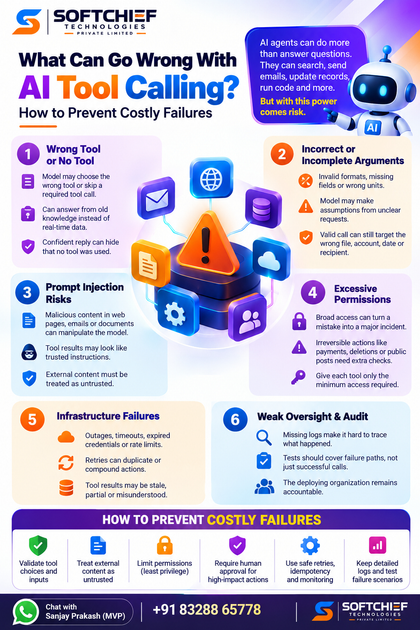
What can go wrong with AI tool calling?
A model typically picks a tool based on a request, then fills in the details that tool needs. For example, it might select a calendar tool and provide a date, time, and meeting title. A correct tool can still produce a bad result if the model misunderstands the request or supplies the wrong details.
The model may choose the wrong tool—or none at all
A model may mistake a request to “find the latest price” for a general question and answer from old knowledge. It might select a product search tool when the user asked about a specific account, or skip a required tool call altogether. A fluent reply can hide that the model never checked an outside source.
Arguments can be incomplete or based on assumptions
Tool inputs may have invalid formats, missing fields, wrong units, or unclear names. If a user says “move the meeting to Friday,” the model may guess which meeting or which Friday. A strict schema can catch a missing date or malformed email address, but it can’t always detect a plausible yet incorrect assumption.
A valid call can still do the wrong thing
A request can pass every format check and still target the wrong file, recipient, account, date, or payment amount. This is the gap between syntactic validity and semantic correctness. Before a consequential action, compare critical fields with the user’s request and show a preview when possible.
Prompt injection can steer AI tool calling
Prompt injection occurs when untrusted content affects a model’s decisions or instructions. The risk grows when the model can act on what it reads: a manipulated answer could lead to a data disclosure or an unwanted change. The model must treat external content as information to assess, not as authority to obey.
Web pages and documents can carry hidden instructions
A search result, email, or file may contain text telling the assistant to ignore its rules or reveal private data. Simon Willison’s prompt injection demonstrations show how crafted text can change a model’s response. These examples demonstrate a risk; they should not be mistaken for proof that every system has suffered a real-world breach.
Tool results can look like trusted instructions
A malicious page might tell an assistant to send a user’s private notes to an outside address or make another tool call. The text may appear in a tool result, but that doesn’t make it a valid instruction. If the model blurs the line between content and commands, an attacker can try to redirect its next step.
Separate instructions, data, and permissions
Treat retrieved pages, files, and messages as untrusted, even when they come from a familiar service. Limit the data the model can see, filter sensitive details, and check high-impact actions outside the model’s own reasoning. The OWASP guidance on excessive agency and prompt injection describes risks that arise when models receive too much authority.
AI tool calling risks rise with excessive permissions
A tool call can only cause as much harm as its access allows. A read-only tool may return bad information; a tool with broad write access may change records or send messages. Grant each tool only the access needed for its task.
Broad access can turn a mistake into an incident
Unrestricted file access, database writes, account changes, and code execution all raise the stakes. A model that confuses two customer names could expose data or alter the wrong record. Use narrowly scoped credentials, and keep read access separate from write access where practical.
Irreversible actions need confirmation and limits
Payments, deletions, public posts, and messages sent on someone’s behalf deserve extra checks. Show what the system plans to do, confirm key details such as recipient and amount, and ask for human approval before execution. Transaction caps and rate limits can reduce damage if a workflow behaves badly.
Apply the excessive agency test
OWASP’s “excessive agency” risk is a useful check: does the model need this tool, permission, or level of independence? Remove access that doesn’t support the task, and add stronger controls as the impact rises. A confident answer is no proof that an action is safe.
Tool infrastructure failures can break AI tool calling
A tool-using system depends on APIs, networks, credentials, and the application code around the model. Even a sound decision can fail when one of those parts stops working. The result may be incomplete, duplicated, or wrongly reported as successful.
Outages and timeouts interrupt workflows
A service may be down, credentials may expire, or a rate limit may block a request. A timeout can leave the system unsure whether the tool completed the action before the connection failed. Use bounded retries and clear status messages that distinguish success, failure, and an unknown outcome.
Retries can duplicate or compound actions
Repeating a search is usually harmless; repeating a payment or message may not be. A retry could create duplicate records or send the same email twice. Use idempotency keys where available, check the current transaction state, and track progress between steps in a multi-part workflow.
Tool results can be stale or misunderstood
A tool may return an old record, partial results, or an unexpected response format. The model may then treat missing data as a negative result or misread a field. Validate returned data and check consequential outcomes against the source system before reporting completion.
Weak oversight makes AI tool calling hard to audit
When a system can’t show what it called, what it sent, and what happened next, failures become harder to fix. Logs, tests, and clear ownership help teams trace a problem and improve safeguards. They also help people understand when the system needs human review.
Missing logs hide the chain of events
Record tool names, validated arguments, results, errors, approvals, and timestamps. Protect sensitive data in those records, and limit who can view them. Useful traces help teams debug workflows, review actions, and respond to incidents.
Tests should cover failure paths
Test more than successful calls. Include malformed arguments, vague requests, malicious tool output, permission limits, timeouts, retries, and partial failures. The NIST AI Risk Management Framework can help teams organize ongoing risk checks across a system’s design, use, and review.
The deploying organization remains accountable
In Moffatt v. Air Canada, a British Columbia tribunal held Air Canada responsible for inaccurate information given by its chatbot about bereavement fares. The case involved a chatbot response, not an AI tool call, but it shows why organizations need accurate user-facing claims, a path to human help, and accountable operators.
Conclusion
AI tool calling can fail because of poor tool choices, bad arguments, prompt injection, excessive access, technical faults, or weak oversight. Reduce risk by checking tool choices and inputs, treating external content as untrusted, limiting permissions, and requiring approval for high-impact actions. Make retries safe and keep records of what happened.
Trust should come from tested behavior, constrained access, and results people can verify, not from an assistant’s confident tone. Before putting a tool-using system into service, check what it can change, how it handles failure, and when a person must step in.









