
From Business Requirement to Enterprise AI Agent: A Blueprint for Safe, Measurable Delivery
Introduction
A request to “reduce the support backlog” sounds clear until a team must decide what the agent can answer, which records it can access, and when a person must step in. Turning that goal into a defined workflow, measurable result, and safe operating boundary is what moves From Business Requirement to Enterprise AI Agent.
An enterprise AI agent is more than a chatbot connected to company data. It can use context, call approved tools, and take actions within limits set by the business. The path to production runs through use-case design, secure integration, testing, and ongoing measurement. Each stage has practical decisions that can keep the work focused.
From Business Requirement to Enterprise AI Agent: Define the Outcome
Find the business problem first
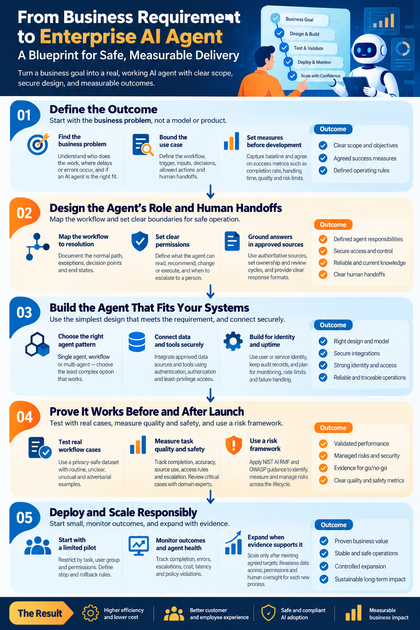
Start with the business issue, not a preferred model or product. Identify who does the work, who owns the process, how it runs today, and where delays or errors occur. An agent may fit when a task needs language understanding and decisions across several steps; a search tool or fixed automation may be a better fit for simpler needs.
For example, a claims team may spend time reading documents and preparing case summaries. The core problem might be slow review, not a lack of AI. Define that distinction before designing a solution.
Bound the use case
Turn the goal into a repeatable workflow with a clear trigger, required inputs, decisions, allowed actions, and expected output. Include points where the agent must pause, ask for missing details, or hand the case to a person. A narrow task, such as drafting a summary for one claim type, is easier to test than a broad mandate to “handle claims.”
This step turns business intent into agent objectives and operating rules. It also gives the delivery team a scope they can build and assess.
Set measures before development
Record current results before changing the process. Track measures that match the goal, such as completion rate, handling time, escalation rate, cost per case, and user satisfaction. Pair speed and cost targets with quality and risk limits, such as an acceptable error rate or a rule that certain actions always need approval.
Agree on acceptance criteria with the process owner. If the agent saves time but gives wrong answers or misses required handoffs, it hasn’t met the business need.
Design the Agent’s Role and Human Handoffs
Map the workflow to resolution
Document the normal path, common exceptions, decision points, and end states. Mark which steps need information retrieval, reasoning, a tool call, approval, or human judgment. This map helps reveal where the agent can proceed and where it should stop rather than guess.
For a support agent, a routine policy question may need a source lookup and a reply. A request to change an account or a case with conflicting details may need a person.
Set clear permissions
Define what the agent may read, recommend, change, or execute. Limit access by user role, data type, action, and transaction value. For example, it might prepare a refund request but need approval before issuing a payment.
Set rules for missing information, low confidence, policy conflicts, and failed tool calls. The agent should explain when it can’t finish and route the request to a named human queue or support path.
Ground answers in approved sources
Choose authoritative sources, assign owners, and set a review cycle so content stays current. Decide which source takes priority when two records disagree. Give the agent concise instructions and a clear response format, such as a short answer with a source reference or a structured case summary.
Instructions alone can’t correct out-of-date or conflicting content. Treat knowledge upkeep as part of process ownership, with a way to report gaps and remove retired material.
Build an Enterprise AI Agent That Fits Your Systems
Choose the simplest agent pattern that works
A single agent can handle a bounded task with a small set of tools. A workflow with model-powered steps can offer more control when each stage needs a fixed order. A multi-agent design may fit work with distinct roles, but it adds coordination, delay, and more points to monitor.
Choose the least complex pattern that meets the requirement. Assess model quality for the task, as well as cost, hosting, speed, and how the model provider handles company data.
Connect data and tools securely
Retrieval-augmented generation can bring approved documents into the agent’s context without treating every answer as built-in knowledge. APIs and approved tools let it take actions, such as opening a case or drafting a reply. Each connection should support a defined task and use authentication, authorization, and least-privilege access.
Validate inputs and check actions before execution. Treat retrieved text as information, not as instructions, since malicious content can attempt to redirect the agent. The OWASP GenAI security guidance covers risks such as prompt injection and unsafe tool use.
Build for identity and uptime
The agent should act with permissions tied to the user or service identity, not with broad shared access. Keep records of relevant requests, sources, approvals, and actions while limiting sensitive data in logs. These records help teams trace decisions and review incidents.
Production design also needs monitoring, rate limits, version control, and clear failure behavior. If a tool or model is unavailable, the system should pause, retry within set limits, or hand the task to a person rather than report a false success.
Prove the Agent Works Before and After Launch
Test real workflow cases
Build a privacy-safe test set from real process examples. Include routine requests, unclear wording, missing details, unusual cases, and attempts to bypass instructions. Compare results with expected outcomes and record known limits.
Test the full workflow, including retrieval, tool calls, permissions, and human handoffs. A polished answer doesn’t prove that a case was updated correctly or routed to the right team.
Measure task quality and safety
Track whether the agent completes the intended task, uses suitable sources, follows access rules, and escalates when required. Log failure types and their severity so the team can distinguish a minor format issue from a harmful action. Domain experts should review results when errors could affect money, rights, or safety.
Klarna’s February 2024 company announcement said its AI assistant handled 2.3 million customer-service conversations in its first month, equal to two-thirds of customer-service chats at the time. The figures show reported usage, not the full quality of service. Read volume alongside resolution quality, escalation, and customer outcomes.
Use a risk framework
The NIST AI Risk Management Framework: Generative AI Profile offers a structure for identifying, measuring, and managing generative AI risks across a system’s life cycle. Use it to shape reviews before launch and during operation. OWASP’s guidance can help teams check security risks in the model application and its tools.
Apply controls that match the workflow and the organization’s rules. A low-impact drafting aid and an agent that changes customer records don’t need the same approval or review process.
Deploy and Scale an Enterprise AI Agent Responsibly
Start with a limited pilot
Limit the first release by task, user group, and permission set. Make human help easy to reach, and watch real interactions for failures that tests missed. Before launch, agree on stop and rollback rules, such as a spike in harmful errors or a broken handoff path.
A pilot should test the operating model as well as the agent. Confirm that owners can review issues, update instructions or source data, and restore the prior process if needed.
Monitor outcomes and agent health
Compare production results with the baseline. Track task completion, escalation, errors, latency, cost, user feedback, and policy violations. Assign owners to investigate changes and review updates to prompts, models, tools, and source data.
Keep changes traceable. A model update or new data source can affect results, so retest key cases before expanding or changing the agent’s role.
Expand when evidence supports it
Treat wider access as a business and governance decision, not an automatic technical step. Expand only after the agent meets agreed quality and risk targets in the current workflow. For each new process, reassess data access, permissions, exceptions, and human oversight.
The same agent design may not transfer safely to another team. A new workflow needs its own owner, baseline, test set, and approval rules.
Conclusion
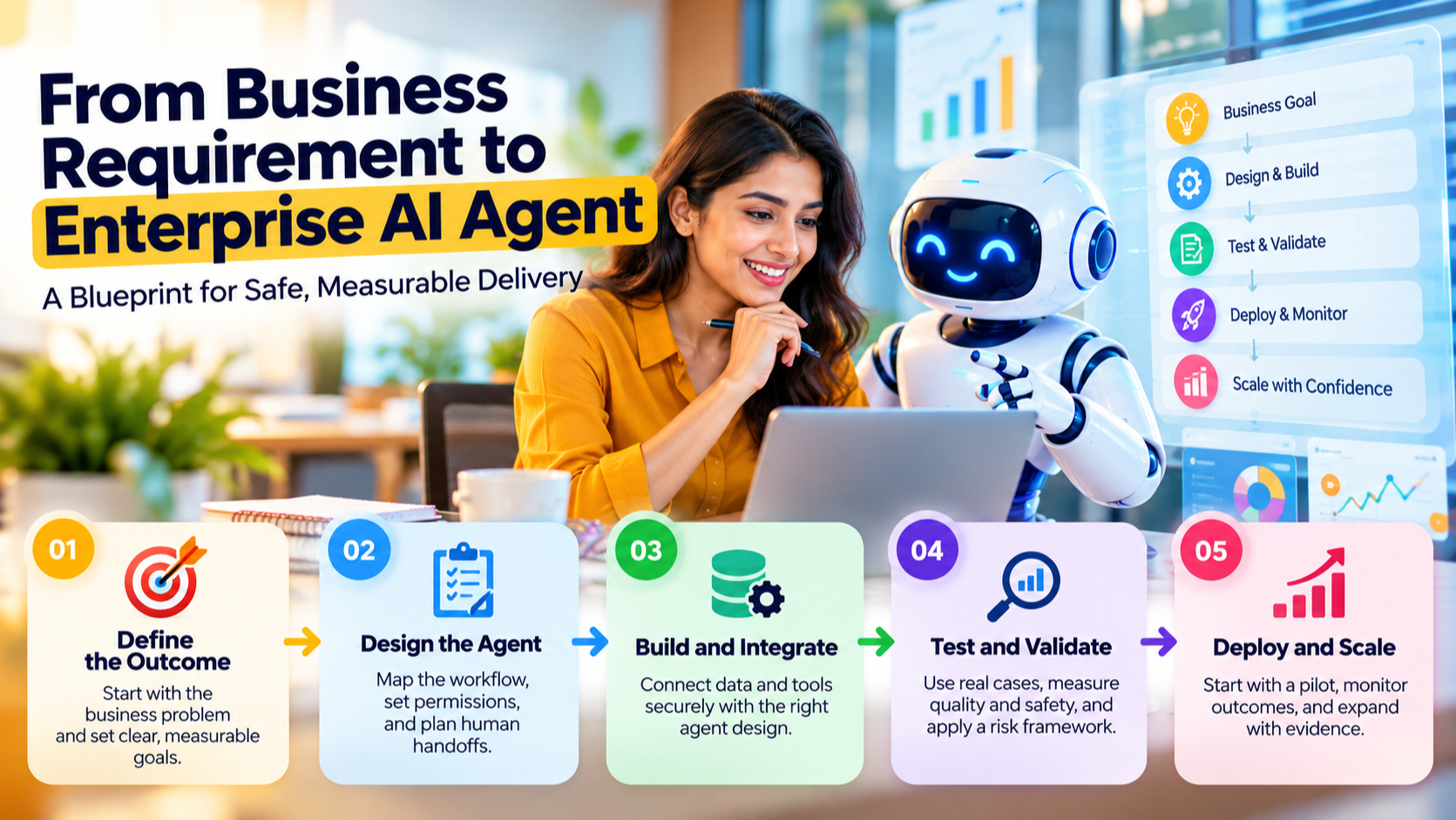
A successful enterprise AI agent starts with a measurable business problem and a bounded workflow. Map each step, define permissions and handoffs, connect only approved data and tools, then test the whole system against real cases. Production monitoring shows whether the agent continues to meet its targets.
Start with one process and a clear owner. Set the success measures before build work begins, and expand only when results show the agent is accurate, safe, and useful.









