
Secure AI Agent Tool Access Without Expanding Your Attack Surface
Introduction
An AI agent can do more than write a reply. Give it tools, and it may read files, query databases, send messages, or change settings. Every connection can create a path to sensitive data or actions with real consequences.
The model may choose which tool to call, but it shouldn’t set the rules for what that tool can do. Secure AI agent tool access by limiting permissions outside the model, checking every requested action, and containing mistakes before they spread.
Map AI agent tool access before granting permissions
Start by finding out what each agent can reach and change. A short threat model can help you identify sensitive data, trust boundaries, and ways that a harmful or mistaken request might lead to a tool call.
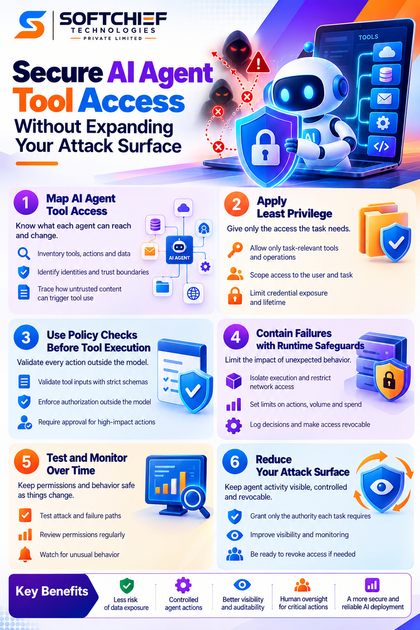
Inventory tools, actions, and data
Document each connected tool, the operations it supports, and the data it can access. Record whether it can read, create, edit, or delete information. “Connected to the CRM” says little about the risk; “can read all customer records and change billing details” is far more useful.
Broad tools and undocumented integrations are hard to review. If you can’t explain what a tool does and which records it can reach, don’t grant it to an agent yet.
Identify identities and trust boundaries
Keep the user, agent, application, and tool identities distinct. Note where each credential is stored, which component can use it, and whether the agent acts with a user’s delegated rights or a service account’s access.
That distinction affects the damage a bad call can cause. An agent using a broad service account may reach data the requesting user can’t see. A user-bound token can help limit access, but it still needs narrow scopes and checks for the specific task.
Trace how untrusted content can trigger tool use
Map how prompts, emails, web pages, retrieved files, and tool responses can affect the agent’s next action. Content that looks like ordinary data may contain instructions intended to steer the agent toward a tool or sensitive information.
A 2023 study by Kai Greshake and coauthors described indirect prompt injection attacks, where malicious instructions in retrieved content can influence an application’s behavior. The risk varies by system, but the path is worth testing whenever an agent reads outside content.
Apply least privilege to AI agent tool access
Give each agent only the access its defined task needs. OWASP’s GenAI security guidance identifies excessive agency as a risk, while the NIST AI Risk Management Framework offers a broader way to manage AI risks.
Allow only task-relevant tools and operations
Use explicit tool allowlists and narrow permissions for each operation. A workflow that summarizes records may need read access, but it shouldn’t need permission to edit or delete those records.
Separate actions with different consequences. Reading a support case, drafting a reply, and sending that reply should not automatically come as one permission bundle. Grant write access only when the task requires it.
Scope delegated access to the user and task
Use user-bound authorization, narrow OAuth scopes, and access rules for individual resources. If an agent helps a user review one project folder, it shouldn’t inherit access to every folder the user can open.
Avoid administrator permissions just because a connected app offers them. Broad rights make it harder to contain a mistake and can expose records unrelated to the task. Set scopes around the actual work, then check both the requester’s rights and the agent’s permissions.
Limit credential exposure and lifetime
Store secrets in a managed secrets system, not in prompts, conversation history, or retrieved documents. Use short-lived or revocable credentials where the service supports them, and rotate credentials on a regular schedule.
Review access when an agent’s purpose changes. A token issued for a read-only task may no longer fit after someone adds a feature that writes to records or sends messages.
Secure AI agent tool access with policy checks
A model’s choice to call a tool is not proof that the action is authorized. Put a check in application code or a policy layer between the model and the tool, and evaluate each requested action before execution.
Validate tool inputs against strict schemas
Treat model-generated arguments as untrusted input. Check types, allowed values, record IDs, and destination addresses against strict rules before passing them to a tool.
Reject malformed or out-of-scope requests. For example, a message tool should not accept an arbitrary destination if the task only allows replies to a verified customer address. Input checks also help stop accidental calls with missing or incorrect parameters.
Enforce authorization outside the model
Run server-side checks for the user, resource, operation, and current task. A prompt that says “do not open this file” is not an access control; the file should be unavailable to the agent unless the task grants access.
Recheck permission for each meaningful call, including calls made in a chain. A valid first step does not authorize every later step. This matters when a tool response or retrieved document changes what the agent tries next.
Require approval for high-impact actions
Pause for human approval before external data sharing, financial transactions, permission changes, or destructive actions. The approval screen should show the intended action, target, and relevant data so a person can catch an unexpected recipient or record.
Ask for approval of a specific action, not a vague workflow. “Send this file to this address” is reviewable; “continue with the task” is not. For actions that are hard to reverse, require a clear decision before the tool runs.
Contain tool failures with runtime safeguards
Policy checks limit which actions can run, while runtime controls help limit their impact. Use both to contain unexpected behavior, compromised inputs, or failures in connected tools.
Isolate execution and restrict network access
Run code execution in a sandbox and limit network access to required destinations. Separate agent workloads from core systems so a compromised component can’t freely reach other tools or services.
Keep credentials out of the model’s view, and give each tool only the access it needs. These boundaries help reduce the reach of a bad call without relying on prompt filters alone.
Set limits on actions, volume, and spend
Set caps for call frequency, transaction amounts, data returned, and task duration. Rate limits and loop detection can stop an agent that repeats a failing call or fetches records in an endless cycle.
Provide a quick way to stop activity. A kill switch should halt the agent’s calls, while credential revocation should block further access if a token or connector is at risk.
Log decisions and make access revocable
Record the requesting identity, tool, operation, target, policy decision, and outcome. Protect logs from broad access and avoid storing full prompts or sensitive record contents when redacted event details will support review.
Make sure incident responders can revoke credentials and disable an agent without delay. Logs should help them see what happened, while revocation limits what can happen next.
Test and monitor AI agent tool access over time
Permissions can become unsafe when a model, prompt, tool, or workflow changes. The NIST framework’s Govern, Map, Measure, and Manage functions can help teams keep ownership, risk review, testing, and updates connected.
Test realistic attack and failure paths
Test prompt injection, unauthorized tool selection, malformed arguments, cross-user access, and repeated or chained calls. Use published research and OWASP guidance to shape scenarios, rather than assuming one successful test proves the agent is safe.
Include ordinary failures too: expired credentials, missing records, and service errors. Confirm that the agent stops or asks for help instead of trying broader tools or repeating calls without limit.
Review permissions and watch for unusual behavior
Recheck access after model, prompt, tool, or workflow updates. New data sources and actions can create exposure, so confirm that each permission still supports a specific task.
Alert on unexpected destinations, unusual data volume, repeated denials, or activity outside normal patterns. Use audit trails to investigate the cause, then adjust permissions or tool rules when needed.
Conclusion
Secure AI agent tool access by mapping every connection, giving each identity narrow permissions, and checking every call outside the model. Add approval for high-impact actions, isolate execution, set runtime limits, and review access after meaningful changes.
The goal is clear: keep agent activity visible and revocable, and grant only the authority each task requires. Start with an access inventory, then close any gap between what the agent needs and what its tools allow.









