
Production Plugin Design: Build Extensions That Stay Reliable at Scale
Introduction
Plugins let teams add useful features without rebuilding an entire application. But a poorly designed extension can crash its host, expose sensitive data, or make upgrades risky.
Production plugin design means building extensions that are safe to install, predictable to run, easy to monitor, and maintainable over time. This article focuses on software plugins that run inside production applications and platforms.
Reliable plugins need clear boundaries, stable contracts, controlled execution, and careful releases. A feature that works on a developer’s machine is only the beginning.
Production plugin design starts with clear boundaries
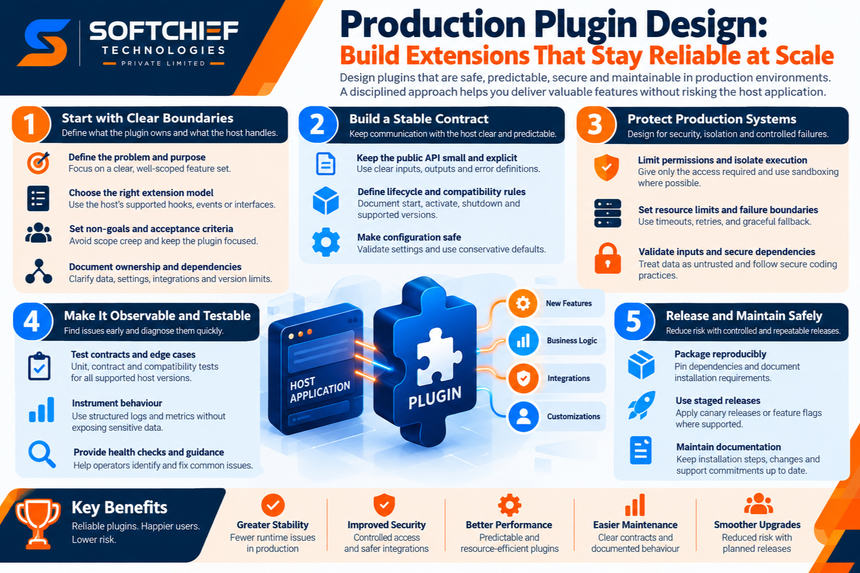
A focused scope keeps a plugin from turning into a tightly linked mini-application. Decide what the host owns and what the extension should handle before writing code.
Define the problem the plugin owns
Describe the plugin’s purpose, who will use it, and which tasks it supports. For example, a payment plugin might handle payment requests but leave customer records and account access to the host.
Set non-goals, too. Concrete acceptance criteria help you reject features that don’t support the plugin’s main job.
Choose an extension model that fits the host
A host may offer hooks, events, interfaces, middleware, or settings-driven extensions. Choose a model that fits the host’s language, startup process, speed needs, and existing developer practices.
A hook may suit a small response change, while middleware may fit request checks. Follow the host’s supported pattern instead of adding a custom entry point.
Document ownership and dependencies
State who owns data, settings, access rules, and user-facing behavior. This prevents the host and plugin from making conflicting decisions about the same resource.
Map required integrations separately from optional ones. Note version limits and likely conflicts so operators know what must be present before installation.
Build a stable contract between the host and plugin
The host and plugin need clear rules for how they communicate. A small, documented contract makes changes easier to test and safer to release.
Keep the public API small and explicit
Expose only the functions consumers need. Use clear input and output types, and define what errors mean so the host can respond in a known way.
Avoid relying on private host details, such as internal database tables or undocumented events. Those details can change without warning and break the plugin.
Define lifecycle and compatibility rules
Document how the plugin starts, activates, handles work, shuts down, and upgrades. Also state which host versions you support and how long you’ll keep older versions working.
Semantic Versioning links version changes to API compatibility: patch releases fix compatible bugs, minor releases add compatible features, and major releases signal breaking changes. Use this policy only if you follow it consistently.
Make configuration and defaults safe
Check settings when the plugin loads, and separate required values from optional ones. Use conservative defaults that don’t send data, grant access, or change user behavior without clear intent.
For missing or outdated settings, show a clear error or use a safe fallback. Reject malformed values early rather than letting them cause unexpected behavior later.
Protect production systems from plugin failures
A plugin can affect the host’s uptime, security, and speed. Design for limited access and contained failure, even when the host runs extensions in the same process.
Limit permissions and isolate execution
Give the plugin only the access it needs. Restrict its ability to read files, use the network, or view sensitive data, based on the host’s permission model.
Use a sandbox or separate process when the platform supports it. Some hosts offer few isolation options, so document those limits and reduce access where possible.
Set resource limits and failure boundaries
Set timeouts for slow work, cap retries, and limit concurrent tasks. These controls help stop one plugin from using too much CPU, memory, or network capacity.
Use graceful fallback behavior when a plugin or dependency fails. A circuit breaker can pause repeated calls to a failing service, protecting unrelated host features.
Validate inputs and secure dependencies
Treat data at the plugin boundary as untrusted, even when it comes from the host. Check its type, size, and allowed values before using it in a query, file path, or command.
The OWASP Secure Coding Practices checklist covers input checks, access control, secret handling, and safe error logging. Review dependencies for known flaws, store secrets in a secure place, and plan updates.
Make plugin behavior observable and testable
Tests can catch faults before release, while useful telemetry helps operators find problems after deployment. Together, they show whether the plugin works with the host and behaves well under stress.
Test contracts, edge cases, and host compatibility
Unit tests check plugin logic; contract tests check how it works with the host. Run compatibility tests against each supported host version, not only the newest one.
Include invalid settings, missing dependencies, timeouts, and partial failures. These cases often reveal issues that normal success-path tests miss.
Instrument behavior without exposing sensitive data
Use structured logs with enough context to explain what failed, such as the operation name and error type. Track invocation counts, response times, and failure rates so changes are easy to spot.
Link plugin signals to host traces or request IDs when possible. Keep passwords, tokens, and unnecessary personal data out of logs.
Provide health checks and diagnostic guidance
Use readiness or health signals if the host supports them. Give operators clear errors that identify whether the plugin, host, or an external service caused the problem.
Add troubleshooting steps for common setup and runtime faults. A useful guide can help teams fix a bad setting without exposing internal details.
Release and maintain plugins without risky upgrades
A sound release process helps teams install and update plugins with less uncertainty. It should include repeatable builds, gradual rollout options, and a safe way back.
Package and distribute reproducibly
Pin dependencies and build from known inputs so the same source can produce a consistent package. List install needs, supported host versions, and any required services.
Where the platform allows it, sign packages or share build provenance. These checks help consumers verify where a plugin came from and whether it changed.
Roll out changes with a rollback plan
Use staged releases, canaries, or feature flags when the host supports them. Google’s SRE Workbook guidance on canary releases describes testing a change with limited production exposure before wider rollout.
Plan data changes so an upgrade doesn’t destroy information needed by the prior version. Write rollback steps and test them before a release depends on them.
Maintain documentation and support commitments
Keep installation steps, settings, compatibility details, and known limits current. For each release, explain changes that may affect users and include migration instructions when needed.
Set a clear process for bug reports and security issues. Define how long you’ll provide fixes and when older host or plugin versions reach end of support.
Turn production plugin design into a repeatable checklist
A design review can catch risks that code review alone may miss. Check the plugin’s scope, runtime behavior, and release plan before treating it as production-ready.
Review the essential design principles
Confirm that the plugin has a focused job and a stable host contract. Check that permissions are limited, resource use is bounded, and important behavior is visible in logs or metrics.
Compatibility tests should cover supported host versions and failure cases. Releases should be repeatable, documented, and reversible.
Check release readiness
Before launch, confirm that:
- Each permission is needed, and plugin failures stay contained.
- Supported host versions and required integrations are documented.
- Operators can diagnose errors without seeing secrets.
- Configuration has safe defaults and rejects invalid values.
- Rollback works without losing user data.
Conclusion
A production-ready plugin is more than a feature that runs. It has clear boundaries, predictable behavior, and a maintenance plan that helps it work as the host changes.
Review plugins across design, runtime, and release operations, not only at the code level. Make those checks part of every design review and release decision.









