
Designing Dataverse for Growing Data Volumes: Keep Apps Fast and Costs Predictable

Introduction
A Dataverse environment can feel fast when it holds a few thousand records, then slow down as years of activity and integrations add more. Storage, query speed, and day-to-day support can all become harder to manage if growth is treated as a future problem.
Designing Dataverse for growing data volumes starts with choices about table types, data access, ingestion, and retention. Adding capacity later may address a storage shortfall, but it won’t fix a query that loads too much data or an integration that keeps retrying failed updates.
A sound plan begins with a growth forecast, then matches table design and data pipelines to real workloads. Regular monitoring helps you adjust as record creation, file use, and business needs change.
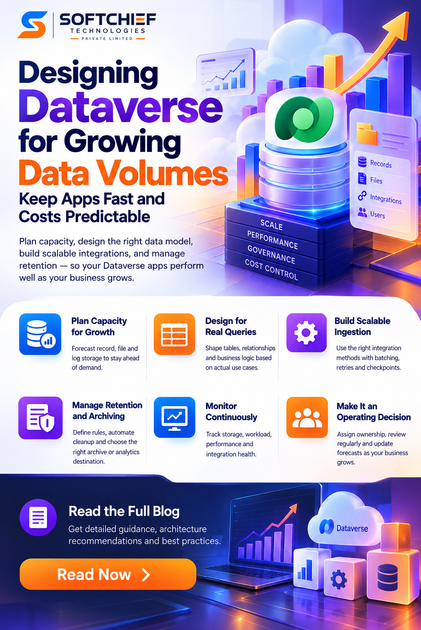
Plan Dataverse capacity for growing data volumes
Dataverse capacity needs depend on what your apps store and how they use it. Forecasting record, file, and log storage separately gives you a clearer view than one overall estimate.
Forecast record, file, and log storage separately
A record-heavy app may use storage differently from one that keeps large attachments or produces substantial logs. Review current use, record creation rates, average file sizes, and how long each data type must remain available.
Build separate estimates for database, file, and log storage. Dataverse entitlements and capacity costs depend on your organization’s licenses and Microsoft’s current terms, so check the Microsoft Learn Dataverse capacity documentation and licensing guidance before setting a budget.
Match table type to workload requirements
Standard tables suit many relational business applications. Elastic tables can fit some high-volume workloads, but their features and behavior differ from standard tables.
Before choosing, test the features your app depends on, including relationships, transactions, business logic, and query patterns. Check current Microsoft Learn documentation for the selected table type; don’t assume every feature works the same way across both types.
Set capacity thresholds before growth becomes urgent
Review capacity reports on a set schedule and assign an owner to investigate changes. Internal warning thresholds can prompt action before a team runs short, but they are planning targets, not Microsoft service limits.
Agree on who reviews alerts, who approves extra capacity, and when a forecast must be updated. Use Microsoft’s current capacity and licensing guidance to confirm official limits and entitlements.
Design Dataverse for growing data volumes around real queries
A table should help users and systems answer clear questions. When the model matches common access patterns, apps can avoid loading records and columns they don’t need.
Shape tables around real retrieval patterns
Start with the queries users and integrations run most often. For example, a service app may need to find open cases by owner and date, rather than retrieve every case and filter later.
Use selective filters and request only the columns a screen or process needs. Review broad queries that repeatedly fetch old records or unused fields, since they can add work to common tasks.
Keep relationships and business logic purposeful
Relationships and business rules support useful app behavior, but they can also add work during large imports or updates. Plug-ins, calculated behavior, and other automation should be tested under the same conditions as the expected workload.
Check that each relationship and rule supports a real need. Then test the required features with your chosen table type and data volume, rather than relying on small test sets.
Separate active data from historical data
Older records may not need to remain in the main operational app. Decide whether users need them there, whether they belong in an archive, or whether a reporting system can provide access instead.
Keep frequently used data available for daily work and set clear access rules for historical records. If you move data, confirm that users can still meet business and audit needs without creating a second source of conflicting records.
Build Dataverse ingestion for sustained volume
Imports and integrations are ongoing workloads, not one-time setup tasks. Their pace depends on data shape, automation, API behavior, and current service protections, so test with representative data before increasing production loads.
Choose an ingestion method that fits the data flow
Dataverse APIs can support app integrations that need timely updates. Dataflows can suit repeatable imports and transformations, while supported bulk-operation methods may help with large sets of changes.
Compare options by delay, transformation needs, error handling, and support effort. Check Microsoft Learn guidance for the chosen method, including its current limits and feature constraints.
Use batching, retries, and checkpoints responsibly
Process records in manageable batches and record completed work so a job can resume after a failure. When the service throttles requests or returns a temporary error, use backoff and respect any retry guidance in the response.
Use upserts with stable keys when they fit the data model. This can help prevent duplicate records when a job retries, but only if the key and update behavior are designed and tested carefully.
Avoid creating integration bottlenecks
Measure end-to-end throughput, including time spent in validation, plug-ins, and downstream systems. More parallel requests don’t always mean faster processing, especially when several jobs update the same records.
Coordinate integrations that touch shared data and avoid repeated updates that add no new value. Load-test typical record shapes and automation before a major import or integration change goes live.
Control Dataverse growth with retention and archiving
Keeping every record in the operational environment forever can raise storage needs and make routine work harder. Retention decisions should reflect business access, legal duties, and app behavior, not only a desire to reduce capacity use.
Define retention rules by data purpose
Work with data owners, security teams, and compliance staff to set retention periods for each category. A support record, a transaction log, and a file may have different access needs and retention rules.
Document who approves the rules and who can grant exceptions. Keep business requirements distinct from technical defaults so a system setting doesn’t become an accidental policy.
Automate eligible cleanup safely
Dataverse bulk deletion and supported retention features can help remove or retain eligible data on a schedule. Before enabling a recurring job, test its filters, permissions, and effects on related records in a non-production environment.
Confirm recovery expectations with the data owner before deletion begins. Keep a record of the selection rules and schedule so teams can review what the job is intended to remove.
Choose an archive or analytics destination deliberately
Historical data may fit better in a separate archive or analytics platform when it no longer needs frequent operational access. Microsoft Learn documentation for Microsoft Dataverse Azure Synapse Link describes an option for exporting Dataverse data for analytics.
Choose a destination based on access speed, reporting needs, governance, and ongoing support. Confirm which data moves, how updates are handled, and whether users can find the records they need after the change.
Monitor Dataverse performance as usage changes
Capacity planning works best as a regular review, not a one-time estimate. Storage trends, failed jobs, slow queries, and user reports can show where the original design needs attention.
Track storage, workload, and integration health together
Review database, file, and log storage alongside record creation rates and integration failures. A sudden rise in failed jobs may point to a workload issue even when storage use remains within plan.
Use the Power Platform admin center and Microsoft’s current Dataverse monitoring and analytics documentation to check available reports and metrics. Tie each signal to an owner and a response, such as reviewing a query or adjusting an import schedule.
Test realistic growth before changing production
A large test set is useful only when its data resembles real use. Include varied record sizes, common query filters, active relationships, and the automation that runs during normal work.
Repeat performance checks after schema, plug-in, or integration changes. This helps teams spot a slower query or longer import before users depend on the change.
Establish ownership and a regular review cycle
Assign clear owners for capacity, retention, data quality, and integration health. Schedule reviews around business cycles and before major releases or expected growth.
Update forecasts when record creation, file use, or app behavior changes. Check Microsoft guidance again before design changes, since platform features and licensing terms can change.
Make Dataverse growth a planned operating decision
Dataverse can support growing workloads when storage, table design, ingestion, and retention fit the way people use the data. The practical next steps are to measure current use, forecast growth by storage type, validate table choices, and test integrations with realistic data.
Set retention rules and monitoring ownership before volume makes those decisions urgent. Review Microsoft Learn for current licensing, capacity limits, and feature behavior, then use your findings to guide the next design review.









