
Secretless Azure Applications: Cut Credential Risk Without Losing Control
Introduction
A client secret copied into an app setting or pipeline variable can outlive its purpose. If it leaks, someone may use it until you find and replace it. Secret rotation also takes time and can break apps that still depend on an old value.
Secretless Azure applications reduce that burden by using identities provided by Azure or a trusted identity provider. The app requests a short-lived token when it needs one, instead of keeping a long-lived client secret.
Secretless doesn’t mean access without checks. Your app still authenticates, and you still decide what it can reach. The right identity pattern depends on where the workload runs and which services it needs.
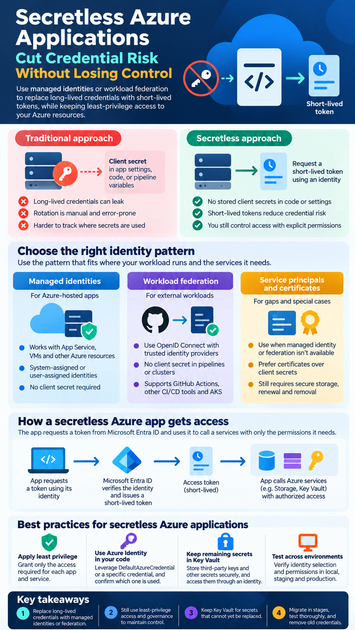
Secretless Azure Applications Remove Stored Credentials, Not Identity
What secretless means for an Azure app
A secretless design avoids storing long-lived credentials, such as client secrets, in code, settings, or deployment variables. Instead, an app uses an identity to request an access token from Microsoft Entra ID. The token proves the app’s identity to a service that accepts Entra authentication.
The Microsoft Learn overview of managed identities explains how Azure resources can obtain Entra tokens without developers managing credentials. The app still needs a trusted identity and permission to access its target.
Which risks remain
Stored secrets can be exposed through source control, logs, build systems, or configuration exports. Teams must also track where each secret is used, rotate it, and avoid outages when replacing it. Removing a long-lived Azure credential cuts down on these tasks, but it doesn’t prevent every attack.
Some credentials may remain, including database passwords, third-party API keys, or access details for systems that don’t support Entra ID. Keep those secrets in a secure store such as Key Vault, and limit who or what can read them.
Choose an Identity Pattern for Secretless Azure Applications
Use managed identities for Azure-hosted apps
A managed identity is an identity assigned to a supported Azure resource. An App Service or virtual machine can use it to request a token for Azure Storage or Key Vault, without an app-held client secret.
A system-assigned identity belongs to one resource and shares its lifecycle. A user-assigned identity is created separately and can be attached to more than one resource. Choose based on how you manage workloads and identities; either type still needs explicit access permissions.
Use workload federation for external workloads
Workload identity federation lets a trusted identity provider issue a signed token that Entra ID can exchange for an Azure token. No application client secret needs to sit in a pipeline or cluster. GitHub Actions can use OpenID Connect with Azure Login, as described in Microsoft’s GitHub-to-Azure authentication guidance.
Federated credentials trust a configured issuer and subject, so check that those claims match the pipeline or workload. Similar patterns support other CI/CD tools and Kubernetes scenarios, including Microsoft Entra Workload ID for AKS.
Keep service principals and certificates for gaps
Managed identity or federation may not fit every tool or hosting setup. A service principal can still be useful, but avoid a client secret when a supported secretless option exists. In some cases, a certificate is a better choice than a client secret, though it still needs secure storage, renewal, and removal when no longer needed.
Connect Secretless Azure Applications to Services
Grant the identity only the access it needs
Authentication confirms which identity made a request. Authorization decides what that identity can do. Assign the app’s identity only the access required for its work, such as a data-plane role on one storage account rather than broad subscription access.
Azure RBAC can grant access at different scopes. Check the target service’s data roles, too: a role that permits resource management may not grant permission to read or write its data.
Use Azure Identity and keep needed secrets in Key Vault
Azure SDKs use the Azure Identity libraries to request tokens. DefaultAzureCredential can use developer sign-in locally and supported workload credentials in deployed environments. Credential support and chain behavior can vary by SDK and version; the Microsoft Learn guide to credential chains covers .NET behavior and its trade-offs.
For predictable production behavior, check which credential your app selects and consider using a specific credential type. Key Vault remains useful for secrets that can’t yet be replaced. Access it through managed identity or federation, then grant the app permission only to the required vault and secrets.
Build a Secretless Authentication Flow Across Environments
Keep local development separate from production
Developers can sign in through approved tools such as Azure CLI or Visual Studio, then use a supported Azure Identity credential chain. Don’t copy production credentials onto a laptop for convenience. Use a separate development subscription, resource group, or data set, and give developer accounts limited access.
Test the same app in local, staging, and production environments. Confirm which identity it selects in each place and that each identity can reach only its intended resources.
Use federation in deployment pipelines
For GitHub Actions, configure a federated credential that trusts the correct issuer and subject claims. Then give the associated Entra identity only the Azure permissions needed for the workflow. Azure Login can use OpenID Connect rather than a client secret stored in repository variables.
Before promoting a change, confirm that the deployed resource has the expected identity and can acquire a token. A successful token request doesn’t prove the app has permission to access a target, so test the actual service operation as well.
Migrate, Monitor, and Troubleshoot Secretless Azure Applications
Replace credentials in controlled stages
Start by listing each credential, where it is stored, and which app or job uses it. Identify the Azure services that support Entra authentication, assign an identity, and grant the smallest required permissions. Update one consumer at a time and test access before retiring its old credential.
Keep a rollback plan during the change. Once the new identity works, remove the old credential and rotate it if it may have been exposed or shared across systems.
Check identity, permissions, and ongoing access
When a request fails, first separate token problems from authorization problems. Check the managed identity assignment, or confirm the federated credential’s issuer, subject, and audience. Then review tenant settings, role assignments, and the scope where those roles apply.
Use application logs and relevant Azure activity or Entra sign-in records to investigate failures. Review access denials and role assignments over time, and remove unused identities and permissions. Secretless authentication still needs regular identity governance and secure workload practices.
Conclusion
Secretless Azure applications replace stored Azure credentials with managed identities for Azure-hosted workloads or federation for supported external workloads. The app still needs an identity, and that identity needs least-privilege access to each target.
Keep Key Vault for secrets that cannot yet be replaced, and access it through an identity. Test the full flow in development, deployment, and production before removing old credentials. Start by inventorying one app’s secrets, then replace and verify them one at a time.









