
Reliable Enterprise Automation: Build Workflows That Scale Without Breaking Trust
Introduction
Automating an invoice check can save time; a brittle workflow can also send the wrong payment through several systems before anyone spots the error. Reliable enterprise automation improves speed and consistency while keeping mistakes contained. To get there, teams need to choose suitable processes, plan for failure, control access and changes, and track results after launch.
Define Reliable Enterprise Automation Before You Build
Reliability means a workflow produces accurate results, runs when needed, and can recover when something goes wrong. A successful run count alone can hide missed deadlines, bad data, or work that staff must redo.
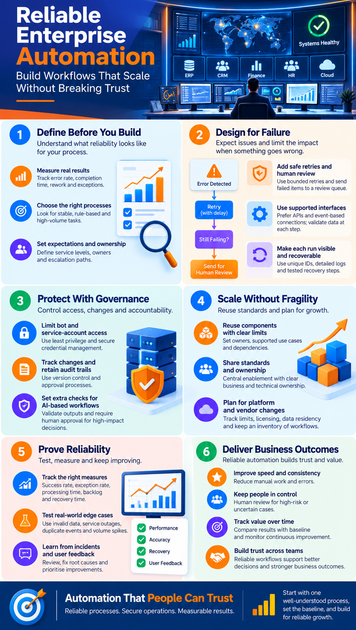
Measure results, not just completed runs
Set a baseline before automating. Record the current process’s error rate, completion time, rework, and number of exceptions. After launch, compare results against those figures and include availability, recovery time, and auditability in your view of performance.
A bot can finish every task and still create extra work if it enters incorrect data. Define what a good outcome looks like for the people who depend on the process.
Choose processes with clear rules
Look at process stability, rule clarity, transaction volume, risk, and exception frequency. Invoice matching, employee access provisioning, and routine data transfers often suit automation because teams can define the expected steps and results.
Frequent policy changes or cases that depend on complex judgment need closer review. You may still automate parts of these processes, but keep a person involved where rules are unclear or a mistake could cause harm.
Set service expectations and ownership
Before launch, agree on service expectations, business and technical owners, and escalation paths. Decide what happens if the workflow misses a deadline, returns a suspect result, or cannot complete a transaction.
Document who can pause the workflow and who handles recovery. Clear ownership prevents an alert from sitting unanswered while downstream work waits.
Design Reliable Enterprise Automation for Failure
Production systems change, inputs arrive incomplete, and services go offline. Reliable automation expects these conditions and limits the damage when a step fails.
Add safe retries and human review
Use bounded retries, with a pause between attempts, for temporary problems such as a short network outage. Put failed work in a queue when it needs later review, and use a backup route only when it is safe and approved.
Before retrying a transaction, check whether the earlier attempt may have succeeded. A duplicate payment or account change can be worse than a delay. Hold ambiguous or high-impact cases for human review, and alert the right owner.
Connect systems through supported interfaces
Use supported APIs or event-based connections when they fit the task. These interfaces usually offer clearer rules than screen-level automation, which can break when an application’s layout changes. User-interface automation may still be needed when no supported interface exists, but it calls for closer checks.
Set clear input and output rules, validate data at each handoff, and version integrations so teams can manage changes. Watch for upstream application updates that could affect later steps.
Make each run visible and recoverable
Give each transaction a unique ID and keep structured logs of key actions, results, and errors. Dashboards and alerts can help the support team spot delays or growing backlogs before users report them.
Write restart and rollback steps before production use. Test them with realistic failures, such as a service outage midway through a task, so staff know how to resume work without repeating completed actions.
Protect Enterprise Automation With Governance
Every automated workflow needs controls for identity, change, and accountability. These controls become more important as workflows touch more systems, teams, and vendors.
Limit bot and service-account access
Give each bot only the access it needs for its job. Store credentials in an approved secrets system, rotate them under your organization’s policy, and avoid shared or unmanaged accounts. Separate duties where one person should not both change and approve a sensitive workflow.
NIST SP 800-53 includes control families for access control, audit and accountability, and configuration management. Use the relevant controls alongside your own identity and access policies.
Track changes and retain audit trails
Keep automation logic in version control. Test changes, record approvals and releases, and log updates to configuration and access. Each production workflow needs a named owner and a change history that shows what changed and when.
These records help teams trace an issue back to a release or permission change. They also make reviews more consistent when workflows handle sensitive data or business-critical tasks.
Set extra checks for AI-based workflows
Rules-based automation follows set instructions; machine learning and generative AI can return uncertain or variable results. Check AI outputs against clear rules, limit the data the system can access, and require human approval for decisions with serious effects.
The NIST AI Risk Management Framework offers a voluntary way to assess risks tied to AI systems. Align any added checks with your organization’s policies and the rules that apply to your work.
Scale Enterprise Automation Without Spreading Fragility
A growing program needs shared standards, but shared tools should not hide who owns each process. Build for reuse while keeping workflows and responsibilities clear.
Reuse components with clear limits
Shared connectors, templates, and error-handling patterns can reduce repeated work. Give each component an owner, list its supported use cases and dependencies, and set expectations for version changes.
Avoid tying unrelated workflows together so tightly that a change in one can break several others. Reuse should make support easier, not create a chain of hidden dependencies.
Share standards and ownership
A central enablement team can set design and security standards, provide tools, and review complex cases. Business and technology teams should still own process accuracy, day-to-day support, and the results each workflow produces.
Define how teams submit ideas, request design and security reviews, approve production releases, and handle support. That route helps prevent quick local projects from becoming unsupported business-critical systems.
Plan for platform and vendor changes
Record platform limits, licensing needs, vendor support terms, data residency rules, and options for moving away from a provider. Keep an inventory of workflows, dependencies, owners, business criticality, and recovery needs.
Review that inventory when systems or vendors change. A workflow no one remembers can fail unnoticed until a team depends on it.
Prove Automation Is Reliable and Keep Improving It
Reliability can decline as volumes rise, applications change, or exceptions grow. A steady review of technical and business results helps teams catch those shifts early.
Track a balanced set of measures
Choose a small set of measures tied to each process’s service expectations. Track successful completion alongside exception rate, processing time, backlog, recovery time, and downstream rework. Compare these results with savings in time or cost.
Run counts alone don’t show whether automation helps. A workflow that runs often but sends errors downstream needs attention, even if its dashboard shows activity.
Test real-world edge cases
Test malformed inputs, unavailable systems, permission failures, duplicate events, and sudden volume spikes before launch. Include changed business rules, too, since an older workflow may continue running after its assumptions stop being valid.
Repeat regression tests after application updates. For critical processes, run controlled failure exercises to check that alerts, recovery steps, and human handoffs work as planned.
Learn from incidents and user feedback
Review incidents, near misses, and common exception types with the people who use or support the workflow. Frontline feedback can reveal confusing steps or failures that system logs don’t explain.
Add fixes to a prioritized backlog, assign an owner, and check whether each change reduces repeat problems. Closing a ticket is not the same as resolving the cause.
Conclusion: Make Reliability the Measure of Automation Success
Reliable enterprise automation starts with processes teams understand and can measure. It accounts for failure, protects credentials and changes, and gives people clear ownership when a workflow needs help.
Scale with reusable standards, but keep boundaries and support roles clear. Track both reliability and business results over time, then use incidents and feedback to improve the design. Choose one well-understood process, set its baseline, and define who owns recovery before you put it into production.









