
Azure Identity Patterns That Reduce Credential Risk
Introduction
An employee signing in, a customer opening an app, and a service reading a file need different identities. Choosing the right Azure identity patterns helps protect credentials and control access. Microsoft Entra ID is the current name for Azure Active Directory (Azure AD). Start by identifying the actor, then match its sign-in method and permissions to the task.
Choose Azure identity patterns by actor
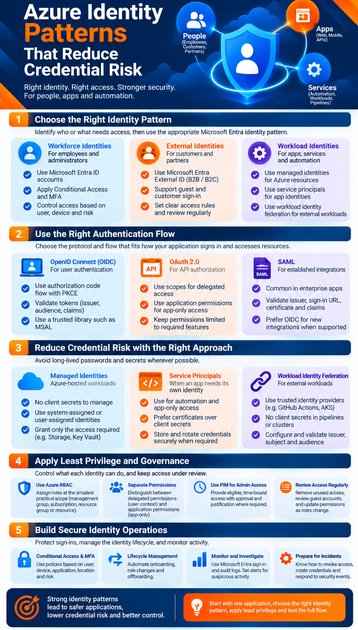
Identity design starts with knowing who or what needs access. Identity names an actor, authentication verifies it, and authorization decides what it can do. Keep these roles clear when you plan access.
Use workforce identities for employees and administrators
Use Microsoft Entra ID accounts for employees and administrators who access Azure resources or business apps. Their sign-in methods can include passwords, passkeys, or other supported options. Conditional Access policies can add requirements based on the user, device, app, or sign-in context.
Use external identities for customers and partners
For business partners, Microsoft Entra External ID supports B2B collaboration. Guests can use their own identities, while your organization controls which resources they can access. Customer-facing apps use External ID in a separate external tenant, with sign-up and sign-in experiences suited to customers.
Set clear access rules for guests, assign an internal owner, and review access over time. Remove access when a project ends or a partner no longer needs it. Customer accounts should follow the app’s own sign-up and account management process.
Use workload identities for apps and automation
Applications, scripts, and services need identities too. A workload running on Azure can often use a managed identity; an app may use a service principal. Workloads outside Azure, including some CI/CD systems, can use workload identity federation instead of storing a secret.
Match authentication flows to how apps sign in
The right flow depends on the application and the resource it needs to reach. Standards-based protocols help apps sign in users and request API access in predictable ways. Use a supported authentication library where possible.
Use OpenID Connect for user authentication
OpenID Connect (OIDC) adds user sign-in to OAuth 2.0. For modern web and mobile apps, use the authorization code flow with PKCE where supported. Microsoft’s authorization code flow guidance recommends PKCE for this flow.
An app must validate tokens for its purpose, audience, issuer, and other required claims. Don’t treat a token as plain user data or trust a token meant for another API. Use Microsoft Authentication Library (MSAL) or another suitable, maintained library to handle token work.
Use OAuth 2.0 to authorize API access
OAuth 2.0 lets a client request access to a protected resource, such as an API. Scopes describe delegated access, and consent controls whether the app may request those permissions. The client app requests access; the API checks the access token and enforces its own rules.
OAuth 2.0 is not, by itself, a general user sign-in protocol. Use OIDC when the app needs to authenticate a user, and OAuth scopes or app permissions when it needs API access. Keep requested permissions limited to the features the app actually uses.
Retain SAML for established enterprise integrations
SAML remains common in established enterprise apps and federated sign-in setups. When adding an integration, check the issuer, sign-in URLs, signing certificate, audience, and expected claims. Prefer OIDC for new integrations when the application supports it.
Reduce credential risk with Azure identity patterns
Workloads should authenticate without long-lived passwords or secrets wherever possible. The right choice depends on where the code runs and which identity methods its services support. For example, an app that reads Azure Storage can use a different pattern depending on its host.
Prefer managed identities for Azure-hosted workloads
A managed identity lets a supported Azure resource request Microsoft Entra tokens without storing a password or client secret. Microsoft’s managed identity overview describes how an app can use this identity to reach services such as Azure Storage, when those services support Microsoft Entra authentication.
A system-assigned identity follows the lifecycle of its Azure resource and is tied to that resource. A user-assigned identity is created separately and can be attached to more than one resource. Choose the one that fits your app’s lifecycle and identity needs, then grant it only the Storage access it requires.
Use service principals when an app needs its own identity
An app registration defines an application, while its service principal is the application’s identity in a tenant. Automation and app-only access often use a service principal. If it needs a secret or certificate, store that credential securely, restrict access, and set a rotation plan.
Use workload identity federation to avoid stored secrets
Federation lets supported external workloads exchange a trusted identity token for a Microsoft Entra access token. It can suit systems such as GitHub Actions or Kubernetes workloads that need access to Azure resources. Microsoft’s workload identity federation guidance requires the configured issuer, subject, and audience to match the incoming token.
Apply least privilege across Azure resources and apps
Authentication confirms an identity; authorization limits what it can do. Grant only the permissions needed, at the narrowest useful scope. Review those permissions as work and roles change.
Assign Azure RBAC roles at the smallest practical scope
Azure role-based access control (Azure RBAC) assignments can apply at management group, subscription, resource group, or resource scope. Use built-in roles when they fit, and narrow the scope where practical. Microsoft’s Azure RBAC best practices recommend limiting both permissions and scope.
Avoid broad roles such as Owner unless the duties require them. Assigning roles to groups can also make access easier to manage as people join, leave, or change teams.
Separate application permissions from user permissions
Delegated permissions let an app act on behalf of a signed-in user, within the granted scope. Application permissions let an app act as itself, without a user present. Review consent requests carefully, especially when an app asks for broad access to a directory or API.
Limit standing admin access with PIM
Microsoft Entra Privileged Identity Management (PIM) can provide eligible, time-bound access to privileged roles, subject to licensing and setup. With an eligible assignment, an administrator activates the role when needed. PIM’s role controls can require justification, approval, or multifactor authentication for activation.
Build secure identity operations into the full lifecycle
Identity security needs daily care, not only a sound first setup. Protect sign-ins, keep access current, and watch for activity that needs investigation. Plan these tasks as part of onboarding, role changes, and offboarding.
Protect sign-ins with Conditional Access and MFA
Microsoft Entra Conditional Access can assess signals such as user, device, application, location, and risk. Based on policy, it can require MFA, require a compliant device, or block access. Test policies in report-only mode where available before enforcing them, and plan emergency access accounts carefully.
Manage access from onboarding through offboarding
Use provisioning and groups to grant access consistently when people join or change roles. Review access regularly, especially for administrators and external guests. Give guest accounts a clear owner and set a review or renewal process; remove access promptly when it is no longer needed.
Monitor identity activity and prepare for incidents
Use Microsoft Entra sign-in logs to investigate access attempts, including service principal and managed identity sign-ins. Audit logs help track directory changes, such as updates to users or groups. Set alerts for suspicious activity, review app credentials, and document how to revoke access or rotate a secret if it is exposed.
Conclusion: Build around identity, not stored credentials
A sound Azure identity design starts by identifying the actor, then choosing the right sign-in pattern and narrowly scoped permissions. Use workforce identities for employees, External ID for customers and partners, and workload identities for apps and automation. Prefer managed identities for supported Azure workloads and federation for supported external workloads.
Choose OIDC, OAuth 2.0, or SAML to fit the app’s needs. Then protect sign-ins, review access, and monitor identity activity. Make those choices explicit in your next Azure design review.









