
Reviewing Azure Application Architecture to Find Risks Before They Become Incidents

Introduction
An Azure application can appear healthy while its design hides risks: a database with no tested restore plan, an exposed service, or a costly scaling setup. Reviewing Azure application architecture helps teams find these issues before they cause outages, security problems, or expensive changes.
A useful review looks beyond resource settings. It checks how application parts, Azure services, data flows, security controls, and team processes work together. With a clear scope and evidence from real operations, you can assess the design and turn findings into practical next steps.
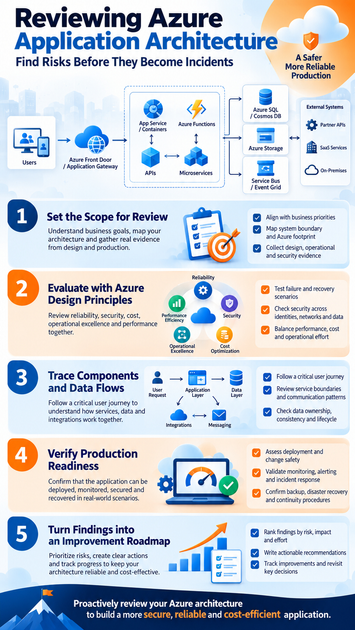
Set the scope for reviewing Azure application architecture
Start by agreeing on what the review must cover and what decisions it should support. A focused scope keeps the work tied to business needs instead of turning it into a broad check of every Azure setting.
Connect review questions to business priorities
Identify the people who use the application, the tasks they need to complete, and the business goals it supports. Then define what downtime, slow response, or lost data would mean for those users and the organization.
Turn broad goals into review questions. For example, can the design restore service within the business’s recovery target? Can it support seasonal traffic without a costly upgrade? These questions help the team judge design choices against real needs.
Map the system boundary and Azure footprint
Record the main application parts, environments, subscriptions, regions, and external services. Include important dependencies, such as identity providers, payment services, or partner systems, since failures outside Azure can still affect users.
Use existing diagrams and resource lists as a starting point, then compare them with the deployed environment. If a diagram shows one database but production uses several, update the map before drawing conclusions.
Gather evidence from design and production
Collect architecture diagrams, infrastructure-as-code, release pipelines, Azure Monitor data, incident records, cost reports, and security findings. These sources show both what the team planned and how the application behaves.
Check documents against live settings and production experience. A recovery plan may look complete on paper, but past incidents or restore tests can reveal gaps.
Reviewing Azure application architecture against Azure’s design principles
The Azure Well-Architected Framework gives teams a useful structure for weighing design choices. Its five pillars are reliability, security, cost optimization, operational excellence, and performance efficiency. Treat them as connected concerns: a change that improves performance may also raise cost or add operational work.
Test reliability against failure and recovery scenarios
Check how the application handles the loss of a component, zone, region, or key dependency. Look for single points of failure, suitable backups, and clear recovery steps. The right design depends on the workload and its availability needs.
Confirm that recovery targets are defined and tested. A backup is useful only if the team can restore the right data within an acceptable time. Compare exercise results with business needs, and record any gaps.
Examine security across identities, networks, and data
Review who and what can access each service. Check for least-privilege permissions, secure handling of secrets, limited network exposure, encryption, and clear data classification. Consider Microsoft Entra ID, managed identities, and Azure Key Vault where they fit the design.
Follow a request through each layer to see where access is checked and sensitive data moves. A service with strong network controls may still need better identity rules or secret storage.
Balance performance, cost, and operational effort
Compare service choices and scaling plans with actual workload patterns. Review resource sizing, caching, cost visibility, and how the system behaves during peak demand. More capacity or extra services can add cost and upkeep without solving the real bottleneck.
Microsoft’s Azure Architecture Center offers reference designs and patterns for common needs. Use them to compare options, not as templates to copy without checking workload requirements.
Trace application components, data flows, and integrations
Following one important user request can reveal weak links that a service inventory misses. Trace the request from its entry point through compute, storage, messaging, and downstream systems.
Follow a critical user journey end to end
Choose a task that matters, such as signing in or placing an order. Track how authentication, input checks, retries, and errors work at each step. Note which components could stop the whole task if they fail.
Check timing and handoffs as well as the happy path. A slow external service, for example, may hold open requests and affect other users if timeouts and limits are missing.
Review service boundaries and communication patterns
Assess whether services have clear roles and owners. Synchronous calls can suit requests that need an immediate answer, while queues or events can help with work that can happen later. Each pattern has trade-offs in delay, failure handling, and complexity.
Look for long chains of dependent calls, unclear ownership, or retries that may multiply traffic during an outage. The goal is to keep components as simple as the workload allows while limiting the impact of failure.
Check data ownership, consistency, and lifecycle
Name the system of record for each key data type, then trace where copies move and who can change them. Review how quickly changes must appear across services and what happens when updates arrive late or out of order.
Check retention rules, restore paths, and compliance needs alongside the chosen data services. The design should make it clear how teams protect, recover, and remove data when required.
Verify that the architecture can be operated in production
Architecture quality includes the team’s ability to deploy, observe, troubleshoot, and recover the application. Check these practices before launch or major change, not after an incident exposes a gap.
Assess deployment and change safety
Review infrastructure-as-code, environment consistency, release steps, and approval controls. Confirm that tests run before changes reach production and that the team has a safe way to roll back or move forward if a release fails.
Look at how changes are tested and limited in scope. A release plan should explain who can act, what signals show trouble, and how the team will reduce user impact.
Validate monitoring, alerting, and incident response
Check Azure Monitor, Application Insights, logs, metrics, traces, dashboards, and alerts for the key user journeys and dependencies. Teams should be able to connect a user-facing problem with the service or handoff causing it.
Review alerts for clear actions and ownership. Confirm that incident roles and escalation paths are known, and that teams can find the runbooks they need during an outage.
Confirm backup, disaster recovery, and continuity procedures
Check which data and services are covered by backups, how long recovery should take, and who runs the process. Verify that regional recovery assumptions match the application’s design and business requirements.
Schedule restore tests or recovery exercises, then record results, owners, and follow-up dates. A runbook that has never been tested may miss permissions, dependencies, or steps needed to bring the service back.
Turn review findings into a prioritized improvement roadmap
A review matters when its findings lead to decisions and work. The Azure Well-Architected Review assessment can provide tailored guidance, while teams still need to judge findings against their own evidence and priorities.
Rank findings by risk, impact, and effort
Group issues by business consequence, likelihood, and urgency. A public access path or untested recovery process may need attention before a longer-term cost change. Include effort and dependencies so teams can plan realistic work.
Separate confirmed problems from questions that need more evidence. This prevents guesses from becoming urgent tasks and helps teams target the right follow-up checks.
Write recommendations teams can act on
For each finding, name the affected component, evidence, likely impact, proposed action, owner, and target date. “Improve monitoring” is too vague; “add an alert for failed checkout requests and assign it to the payments team” gives people a clear task.
State the expected result in terms the team can verify. For example, a restore test can confirm whether the application meets its recovery target.
Track improvements and revisit architecture decisions
Keep findings in a backlog with owners and completion checks. Revisit key decisions after major workload, security, regulatory, or Azure service changes. Azure Advisor can add useful recommendations based on resource settings and usage, but it cannot replace a review of the full application.
Conclusion: Make Azure architecture reviews part of the work
A strong Azure architecture review starts with business goals, follows real application and data flows, and checks reliability, security, cost, operations, and performance together. Evidence from production, tests, and design records helps teams separate urgent risks from longer-term improvements.
Turn each important finding into a clear action with an owner and a way to confirm completion. Schedule the next review when the workload changes, and use the results to keep the design fit for the people and business it supports.









