Power Platform: How to Plan a Controlled Rollback When a New Release Disrupts Business Operations
Introduction
A Practical Guide to Release Recovery, Solution Versioning, Dataverse Data Protection, and Business Continuity
A Power Platform release can pass development testing, move successfully through UAT, and still create unexpected problems after reaching production.
A Power Automate flow might stop processing business transactions. A model-driven app might fail to load a form correctly. A Dataverse plugin might start throwing exceptions after a schema change. An integration that worked perfectly before deployment might suddenly fail because an API contract or connection reference has changed.
At this point, the development team’s responsibility changes.
The immediate objective is no longer to deliver new functionality. It is to restore business operations without introducing additional data integrity, security, or operational problems.
This is where a controlled rollback strategy in Microsoft Power Platform becomes essential.
However, rolling back a Power Platform release is not as simple as importing an older solution package. Solutions, Dataverse data, cloud flows, connection references, environment variables, external integrations, and security configurations have different recovery requirements.
A rollback that restores the application but leaves business processes partially broken is not a successful rollback.
In this article, we will explore how experienced Power Platform developers, consultants, and solution architects should plan and execute a controlled rollback when a new production release disrupts business operations.
We will also examine practical scenarios, deployment considerations, recovery strategies, and the mistakes teams should avoid.
1. Why Does a Power Platform Release Need a Rollback Strategy?
Consider a real-world business scenario.
An organization uses a model-driven Power App for managing customer service requests.
The application supports:
- Creating and updating customer service cases.
- Assigning cases to support representatives.
- Triggering Power Automate flows when case priorities change.
- Sending notifications through Microsoft Teams.
- Integrating with an external ticket management system.
- Storing business information in Microsoft Dataverse.
The development team introduces a new release containing:
- A redesigned case management form.
- New Dataverse columns for escalation tracking.
- Changes to a cloud flow responsible for escalation notifications.
- An updated plugin that calculates case priority.
- A new integration endpoint.
The solution is deployed successfully to production.
However, within 30 minutes, the support team reports several problems.
- Case escalation notifications are not being triggered.
- Some users cannot save updated cases.
- The integration with the external ticketing application is returning errors.
- The newly introduced plugin is generating unexpected exceptions.
The release has technically completed, but the business functionality is no longer reliable.
What should the development team do?
Should they immediately import the previous solution?
Should they restore the Dataverse environment?
Should they disable the affected cloud flows?
Should they fix the new release while users continue working?
These decisions cannot be made without understanding the nature of the failure.
A controlled rollback begins with identifying what has actually broken and determining the safest recovery option.
Important: A successful solution import does not necessarily mean a successful business deployment. Production validation must include the complete business process, not just the deployment status.
2. Understand What You Are Actually Rolling Back
Before planning a rollback, understand the different components involved in a Power Platform release.
A typical Power Platform application can contain multiple interconnected components.
| Component | Possible production impact |
|---|---|
| Power Apps | Forms, views, commands, navigation, and application behavior |
| Dataverse | Tables, columns, relationships, business rules, and data |
| Power Automate | Triggers, actions, conditions, and business automation |
| Plugins | Server-side validation and business logic |
| Connection references | Authentication and connector connectivity |
| Environment variables | Environment-specific configuration |
| Custom connectors | External API communication |
| Security roles | User permissions and access |
| Integrations | Communication with external systems |
The important point is that these components do not all behave in the same way during deployment and rollback.
For example, redeploying an earlier managed solution version does not automatically reverse every Dataverse data change or undo an external transaction.
Similarly, restoring a Dataverse environment does not automatically guarantee that all cloud flows, connections, and integrations will resume functioning correctly.
Microsoft Power Platform Pipelines deploy solutions and target-environment configuration, but they do not deploy the data stored in Dataverse tables.
This distinction is particularly important when designing a recovery strategy.
Reference: Microsoft Learn – Overview of pipelines in Power Platform.
3. Define the Rollback Decision Before Taking Action
Not every production issue requires a complete rollback.
In some situations, reverting one component is safer than reversing the entire release.
I generally recommend classifying production failures into three categories.
Scenario A: Application-level failure
Examples:
- A form is not displaying correctly.
- A command bar button is not working.
- A JavaScript customization is producing errors.
- A model-driven app is showing unexpected behavior.
If the issue is isolated to application functionality, a previous solution version or a targeted corrective deployment might be sufficient.
Scenario B: Automation or integration failure
Examples:
- A Power Automate flow is failing.
- A connection reference points to an incorrect connection.
- An external API is rejecting requests.
- A plugin is failing during transaction execution.
Here, the team should examine flow definitions, connection references, plugin registrations, API contracts, and dependencies.
A full environment restore may be unnecessary and potentially more disruptive.
Scenario C: Data integrity or environment-wide failure
Examples:
- A deployment has corrupted important business data.
- Critical records have been incorrectly updated.
- Multiple application components are failing.
- A data migration has introduced widespread inconsistencies.
This situation may require a broader recovery approach, including environment restoration or a carefully designed data recovery operation.
The decision should be based on the impact and recoverability of the failure, not simply on the availability of an older solution package.
4. Prepare a Rollback Strategy Before the Production Deployment
The best time to prepare a rollback plan is before releasing the solution.
A production deployment should have a documented recovery strategy just as it has a deployment strategy.
4.1 Maintain version-controlled solution artifacts
Never depend on a developer’s local machine as the only location for a previous solution package.
Maintain version-controlled source code and retain the exact build artifacts associated with each production release.
For example:
| Release | Solution version | Deployment status |
|---|---|---|
| Release 1.0 | 1.0.0.0 | Previous stable release |
| Release 1.1 | 1.1.0.0 | Previous production release |
| Release 1.2 | 1.2.0.0 | Current release |
| Release 1.3 | 1.3.0.0 | Upcoming release |
For every release, retain:
- Managed solution package.
- Source-controlled solution files.
- Deployment settings.
- Environment-specific configuration records.
- Release notes.
- Known dependencies.
- Validation results.
This gives the team a reliable reference point when production recovery becomes necessary.
4.2 Use managed solutions in production
A recommended ALM approach is to develop using unmanaged solutions and deploy managed solutions to downstream environments, including production.
Managed solutions provide a more controlled deployment and servicing model.
They also help teams understand solution layering and component ownership.
However, remember that importing an older managed solution is not equivalent to removing every change introduced by the newer release.
Solution updates, patches, and upgrades have different behaviors.
For example:
- An update applies changes to the existing managed solution without creating an additional solution layer.
- A patch introduces a separate layer for smaller changes.
- An upgrade introduces a new solution layer and can remove components that existed in the previous solution but are no longer included in the upgraded version.
Therefore, solution upgrade behavior must be understood before deciding how to reverse a release.
Reference: Application lifecycle management basics with Power Platform.
4.3 Enable historical solution redeployment in Power Platform Pipelines
One important capability that Power Platform teams should understand is the ability to redeploy an earlier solution version through Power Platform Pipelines.
The pipeline configuration includes an option called Allow redeployment of older versions.
When this setting is enabled, authorized users can initiate redeployment of a previous successful solution version from the pipeline run history.
This is particularly useful when a newly deployed managed solution introduces application-level problems.
A typical recovery process looks like this:
- Open the Power Platform Pipelines experience.
- Navigate to the relevant pipeline.
- Open the deployment run history.
- Identify the last known stable deployment.
- Review the solution version and deployment details.
- Initiate redeployment of the previous version.
- Complete the required confirmation.
- Validate the production application and dependent business processes.
There is an important operational consideration here.
Redeployment of an older solution version is an intentional operation that overwrites the current solution version. It should be restricted to authorized personnel and performed only after evaluating the consequences.
If historical redeployment is disabled, the pipeline supports only higher solution versions. An administrative workaround involves retrieving the previous artifact, incrementing its solution version in the solution.xml file, and importing it manually.
Do not treat this workaround as a substitute for a properly governed release process.
Reference: Overview of pipelines in Power Platform.
5. Protect Dataverse Data Before Planning a Rollback
This is one of the most important parts of the entire recovery strategy.
A solution package contains application customizations and components. It does not contain a historical copy of the business records stored in Dataverse.
Suppose the latest release introduces a new column called new_escalationstatus.
After deployment, a business process starts updating thousands of existing case records using this column.
The team decides to redeploy the previous solution version.
What happens to the data stored in new_escalationstatus?
Redeploying the previous solution does not automatically restore the historical values of those records.
This is why application rollback and data rollback must be treated as separate activities.
5.1 Create a manual backup before major production changes
Before deploying a major release, create a manual backup of the production environment.
Microsoft provides automated system backups as well as manually initiated backups.
For environments with a Dataverse database, system backups are available automatically. By default, production and nonproduction backups are retained for seven days.
For production Managed Environments, administrators can extend retention up to 28 days.
Manual backups are particularly useful before major customizations, version updates, and significant changes.
The backup should be created early enough to verify that it is available before the production deployment begins.
Reference: Back up and restore environments.
5.2 Understand when environment restoration is appropriate
Environment restoration is a broader recovery operation.
It should not be the default response to every application-level issue.
Consider using restoration when the incident involves serious data corruption or an environment-wide failure that cannot be safely corrected through a targeted solution or data recovery process.
There are important Microsoft platform restrictions:
- Production environments cannot be restored directly over themselves through the standard restore operation.
- A production source environment can be restored to a sandbox target.
- The source and target must meet the supported region and environment requirements.
- A restored environment is placed in administration mode.
- Sufficient available capacity is required.
A production restoration process therefore requires careful administrative planning and coordination.
It is also important to understand that restoring an environment can have consequences beyond Dataverse records.
After restoration:
- Solution cloud flows are turned off.
- Existing solution flows in the target are deleted and must be reviewed and restored as required.
- Connection references require appropriate connections to be configured.
- Custom connectors must be reviewed.
- Application sharing and access must be validated.
A restored database does not automatically mean that the entire business application is ready for users.
Reference: Microsoft Learn – Backup and restore environments.
6. Plan Power Automate Flow Recovery Separately
Power Automate is often a major source of production disruption because a flow can be technically deployed but operationally unavailable.
Consider an order management application.
When an order is approved:
- Dataverse updates the order status.
- A cloud flow is triggered.
- The flow creates an invoice in an external ERP system.
- A confirmation notification is sent to the finance team.
A new release changes the flow’s input structure and connection configuration.
After deployment, the flow starts failing.
The team redeploys the previous application solution, but the flow still does not process orders correctly.
Why?
Because the failure may involve the connection reference, trigger configuration, flow activation state, or integration contract.
A proper recovery checklist should include:
Flow validation
- Is the correct solution-aware cloud flow present?
- Is the flow turned on?
- Is the trigger configured correctly?
- Are the required actions available?
- Are the input and output contracts compatible with the calling application?
Connection validation
- Does the connection reference point to the correct connection?
- Is the connection authenticated?
- Does the connection identity have the necessary permissions?
- Are the correct target-environment settings being used?
Execution validation
- Can a controlled test record trigger the flow?
- Does the flow complete successfully?
- Are failed runs generating duplicate transactions?
- Are retry policies and error-handling paths behaving correctly?
One particularly important point is backward compatibility.
Microsoft documents scenarios where changes to flow inputs, connections, or outputs can break existing Power Apps that call those flows.
For example, changing the outputs of a Respond to a Power App or flow action can affect applications that depend on the earlier response structure.
When updating a live application, maintaining a separate flow version and moving the application to the new flow after testing can reduce disruption.
Reference: Best practices when updating a flow.
7. Check Connection References and Environment Variables
Connection references and environment variables are essential parts of a well-designed Power Platform ALM strategy.
They separate solution logic from environment-specific configuration.
Consider the following example.
Your application uses an external API.
The development environment uses:
The test environment uses:
The production environment uses:
Instead of hardcoding these URLs inside application logic or flows, use an environment variable.
Similarly, use connection references to manage the connections required by solution-aware cloud flows.
During rollback, verify that:
- The previous solution contains the required environment variable definitions.
- The correct production values are available.
- Connection references point to valid production connections.
- The required authentication permissions are present.
- No development or test configuration has accidentally reached production.
For automated deployments, Power Platform Build Tools support deployment settings files that provide target-specific environment variable values and connection reference information.
This makes configuration management more predictable across environments.
Reference: Pre-populate connection references and environment variables for automated deployments.
8. Understand the Risks of Dataverse Schema Changes
Schema changes require particular attention because they can affect both the application and the data.
Consider a scenario where the development team renames a business requirement into a new data model.
The previous design contains:
new_customerstatusnew_approvalstatus
The new release introduces:
new_customerlifecyclenew_approvalstage
The team updates forms, plugins, flows, and integrations to use the new columns.
After deployment, the new release causes a problem.
The team decides to roll back.
But the previous application version may still depend on the original columns and their expected values.
If the release involved deleting or changing existing schema components, simply deploying the previous application version may not reconstruct the original data model or data.
This is why experienced architects should follow a backward-compatible schema migration strategy.
Recommended approach: Expand, migrate, contract
Phase 1: Expand
Introduce new columns or components without immediately removing the existing ones.
Keep the existing application logic functional.
Phase 2: Migrate
Update the application and integrations to support the new schema.
Migrate existing records carefully and validate the results.
Phase 3: Contract
Only after all dependent components have moved successfully should the team consider removing obsolete components.
This approach reduces the risk of a new release making the previous application version unusable.
It also gives the team more flexibility when a rollback is required.
The key principle is simple:
Do not introduce irreversible data-model changes in the same release where you expect an immediate rollback to remain possible.
9. Execute a Controlled Rollback: A Practical Production Scenario
Let’s put the concepts together.
Assume an organization deploys solution version 2.4.0.0 to production.
Within 20 minutes, users report that the order approval application is failing.
The issue is traced to a plugin introduced in the latest release.
The plugin throws an exception when the approval amount exceeds a specific threshold.
The previous production release, version 2.3.0.0, was working correctly.
How should the team proceed?
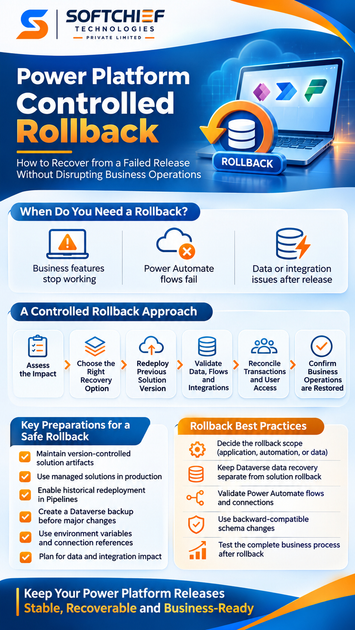
Step 1: Declare the production incident
The support team records:
- Incident start time.
- Affected applications.
- Impacted business processes.
- Affected user groups.
- Failed transactions.
- Current production solution version.
The team assigns an incident owner and a technical recovery lead.
Step 2: Stop additional damage
Depending on the failure, the team may temporarily disable the affected functionality, pause an automation, or restrict access to a broken process.
However, this must be done carefully.
For example, disabling an order approval flow without checking pending transactions may leave orders in an inconsistent state.
The team should identify in-flight transactions before changing automation behavior.
Step 3: Identify the last known stable artifact
The team checks the pipeline deployment history.
It confirms:
- Version 2.3.0.0 was the last successful production release.
- Version 2.4.0.0 introduced the plugin change.
- The previous solution artifact is available.
- The rollback setting is enabled.
Step 4: Assess data and integration impact
Before redeploying, the team checks whether the new plugin or other components have already:
- Updated Dataverse records.
- Triggered Power Automate flows.
- Created external transactions.
- Sent notifications.
- Changed approval states.
This is critical because redeploying the previous solution cannot automatically reverse those operations.
Step 5: Redeploy the previous solution
The authorized release administrator initiates redeployment of version 2.3.0.0 through the pipeline run history.
The team monitors the deployment and verifies that the previous application logic is available.
Step 6: Validate the business process
The team tests the complete order approval process.
For example:
- Create a new test order.
- Submit it for approval.
- Verify the Dataverse record.
- Execute the approval logic.
- Verify the plugin execution.
- Confirm that the appropriate flow is triggered.
- Verify the external ERP integration.
- Confirm that the final order status is correct.
Testing only whether the app opens is not sufficient.
Step 7: Reconcile transactions
The team checks transactions created during the failed release.
If some orders were partially processed, the team must reconcile their status with the external ERP system.
Duplicate invoices, missing notifications, or inconsistent approval states should be investigated before normal operations resume.
Step 8: Communicate recovery completion
The business stakeholders receive confirmation of:
- The affected functionality.
- The recovery action taken.
- The current application version.
- The validation results.
- Any remaining limitations.
The incident is then documented for a post-release review.
This is what a controlled rollback looks like in an enterprise Power Platform implementation.
10. Build a Rollback Readiness Checklist
A rollback strategy should be documented and reviewed before every major production release.
The following checklist can be used by Power Platform developers, administrators, and release managers.
Before deployment
- Confirm the production solution version.
- Retain the previous managed solution artifact.
- Verify source control and release history.
- Enable historical solution redeployment where appropriate.
- Create a manual Dataverse backup.
- Verify environment backup retention.
- Review solution dependencies.
- Validate connection references.
- Validate environment variables.
- Identify external integrations.
- Document the rollback owner and approval process.
- Define production smoke tests.
During a production incident
- Record the incident and business impact.
- Identify the failed component.
- Determine whether a partial or complete rollback is required.
- Stop additional harmful transactions where necessary.
- Check pending and in-flight transactions.
- Identify the last known stable solution artifact.
- Assess Dataverse data changes.
- Assess external system impact.
- Obtain the required recovery approval.
After rollback
- Verify the deployed solution version.
- Validate model-driven and canvas applications.
- Validate Dataverse operations.
- Validate plugin execution.
- Validate Power Automate flows.
- Validate connection references.
- Validate external integrations.
- Reconcile incomplete transactions.
- Verify user permissions and application sharing.
- Monitor application and automation failures.
- Document the root cause and corrective actions.
11. Common Rollback Mistakes Power Platform Teams Should Avoid
Even experienced teams can make mistakes when production pressure increases.
Here are some important situations to avoid.
Mistake 1: Assuming an older solution automatically restores Dataverse data
Solution redeployment and data restoration are different recovery operations.
Always evaluate data changes separately.
Mistake 2: Restoring the entire production environment for a small application issue
An environment restore can introduce additional operational work, including flow activation, connection configuration, and user access validation.
Choose the smallest safe recovery scope.
Mistake 3: Ignoring external integrations
A Dataverse rollback cannot automatically reverse an invoice already created in an external ERP system.
External transactions require reconciliation.
Mistake 4: Ignoring connection references
A previously working flow can fail because its connection reference is missing, invalid, or associated with an incorrect connection.
Mistake 5: Making destructive schema changes too early
Deleting columns or changing contracts without considering backward compatibility can make an older application version unusable.
Mistake 6: Testing only technical deployment success
A successful solution import does not prove that business operations have recovered.
Test complete business transactions.
Mistake 7: Allowing everyone to perform production rollback
Production rollback should have clear ownership, approval, and access controls.
An unauthorized rollback can introduce another production incident.
12. How to Make Power Platform Releases More Resilient
A mature Power Platform team does not depend entirely on rollback.
It designs releases so that failures can be isolated and corrected with minimal business impact.
Here are some practices worth adopting.
Use environment separation.
Maintain separate development, testing, UAT, and production environments with appropriate access and governance.
Adopt a source-controlled ALM process.
Store solution source, deployment configuration, and release artifacts in a controlled repository.
Automate deployment validation.
Use Power Platform Pipelines or an appropriate Azure DevOps or GitHub-based ALM process.
Design backward-compatible integrations.
Avoid changing flow inputs, outputs, or API contracts in ways that immediately break existing consumers.
Use environment variables and connection references.
Keep environment-specific configuration outside application logic.
Introduce phased schema changes.
Use expand-migrate-contract patterns when changing Dataverse structures.
Monitor production after deployment.
Track flow failures, plugin exceptions, API errors, and business transaction failures.
Practice rollback exercises.
A rollback procedure that has never been tested should not be considered production-ready.
The team should periodically simulate a failed release in a nonproduction environment and verify that the documented recovery steps actually work.
13. Final Thoughts: A Rollback Is a Business Continuity Decision
Power Platform makes it possible to build and deploy business applications quickly. However, faster delivery should not come at the cost of production stability.
When a new release disrupts business operations, the development team must understand more than solution version numbers.
It must understand the relationship between application components, Dataverse data, automation, integrations, security, and environment configuration.
A controlled rollback is not simply about returning to an earlier version.
It is about restoring the last known reliable business state while protecting data integrity and minimizing operational disruption.
For Power Platform developers and solution architects, the ability to plan and execute a controlled rollback is an important part of production engineering.
Remember this principle: A deployment is complete only when the business process works reliably. A rollback is complete only when the business process has been safely restored.
Frequently Asked Questions (FAQs)
1. Can we roll back a Power Platform solution to an earlier version?
Yes. Power Platform Pipelines support redeployment of previous solution versions when the pipeline setting Allow redeployment of older versions is enabled. Authorized users can initiate the operation from the deployment run history.
2. Does rolling back a managed solution restore Dataverse data?
No. Solution deployment and Dataverse data recovery are separate operations. Redeploying an earlier solution does not automatically reverse record updates or external transactions.
3. Should we restore the entire Dataverse environment after every failed deployment?
No. Environment restoration is a broader recovery option. For isolated application or automation failures, targeted solution recovery or corrective deployment may be safer.
4. What happens to Power Automate flows after an environment restore?
Solution cloud flows are turned off after restoration. Connection references need appropriate connections, and custom connectors must be reviewed. Flows should be validated before business operations resume.
5. Why are connection references important during rollback?
Connection references separate the flow’s design from environment-specific connections. A previously working flow can still fail if its connection reference is not correctly configured.
6. How can developers make a Power Platform solution easier to roll back?
Use managed solutions for production, retain previous release artifacts, maintain source control, create backups, use environment variables and connection references, and introduce backward-compatible schema and integration changes.
7. What is the difference between solution rollback and environment restoration?
Solution rollback focuses on reverting application components to a previous release. Environment restoration recovers an environment from an available backup and can affect Dataverse data, applications, flows, connections, and other environment configuration.
Continue Learning with Softchief Learn
Understanding Power Platform development is one thing. Building applications that can be deployed, monitored, maintained, and recovered in real production environments requires a deeper understanding of application lifecycle management.
At Softchief Learn, we focus on practical Microsoft technology training, real-world implementation scenarios, and the technical decisions developers and consultants encounter in enterprise projects.
If you are working with Power Apps, Power Automate, Dataverse, or Dynamics 365 and want to strengthen your implementation skills, explore our instructor-led Microsoft Power Platform training programmes.
Learn the technology. Understand the architecture. Build with production confidence.
Explore Softchief Learn Courses: Visit the Softchief Learn Courses page.
Have a course-related question? Connect with our trainer, Sanjay Prakash Pradhan (Microsoft MVP), through WhatsApp for programme details.