How to Handle Ambiguous User Requests Without Sending Them Down the Wrong Workflow in Microsoft Copilot Studio
Introduction
A conversational AI agent can understand a user’s question, identify an appropriate topic and execute a business process. But what happens when the user’s request is not clear?
Consider a customer interacting with an organisation’s Copilot Studio agent.
The customer types:
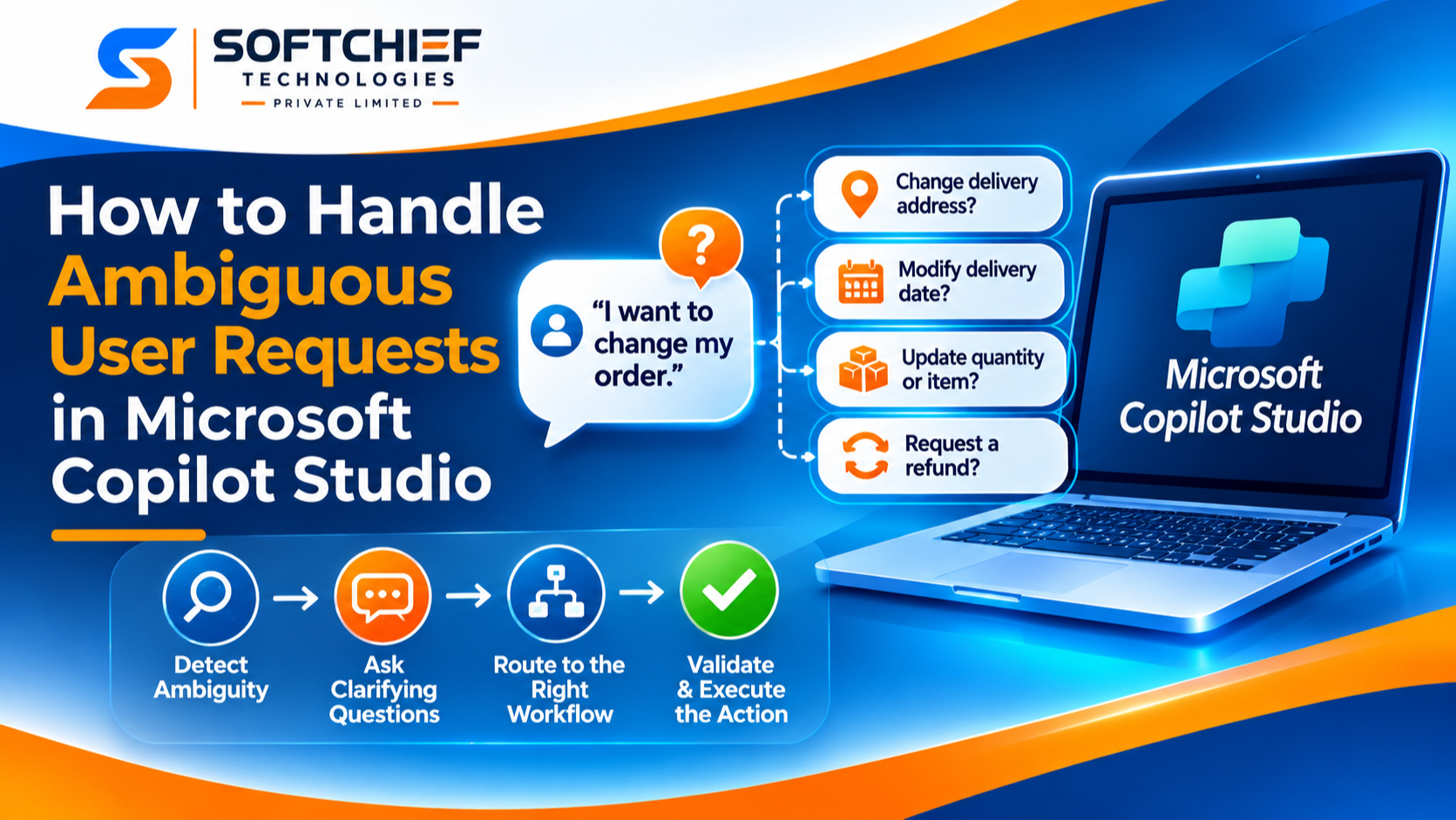
“I want to change my order.”
What does the customer actually want?
- Change the delivery address?
- Modify the quantity of an ordered product?
- Cancel the order?
- Change the delivery date?
- Replace an item?
- Check whether the order can still be modified?
These requests may belong to entirely different business workflows. If the agent selects the wrong workflow and immediately executes an action, it can create incorrect records, trigger unnecessary approvals or even modify an existing business transaction incorrectly.
This is one of the important challenges in enterprise conversational AI: handling ambiguity before initiating a business action.
Microsoft Copilot Studio provides capabilities such as topics, generative orchestration, input collection, conditions, variables, knowledge sources and tool integration to help developers build agents that respond to user intent.
However, configuring these capabilities is only part of the solution. Developers must also design how the agent identifies missing information, asks meaningful clarification questions, retains conversational context and determines when it is safe to proceed.
An enterprise agent should not simply attempt to answer every user message. It should recognise when the available information is insufficient to make a reliable decision.
In this article, we will explore how to design ambiguity-aware conversational agents in Microsoft Copilot Studio, with practical implementation patterns, enterprise scenarios, technical considerations and workflow-routing strategies.
Why Ambiguous User Requests Are a Serious Enterprise Problem
In a basic chatbot, misunderstanding a question may result in an irrelevant response.
In an enterprise agent, the consequences can be much more significant.
Consider an HR agent receiving this request:
“I need to update my details.”
The agent may have several available workflows:
- Update employee address.
- Change bank account details.
- Update emergency contact information.
- Modify tax declarations.
- Change personal contact information.
If the agent directly selects the bank account update workflow, it may request sensitive financial information when the employee only wanted to update their residential address.
Similarly, consider a Dynamics 365 Customer Service agent receiving:
“I need help with my account.”
The request could relate to:
- Account access.
- Billing.
- Subscription changes.
- Contact information.
- Account suspension.
- Technical issues.
The agent must distinguish between these possibilities before selecting a workflow that performs an action.
Common Types of Ambiguity
| Ambiguity Type | Example User Request | Potential Problem |
|---|---|---|
| Intent ambiguity | “I want to change something.” | Agent cannot identify the intended operation |
| Entity ambiguity | “Update my account.” | Multiple accounts may exist |
| Context ambiguity | “Cancel that.” | The reference to the previous item is unclear |
| Action ambiguity | “I need a refund.” | Refund, cancellation or payment dispute may be intended |
| Data ambiguity | “Change my delivery details.” | Address, date or contact number may be missing |
| Multi-intent ambiguity | “Update my address and check my order.” | Multiple workflows may be required |
| Business-rule ambiguity | “Change my approved request.” | The action may be restricted by the current status |
A reliable agent must distinguish between these situations because each requires a different clarification strategy.
The objective is not to ask more questions. The objective is to ask the right question before making the wrong decision.
Understanding Intent Detection in Microsoft Copilot Studio
Before designing an ambiguity-handling mechanism, developers must understand how Copilot Studio determines what an agent should do next.
An agent receives a user message and evaluates the available capabilities that could satisfy the request.
Depending on the orchestration configuration, it can select topics, tools and knowledge sources.
Two important orchestration approaches are available.
Classic Orchestration
In classic orchestration, the agent uses topic trigger phrases to identify a matching topic.
For example:
| Topic | Example Trigger Phrases |
|---|---|
| Cancel Order | Cancel my order, stop my order |
| Modify Order | Change my order, edit my order |
| Track Order | Where is my order, track delivery |
| Refund Request | I need a refund, return my payment |
When a user enters a message, Copilot Studio attempts to match it with the configured trigger phrases.
This approach provides developers with a more explicitly defined topic-triggering model.
However, users do not always express their requirements using the phrases developers anticipate.
For example:
“Something is wrong with the order I placed yesterday.”
The user has not explicitly said whether they want to cancel, modify or track the order.
A collection of trigger phrases alone may not provide enough information to select the correct business workflow.
Generative Orchestration
Generative orchestration introduces an AI-driven planning layer.
Instead of relying only on matching trigger phrases, the orchestrator evaluates the available topics, tools, knowledge sources and their descriptions to determine which capabilities are appropriate.
For example:
A user types:
“I need to know why my last payment was unsuccessful.”
The agent may identify that the request relates to payment troubleshooting rather than order cancellation.
If the available payment-support topic requires a transaction ID that the user has not supplied, the orchestrator can ask for the missing information.
This is particularly useful when users express the same requirement in different ways.
Classic vs Generative Orchestration
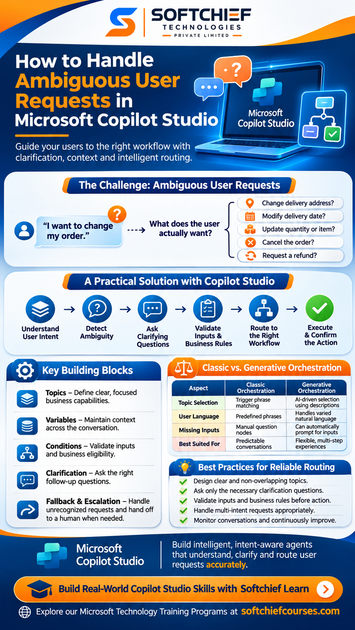
| Area | Classic Orchestration | Generative Orchestration |
|---|---|---|
| Topic selection | Trigger phrase matching | AI-driven topic selection using descriptions |
| User language | Depends on configured trigger phrases | Handles varied natural-language expressions |
| Missing inputs | Developers configure question nodes | Can automatically prompt for missing inputs |
| Multiple capabilities | More explicitly defined topic flow | Can combine topics, tools and knowledge |
| Developer control | Explicit conversational structure | More flexible planning with configuration and guardrails |
| Best suited for | Predictable, controlled conversations | Flexible, multi-step conversational experiences |
Important: Generative orchestration does not eliminate the need for topic design, input validation or business rules. Developers must still define clear capabilities and ensure that the agent cannot perform an inappropriate operation simply because a user request sounds similar to a supported workflow.
The exact behaviour also depends on the agent’s configuration, available capabilities and orchestration settings.
Design an Ambiguity Detection Strategy Before Building Topics
One of the mistakes developers make is creating separate topics for every possible sentence a user might enter.
This can lead to unnecessary topic duplication and complicated maintenance.
A better approach is to identify the business intents first.
Consider an order-management agent.
The business supports these operations:
- Track an order.
- Modify an order.
- Cancel an order.
- Request a refund.
- Report a delivery problem.
Before creating the topics, define the information needed to execute each operation.
| Business Intent | Required Information | Action |
|---|---|---|
| Track Order | Order Number | Retrieve order status |
| Modify Order | Order Number, Change Type | Validate modification |
| Cancel Order | Order Number, Cancellation Reason | Check cancellation eligibility |
| Request Refund | Order Number, Refund Reason | Initiate refund assessment |
| Delivery Problem | Order Number, Problem Type | Create support case |
Now consider the request:
“Please help me with my order.”
The agent knows that the user is discussing an order, but it does not know which operation is required.
The correct behaviour is to request clarification.
It should not randomly select the first available order-related topic.
Define Intent Categories
A useful design approach is to group user requests into three categories.
Informational Requests
The user wants information.
Examples:
- What is my order status?
- What are the delivery charges?
- What is your refund policy?
Task-Completion Requests
The user wants the agent to perform an operation.
Examples:
- Cancel my order.
- Update my delivery address.
- Submit a refund request.
Troubleshooting Requests
The user reports a problem.
Examples:
- My payment failed.
- I cannot access my account.
- My order has not arrived.
This classification helps developers organise topics around business requirements instead of simply creating topics based on keywords.
Microsoft’s topic-design guidance also recommends identifying informational, task-completion and troubleshooting intents, including clarification topics for ambiguous requests.
Building Clarification Logic in Copilot Studio
The most important design decision is determining when the agent should ask a follow-up question instead of initiating a workflow.
Consider the following interaction.
User:
“I want to change my order.”
Incorrect agent response:
“Sure. I will cancel your existing order and create a new one.”
The agent has assumed the user’s intention without confirming it.
Better agent response:
“I can help you with that. What would you like to change?”
- Delivery address
- Delivery date
- Product quantity
- Ordered item
This approach allows the agent to collect the missing information before continuing.
Clarification Is Not the Same as Repeating the User’s Question
A poorly designed agent may respond:
“Could you please clarify?”
Although technically valid, this does not help the user understand what information is missing.
A better clarification question should:
- Acknowledge the user’s request.
- Identify the missing information.
- Present relevant choices.
- Avoid technical terminology.
- Collect only the information required to determine the next action.
For example:
Instead of:
“Please provide more details.”
Use:
“Would you like to update your delivery address, change the delivery date or modify the products in your order?”
The second question reduces ambiguity because it guides the user towards supported business operations.
When Should the Agent Ask a Clarification Question?
A clarification question is appropriate when:
- Multiple business intents are equally plausible.
- A required input is missing.
- A reference such as “that order” cannot be resolved.
- Multiple records match the supplied information.
- The requested action has business or financial consequences.
- The agent cannot confidently distinguish between two workflows.
Not every incomplete sentence requires clarification.
If the conversation already contains enough reliable information, the agent should use that context rather than repeatedly asking the user for details.
Implementing Ambiguity Handling Using Topics
Topics are one of the core building blocks of conversational agents in Copilot Studio.
A topic defines how a particular conversation or business operation progresses.
For an order-management agent, we might create the following topics:
| Topic Name | Responsibility |
|---|---|
| Order Assistance | Handles general order-related requests |
| Track Order | Retrieves order status |
| Modify Order | Handles permitted order modifications |
| Cancel Order | Handles cancellation requests |
| Refund Request | Manages refund initiation |
| Clarify Order Intent | Identifies the user’s intended operation |
The clarification topic is particularly important because it acts as a decision point when the initial request does not provide sufficient information.
Example Topic Flow
       User Message
            |
            v
      Identify Intent
            |
            v
    Is the Intent Clear?
            |
       +----+----+
       |         |
      Yes        No
       |         |
       v         v
  Select Topic  Ask Clarifying
       |         Question
       |         |
       |         v
       |    Capture Response
       |         |
       |         v
       |    Validate Response
       |         |
       |    +----+----+
       |    |         |
       |   Valid    Invalid
       |    |         |
       |    v         v
       |  Route     Clarify Again
       |    |
       +----+
            |
            v
      Execute Workflow
            |
            v
       Return Result
Important Design Consideration
In classic orchestration, developers can create a clarification topic with trigger phrases and use Question nodes, Condition nodes and Redirect to topic nodes to manage the conversation.
In generative orchestration, the orchestrator can select the appropriate topic based on its description and ask for missing topic inputs automatically.
These approaches should not be mixed up.
For example, a developer using generative orchestration should not assume that every missing input requires a manually authored question node. Input definitions and descriptions can allow the orchestrator to collect the required values.
However, explicit Question nodes remain useful when the business requires a particular sequence, fixed choices or a controlled interaction.Microsoft Learn+2
Using Variables to Maintain Conversational Context
A common problem in enterprise agents occurs when users provide information across multiple messages.
Consider this interaction:
User: I want to modify my order.
Agent: Which order would you like to modify?
User: Order 45021.
Agent: What would you like to change?
User: The delivery address.
Agent: Please provide the new delivery address.
User: 25 Park Street, Hyderabad.
The agent has collected several pieces of information across multiple conversational turns.
It needs to retain the information so that the correct workflow can be executed.
This is where variables become important.
What Are Variables in Copilot Studio?
Variables store information that an agent collects or generates during a conversation.
They can hold information such as:
- Order Number.
- Customer ID.
- Requested Action.
- Delivery Address.
- Payment Reference.
- Approval Status.
For our example, the agent could maintain:
| Variable | Example Value |
|---|---|
varOrderNumber | 45021 |
varRequestedAction | Modify |
varChangeType | Delivery Address |
varNewAddress | 25 Park Street, Hyderabad |
varIntentConfirmed | Yes |
The variable names above are illustrative developer-defined names.
Why Are Variables Important?
Without appropriate context management, an agent might ask the user for the same information repeatedly.
It could also lose track of the original request when a user supplies additional details.
Variables help developers maintain the information needed by subsequent nodes and actions.
Variable Scope
Copilot Studio supports different variable scopes, including:
- Topic variables.
- Global variables.
- System variables.
Topic variables
Used within a particular topic to manage its inputs, intermediate values and outputs.
Global variables
Can be used across topics within the agent conversation context.
System variables
Provide platform-managed information about the conversation and agent.
The choice of scope should depend on how long the information needs to remain available and which parts of the agent require it.
For example, the order number might need to be available to multiple topics, whereas a temporary clarification response may only be required inside the current topic.
Production consideration: Do not store sensitive information in broadly accessible variables without a clear business requirement. Also, do not assume that a conversation variable is a secure or permanent database record. Persistent business data should be managed through appropriate systems and access controls.
Designing Topic Inputs and Descriptions for Better Routing
In generative orchestration, topic descriptions play a particularly important role.
The orchestrator uses the names, descriptions and input definitions of available capabilities to determine which ones are relevant.
A topic with a vague description can create routing problems.
Consider these two examples.
Poor Topic Description
“Handles order-related requests.”
Better Topic Description
“Handles requests where customers want to modify an existing order, including changing delivery dates, delivery addresses or permitted product quantities. Requires an order number and the requested modification type. Does not handle order cancellations, refund requests or order-status enquiries.”
The second description gives the orchestrator more useful information.
It defines:
- The topic’s responsibility.
- Supported business operations.
- Required information.
- Boundaries.
- Related workflows that should not be selected.
Recommended Topic Description Structure
For important enterprise topics, define:
| Element | Description |
|---|---|
| Purpose | What the topic is responsible for |
| Supported Requests | What user requirements it handles |
| Required Inputs | Information required to execute it |
| Exclusions | What the topic must not handle |
| Expected Outputs | What information or result it returns |
| Business Restrictions | Applicable conditions and limitations |
Example: Modify Order Topic
Name: Modify Existing Order
Description:
Handles customer requests to modify an existing order, including permitted changes to delivery address, delivery date and product quantity. Requires an order number and a specific change type. Verifies order eligibility before initiating the modification. Does not handle order cancellation, refunds or general order tracking.
Inputs:
- Order Number.
- Change Type.
- New Value.
Outputs:
- Validation Status.
- Modification Status.
- Reason if modification cannot proceed.
This design makes the topic easier to understand, test and maintain.
Microsoft’s generative orchestration guidance specifically recommends clear names, descriptions and well-defined inputs and outputs. It also recommends avoiding overlapping or unnecessarily broad capability descriptions. Microsoft Learn+1
Using Conditions to Prevent Incorrect Workflow Execution
Clarification alone is not sufficient.
Once the agent receives the user’s response, it must validate that the response is suitable for the requested operation.
Consider this example:
The user wants to change an order’s delivery address.
The agent collects:
- Order Number: 45021.
- Change Type: Delivery Address.
- New Address: 25 Park Street, Hyderabad.
Before invoking the actual update operation, the agent should check whether the requested change is allowed.
Example Business Conditions
IF Order Number is missing
    Ask for Order Number

ELSE IF Order does not exist
    Show an appropriate message

ELSE IF Order Status is Delivered
    Do not allow address modification

ELSE IF Change Type is missing
    Ask which information must change

ELSE IF New Address is missing
    Ask for the new address

ELSE
    Continue to validation and approval
The above is conceptual pseudocode, not a directly executable Copilot Studio formula.
Why Are Conditions Important?
Conditions help separate the conversational decision from the actual business operation.
For example, an agent may correctly understand that a customer wants to cancel an order.
However, the order may already have been shipped.
The agent has identified the correct intent, but the business operation is not permitted.
These are two different decisions:
Intent validation: What does the customer want?
Business validation: Is the requested operation allowed?
Both must succeed before an action is executed.
Functional Example
| Scenario | Agent Behaviour |
|---|---|
| Order exists and is eligible | Continue cancellation workflow |
| Order number is missing | Ask for order number |
| Order does not exist | Explain that the order could not be found |
| Order is already shipped | Explain cancellation restriction |
| User changes their mind | Allow the conversation to move to another supported request |
This separation is essential when integrating Copilot Studio with Dynamics 365, Business Central or external enterprise applications.
Handling Multiple Intents in a Single User Message
Users do not always submit one request at a time.
Consider:
“Please check my order status and change the delivery address.”
This request contains two different intentions:
- Track the order.
- Modify the delivery address.
A poorly designed agent may select only one workflow and ignore the other.
An enterprise agent should recognise that the user has requested multiple operations.
Recommended Processing Approach
       User Request
            |
            v
      Intent Analysis
            |
       +----+----+
       |         |
       v         v
   Track Order  Modify Address
       |         |
       v         v
  Get Status   Validate Order
       |         |
       v         v
  Return Data  Collect Address
       |         |
       |         v
       |    Confirm Change
       |         |
       +----+----+
            |
            v
      Combined Response
With generative orchestration, the planner can combine multiple relevant topics and tools to address a request.
However, each operation must have clear inputs, outputs and boundaries.
For example, the order-status lookup can be completed while the address modification is still waiting for user input.
The agent should not unnecessarily block the informational request simply because the second request is incomplete.
Important Enterprise Rule
Multiple intents do not mean that every action should be executed immediately.
Each operation must independently pass its required validation and authorisation checks.
A request to check an order and modify its delivery address should not result in an address update merely because the user also requested an order-status lookup.Microsoft Learn+1
Handling Fallback Scenarios When the Agent Cannot Understand the Request
Even well-designed agents will encounter messages that cannot be mapped to available topics or capabilities.
For example:
“Do the usual thing with my previous request.”
The agent may not have sufficient context to determine what “the usual thing” means.
Another example:
“Fix the problem I told you about.”
The current conversation may not contain enough information to identify the issue.
This is where fallback handling becomes important.
What Is a Fallback Topic?
The Fallback system topic is designed to handle user messages that the agent cannot understand or match to an appropriate topic.
In the standard harness, the default Fallback topic can prompt the user to rephrase their request and redirect the conversation to the Escalate system topic when the agent still cannot determine the intent.
Developers can customise the Fallback topic to improve the experience and capture unrecognised user input.
For example, the system variable UnrecognizedTriggerPhrase can be used to retain the unrecognised user input within the fallback process.
Recommended Fallback Strategy
First Attempt
The agent should ask a meaningful clarification question.
Example:
“I can help with your order. Are you trying to track it, modify it or cancel it?”
Second Attempt
If the user still provides an unclear response, the agent should narrow the choices or explain what information is required.
Final Attempt
If the agent still cannot identify the requirement, it should provide an appropriate alternative, such as transferring the conversation to a live representative where that capability is configured.
Avoid Infinite Clarification Loops
A common design mistake is allowing the agent to ask the same clarification question repeatedly.
For example:
Agent: “Can you clarify?”
User: “I need help.”
Agent: “Can you clarify?”
User: “I want to change something.”
Agent: “Can you clarify?”
This creates a frustrating experience.
A better design uses a controlled number of clarification attempts and provides an alternative route when the agent cannot resolve the ambiguity.
Note: The standard Fallback topic behaviour and available escalation mechanisms can depend on the agent harness and configuration. Review the current system topic configuration rather than assuming every agent has identical default behaviour. Microsoft Learn+1
Human Handoff: When Clarification Is Not Enough
There are situations where the agent should not continue attempting to resolve the request independently.
Consider a customer who says:
“I want to reverse a payment, but the amount charged is incorrect and I have already raised a complaint.”
This request could involve:
- Payment investigation.
- Refund eligibility.
- Transaction dispute.
- Existing complaint status.
- Financial reconciliation.
If the agent does not have sufficient information or authority to resolve the matter, a human representative may need to take over.
When Should an Agent Escalate?
| Situation | Recommended Behaviour |
|---|---|
| Repeatedly unclear intent | Offer human assistance |
| Sensitive financial operation | Apply appropriate verification and escalation controls |
| High-impact business decision | Require authorised review |
| Unsupported request | Explain the limitation |
| Failed backend operation | Provide an appropriate recovery path |
| Customer explicitly requests an agent | Initiate configured handoff |
Implementing Handoff in Copilot Studio
Copilot Studio provides the Escalate system topic and the Transfer conversation node for supported live-agent handoff scenarios.
A developer can configure the handoff to include useful context for the receiving representative.
For example:
Customer Request:
Reverse a payment

Identified Intent:
Payment Dispute

Transaction Reference:
TXN-45021

Clarification Status:
Completed

Reason for Escalation:
Requires financial investigation

Conversation Summary:
Customer reports an incorrect payment amount
and has previously raised a complaint.
The receiving representative should not have to restart the conversation from the beginning.
Enterprise consideration: Handoff must be integrated with an appropriate engagement hub or supported live-agent channel. Simply redirecting a topic does not automatically create a staffed support process.Microsoft Learn+1
Real-World Enterprise Scenario: Customer Service Agent for Dynamics 365
Consider a fictional organisation, Contoso Retail, that manages customer orders through Dynamics 365 and an integrated order-management application.
The company wants to deploy a Copilot Studio agent that handles common customer requests.
The business wants to reduce repetitive support interactions while ensuring that customers are not sent into incorrect workflows.
Existing Business Problem
Customers frequently enter vague requests such as:
- “I need help with my order.”
- “Can you change my details?”
- “I want to stop the payment.”
- “My order is not correct.”
- “Please fix my delivery.”
The existing chatbot relies on predefined keywords.
As a result:
- Similar requests trigger different topics.
- Customers are repeatedly asked for information.
- Incorrect workflows are selected.
- Support representatives receive incomplete context.
- Customers abandon conversations.
Proposed Solution
Build an ambiguity-aware Copilot Studio agent using generative orchestration and clearly defined business capabilities.
The agent should:
- Identify the general business intent.
- Determine whether the request contains sufficient information.
- Ask targeted clarification questions when required.
- Collect and validate the necessary inputs.
- Select the appropriate topic or tool.
- Execute permitted operations only after validation.
- Return the result or escalate the request.
Proposed Architecture
             Customer
                 |
                 v
       Copilot Studio Agent
                 |
                 v
        Generative Orchestration
                 |
          +------+------+
          |             |
          v             v
       Topics         Knowledge
          |
          v
    Clarification
          |
          v
     Input Validation
          |
          v
    Business Decision
          |
     +----+----+
     |         |
     v         v
   Tools     Human Handoff
     |
     v
 Power Automate / APIs
     |
     v
 Dynamics 365 / Order System
     |
     v
 Monitoring and Audit
Technology Responsibilities
| Technology | Responsibility |
|---|---|
| Copilot Studio | Conversational experience and orchestration |
| Generative Orchestration | Selection and sequencing of relevant capabilities |
| Topics | Reusable conversational and business-process logic |
| Variables | Store conversational context |
| Power Automate | Execute supported workflow operations |
| Dataverse | Store and manage business records where applicable |
| Dynamics 365 | Manage customer and service-related information |
| Custom APIs | Perform controlled operations in external systems |
| Monitoring | Track execution, exceptions and failures |
Expected Business Outcome
- Fewer incorrect workflow selections.
- Reduced unnecessary clarification.
- Better customer experience.
- More consistent business operations.
- Improved context transfer to support representatives.
- Better visibility into agent performance.
This is a proposed architecture for a fictional enterprise scenario, not a description of an actual Microsoft customer implementation.
Designing a Safe Workflow Execution Boundary
One of the most important architectural principles in enterprise Copilot Studio implementations is separating the agent’s interpretation of a request from the system that performs the actual business operation.
Consider the following interaction:
User: Cancel my order 45021.
Agent: I found order 45021. It is currently eligible for cancellation. Would you like me to submit the cancellation request?
User: Yes.
Only after the required checks and confirmation should the agent invoke the cancellation operation.
Recommended Execution Pattern
User Message
     |
     v
Intent Identification
     |
     v
Required Input Collection
     |
     v
Input Validation
     |
     v
Business Eligibility Check
     |
     v
User Confirmation
     |
     v
Authorised Backend Action
     |
     v
Verify Operation Result
     |
     v
Return Business Response
Why Is This Separation Necessary?
A language model can interpret user intent, but it should not be treated as the authority for business permissions or transaction eligibility.
For example:
- The agent can identify that a customer wants to cancel an order.
- The backend system must verify whether that order can be cancelled.
- The identity and permissions model must determine whether the user can perform the operation.
- The business application must confirm whether the transaction was successfully processed.
This distinction prevents an AI-generated interpretation from becoming an uncontrolled business operation.
Use Deterministic Validation for Critical Operations
For high-impact actions, use explicit validation logic in Power Automate, Dataverse, custom APIs or the relevant business application.
Examples include:
- Checking whether an order exists.
- Verifying the customer owns the order.
- Checking whether an invoice is already posted.
- Confirming whether an approval is complete.
- Preventing duplicate cancellation requests.
- Validating whether the user has the required permission.
The agent should communicate the result of these checks rather than independently deciding that the operation is permitted.
Best Practices for Handling Ambiguity in Copilot Studio
Define Clear Topic Boundaries
Avoid creating topics with overlapping responsibilities.
For example, a Modify Order topic should not also handle refunds, cancellations and general order tracking.
Clear topic descriptions make the orchestration decision easier to evaluate and maintain.
Ask Only Necessary Questions
Do not collect ten details when the agent needs only two to identify the workflow.
For example, before routing a delivery modification, the agent may need only the order number and requested change type.
Collect additional information when the selected operation requires it.
Use Context Carefully
If the user already provided the order number earlier in the conversation, do not ask for it again unnecessarily.
However, when the conversation contains references to multiple orders, clarify which order the user means.
Validate Before Executing Actions
An extracted or user-provided value should not automatically be treated as valid.
Verify it against the relevant business application.
Make High-Impact Actions Explicit
For cancellation, financial changes, record deletion and other significant operations, use appropriate confirmation and authorisation controls.
Keep Fallback Logic Meaningful
The fallback response should help the user reach a supported outcome rather than repeatedly asking them to rephrase.
Test Overlapping Intents
Test requests that could reasonably match multiple topics.
For example:
- “I need to change my payment.”
- “I want to stop my order.”
- “My order is incorrect.”
- “I need my money back.”
These phrases may indicate different operations depending on the surrounding conversation.
Monitor Actual Conversations
Review real conversation transcripts and investigate:
- Incorrect topic selection.
- Repeated clarification.
- Missing inputs.
- Failed actions.
- Unnecessary escalation.
- Unresolved requests.
Use these observations to refine topic descriptions, agent instructions and workflow boundaries.
Testing and Monitoring Ambiguous Requests Before Production
A Copilot Studio agent should not be considered production-ready merely because it responds correctly to a few straightforward questions.
The testing strategy should include normal requests, ambiguous requests, incomplete inputs, multiple intents and unexpected responses.
Build an Ambiguity Test Dataset
Consider the following test cases for an order-management agent.
| Test Case | User Message | Expected Behaviour |
|---|---|---|
| Clear intent | “Track order 45021” | Select Track Order |
| Ambiguous intent | “Help me with my order” | Ask what assistance is required |
| Missing information | “Cancel my order” | Request order number |
| Unclear reference | “Cancel that one” | Identify which order is intended |
| Multiple intents | “Track my order and update the address” | Handle both supported requests |
| Unsupported action | “Change the price of my completed order” | Explain limitations |
| Invalid input | “Cancel order ABC” | Validate the order identifier |
| Business restriction | “Cancel my delivered order” | Explain the restriction |
| Context change | “Actually, I want to track it instead” | Reassess the current request |
| Human handoff | “I want to speak with someone” | Initiate configured escalation |
What Should Be Measured?
| Metric | Purpose |
|---|---|
| Correct Intent Selection Rate | Measures whether the correct business intent was identified |
| Clarification Success Rate | Measures whether follow-up questions resolved ambiguity |
| Incorrect Workflow Rate | Measures how often the agent selects an inappropriate workflow |
| Missing Input Rate | Identifies incomplete input collection |
| Workflow Completion Rate | Measures successful completion of supported operations |
| Escalation Rate | Tracks the proportion of conversations handed to humans |
| Abandonment Rate | Identifies conversations users leave without resolution |
| Backend Failure Rate | Measures failed workflow and integration operations |
Example: Correct Intent Selection Rate
Suppose the team tests 200 representative conversations.
- 180 conversations are routed to the correct business intent.
- 20 conversations are routed incorrectly.
Correct Intent Selection Rate:
(180 / 200) × 100 = 90%
The result is 90%.
The team should investigate the 20 incorrect selections to identify whether the root cause is:
- Overlapping topic descriptions.
- Missing business intents.
- Insufficient context.
- Poor input definitions.
- Incorrect agent instructions.
- Unclear user messages.
This measurement should be evaluated separately from workflow completion.
An agent may identify the correct intent but still fail because the backend API is unavailable.
Use Copilot Studio Testing and Diagnostics
During development, use the Copilot Studio test experience to examine how the agent handles different inputs.
With generative orchestration, the activity map is particularly useful because it helps developers inspect the capabilities selected by the orchestrator.
For example, you can investigate:
- Which topic was selected?
- Which tool was invoked?
- Was a required input missing?
- Did the agent ask an appropriate clarification question?
- Did it use the correct knowledge source?
- Was an action executed in the expected sequence?
Also review conversation transcripts and production analytics to identify recurring routing issues.
Microsoft’s current generative orchestration guidance recommends using the activity map and conversation reviews to tune the agent’s behaviour.
Security, Governance and Responsible AI Considerations
Ambiguity handling is not only a conversational design problem. It also has security and governance implications.
A well-designed agent must ensure that an unclear request does not result in unauthorised access or unintended data modification.
Identity and Access Control
The agent should respect the user’s identity and permissions when accessing business information.
For example, an employee should not be able to retrieve another employee’s salary information simply by asking an ambiguous question.
Use appropriate authentication and authorisation mechanisms for connected systems.
Data Privacy
Clarification questions should collect only the information required for the business operation.
Avoid requesting unnecessary personal or financial information.
Sensitive values should be handled according to the organisation’s security and data-protection requirements.
Responsible AI
Developers should ensure that:
- The agent does not invent missing business information.
- Uncertain requests are clarified rather than interpreted as confirmed instructions.
- AI-generated decisions do not bypass business validation.
- Users understand when an operation requires human approval.
- Sensitive or high-impact operations have appropriate safeguards.
- Conversations are monitored for incorrect or potentially harmful outcomes.
ALM and Environment Management
An enterprise agent should be developed and tested in controlled environments.
A recommended lifecycle is:
Development → Testing → User Acceptance Testing → Production
Use appropriate Power Platform solutions, environment variables, connection references and deployment controls to manage the agent and its dependencies.
Topic changes, tool descriptions, instructions and business rules should be tested before deployment.
This is particularly important because even a small change to a topic description can influence generative orchestration decisions.
Common Developer Mistakes
| Mistake | Business Impact | Recommended Approach |
|---|---|---|
| Creating too many overlapping topics | Incorrect topic selection | Define clear topic boundaries |
| Using vague topic descriptions | Unpredictable orchestration | Describe supported and excluded operations |
| Assuming every request is clear | Incorrect workflow execution | Introduce clarification logic |
| Asking repetitive questions | Poor customer experience | Reuse validated conversation context |
| Executing actions before validation | Incorrect business transactions | Separate intent and business validation |
| Ignoring multi-intent requests | Incomplete service | Design composable capabilities |
| Allowing unlimited fallback attempts | Conversation abandonment | Define controlled clarification and escalation |
| Trusting AI-generated values without checking | Invalid business data | Validate through backend systems |
| Ignoring conversation transcripts | Repeated routing failures | Monitor and continuously improve |
| Testing only straightforward requests | Poor production reliability | Include ambiguous and adversarial test cases |
Practical Implementation Assignment
Assignment: Build an Ambiguity-Aware Customer Service Agent
Business Scenario
A retail organisation wants to develop a customer service agent using Microsoft Copilot Studio.
Customers should be able to interact with the agent to:
- Track orders.
- Modify delivery details.
- Cancel orders.
- Request refunds.
- Report delivery problems.
The organisation has identified that customers frequently use vague language, resulting in incorrect workflow selection.
Your task is to design an agent that identifies the user’s intention before executing the corresponding business operation.
Functional Requirements
The agent should:
- Identify the customer’s general request.
- Recognise ambiguous requests.
- Ask relevant clarification questions.
- Collect required information.
- Maintain context across conversational turns.
- Support multiple intents where appropriate.
- Validate business eligibility.
- Request confirmation before high-impact actions.
- Handle unsupported requests.
- Escalate unresolved conversations to a human representative.
Technical Requirements
Create the following components:
| Component | Implementation |
|---|---|
| Agent | Customer Service Agent |
| Topic | Track Order |
| Topic | Modify Order |
| Topic | Cancel Order |
| Topic | Refund Request |
| Topic | Delivery Issue |
| Topic | Clarify User Intent |
| Variables | Order Number, Intent, Change Type, Status |
| Conditions | Input validation and business eligibility |
| Tools | Order lookup and modification operations |
| Fallback | Unrecognised request handling |
| Escalation | Human representative handoff |
Expected Deliverables
- Copilot Studio agent.
- Clearly defined topics.
- Topic descriptions and inputs.
- Clarification conversation flow.
- Variable configuration.
- Business validation logic.
- Fallback handling.
- Testing evidence.
- Conversation test results.
Bonus Challenge
Implement a scenario where a customer says:
“I want to change my order, but I am not sure whether I should cancel it or update the delivery details.”
The agent should identify the uncertainty, explain the available options and help the customer select the correct operation without initiating either workflow prematurely.
Frequently Asked Questions
What is ambiguity handling in Microsoft Copilot Studio?
Ambiguity handling is the process of identifying incomplete or unclear user requests and collecting the missing information before selecting or executing the appropriate business workflow.
How does generative orchestration help handle ambiguous requests?
Generative orchestration evaluates user intent, available topics, tools and knowledge. It can also ask follow-up questions when required inputs are missing or unclear.
What is the difference between a topic and a clarification question?
A topic defines a conversational or business capability. A clarification question collects additional information needed to identify or complete the correct operation.
Can Copilot Studio handle multiple user intents?
Yes. Generative orchestration can combine multiple relevant capabilities to address requests containing more than one intent, provided the agent has suitable topics, tools and knowledge configured.
What happens when Copilot Studio cannot understand a request?
The Fallback system topic can handle unrecognised input. Developers can customise its behaviour and configure an appropriate escalation path.
How can developers prevent an agent from executing the wrong workflow?
Use clear topic descriptions, required inputs, clarification questions, explicit conditions, backend business validation and confirmation steps for important operations.
Is generative orchestration always better than classic orchestration?
Not necessarily. The choice depends on the business requirements, desired conversational flexibility, level of control and available capabilities. Some solutions benefit from predictable classic topic routing, while others benefit from generative orchestration.
Conclusion: A Reliable AI Agent Must Know When Not to Act
Building a conversational agent is not simply about connecting topics, tools and knowledge sources.
The real challenge is ensuring that the agent understands what the user actually wants before initiating a business operation.
In enterprise environments, a seemingly simple message such as “change my order” can represent several different business requirements. Sending that request into the wrong workflow can create incorrect transactions, unnecessary approvals, security concerns and poor customer experiences.
Microsoft Copilot Studio provides the building blocks to address these challenges through generative orchestration, topics, input collection, variables, conditions, fallback handling and live-agent escalation.
However, the reliability of the solution depends on how these capabilities are designed together.
A production-ready agent should:
- Identify the user’s intended business operation.
- Recognise when important information is missing.
- Ask meaningful clarification questions.
- Maintain the necessary conversational context.
- Validate inputs and business conditions.
- Execute only authorised operations.
- Provide a recovery or escalation path when it cannot proceed.
For developers and solution architects, the mindset should move beyond:
“How can I make my Copilot Studio agent respond to a user message?”
The more important question is:
“How can I ensure my agent understands the user’s actual requirement before triggering a business workflow?”
That is the difference between building a conversational chatbot and engineering a reliable enterprise AI agent.
Build Practical Microsoft Copilot Studio Skills with Softchief Learn
Understanding Copilot Studio requires more than creating topics and configuring conversational responses.
Enterprise implementation involves generative orchestration, topic architecture, Power Platform integration, business logic, security, governance and workflow automation.
At Softchief Learn, our Microsoft technology training focuses on connecting technical implementation with practical business requirements.
Whether you are a Power Platform developer, Dynamics 365 consultant, Azure professional or IT working professional looking to expand your enterprise AI capabilities, developing practical Copilot Studio skills can help you prepare for the next generation of intelligent business applications.
Want to build enterprise-ready AI agents using Microsoft Copilot Studio?
Explore our Microsoft technology training programs
📅 Upcoming Webinars: https://softchiefcourses.com/Community/Events
💬 Course Enquiries: Connect with Softchief to discuss the relevant training program and curriculum.
Learn beyond the chatbot. Design intelligent workflows. Build AI agents that understand business requirements.