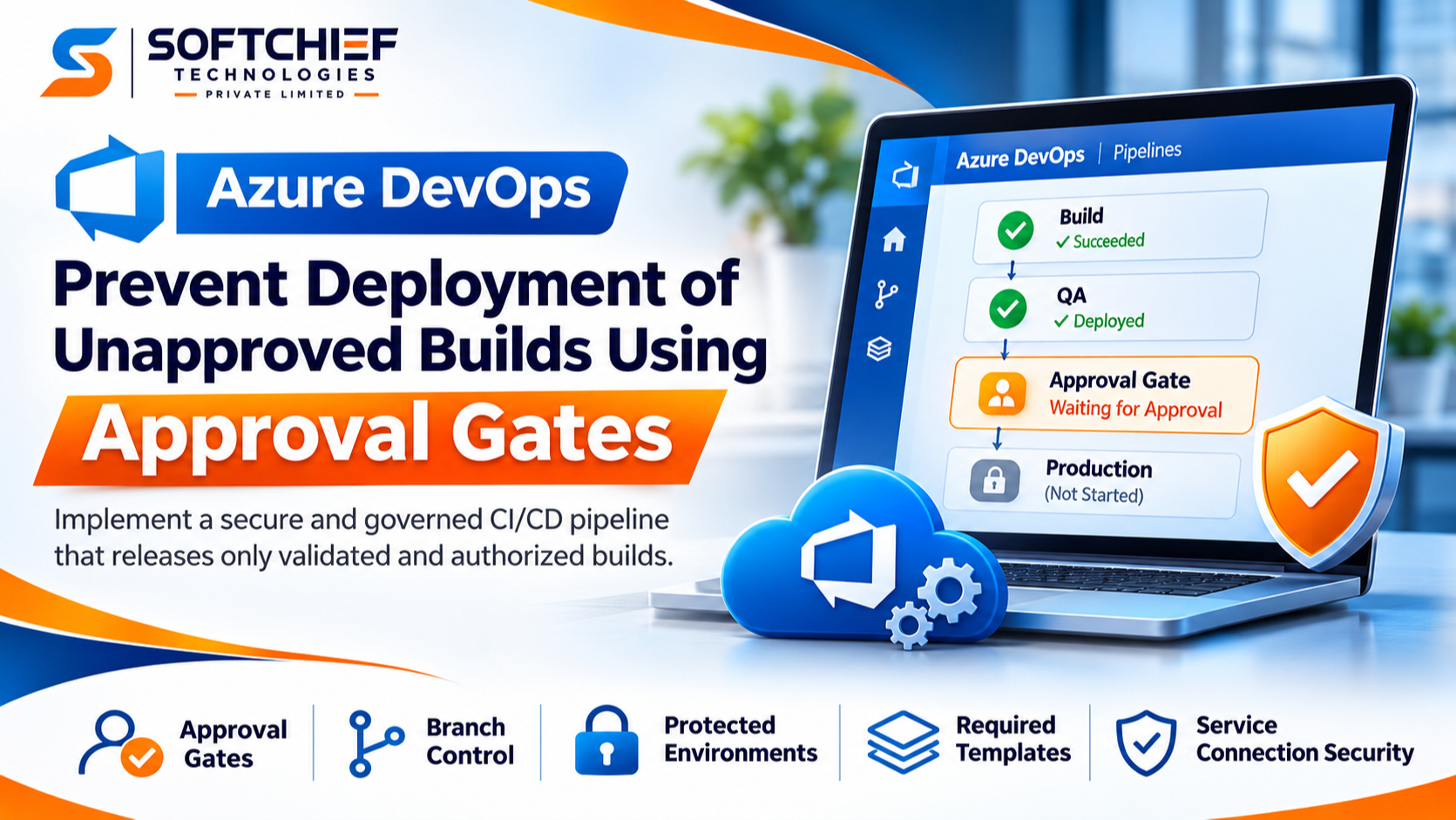
Azure DevOps: Prevent Deployment of Unapproved Builds Using Approval Gates
Introduction
Azure DevOps approval gates provide an additional layer of release authorisation for enterprise applications.
Azure DevOps approval gates play a critical role in securing enterprise CI/CD pipelines by ensuring that only validated, tested, and authorized application builds reach production.
In modern DevOps environments, a successful build does not automatically mean that an application is ready for production. Every release must satisfy technical validation, quality assurance, security requirements, and business authorization before deployment.
In this practical guide, we will explore how to configure Azure DevOps approval gates, protect production environments, enforce branch control, secure deployment pipelines, and prevent unapproved builds from reaching production.
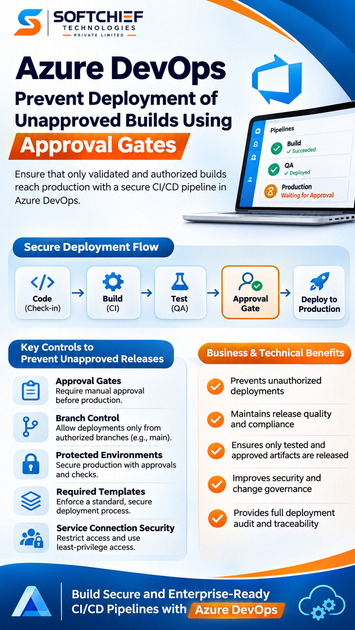
How Azure DevOps Approval Gates Prevent Unauthorized Deployments
Before implementing the solution, it is important to understand two separate responsibilities in a CI/CD pipeline.
Continuous Integration (CI) validates the application and produces a build artifact.
Continuous Deployment or Delivery (CD) determines when and where that artifact can be deployed.
Consider the following scenario:
| Pipeline activity | Status |
|---|---|
| Source code compilation | Successful |
| Unit testing | Successful |
| Artifact generation | Successful |
| QA approval | Pending |
| Change management approval | Pending |
| Production deployment | Should be blocked |
A common implementation mistake is to use the successful completion of the build stage as the only condition for production deployment.
For example:
condition: succeeded()This condition checks whether the dependencies of the stage or job have completed successfully.
It does not establish that a business stakeholder, QA engineer, security team, or release manager has approved the deployment.
That distinction is fundamental.
A pipeline must validate both technical readiness and release authorization.
A production deployment should proceed only when the required conditions have been satisfied.
3. Azure DevOps Architecture for Preventing Unapproved Deployments
Azure DevOps approval gates separate technical build validation from production release authorization.
A secure deployment architecture should separate build generation, validation, approval, and production deployment.
The recommended workflow is:
             Developer
                 |
                 v
          Azure Repos
                 |
                 v
          Pull Request
                 |
                 v
          Branch Policies
                 |
                 v
        CI Build Pipeline
                 |
        -------------------
        |                 |
        v                 v
    Compilation       Unit Tests
        |                 |
        -------------------
                 |
                 v
          Build Artifact
                 |
                 v
         QA Deployment
                 |
                 v
       Functional Testing
                 |
                 v
       Release Readiness
                 |
                 v
       Production Approval
                 |
          [Approval Gate]
                 |
          +------+------+
          |             |
       Approved       Rejected
          |             |
          v             v
     Production       Deployment
     Deployment        Blocked
          |
          v
       Monitoring
The important architectural decision is that production deployment must depend on an independently enforced approval mechanism.
Do not treat a successful CI build as permission to deploy.
3.1 Key Azure DevOps components
The following Azure DevOps capabilities work together to enforce release governance.
| Component | Responsibility |
|---|---|
| Azure Repos | Maintains source code and version history |
| Branch Policies | Enforces code review and branch protection |
| Build Pipeline | Compiles, tests, and generates artifacts |
| Pipeline Artifacts | Transfers build output between pipeline stages |
| Azure DevOps Environment | Represents a deployment target such as Production |
| Approvals and Checks | Controls access to protected resources |
| Service Connection | Provides controlled access to Azure resources |
| Pipeline Permissions | Restricts which pipelines can use protected resources |
Azure DevOps supports protected resources such as environments, repositories, service connections, agent pools, secure files, and variable groups.
These resources can have permissions, approvals, and checks configured independently of the YAML pipeline.
This is particularly important because pipeline authors should not be able to remove production approval requirements simply by changing their pipeline YAML.
Configuring Azure DevOps Approval Gates for Production Environments
Configuring Azure DevOps approval gates helps organizations protect production environments from unauthorized deployments.
Let’s implement the primary control.
Our requirement is straightforward:
The production deployment stage must not execute until an authorized release manager approves the deployment.
Azure DevOps supports environment-based approvals and checks.
Unlike a normal condition inside YAML, these checks are configured by the resource administrator through the Azure DevOps interface.
This provides an additional security boundary.
Step 1: Create a Production Environment
Navigate to your Azure DevOps project.
- Open Pipelines.
- Select Environments.
- Select New Environment.
- Enter the environment name:
production- Add an appropriate description:
Protected production environment.
All application deployments require release approval.- Create the environment.
An environment represents a logical deployment target. It also provides deployment history and a place to configure resource-level controls.
For example, an organization might maintain:
development
qa
staging
production
Each environment can have different access permissions and approval requirements.
Step 2: Configure Manual Approval Checks
Open the newly created production environment.
Navigate to:
Approvals and checks → Add check → Approvals
Configure the following:
| Setting | Recommended configuration |
|---|---|
| Approvers | Release Managers |
| Approval requirement | Manual approval |
| Instructions | Verify QA, security, and change approval |
| Timeout | Based on the organization’s release policy |
| Approval authority | Authorized independent reviewers |
Select the appropriate users or groups as approvers.
Save the configuration.
Now, whenever a pipeline stage attempts to consume this protected environment, Azure DevOps evaluates the configured approval before allowing that stage to proceed.
Important security consideration:
Do not rely exclusively on an approval task written inside YAML for production authorization.
For example:
- task: ManualValidation@1
  inputs:
    notifyUsers: 'release-manager@company.com'
    instructions: 'Approve production deployment'
This task can pause a pipeline and request manual intervention. However, it is defined by the pipeline author.
An author who can modify the YAML may also modify or remove that task.
An environment-level approval is managed by the protected resource owner and is therefore a stronger governance boundary.
5. Implement a Secure Multi-Stage YAML Pipeline
Azure DevOps approval gates ensure that a successful pipeline execution does not automatically authorize production deployment.
Now let’s implement the actual deployment pipeline.
Our example uses a .NET application, but the same architecture can be adapted for ASP.NET Core, APIs, microservices, and other application workloads.
The pipeline contains two stages:
- Build and publish the application artifact.
- Deploy the same artifact to the protected production environment.
The important requirement is that the deployment stage must consume the production environment.
5.1 Build and publish the artifact
Create an Azure Pipelines YAML file named:
azure-pipelines.ymlUse the following example:
trigger:
  branches:
    include:
      - main

pool:
  vmImage: 'ubuntu-latest'

stages:

- stage: Build
  displayName: 'Build and Test Application'

  jobs:
  - job: BuildApplication

    steps:

    - checkout: self

    - task: UseDotNet@2
      displayName: 'Install .NET SDK'
      inputs:
        packageType: 'sdk'
        version: '8.x'

    - script: dotnet restore
      displayName: 'Restore Dependencies'

    - script: dotnet build --configuration Release --no-restore
      displayName: 'Compile Application'

    - script: dotnet test --configuration Release
      displayName: 'Execute Unit Tests'

    - script: >
        dotnet publish
        --configuration Release
        --output $(Build.ArtifactStagingDirectory)/app
      displayName: 'Publish Application'

    - task: PublishPipelineArtifact@1
      displayName: 'Publish Build Artifact'
      inputs:
        targetPath: '$(Build.ArtifactStagingDirectory)/app'
        artifact: 'application-package'
        publishLocation: 'pipeline'
What happens in this stage?
1. Checkout
The pipeline retrieves the source code from the repository.
2. Restore
The application dependencies are restored.
3. Build
The application is compiled using the Release configuration.
4. Test
Unit tests are executed to validate the application logic.
5. Publish
The application is packaged into a publish directory.
6. PublishPipelineArtifact
The resulting package is published as a pipeline artifact.
The artifact is now available for downstream stages.
The key architectural principle is that the build should happen once and its output should be promoted through the deployment process.
Avoid rebuilding the application independently for production after QA approval. Doing so could produce a different artifact from the one that was actually tested.
5.2 Configure the Production Deployment Stage
Add the following stage to the same YAML file:
- stage: Production
  displayName: 'Production Deployment'

  dependsOn: Build

  condition: |
    and(
      succeeded(),
      eq(variables['Build.SourceBranch'], 'refs/heads/main')
    )

  jobs:

  - deployment: DeployApplication

    displayName: 'Deploy Approved Application'

    environment: 'production'

    strategy:
      runOnce:
        deploy:

          steps:

          - download: current
            artifact: application-package

          - script: |
              echo "Starting production deployment"

              echo "Deploying the approved artifact"

              echo "Production deployment completed"

            displayName: 'Deploy Application'
For this example, the deployment step uses demonstration commands rather than a real application deployment task.
In an actual implementation, replace the script with the appropriate deployment task, such as Azure Web App deployment, Azure Kubernetes deployment, or a deployment script using an authorized service connection.
Understanding the important YAML properties
dependsOn
dependsOn: BuildThe production stage depends on the successful completion of the Build stage.
condition
condition: |
  and(
    succeeded(),
    eq(variables['Build.SourceBranch'], 'refs/heads/main')
  )
This condition ensures that the stage runs only when the previous dependent stages have succeeded and the source branch is main.
This is an additional pipeline-level control, not a replacement for branch policies or environment checks.
environment
environment: 'production'This is the most important configuration for our approval requirement.
It associates the deployment job with the protected production environment created earlier.
Azure DevOps evaluates the environment’s approvals and checks before allowing the deployment stage to consume that resource.
download
- download: current
  artifact: application-package
This downloads the artifact published by the current pipeline run.
It avoids generating a new production build and ensures that the deployment stage uses the output of the build stage.
5.3 What happens when the pipeline runs?
Consider the following execution:
| Activity | Result |
|---|---|
| Build stage | Successful |
| Unit tests | Successful |
| Artifact publication | Successful |
| Production stage requested | Waiting for approval |
| Release manager approval | Pending |
| Production deployment | Not started |
At this point, Azure DevOps pauses the production stage because its protected environment has an outstanding approval check.
The release manager reviews the deployment and makes a decision.
Scenario A: Approval granted
The environment approval succeeds, and the deployment stage can proceed if its other conditions are also satisfied.
Scenario B: Approval rejected
The stage is prevented from consuming the protected environment, and production deployment does not proceed.
Scenario C: Approval remains pending
The pipeline remains blocked until the approval is completed or the configured timeout policy is reached.
This is how an organization can separate successful build generation from authorized production deployment.
6. Strengthen the Pipeline with Additional Security Controls
Combining branch policies with Azure DevOps approval gates strengthens release governance.
Manual approval is an important control, but production-grade CI/CD security should not depend on a single mechanism.
A release can be approved by a person and still originate from an unauthorized branch or use an incorrectly configured deployment resource.
Let’s examine the additional controls.
6.1 Branch Control: Protect Production Using Branch Control
Consider an application with the following branches:
main
develop
feature/customer-dashboard
feature/payment-integration
hotfix/security-patch
Developers may use feature branches for development and testing.
However, the organization may permit production deployment only from the protected main branch.
A pipeline-level condition can help, but the stronger approach is to configure a Branch Control check on the production environment.
Navigate to:
Pipelines → Environments → production → Approvals and checks → Add check → Branch control
Configure the allowed branch:
refs/heads/mainAlso configure the check to require branch protection.
This provides an independent validation of the branch associated with the pipeline resources.
If the branch is not authorized or its protection requirements are not satisfied, the production stage is blocked.
This helps prevent deployments from feature branches or other unauthorized sources.
6.2 Required Template: Enforce Standard Deployment Logic
In enterprise DevOps environments, different teams sometimes create their own YAML pipelines.
This can create inconsistent security configurations.
For example:
- One team uses production approval.
- Another team deploys without approval.
- Another team uses an unrestricted service connection.
- Another team has no standardized security validation.
A centralized YAML template helps standardize deployment logic.
Azure DevOps provides a Required Template check for protected resources.
This allows resource administrators to require pipelines using a protected resource to extend from a specified YAML template.
A simplified example:
resources:
  repositories:
  - repository: templates
    type: git
    name: DevOps/SharedTemplates
    ref: refs/heads/main

extends:
  template: templates/secure-deployment.yml@templates
The shared template can define common deployment stages, security validation, artifact handling, and deployment conventions.
The required template check should be configured on the protected production resource.
This is important: simply using a shared template in YAML does not enforce that every pipeline must use it. The resource-level Required Template check provides that additional enforcement.
6.3 Restrict Service Connection Permissions
A service connection provides access to external resources such as Azure subscriptions.
Suppose a pipeline has permission to deploy directly into a production Azure subscription.
If the service connection is available to every pipeline in the project, an unrelated pipeline may also be able to use it.
This increases the security risk.
Recommended controls:
- Restrict service connection access to authorized pipelines.
- Avoid enabling unrestricted access unless there is a justified requirement.
- Use appropriate service principals or workload identity federation.
- Follow least-privilege access principles.
- Separate development and production service connections.
- Configure approvals and checks on the production service connection where required.
For example:
Azure-Dev-Connection
Azure-QA-Connection
Azure-Production-Connection
Each connection should have only the permissions necessary for its intended deployment environment.
6.4 Use Exclusive Locks to Control Concurrent Production Deployments
Consider two developers triggering production deployments almost simultaneously.
Deployment A is deploying version 1.5.0.
Deployment B is deploying version 1.6.0.
Without an appropriate concurrency strategy, overlapping deployment operations may produce unexpected results.
Azure DevOps provides an Exclusive Lock check.
When configured on the production environment, it allows only one run to consume the protected resource at a time.
The pipeline can also specify:
- stage: Production
  lockBehavior: sequential
With the Exclusive Lock check enabled on the environment, sequential allows eligible runs to acquire the lock one after another.
Alternatively:
- stage: Production
  lockBehavior: runLatest
This uses the latest-run strategy for handling waiting runs.
The choice depends on release requirements.
For example:
- Use sequential processing when every approved release must be deployed in order.
- Use runLatest when newer runs should supersede older waiting runs.
An exclusive lock controls concurrency. It does not replace approval or artifact validation.
7. Advanced Release Governance: Verify the Exact Artifact Being Approved
This is where production deployment architecture becomes more interesting.
Imagine the following scenario:
- Build 105 passes all unit tests.
- QA validates Build 105.
- The release manager approves Build 105.
- A developer triggers Build 106.
- The production pipeline downloads the latest available artifact rather than the approved Build 105.
The production deployment now contains an artifact that was never reviewed.
The approval itself may have been valid, but the artifact selection process was incorrect.
This is an important release-management failure.
Approval must be associated with the exact artifact intended for deployment, not merely with the idea of a successful pipeline run.
7.1 Promote the Same Artifact Across Environments
A recommended artifact-promotion model is:
Source Code
    |
    v
CI Build
    |
    v
Artifact 1.5.0
    |
    v
QA Deployment
    |
    v
QA Validation
    |
    v
Artifact Approval
    |
    v
Production Approval
    |
    v
Production Deployment
The same artifact should move through QA, staging, and production.
Do not rebuild the application between these stages unless your release architecture explicitly requires a new build and a complete revalidation process.
7.2 Validate Build Artifacts Before Deployment
For stronger artifact integrity, record the artifact identity and calculate a cryptographic checksum.
For example, a SHA-256 checksum can help establish whether the downloaded package matches the expected package.
In a Linux-based agent, the following command can calculate the checksum:
sha256sum application-package.zipStore the resulting checksum in release metadata.
Before deployment, calculate the checksum again and compare it with the expected value.
If the values differ, stop the deployment.
For enterprise implementations, also consider:
- Immutable artifact storage.
- Artifact provenance.
- Build run identifiers.
- Source commit identifiers.
- Signed artifacts.
- Software Bill of Materials (SBOM).
- Vulnerability scan results.
- Deployment audit records.
A checksum alone does not prove that an artifact is safe or approved. It verifies content identity against a trusted expected value.
The approval process must still establish authorization and release readiness.
8. Real-World Enterprise Scenario: An Unapproved Payment Application Release
Implementing Azure DevOps approval gates helps financial services organizations establish controlled deployment processes.
Let’s understand how these controls work together in a real-world business scenario.
Assume a financial services organization maintains a payment processing application.
The development team introduces a new payment validation feature.
The organization has the following release policy:
- Developers can create builds from feature branches.
- Pull requests require peer review.
- QA must complete functional testing.
- Security validation must pass.
- Production deployments require release manager approval.
- Only protected main-branch builds are eligible for production.
- The exact QA-tested artifact must be deployed.
Scenario 1: Developer creates a feature branch build
A developer creates:
feature/payment-validationThe CI pipeline executes successfully.
However, the branch is not approved for production deployment.
Expected result: Production deployment is blocked by the branch control policy.
Scenario 2: Build succeeds, but QA approval is pending
The application is built from the main branch.
Compilation and unit tests pass.
However, the QA team has not completed functional testing.
Expected result: The production deployment must remain blocked until the required release approval process is completed.
Scenario 3: QA approves the build, but security scanning fails
The QA team completes functional validation.
However, the security scanning process identifies a critical vulnerability.
Expected result: The security check must prevent the release from progressing, regardless of the manual approval.
Scenario 4: All validations pass, but the release manager rejects the deployment
The build is technically ready.
QA and security validation are successful.
However, the release manager identifies a business dependency that makes the deployment unsuitable for the current release window.
Expected result: Production deployment remains blocked.
Scenario 5: All required controls pass
The source branch is authorized.
The build and test stages succeed.
QA validation is completed.
Security checks pass.
The release manager approves the intended artifact.
Expected result: The deployment pipeline can proceed to production.
This is the difference between a pipeline that simply automates deployments and a pipeline that enforces enterprise release governance.
9. Common Mistakes in Azure DevOps Approval Configuration
One of the most important Azure DevOps approval gates implementation decisions is separating approval ownership from pipeline authorship.
Even experienced DevOps engineers can introduce security gaps when configuring approval mechanisms.
Here are some important mistakes to avoid.
| Common mistake | Why it is risky | Recommended approach |
|---|---|---|
Using only succeeded() | Checks execution status, not business approval | Configure protected resource checks |
| Putting all approvals in YAML | Pipeline authors may modify the approval logic | Use environment-level approvals |
| Allowing all pipelines to access production resources | Untrusted pipelines may consume sensitive resources | Restrict pipeline permissions |
| Deploying from any branch | Unreviewed code may reach production | Configure branch control |
| Rebuilding after QA approval | Production output may differ from the tested artifact | Promote the same artifact |
| Using unrestricted service connections | Increases the impact of compromised pipelines | Apply least privilege |
| Ignoring concurrent deployments | Can cause deployment conflicts | Configure exclusive locks |
| Treating approval as proof of artifact integrity | An approved release may still contain a different package | Verify artifact identity |
10. Production-Ready Azure DevOps Release Security Checklist
Before implementing a production deployment pipeline, validate the following controls.
Source code governance
- Pull request policies are configured.
- Critical branches are protected.
- Direct changes to production branches are restricted.
- Build triggers follow the organization’s branching strategy.
Build validation
- Compilation completes successfully.
- Unit tests execute.
- Required quality checks pass.
- Security scanning is performed.
- Build artifacts are published with identifiable run information.
Release authorization
- Production environment is protected.
- Manual approval is configured.
- Authorized approvers are identified.
- Branch control is configured.
- Required template checks are considered.
- Approval timeout behavior is defined.
Deployment security
- Production service connections use least privilege.
- Pipeline permissions are restricted.
- The same validated artifact is promoted.
- Artifact identity is verified.
- Concurrent deployment behavior is defined.
- Deployment history and approval records are retained.
Operational readiness
- Failed deployments are handled.
- Rollback procedures are documented.
- Production monitoring is configured.
- Release ownership is clearly defined.
11. Frequently Asked Questions
Q1. Can Azure DevOps stop a deployment if a build is successful but not approved?
Yes. Configure a manual approval check on the protected production environment. Azure DevOps evaluates the check before allowing the deployment stage to consume that environment.
Q2. Can I implement approval directly inside azure-pipelines.yml?
Yes. You can use tasks such as ManualValidation@1 in an agentless server job.
However, for production governance, environment-level approvals are generally stronger because they are configured independently of the pipeline YAML.
Q3. What is the difference between a pipeline condition and an approval check?
A pipeline condition evaluates whether a stage, job, or step should run based on defined expressions and execution results.
An approval check is an authorization mechanism associated with a protected resource.
For example:
condition: succeeded()checks execution success, whereas an environment approval requires an authorized approval before the stage can consume the protected environment.
Q4. Can I prevent deployment from a feature branch?
Yes. You can combine repository branch policies, pipeline conditions, and a Branch Control check on the production environment.
Q5. Can QA and production use different approval rules?
Yes. Create separate Azure DevOps environments and configure different approvals and checks for each environment.
For example, QA may require a testing approval, whereas production may require QA completion, security validation, and release manager authorization.
Q6. Does an approved deployment guarantee that the application is secure?
No. Approval establishes release authorization. Application security requires additional controls such as code analysis, dependency scanning, vulnerability assessment, secret detection, and artifact integrity validation.
Q7. Can multiple approval checks be configured?
Yes. Azure DevOps supports multiple categories of checks, including static checks, pre-approval, dynamic checks, post-approval, and exclusive locks.
The configured checks are evaluated before the stage starts consuming the protected resource.
12. Conclusion: Build Automation Is Not Enough Without Release Governance
Azure DevOps approval gates help teams establish secure, traceable, and authorized production deployments.
A mature Azure DevOps implementation should never treat a successful build as automatic authorization to deploy to production.
Enterprise applications require a clear separation between technical validation and release authorization.
By combining:
- Azure DevOps Environments
- Manual Approvals and Checks
- Branch Control
- Required Templates
- Pipeline Permissions
- Service Connection Security
- Artifact Identity Validation
- Exclusive Locks
organizations can establish a more reliable and controlled deployment process.
The real objective is not to introduce unnecessary manual steps into CI/CD.
It is to ensure that automation proceeds only when the correct technical, operational, and business conditions have been satisfied.
A production deployment should be repeatable, traceable, authorized, and based on the exact artifact that was validated.
That is the foundation of secure enterprise DevOps engineering.
Technical Points for Azure DevOps Professionals
After implementing this architecture, you should be able to:
- Design a multi-stage Azure DevOps YAML pipeline.
- Configure protected deployment environments.
- Implement approval gates independently of YAML.
- Restrict production deployments to authorized branches.
- Enforce standardized deployment templates.
- Secure Azure service connections.
- Promote the same build artifact across environments.
- Understand artifact identity and release traceability.
- Control concurrent production deployments.
- Troubleshoot blocked or unauthorized deployment stages.
Want to Build Real-World Azure DevOps Skills?
Understanding CI/CD concepts is only the beginning. Working professionals need practical experience designing secure pipelines, managing deployments, implementing approval gates, and troubleshooting production release failures.
Explore technical learning opportunities with Softchief and strengthen your skills through practical Microsoft technology training.
Explore our Live Technical Webinars to gain practical insights into Microsoft technologies, Azure solutions, DevOps practices, and real-world implementation scenarios.