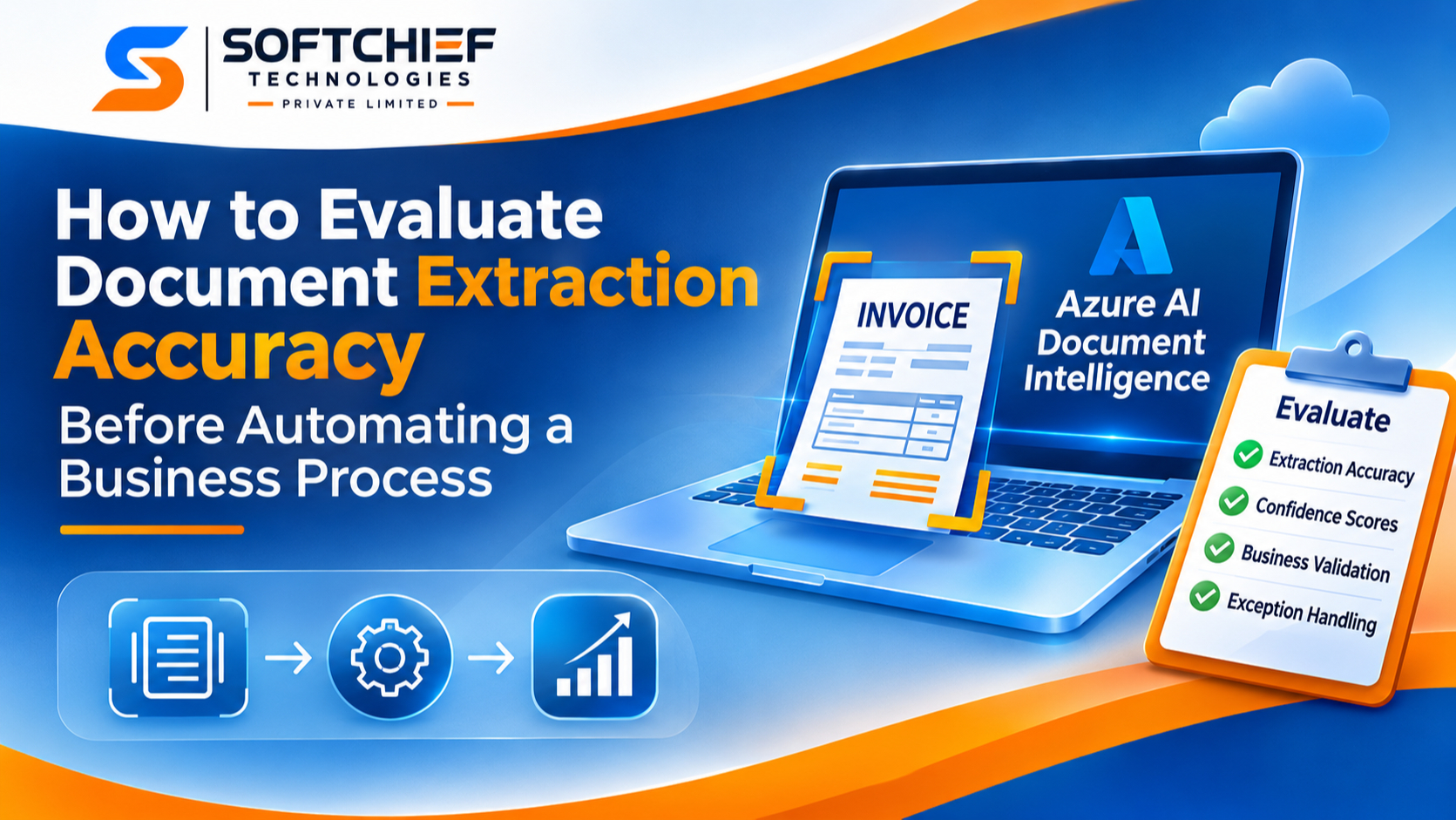
How to Evaluate Document Extraction Accuracy Before Automating a Business Process
Introduction
Document extraction accuracy is a critical consideration when organisations use Azure AI to automate document-intensive business processes. Although Azure AI Document Intelligence can extract structured information from invoices, purchase orders, contracts and forms, enterprises must evaluate the correctness of that information before allowing automated workflows to process it.
Traditionally, employees review these documents, identify the required information and manually enter it into business systems. This process consumes time, introduces human errors and creates operational bottlenecks.
Azure AI changes how organisations approach this problem. Using Azure AI Document Intelligence, businesses can extract structured information from documents and make that information available to downstream applications and workflows.
However, there is an important architectural question that organisations often overlook:
How do you know whether the extracted information is accurate enough to automate a business process without human intervention?
Successfully extracting text from an invoice does not necessarily mean the invoice has been processed correctly. A document extraction model might identify the vendor name correctly but extract the invoice amount incorrectly. It might recognise an invoice number but associate it with the wrong field. It might also return a high-confidence result that fails a business validation rule.
Combining document extraction accuracy measurements with business validation reduces the risk of incorrect automated transactions.
These errors become more serious when extracted information is automatically used for financial posting, purchase approvals, customer onboarding or contract processing.
The real objective should not be to extract information from documents as quickly as possible. It should be to establish measurable extraction accuracy, validate business-critical information and determine which documents are suitable for straight-through processing.
This article explores how technical teams, Azure developers, solution architects and business application professionals can evaluate document extraction accuracy before introducing automation into production.
Why Document Extraction Accuracy Matters in Enterprise Automation
Consider a manufacturing organisation that receives 5,000 supplier invoices every month.
Each invoice contains information such as:
- Vendor Name
- Vendor Tax Registration Number
- Invoice Number
- Invoice Date
- Purchase Order Number
- Taxable Amount
- Tax Amount
- Total Invoice Amount
- Payment Due Date
The finance team currently reviews every invoice and manually enters the information into its ERP system.
The organisation decides to introduce Azure AI Document Intelligence to automate information extraction.
The proposed process is straightforward:
- Supplier submits an invoice.
- The invoice is uploaded to cloud storage.
- Azure AI Document Intelligence analyses the document.
- Extracted fields are returned in structured JSON.
- An automation workflow processes the extracted information.
- The invoice is created in the ERP system.
- The finance team handles exceptions.
At first glance, the architecture appears complete.
But consider the following extraction result:
| Field | Actual Invoice Value | Extracted Value | Result |
|---|---|---|---|
| Vendor Name | ABC Manufacturing | ABC Manufacturing | Correct |
| Invoice Number | INV-2026-1045 | INV-2026-1045 | Correct |
| Invoice Date | 15-Nov-2026 | 15-Nov-2026 | Correct |
| Purchase Order | PO-45021 | PO-45021 | Correct |
| Taxable Amount | ₹1,00,000 | ₹1,00,000 | Correct |
| Tax Amount | ₹18,000 | ₹18,000 | Correct |
| Total Amount | ₹1,18,000 | ₹1,08,000 | Incorrect |
The extraction process successfully identified almost every field, but the total amount is incorrect.
If the workflow automatically posts this invoice, the organisation creates a financial discrepancy.
This illustrates an important principle:
Document extraction accuracy must be evaluated at the field level and at the business-process level, not simply by checking whether the document was successfully processed.
A technically successful API response does not guarantee a correct business outcome.
Understanding Azure AI Document Extraction
Before evaluating extraction accuracy, it is important to understand what happens during document processing.
Azure AI Document Intelligence is a Microsoft Azure service designed to extract information from documents.
It supports capabilities such as:
- Optical Character Recognition (OCR).
- Text extraction.
- Key-value pair extraction.
- Table extraction.
- Selection mark detection.
- Prebuilt document models.
- Custom document models.
- Structured field extraction.
The service can analyse supported document formats, including PDFs and image-based documents.
For example, when an invoice is submitted, the service can identify the vendor name, invoice number, dates, amounts and line items.
How Document Extraction Works
A simplified processing flow looks like this:
Invoice / Purchase Order / Contract
                |
                v
       Document Upload
                |
                v
    Azure Blob Storage
                |
                v
 Azure AI Document Intelligence
                |
                v
       Document Analysis
                |
        +-------+-------+
        |               |
        v               v
    OCR Results     Field Extraction
        |               |
        +-------+-------+
                |
                v
       Structured JSON
                |
                v
       Accuracy Validation
                |
        +-------+-------+
        |               |
        v               v
  Accepted Result   Human Review
        |               |
        +-------+-------+
                |
                v
       Business Application
        |
        +---- Dynamics 365
        |
        +---- Business Central
        |
        +---- ERP / CRM
The extraction result must pass through an evaluation and validation layer before the organisation allows it to trigger important business operations.
Understanding the Difference Between OCR and Field Extraction
These two capabilities are related, but they solve different problems.
OCR – Optical Character Recognition
OCR identifies text within a document.
For example, it might recognise:
Invoice Number: INV-1045
Invoice Date: 15-Nov-2026
Total Amount: 118000
Field Extraction
Field extraction identifies which pieces of information correspond to the required business fields.
For example:
{
  "InvoiceNumber": "INV-1045",
  "InvoiceDate": "2026-11-15",
  "TotalAmount": 118000
}
A system can recognise the text correctly but still map the value to the wrong field.
Therefore, evaluating OCR quality alone is insufficient when designing document automation.
Start with a Business Accuracy Requirement
One of the common mistakes in AI implementation is selecting a model first and deciding what accuracy is acceptable later.
A better approach is to begin with the business requirement.
Consider three different document-processing scenarios.
| Business Process | Critical Information | Risk of Incorrect Extraction |
|---|---|---|
| Supplier invoice processing | Vendor, invoice number, total amount | Incorrect financial posting |
| Customer onboarding | Customer name, tax ID, address | Incorrect customer records |
| Contract processing | Contract dates, renewal terms, payment clauses | Incorrect contractual decisions |
All three processes use document extraction, but their tolerance for errors is different.
For example, extracting a supplier’s address incorrectly may have a different operational impact from extracting the payable amount incorrectly.
This means extraction accuracy requirements should be defined according to field criticality.
Define Field-Level Accuracy Requirements
Before testing the model, prepare a field inventory.
| Field | Business Importance | Validation Requirement |
|---|---|---|
| Vendor Name | High | Match vendor master |
| Vendor Tax ID | Critical | Exact identifier match |
| Invoice Number | Critical | Duplicate and format validation |
| Invoice Date | High | Valid date and business rules |
| Purchase Order | Critical | Match existing purchase order |
| Tax Amount | Critical | Validate against tax rules |
| Total Amount | Critical | Reconcile invoice calculations |
| Description | Medium | Text similarity and review |
This field inventory becomes the foundation of the evaluation framework.
A model should not be considered production-ready simply because it extracts several fields accurately.
The organisation must understand which fields are correct, which fields are unreliable and what happens when an incorrect value enters the next business application.
Build a Ground Truth Dataset Before Testing
A reliable ground truth dataset provides the foundation for measuring document extraction accuracy across different document formats.
It provides the reference against which AI extraction results are compared.
Without ground truth, an organisation cannot reliably measure whether the extracted information is correct.
Example: Invoice Evaluation Dataset
Assume a company receives invoices from 20 suppliers.
Each supplier uses a different invoice template.
Some invoices are digitally generated PDFs, while others are scanned documents.
The evaluation dataset should contain representative samples from these different formats.
| Document Category | Sample Documents |
|---|---|
| Standard digital invoices | 40 |
| Scanned invoices | 30 |
| Multi-page invoices | 20 |
| Different supplier templates | 40 |
| Poor-quality documents | 20 |
| Complex invoices with tables | 20 |
| Total | 170 |
These figures are illustrative, not a universal minimum dataset size.
The important consideration is whether the dataset represents the documents the production system will actually receive.
What Should Be Captured in Ground Truth?
For every document, record:
- Document ID.
- Document type.
- Source format.
- Expected field values.
- Expected table rows.
- Expected numerical values.
- Page number where relevant.
- Validation notes.
- Document quality observations.
For example:
{
  "DocumentId": "INV-TEST-001",
  "DocumentType": "Invoice",
  "ExpectedValues": {
    "VendorName": "ABC Manufacturing",
    "InvoiceNumber": "INV-2026-1045",
    "InvoiceDate": "2026-11-15",
    "TaxableAmount": 100000.00,
    "TaxAmount": 18000.00,
    "TotalAmount": 118000.00
  }
}
This dataset allows the development team to compare the actual extracted output with the expected business values.
Separate Training, Validation and Test Documents
When custom models are trained, the same documents should not be used indiscriminately for training and final evaluation.
A useful approach is to divide the available documents into separate datasets.
Training Dataset
Used to train or improve the custom extraction model.
Validation Dataset
Used during model development to assess alternative configurations and improvements.
Test Dataset
Used for final evaluation against previously unseen documents.
The test dataset should remain separate from model development to provide a more realistic measure of generalisation.
Where documents originate from the same supplier or template, consider separating them by supplier or template rather than randomly splitting near-identical documents. Otherwise, the evaluation may overestimate how well the model handles new document layouts.
Measure Extraction Accuracy Using the Right Metrics
This is one of the most important parts of document automation.
A single accuracy percentage cannot explain every type of extraction error.
Technical teams should use multiple evaluation metrics depending on the type of data being extracted.
Exact Match Accuracy
Exact match comparison is one of the simplest ways to measure document extraction accuracy at the individual field level.
Exact match accuracy measures how many extracted values exactly match their expected values.
The formula is:
Exact Match Accuracy = (Number of Correctly Extracted Values / Total Expected Values) × 100
Consider a dataset containing 100 invoice numbers.
If 96 extracted invoice numbers match the ground truth exactly:
Exact Match Accuracy = (96 / 100) × 100
Result = 96%
This is useful for fields such as:
- Invoice Number.
- Tax Registration Number.
- Purchase Order Number.
- Customer ID.
- Vendor ID.
For these fields, even a single incorrect character may create a business problem.
Normalised Accuracy
Some extracted values can be correct even when their formatting differs.
For example:
Expected value:
15-Nov-2026Extracted value:
2026-11-15These values represent the same date.
Similarly:
₹1,18,000.00and
118000may represent the same numerical amount.
Normalisation should therefore happen before comparison.
Typical normalisation rules include:
- Removing unnecessary whitespace.
- Standardising date formats.
- Converting currency values into numeric representations.
- Standardising case where appropriate.
- Removing permitted formatting characters.
- Applying consistent decimal precision.
However, normalisation must not hide meaningful errors.
For example, removing punctuation from a tax identifier could make two different identifiers appear identical.
Precision, Recall and F1 Score
These metrics are particularly useful when evaluating the identification of fields, table rows or document elements.
Precision
Precision measures how many extracted items are correct among all the items predicted by the model.
Precision = True Positives / (True Positives + False Positives)
Recall
Recall measures how many expected items were successfully identified.
Recall = True Positives / (True Positives + False Negatives)
F1 Score
F1 Score combines precision and recall using their harmonic mean.
F1 = 2 × (Precision × Recall) / (Precision + Recall)
Consider a document containing 20 expected line items.
The model identifies 18 of them, but two additional incorrect rows are also returned.
Assume:
- True Positives = 18
- False Positives = 2
- False Negatives = 2
Precision = 18 / 20 = 90%
Recall = 18 / 20 = 90%
F1 Score = 90%
These metrics help identify whether the model is missing expected information or extracting information that does not belong in the output.
For fixed-schema document extraction, field-level exact match and value-level error analysis should also be reported. Precision and recall should not replace field-value correctness.
Numeric Error Measurement
Financial documents require additional validation.
A model might extract an amount of ₹1,18,050 instead of ₹1,18,000.
An exact-match evaluation identifies this as incorrect, but it is also useful to understand the size of the error.
Mean Absolute Error (MAE) can be used for numerical fields.
MAE = Sum of Absolute Errors / Number of Evaluated Values
For example:
| Document | Expected Amount | Extracted Amount | Absolute Error |
|---|---|---|---|
| Invoice 1 | ₹10,000 | ₹10,000 | ₹0 |
| Invoice 2 | ₹25,000 | ₹25,500 | ₹500 |
| Invoice 3 | ₹50,000 | ₹49,500 | ₹500 |
MAE = (0 + 500 + 500) / 3
MAE = ₹333.33
However, MAE alone should not determine whether an invoice is safe to post. A small error in a tax identifier or a critical payment field can still be unacceptable.
For financial values, combine numerical error analysis with exact reconciliation and business validation.
Understand Confidence Scores in Azure AI Document Intelligence
Confidence scores should be analysed alongside document extraction accuracy rather than treated as proof of correctness.
A confidence score is one of the most useful outputs when designing an intelligent document-processing workflow.
Azure AI Document Intelligence returns confidence values for supported extracted elements, including words and certain field predictions.
Confidence values are generally represented between 0 and 1.
For example:
| Extracted Field | Value | Confidence |
|---|---|---|
| Vendor Name | ABC Manufacturing | 0.98 |
| Invoice Number | INV-2026-1045 | 0.96 |
| Invoice Date | 15-Nov-2026 | 0.94 |
| Purchase Order | PO-45021 | 0.82 |
| Total Amount | ₹1,18,000 | 0.61 |
A confidence score of 0.98 indicates a high degree of model confidence in the prediction.
However, developers should understand an important distinction:
A confidence score is not a guarantee that the extracted value is correct.
A result with a confidence score of 0.95 can still be incorrect.
Confidence scores must be evaluated against actual ground truth to determine how reliably they indicate correctness for a particular document-processing scenario.
Confidence-Based Decision Making
Consider the following example thresholds:
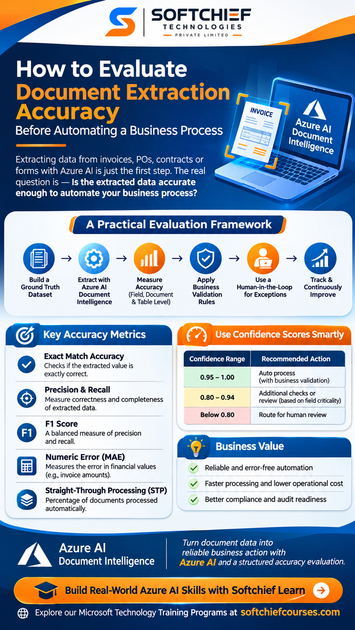
| Confidence Range | Proposed Action |
|---|---|
| 0.95–1.00 | Eligible for automatic processing, subject to business validation |
| 0.80–0.94 | Additional validation or review depending on field criticality |
| Below 0.80 | Human review or exception handling |
These are illustrative starting points, not universal Azure AI thresholds.
A financial organisation might require a higher threshold for payment amounts than for non-critical descriptive fields.
For example:
- Vendor Name: 0.90 may be acceptable if master-data validation succeeds.
- Invoice Number: Requires exact matching and duplicate checking.
- Total Amount: Requires high confidence and financial reconciliation.
- Contract Termination Date: Requires strict validation because of its legal and operational implications.
Microsoft recommends conducting a representative proof of concept to establish appropriate confidence thresholds for the intended business scenario.
The thresholds should be determined through measured performance, not selected arbitrarily.
Confidence Score vs Actual Accuracy
These two concepts should never be confused.
| Confidence Score | Actual Accuracy |
|---|---|
| Model’s estimated certainty | Correctness measured against verified expected values |
| Available from supported model outputs | Requires ground truth evaluation |
| Useful for routing decisions | Useful for measuring real performance |
| Can be high even when a prediction is wrong | Identifies whether the prediction was actually correct |
A mature implementation evaluates both.
Field-Level Evaluation Is More Important Than Document-Level Accuracy
Consider two invoices.
Invoice A
- Vendor Name: Correct
- Invoice Number: Correct
- Invoice Date: Correct
- Total Amount: Correct
Invoice B
- Vendor Name: Correct
- Invoice Number: Correct
- Invoice Date: Correct
- Total Amount: Incorrect
Suppose both documents have 95% extraction accuracy.
Should they receive the same automation decision?
Not necessarily.
Invoice B contains an error in a financially critical field.
This is why organisations should measure extraction performance at multiple levels.
Recommended Evaluation Levels
Field-Level Accuracy
Measures the correctness of individual extracted values.
Document-Level Accuracy
Measures whether all required fields in a document are correct.
Table-Level Accuracy
Measures the correctness of extracted line items, quantities, descriptions and amounts.
Business-Rule Accuracy
Measures whether the extracted information satisfies business rules.
End-to-End Process Accuracy
Measures whether the overall automated business process produces the correct business outcome.
For example, an invoice should not be considered successfully automated merely because all fields were extracted. It must also pass vendor validation, purchase-order matching, duplicate checking and financial reconciliation.
Calculate Document-Level Accuracy
Suppose 100 invoices are evaluated.
- 90 invoices have every required field correctly extracted.
- 10 invoices contain at least one incorrect field.
Document-Level Accuracy = (90 / 100) × 100
Result = 90%
This is different from field-level accuracy.
A system may achieve 98% field-level accuracy but only 85% document-level accuracy if individual errors are distributed across many documents.
Both measurements provide valuable information.
Validate Extracted Information Using Business Rules
This is where document extraction becomes a genuine enterprise automation capability.
AI identifies and extracts information.
Business rules determine whether that information is valid for the organisation.
Consider a supplier invoice.
The extracted information should be checked against the ERP or finance system before posting.
Example Business Validation Rules
| Field | Validation Rule |
|---|---|
| Vendor Number | Must exist in vendor master |
| Invoice Number | Must not already exist for the vendor |
| Invoice Date | Must be a valid date |
| Purchase Order | Must exist and be eligible for matching |
| Quantity | Must be greater than zero where applicable |
| Unit Price | Must satisfy configured business checks |
| Tax Amount | Must reconcile with applicable tax rules |
| Total Amount | Must reconcile with the invoice calculation |
For example:
Taxable Amount = 100000

Tax Rate = 18%

Expected Tax = 18000

Expected Total = 118000
The system can validate:
Expected Total =
Taxable Amount + Tax Amount
If the extracted total amount is ₹1,08,000, the validation should fail.
The document should be routed for investigation rather than automatically posted.
Important Distinction
A document can have excellent extraction accuracy but still fail business validation.
For example, the AI might extract a purchase order number correctly, but the purchase order could be closed or already fully invoiced.
This is not necessarily an extraction failure. It is a business-process validation failure.
A well-designed architecture should report these errors separately.
Designing a Human-in-the-Loop Validation Process
Not every document should be automatically processed.
In enterprise applications, human review is an important control mechanism.
The objective is not to eliminate human involvement completely. It is to reduce unnecessary manual work while ensuring that critical business decisions remain controlled.
Example: Invoice Processing Workflow
       Invoice Received
              |
              v
     Azure AI Document
        Intelligence
              |
              v
       Field Extraction
              |
              v
     Confidence Evaluation
              |
              v
      Business Validation
              |
        +-----+-----+
        |           |
        v           v
    Validated    Validation
     Results      Failure
        |           |
        v           v
   Auto Process  Human Review
        |           |
        |       +---+---+
        |       |       |
        |       v       v
        |    Correct  Reject
        |       |
        +-------+
              |
              v
        ERP Integration
              |
              v
       Processing Status
              |
              v
         Audit Trail
What Should Human Review Include?
A reviewer should be able to:
- View the original document.
- View extracted values.
- See the confidence associated with supported fields.
- Identify which fields failed validation.
- Navigate to the source location of extracted information where available.
- Correct incorrect values.
- Approve or reject the document.
- Record the reason for the correction.
Grounding and source-location information are particularly valuable because they help reviewers verify where an extracted value originated.
For supported Azure AI Content Understanding document analyzers, grounding can provide page and spatial references to the original document.
This improves traceability and makes human review more efficient.
Why Corrections Matter
Human corrections should not simply disappear after the document is processed.
They should be captured as part of the model improvement process.
The development team can analyse:
- Which fields are frequently incorrect.
- Which suppliers have unusual invoice formats.
- Which document types have low confidence.
- Whether errors are caused by poor image quality.
- Whether the extraction schema needs refinement.
- Whether additional labelled examples are required.
This creates a continuous improvement cycle.
Choosing the Right Azure AI Approach
Not every document-processing requirement needs the same extraction technology.
Microsoft provides different capabilities for document understanding.
Two important services to understand are Azure AI Document Intelligence and Azure Content Understanding in Foundry Tools.
Azure AI Document Intelligence
Document Intelligence is particularly useful when organisations need structured extraction from forms, invoices, receipts, identity documents and other supported document types.
Its capabilities include:
- Prebuilt models.
- Custom models.
- OCR.
- Key-value extraction.
- Table extraction.
- Field-level confidence for supported outputs.
Azure Content Understanding in Foundry Tools
Content Understanding provides a broader analyzer-based approach to understanding different content types.
For document workflows, it supports:
- Schema-based field extraction.
- Document analysis.
- Confidence scoring.
- Grounding.
- Labeled samples for improving extraction.
- Structured output.
It can be useful for more complex document-understanding scenarios, including contracts and unstructured business documents.
The choice should be based on the document structure, extraction requirements, evaluation needs and overall architecture.
Comparison
| Evaluation Area | Document Intelligence | Content Understanding |
|---|---|---|
| Document OCR | Yes | Document understanding capabilities |
| Prebuilt document models | Yes | Analyzer-based capabilities |
| Custom extraction | Yes | Custom analyzers |
| Field confidence | Supported outputs | Supported document fields with configuration |
| Grounding | Available extraction references, depending on output | Document grounding with source references |
| Labeled examples | Custom model training | Analyzer improvement using labeled samples |
| Best suited for | Structured document extraction | Broader schema-driven content understanding |
The two services should not be treated as interchangeable in every scenario. Evaluate the actual capabilities and API behaviour required by the implementation.
Enterprise Architecture: From Document Extraction to Business Process Automation
Enterprise teams should monitor document extraction accuracy continuously as document formats and business requirements change.
Consider a financial services organisation that wants to automate customer application processing.
Customers submit:
- Application Forms.
- Identity Documents.
- Address Proof.
- Income Statements.
- Supporting Certificates.
The organisation wants to extract information and create customer records automatically.
A production-ready architecture could look like this:
         Customer Portal
                |
                v
        Document Upload
                |
                v
         Azure Storage
                |
                v
       Azure AI Processing
                |
                v
        Structured Output
                |
                v
       Validation Service
                |
        +-------+-------+
        |               |
        v               v
  Confidence Check   Business Rules
        |               |
        +-------+-------+
                |
                v
        Decision Engine
                |
        +-------+-------+
        |               |
        v               v
   Auto Processing   Human Review
        |               |
        +-------+-------+
                |
                v
        Azure Integration
                |
        +-------+-------+
        |               |
        v               v
     Dynamics 365    Business Central
                |
                v
       Monitoring & Audit
Architecture Components
Azure Storage
Stores uploaded documents and provides a controlled document-processing source.
Azure AI Document Intelligence
Analyses supported document types and extracts the required information.
Validation Service
Checks extracted values against predefined business requirements.
Decision Engine
Determines whether the document can be automatically processed or requires manual review.
Azure Functions
Can execute custom validation, transformation and integration logic.
Azure Service Bus
Can be introduced when asynchronous processing, reliable messaging and decoupling between components are required.
Power Automate
Can orchestrate business workflows, approvals and exception handling where appropriate.
Dynamics 365 / Business Central
Receives validated business information through supported integration mechanisms.
Monitoring and Audit
Captures processing status, errors, corrections and operational metrics.
Why Should the Architecture Separate Extraction and Validation?
Consider an organisation that initially implements everything inside one large automation flow.
The flow uploads a document, extracts values, checks them and creates an ERP record.
As the business grows, new requirements emerge:
- Additional invoice formats.
- Different approval rules.
- New suppliers.
- Additional validation requirements.
- Multiple downstream systems.
A tightly coupled implementation becomes difficult to maintain.
Separating document extraction, validation and business processing creates clearer responsibilities.
It also allows the organisation to change its extraction model without unnecessarily changing its ERP integration logic.
How to Measure Straight-Through Processing Before Production
Straight-through processing (STP) refers to the proportion of documents that complete the intended process without requiring manual intervention.
This is an important operational metric for intelligent document processing.
For example:
A company processes 1,000 invoices.
- 750 invoices pass all required checks.
- 250 invoices require human review.
STP Rate:
STP Rate = (Automatically Processed Documents / Total Documents) × 100
STP Rate = (750 / 1,000) × 100
STP Rate = 75%
This means 75% of the evaluated invoices completed the process without manual review.
However, a high STP rate should never be achieved by weakening validation controls.
The organisation must measure STP alongside accuracy and the rate of incorrect automatic processing.
Recommended Production Readiness Metrics
| Metric | What It Measures |
|---|---|
| Field-Level Accuracy | Correctness of extracted values |
| Document-Level Accuracy | Percentage of documents with all required fields correct |
| Precision | Correctness of predicted items |
| Recall | Completeness of expected extracted items |
| F1 Score | Balance between precision and recall |
| Confidence Distribution | Distribution of model confidence values |
| STP Rate | Documents processed without manual intervention |
| Exception Rate | Documents requiring manual investigation |
| Critical Error Rate | Frequency of errors in business-critical fields |
| Processing Latency | Time required to process a document |
| Cost per Document | Overall processing cost |
Measure the Cost of Incorrect Automation
A successful automation solution should reduce operational effort without introducing unacceptable business risk.
Suppose:
- Monthly invoices = 5,000.
- Manual processing time = 6 minutes per invoice.
- Fully loaded employee cost = ₹300 per hour.
Manual processing effort:
5,000 × 6 minutes = 30,000 minutes.
30,000 / 60 = 500 hours.
Estimated monthly manual processing cost:
500 × ₹300 = ₹1,50,000.
Now suppose the AI solution automatically processes 75% of invoices and the remaining 25% require human review.
Assume:
- Automatically processed invoices require 1 minute of average exception-monitoring effort per document.
- Manually reviewed invoices require 3 minutes each.
- The same hourly cost applies.
Estimated review effort:
Automatic documents:
3,750 × 1 minute = 3,750 minutes.
Manual-review documents:
1,250 × 3 minutes = 3,750 minutes.
Total effort = 7,500 minutes = 125 hours.
Estimated monthly review cost = ₹37,500.
Potential monthly labour-effort saving = ₹1,12,500.
This is an illustrative calculation. It excludes Azure service consumption, integration development, support, monitoring, licensing and ongoing maintenance costs.
The organisation must also account for the cost of incorrect automatic processing.
A solution that saves operational effort but introduces financial errors is not a successful automation implementation.
Common Mistakes When Evaluating Document Extraction Accuracy
Even technically capable teams can make incorrect assumptions when testing document extraction models.
Testing Only a Few Documents
Problem: The model performs well on five sample invoices, so the team assumes it is ready for production.
Why it happens: The test documents are often similar to one another.
Correct approach: Use representative documents across different suppliers, layouts, image qualities and document variations.
Evaluating Only OCR Accuracy
Problem: The text is recognised correctly, but the information is assigned to the wrong fields.
Why it happens: The team treats text recognition as equivalent to structured extraction.
Correct approach: Measure field-level correctness and business-rule accuracy separately.
Treating Confidence as Guaranteed Accuracy
Problem: Every field with a confidence score above 0.90 is automatically accepted.
Why it happens: Confidence is interpreted as a guarantee.
Correct approach: Compare confidence scores with actual outcomes on labelled test documents and establish field-specific thresholds.
Ignoring Business Validation
Problem: Extracted invoice values are sent directly to the ERP.
Why it happens: The development team focuses only on the AI extraction output.
Correct approach: Validate vendor details, duplicate invoices, purchase orders, amounts and applicable financial rules before posting.
Ignoring Document Variations
Problem: The model performs well on digital PDFs but fails on scanned documents.
Why it happens: The training and test documents do not represent production inputs.
Correct approach: Evaluate the different formats and layouts that the business actually receives.
Failing to Measure Incorrect Automatic Processing
Problem: The organisation reports a high automation rate without measuring the correctness of automatically processed documents.
Why it happens: STP is treated as the only success metric.
Correct approach: Track STP alongside critical-field accuracy, document-level accuracy and incorrect automatic-processing rates.
Continuous Improvement: How to Improve Extraction Accuracy Over Time
Document extraction should not be treated as a one-time model development exercise.
Production documents change.
Suppliers introduce new invoice templates. Customers submit different forms. Scanned documents vary in quality. Business requirements also evolve.
A sustainable implementation needs a continuous evaluation and improvement process.
Recommended Improvement Cycle
Step 1 – Capture Extraction Results
Store the extraction output, confidence information where supported, document metadata and processing status.
Step 2 – Capture Validation Errors
Identify which fields failed validation and why.
Step 3 – Review Human Corrections
Compare corrected values with the original extracted results.
Step 4 – Identify Error Patterns
Group errors by:
- Document type.
- Supplier.
- Template.
- Field.
- Document quality.
- Extraction method.
Step 5 – Improve the Extraction Model
Depending on the cause, consider:
- Improving document quality.
- Refining field definitions.
- Adding representative labelled examples.
- Separating visually distinct document types.
- Selecting a more appropriate prebuilt or custom model.
- Improving post-extraction validation.
Step 6 – Re-evaluate Using an Independent Test Dataset
Compare the updated model against the original baseline.
Step 7 – Deploy Through Controlled ALM
Version the model configuration and related application components, test in non-production environments and promote changes through a controlled deployment process.
Step 8 – Monitor Production Performance
Continue measuring accuracy, exceptions, processing time and incorrect automation outcomes.
An improvement should be accepted only when the evaluation results demonstrate that it actually improves the intended business outcome.
A Practical Evaluation Checklist Before Automating a Business Process
Before introducing Azure AI document extraction into a production business process, technical teams should be able to answer the following questions.
| Evaluation Area | Questions to Ask |
|---|---|
| Business Requirements | Which fields are required for the process? |
| Document Samples | Do the samples represent actual production documents? |
| Ground Truth | Are expected values independently verified? |
| Model Selection | Is the selected Azure AI capability appropriate? |
| Field Accuracy | Have critical fields been evaluated separately? |
| Confidence | Have confidence thresholds been tested against ground truth? |
| Business Validation | Are extracted values checked against business rules? |
| Human Review | Is there a process for handling uncertain results? |
| Integration | Are downstream applications protected from invalid data? |
| Monitoring | Can incorrect extraction and processing be identified? |
| Security | Are documents, extracted values and access permissions protected? |
| Governance | Are model changes and validation rules version-controlled? |
If these questions cannot be answered, the solution is not ready for unrestricted production automation.
Final Thoughts: Accuracy Must Come Before Automation
Azure AI has made document understanding significantly more accessible to enterprise development teams.
Organisations can now extract information from invoices, contracts, purchase orders, customer forms and other business documents without building every capability from scratch.
However, extracting information and automating a business process are two different engineering challenges.
The first requires an AI model that can identify and extract information.
The second requires confidence evaluation, ground truth comparison, business validation, exception handling, integration controls and continuous monitoring.
A document-processing solution should not be considered successful simply because it returns structured JSON or achieves a high confidence score.
It should be considered successful when the organisation can demonstrate that critical business information is extracted correctly, errors are detected before they affect downstream systems, and the automation process produces reliable business outcomes.
For Azure developers and solution architects, the real responsibility is to move beyond the question:
“Can Azure AI extract information from this document?”
The more important question is:
“Can we prove that the extracted information is accurate enough to trigger this business process safely?”
That is the difference between implementing an AI document extraction feature and engineering a reliable enterprise document automation solution.
Build Practical Azure AI and Enterprise Automation Skills with Softchief Learn
Working with Azure AI requires more than knowing how to call an API. Enterprise implementation involves understanding document processing, extraction models, confidence evaluation, validation logic, Azure integration services and the business applications that consume the extracted information.
At Softchief Learn, our Microsoft technology training focuses on connecting technical implementation with real business requirements.
Whether you are an Azure developer strengthening your AI development skills, a Dynamics 365 or Business Central consultant exploring intelligent document processing, or an IT professional preparing to work on enterprise AI projects, structured practical learning can help you move from individual technology components to complete business solutions.
Want to strengthen your Azure AI development and enterprise implementation skills?
Explore our Microsoft technology training programs
Upcoming Microsoft Technology Webinars
💬 Discuss Your Learning Goals: Connect with Softchief to understand the relevant training program and curriculum.
Learn the technology. Understand the architecture. Build solutions that solve real business problems.