Expected polymorphic value canvas app
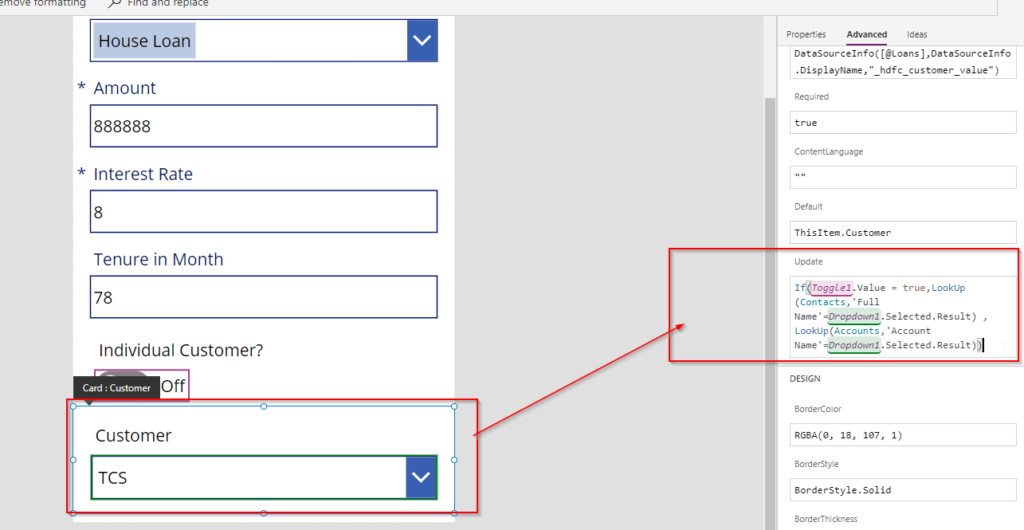
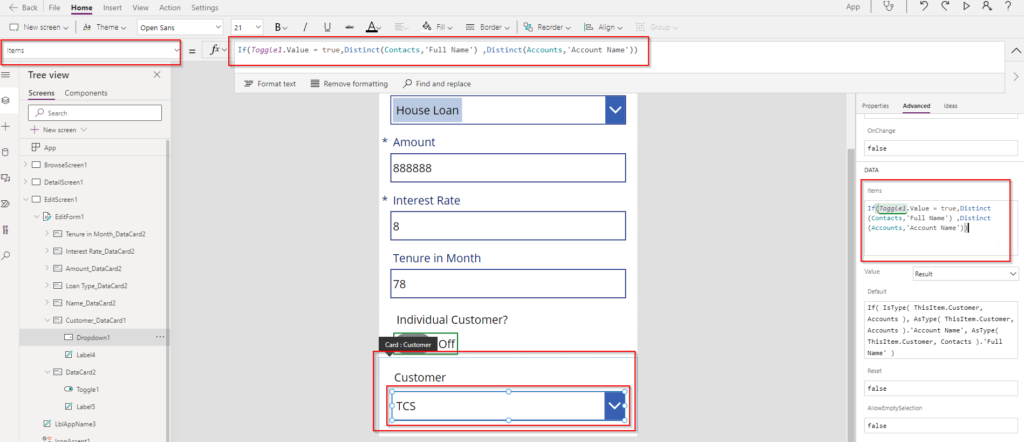
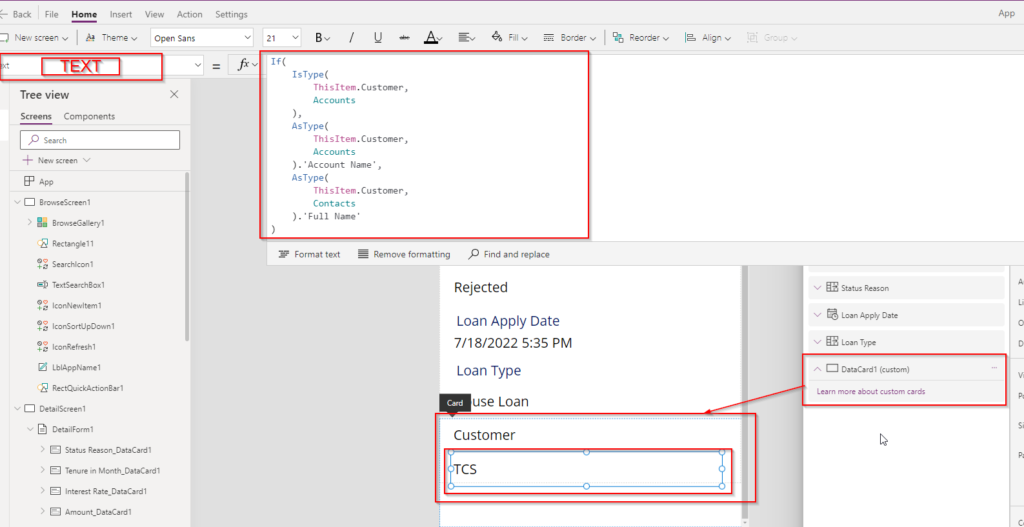
if you are getting this error in canvas app that means you are not assigning a correct polymorphic data type. Use the Power FX as given below screenshot Hope this helps. Create a lookup function and assign it.
If you are looking for complete article how to perform CRUD operation for polymorphic lookup field value then read this article HERE. You can also use Patch function to send data from canvas app to Dataverse using Patch function from a FORM. use below powerfx. You can use a toggle button to decide what type…
Read more
You might have used polymorphic lookup field which can hold reference of multiple tables like Customer Data Type which can hold contact or account. SO for this type of complex data types its is not straight forward to handle CRUD operation from canvas app. Let us see here how to Create a record in Dataverse…
Read more
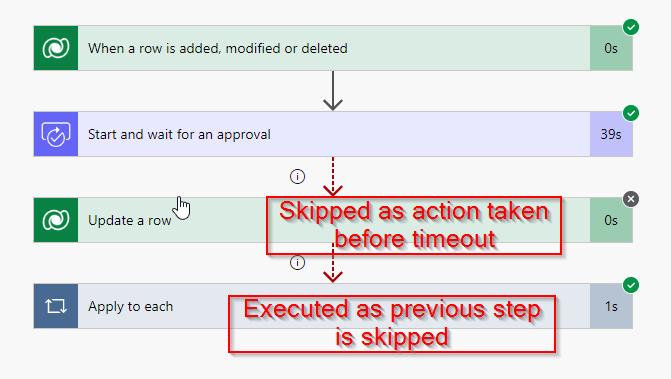
here in this post you will come to know how to handle Time Out scenarios in Power Automate. Lets take a scenario. Once a loan record is created inside Dataverse you want to raise an approval for Branch Manager and The approval request must be taken action within 3 days else the loan request will…
Read more
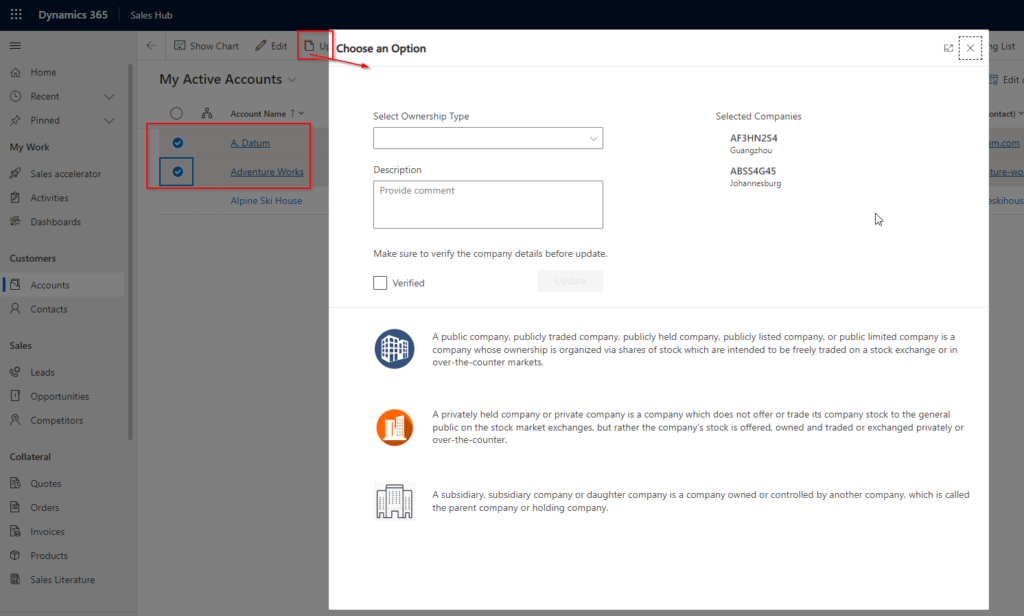
In business requirements you need to open custom page on clicking a command button on main grid by selecting one or multiple rows. This post will explain below points. How to Add Custom button on Main grid command bar Show command button if at least one row selected else hide Call JavaScript to open a…
Read more
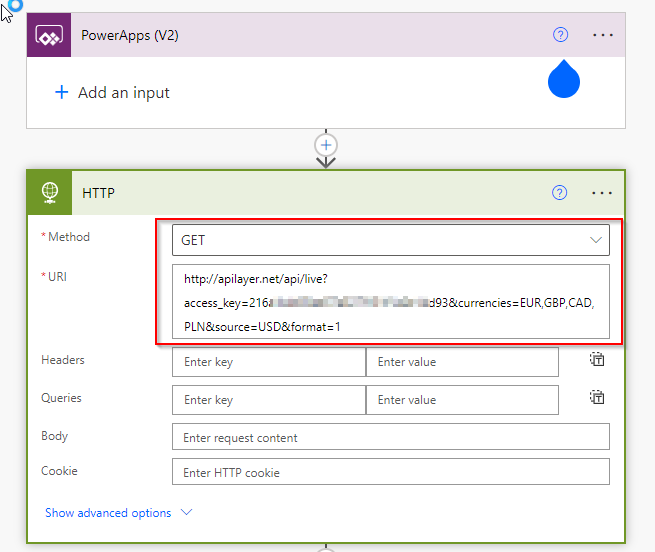
Sometimes you need to return tabular data from power automate to canvas app. This post explains how you can do that. Follow below steps. Here I am calling a third party WEB API and consume response in Power Automate and return result as JSON and bind to data table in canvas app. Watch the video…
Read more
Here is the Dynamics 365 CE CRM and Power Platform Complete Syllabus.
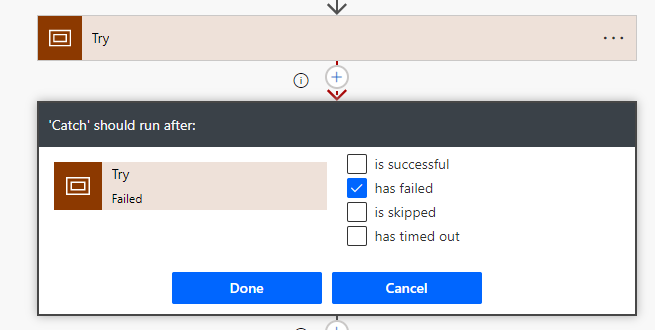
Most of the times when you design a Power Automate flow, you face run time errors due to data issue or environment issues. So this post will explain you how you can handle runtime errors in Power Automate. Follow the below steps to implement TRY CATCH FINALLY BLOCKS in Power Automate. Watch the video or…
Read more
Immersive BPF can be run independently from Power Automate screen. It not required to embed inside model driven apps. Lets explore the steps how to create immersive BPF in power platform. Step 1 : Create a Immersive BPF from power automate portal Open flow website and select correct environment. Click on My flows option. The…
Read more
To Change record status of dynamics 365 records use below code. Update your code accordingly to suit your business need. Hope this helps.
When you want to call a Plugin on Status change of a record in Dynamic 365 CE then you should use EntityMoniker. Check the code below and update it accordingly and use in your project. IMPORTANT NOTE While registering message in Plugin Registration tool, you have to add SetState and SetStateDynamicEntity messages . Hope this…
Read more

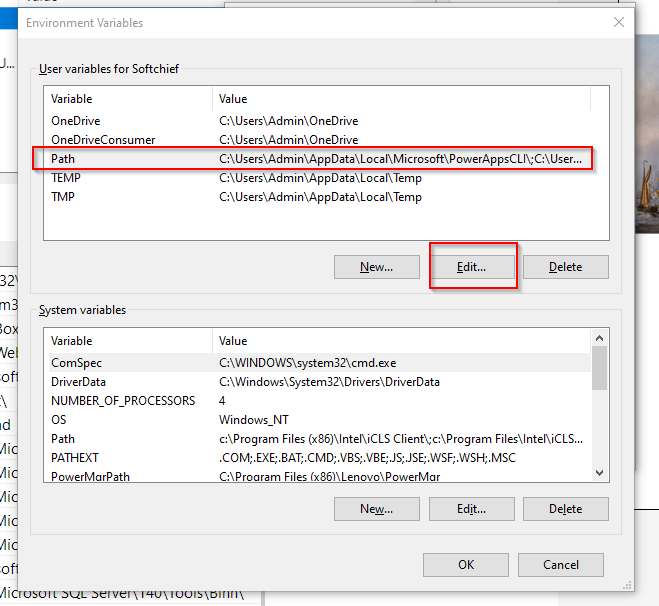
When you run command msbuild you may face below error. ‘msbuild’ is not recognized as an internal or external command,operable program or batch file. Soution To solve this follow below steps. Step 1 – Go to properties of current machine This PC. Step 2 – click on Advanced system settings Step 3 – Click Environment…
Read more
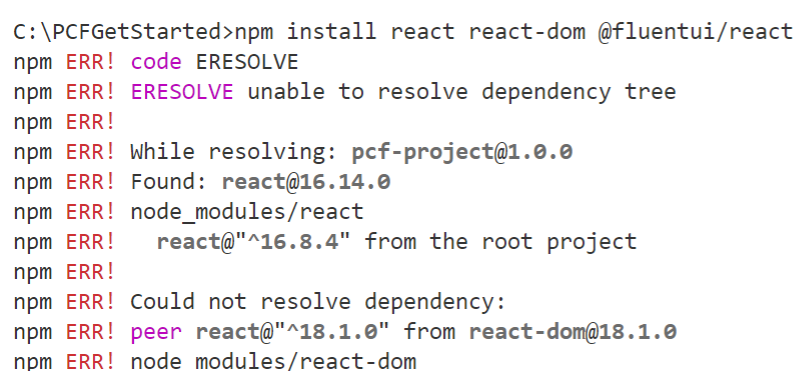
While working with PCF you might install Fluent UI but you may face below issues. ERESOLVE unable to resolve dependency tree while installing a pacakge Solution To solve this follow below methods step by step. It means you have dependency conflicts. So try running the following options one by one. 1. Remove node_modules and package-lock.json and then run 2.…
Read more
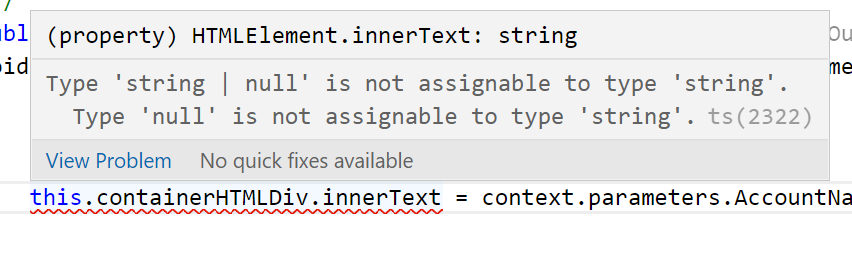
While working with PCF you might get the below error. Type ‘string | null’ is not assignable to type ‘string’. Solution Make sure you have a default value for the value you’re trying to get. In this case, I had to default to empty string. Hope this helps.
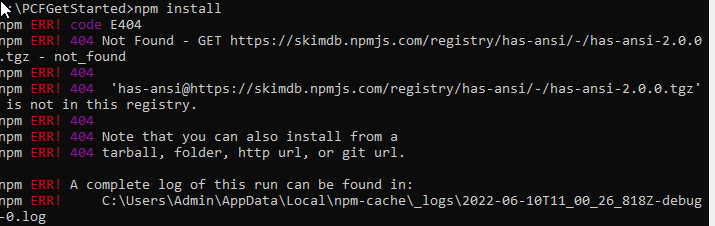
ERROR While working with command npm install you might be facing the 404 issues as given in below screenshot. Solution inside your PCF folder run the commands. STEP 1 : run below commands to solve this issue. npm config set registry http://registry.npmjs.org STEP 2 : run below command next npm -g install npm STEP 3…
Read more
Sometimes you get requirements where you are doing some validation check in JavaScript by calling XRM.WebAPI or some Async operation and if validation failed, you want to restrict Save operation. If the call code is synchronous then there is no issues. But if the code is asynchronous, you need to take special care otherwise it…
Read more
IF you find the error in downloading MCT files using LDM application follow these steps. Step 1 : Login LDM Portal Login to https://learningdownloadcenter.microsoft.com/ Click on FAQ link. Choose LDM and find How to enable the browser download experience? option and inside that click enable browser download experience option. Now you can download with out LDM.
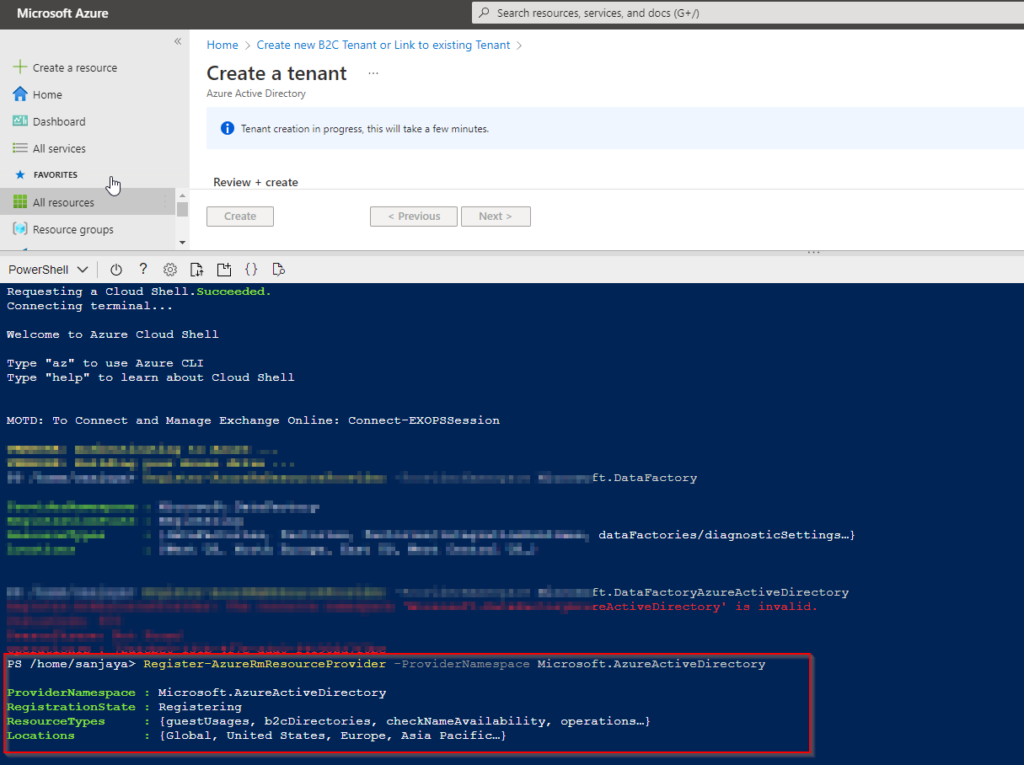
To fix this use Azure Power Shell and hit the command Register-AzureRmResourceProvider -ProviderNamespace Microsoft.AzureActiveDirectory Now the error will go away. Hope this helps
Step 1 : Create Site Settings Records Step 2 : Create Table Permission, Web Role and Contact Association Create Table Permission Create Web Role Associate Web Role with Contact Step 3 : Create Web Template to add liquid code Create a web template and add below code. Use Microsoft site for full tutorial . And…
Read more
In Power Portal, Web pages are the final page that renders on browser but the web page construction depends on Page template and web template. Let us understand the relation between these three components. Web Template In Power Portal, web templates are the top-tier content records. They can work with HTML, CSS, JS, jQuery and…
Read more
In Power Portal, If you want to add custom validations on Submit button click then you have to use following code. Open the Basic form where you want to add validation using Portal Management model-driven app. navigate to additional settings and scroll down to custom JavaScript section. Specify the code below. Make sure to change…
Read more
In Dynamics 365 CE, Project Service is used to manage service based projects. The below flow explains how a project service flow looks like. The Steps include are given below. Project Sales Management Project Leads Project Opportunities Project Quotes Project Contracts Owning Company Contracting Unit Cost Currency Sales Currency Billing Method Project Pricelists Transaction Classes…
Read more

If you want to install Project service automation, follow below steps. Step 1 – Subscribe Project Operation trial Navigate to https://dynamics.microsoft.com/en-us/dynamics-365-free-trial/ and scroll down to select Project Operation. Click on Try for free. Validate existing credential or login using existing credential. Click on Continue. It will setup the Project operation. Step 2 – Assign License…
Read more