
Azure Backup and Disaster Recovery: Best Practices for Building a Resilient Cloud Environment
Introduction
In today’s digital business landscape, data availability and application reliability are critical for organizational success. Businesses depend on cloud platforms to run mission-critical workloads, manage customer data and support global operations. However, unexpected events such as cyberattacks, hardware failures, accidental deletion, software issues and natural disasters can disrupt business operations.
A strong backup and disaster recovery strategy is essential to protect applications, data and infrastructure from unexpected failures.
Microsoft Azure provides a comprehensive set of cloud-native services that help organizations protect workloads, recover quickly and maintain business continuity. Services such as Azure Backup, Azure Site Recovery, Azure Storage redundancy and Azure Monitor enable enterprises to design highly available and resilient cloud architectures.
This blog explores Azure Backup and Disaster Recovery best practices, covering key concepts, implementation strategies, security considerations and recommendations for building a reliable enterprise cloud environment.
Understanding Azure Backup and Disaster Recovery
Although backup and disaster recovery are closely related, they serve different purposes.
What Is Azure Backup?
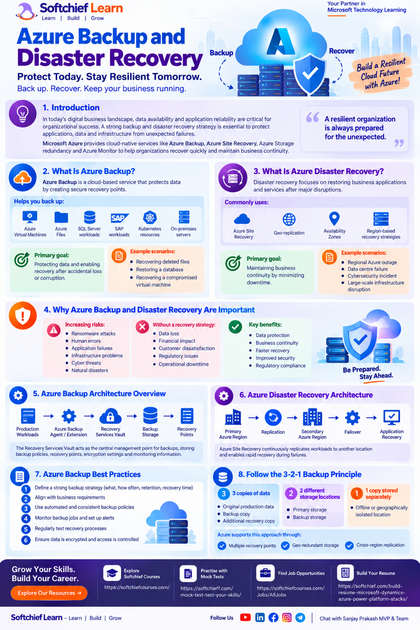
Azure Backup is a cloud-based service that protects data by creating secure recovery points.
It helps organizations back up:
- Azure Virtual Machines
- Azure Files
- SQL Server workloads
- SAP workloads
- Kubernetes resources
- On-premises servers
The primary goal of backup is:
Protecting data and enabling recovery after accidental loss or corruption.
Example scenarios:
- Recovering deleted files
- Restoring a database
- Recovering a compromised virtual machine
What Is Azure Disaster Recovery?
Disaster recovery focuses on restoring business applications and services after major disruptions.
The goal is:
Maintaining business continuity by minimizing downtime.
Azure disaster recovery commonly uses:
- Azure Site Recovery
- Geo-replication
- Availability Zones
- Region-based recovery strategies
Example scenarios:
- Regional Azure outage
- Data centre failure
- Cybersecurity incident
- Large-scale infrastructure disruption
Why Azure Backup and Disaster Recovery Are Important
Organizations face increasing risks from:
- Ransomware attacks
- Human errors
- Application failures
- Infrastructure problems
- Cyber threats
- Natural disasters
Without a proper recovery strategy, businesses may experience:
- Data loss
- Financial impact
- Customer dissatisfaction
- Regulatory issues
- Operational downtime
A well-designed Azure backup and disaster recovery strategy provides:
- Data protection
- Business continuity
- Faster recovery
- Improved security
- Regulatory compliance
Azure Backup Architecture Overview
Azure Backup follows a simple but powerful architecture:
Production Workloads

        |

Azure Backup Agent / Extension

        |

Recovery Services Vault

        |

Backup Storage

        |

Recovery Points
The Recovery Services Vault acts as the central management point for backups.
It stores:
- Backup policies
- Recovery points
- Encryption settings
- Monitoring information
Azure Disaster Recovery Architecture
A typical disaster recovery architecture includes:
Primary Azure Region

        |

Replication

        |

Secondary Azure Region

        |

Failover

        |

Application Recovery
Azure Site Recovery continuously replicates workloads to another location and enables rapid recovery during failures.
Azure Backup Best Practices
1. Define a Strong Backup Strategy
Before implementing Azure Backup, organizations should define:
- What data requires protection?
- How frequently should backups occur?
- How long should backups be retained?
- How quickly should recovery happen?
A backup strategy should align with business requirements.
Follow the 3-2-1 Backup Principle
A widely accepted backup approach is:
3 copies of data
- Original production data
- Backup copy
- Additional recovery copy
2 different storage locations
- Primary storage
- Backup storage
1 copy stored separately
- Offline or geographically isolated location
Azure supports this approach through:
- Multiple recovery points
- Geo-redundant storage
- Cross-region replication
2. Use Recovery Services Vault Effectively
Recovery Services Vault is a key component of Azure Backup.
Best practices include:
Enable Soft Delete
Soft delete protects backups from accidental deletion.
If a backup is removed accidentally, it remains recoverable for a defined period.
Benefits:
- Protection against human mistakes
- Recovery from malicious deletion
Enable Multi-User Authorization
Multi-user authorization adds an additional security layer.
Critical backup operations require approval before execution.
Examples:
- Deleting backups
- Modifying retention policies
3. Implement Backup Encryption
Data security is essential during backup operations.
Azure Backup provides encryption capabilities including:
- Platform-managed keys
- Customer-managed keys
- Encryption at rest
Organizations handling sensitive data should consider customer-managed keys for additional control.
4. Define Appropriate Backup Frequency
Backup frequency should depend on business requirements.
Examples:
Financial Applications
Require:
- Frequent backups
- Short recovery windows
Archive Systems
May require:
- Less frequent backups
- Longer retention periods
Organizations should define backup schedules based on:
- Data importance
- Business impact
- Recovery objectives
5. Configure Backup Retention Policies
Retention determines how long recovery points are stored.
Common retention strategies:
Daily:
- Last 30 days
Weekly:
- Last 12 weeks
Monthly:
- Last 12 months
Yearly:
- Several years
The correct policy depends on:
- Compliance requirements
- Business needs
- Storage costs
Azure Disaster Recovery Best Practices
1. Define Recovery Objectives
Every organization should define two critical metrics.
Recovery Time Objective (RTO)
RTO defines:
How quickly systems must be restored after failure.
Example:
A banking application may require:
- RTO: 30 minutes
Recovery Point Objective (RPO)
RPO defines:
How much data loss is acceptable.
Example:
A transaction system may require:
- RPO: 5 minutes
Understanding RTO and RPO helps design the correct disaster recovery architecture.
2. Use Azure Site Recovery
Azure Site Recovery (ASR) provides disaster recovery capabilities for:
- Azure Virtual Machines
- VMware workloads
- Physical servers
- Hyper-V environments
It provides:
- Continuous replication
- Automated failover
- Recovery plans
- Testing capabilities
3. Use Multiple Azure Regions
A single-region deployment creates unnecessary risk.
For mission-critical applications:
Use:
- Primary Azure region
- Secondary Azure region
Example:
Primary:
Azure East USSecondary:
Azure West USIf the primary region becomes unavailable, workloads can fail over.
4. Design Applications for High Availability
Disaster recovery is not only about backups.
Applications should also use availability features such as:
- Availability Zones
- Load balancing
- Database replication
- Auto scaling
Example:
An application deployed across multiple Availability Zones can continue operating even if one zone fails.
5. Perform Regular Disaster Recovery Testing
A disaster recovery plan is only effective if it works.
Organizations should regularly test:
- Backup restoration
- Application failover
- Database recovery
- Network recovery
Azure Site Recovery provides test failover capabilities without affecting production workloads.
Protecting Azure Backups Against Ransomware
Cybersecurity threats, especially ransomware, are increasing.
Attackers often target backup systems because backups are essential for recovery.
Azure provides multiple protections.
1. Immutable Backups
Immutable backups prevent modification or deletion during the retention period.
Benefits:
- Protection against ransomware
- Stronger compliance controls
2. Role-Based Access Control (RBAC)
Use least-privilege access.
Avoid giving unnecessary permissions.
Example:
Backup operators should not automatically have:
- Resource deletion rights
- Subscription ownership
3. Monitor Backup Activities
Use:
- Azure Monitor
- Microsoft Defender for Cloud
- Azure Activity Logs
Monitor:
- Failed backups
- Suspicious activities
- Configuration changes
Azure Backup and Disaster Recovery for Different Workloads
Virtual Machines
Azure Backup protects:
- OS disks
- Data disks
- VM configurations
Best practices:
- Use application-consistent backups
- Test VM restoration regularly
SQL Server Databases
Azure Backup supports:
- Database backups
- Point-in-time recovery
- Long-term retention
Useful for:
- Enterprise applications
- Financial systems
- ERP platforms
Azure Kubernetes Service (AKS)
Modern applications running on containers require protection for:
- Cluster configuration
- Persistent storage
- Application workloads
Backup solutions help recover Kubernetes environments quickly.
Azure Files
Azure Backup protects file shares by enabling:
- Scheduled backups
- File-level recovery
- Centralized management
Monitoring Azure Backup and Recovery Operations
Monitoring ensures backup systems remain reliable.
Organizations should track:
- Backup success rate
- Recovery failures
- Storage consumption
- Recovery time
- Policy compliance
Azure tools include:
Azure Monitor
Provides:
- Alerts
- Metrics
- Logs
Backup Reports
Provides insights into:
- Protected resources
- Backup status
- Recovery operations
Cost Optimization Best Practices
Backup strategies should balance protection and cost.
1. Use Appropriate Storage Tiers
Choose storage based on:
- Recovery requirements
- Access frequency
- Retention duration
2. Remove Unnecessary Recovery Points
Review:
- Old backups
- Unused resources
- Expired retention policies
3. Automate Policy Management
Use:
- Azure Policy
- Infrastructure-as-Code
- Automation scripts
This ensures consistent backup configurations.
Real-World Example: Enterprise Disaster Recovery Strategy
Consider a global retail company running:
- E-commerce platform
- Customer database
- Inventory system
- Payment processing services
Challenges:
- High availability requirements
- Large transaction volumes
- Customer data protection
Azure solution:
Backup Strategy
- Daily VM backups
- Database backups
- Long-term retention
Disaster Recovery
- Azure Site Recovery
- Secondary region replication
- Automated failover
Security
- Encryption
- RBAC
- Immutable backups
Result:
The company achieves:
- Reduced downtime
- Faster recovery
- Improved customer trust
Common Azure Backup and Disaster Recovery Mistakes
1. Not Testing Recovery
A backup that cannot be restored is not useful.
2. Keeping Backups in the Same Location
Regional failures can affect both production and backup.
3. Ignoring Security Controls
Backups must be protected from unauthorized access.
4. No Documented Recovery Plan
Teams need clear procedures during emergencies.
Future Trends in Azure Backup and Disaster Recovery
The future of cloud resilience will focus on:
AI-Based Threat Detection
AI will help identify:
- Suspicious backup activity
- Cyber threats
- Abnormal behaviour
Automated Disaster Recovery
Future systems will automatically:
- Detect failures
- Initiate recovery
- Optimize resources
Cloud-Native Resilience
Applications will increasingly use:
- Microservices
- Containers
- Multi-region architectures
Conclusion
Azure Backup and Disaster Recovery provide organizations with powerful capabilities to protect critical applications, secure business data and maintain operational continuity.
A successful cloud resilience strategy requires more than simply creating backups. Organizations must design comprehensive recovery plans that include:
- Strong backup policies
- Secure storage
- Disaster recovery planning
- Regular testing
- Continuous monitoring
By following Azure Backup and Disaster Recovery best practices, businesses can reduce downtime, protect against cyber threats and build a reliable cloud foundation for future growth.
Microsoft Azure enables organizations to move from reactive recovery to proactive resilience, ensuring that critical workloads remain available when they matter most.
Frequently Asked Questions (FAQs)
1. What is Azure Backup?
Azure Backup is a cloud-based service that protects Azure resources and enables data recovery.
2. What is Azure Site Recovery?
Azure Site Recovery is a disaster recovery service that replicates workloads and enables failover during outages.
3. What is the difference between Azure Backup and Disaster Recovery?
Azure Backup protects data, while disaster recovery focuses on restoring complete applications and services.
4. How often should Azure backups run?
Backup frequency depends on business requirements, data importance and recovery objectives.
5. Does Azure Backup protect against ransomware?
Yes. Azure provides security features such as encryption, soft delete, immutable backups and access controls.
SEO Keywords:
Azure Backup best practices, Azure Disaster Recovery strategy, Azure Site Recovery, Microsoft Azure backup solutions, cloud disaster recovery, Azure business continuity, Azure backup security, Azure ransomware protection, Azure Recovery Services Vault, Azure high availability architecture.
Business Central Manufacturing Module: Features and Benefits for Modern Manufacturing Businesses
Introduction
Manufacturing organizations today operate in a highly competitive environment where efficiency, agility and real-time visibility are critical for success. Rising operational costs, supply chain disruptions, changing customer expectations and increasing production complexity require manufacturers to adopt intelligent technology solutions.
Traditional manufacturing systems often struggle with disconnected processes, manual data entry and limited visibility across production operations. Businesses need an integrated platform that connects planning, production, inventory, purchasing, finance and customer requirements in one unified system.
This is where Microsoft Dynamics 365 Business Central Manufacturing Module provides significant value.
The Business Central Manufacturing module helps small and mid-sized manufacturers manage production processes, optimize resources, control costs and improve operational efficiency. Built within the Microsoft Dynamics 365 ecosystem, it enables manufacturers to streamline their entire production lifecycle while gaining real-time insights into business performance.
This blog explores the key features, benefits and real-world applications of the Business Central Manufacturing Module, helping organizations understand how it can support modern manufacturing transformation.
What Is Microsoft Dynamics 365 Business Central Manufacturing Module?
Microsoft Dynamics 365 Business Central is a cloud-based ERP solution designed to help organizations manage finance, operations, sales, inventory and customer relationships.
The Manufacturing functionality in Business Central extends ERP capabilities by supporting production management processes such as:
- Production planning
- Bill of Materials (BOM)
- Manufacturing orders
- Capacity planning
- Machine and work centre management
- Material requirements planning
- Production costing
- Shop floor operations
It provides manufacturers with a centralized platform to manage production activities from planning through delivery.
Why Manufacturers Need ERP-Based Manufacturing Solutions
Manufacturing operations involve multiple interconnected activities:
- Raw material procurement
- Inventory management
- Production scheduling
- Quality control
- Resource allocation
- Cost tracking
- Customer fulfilment
Without an integrated system, businesses often experience:
- Production delays
- Material shortages
- Increased costs
- Poor inventory visibility
- Inefficient resource utilization
- Manual reporting challenges
An ERP solution such as Business Central Manufacturing helps organizations connect these processes and create a more efficient production environment.
Key Features of Business Central Manufacturing Module
1. Production Orders Management
Production orders are at the centre of manufacturing operations.
Business Central enables manufacturers to create, manage and monitor production orders throughout the production lifecycle.
Production orders include:
- Product information
- Required quantities
- Components
- Routing instructions
- Production timelines
Manufacturers can track:
- Planned production
- Released orders
- Finished goods
- Production status
Business Example:
A furniture manufacturer receives a customer order for 500 customized tables.
Using Business Central:
- A production order is created.
- Required materials are calculated.
- Work centres are assigned.
- Production progress is monitored.
- Finished products are updated into inventory.
2. Bill of Materials (BOM) Management
A Bill of Materials defines the components and quantities required to manufacture a finished product.
Business Central allows manufacturers to create multi-level BOM structures.
Example:
A laptop manufacturing BOM may include:
- Motherboard
- Processor
- Memory
- Battery
- Display
- Keyboard
BOM management helps organizations:
- Maintain accurate product structures
- Calculate material requirements
- Control production costs
- Reduce material errors
3. Manufacturing Routes and Operations
Manufacturing processes involve multiple steps.
Business Central allows organizations to define production routes including:
- Work centres
- Machine centres
- Operation sequences
- Processing times
Example:
A metal manufacturing process may include:
- Cutting
- Welding
- Painting
- Quality inspection
- Packaging
Each operation can be tracked and optimized.
4. Work Centre and Machine Centre Management
Efficient resource utilization is essential for manufacturing success.
Business Central helps manage:
Work Centres
Examples:
- Assembly department
- Packaging area
- Inspection unit
Machine Centres
Examples:
- CNC machines
- Automated equipment
- Production machines
Organizations can track:
- Capacity
- Availability
- Efficiency
- Operating costs
5. Material Requirements Planning (MRP)
Material Requirements Planning helps manufacturers ensure the right materials are available at the right time.
Business Central calculates:
- Required materials
- Purchase requirements
- Production demand
- Inventory availability
MRP considers:
- Existing inventory
- Sales orders
- Production orders
- Forecast demand
Example:
A company needs to manufacture 1,000 products.
Business Central automatically determines:
Current stock:
- 600 units available
Required production:
- 400 additional units
Material requirements:
- Raw materials needed
- Purchase recommendations
This reduces shortages and excess inventory.
6. Capacity Planning
Capacity planning helps manufacturers understand whether production resources can meet demand.
Business Central provides visibility into:
- Machine availability
- Labour capacity
- Production workload
Manufacturers can identify:
- Bottlenecks
- Overloaded resources
- Scheduling conflicts
Benefits:
- Improved production planning
- Better resource utilization
- Reduced delays
7. Production Scheduling
Production scheduling is essential for meeting customer deadlines.
Business Central helps organizations plan:
- Production dates
- Resource allocation
- Order priorities
Manufacturers can optimize schedules based on:
- Capacity
- Material availability
- Customer requirements
8. Inventory Integration
Manufacturing depends heavily on accurate inventory information.
Business Central connects manufacturing with inventory management.
Manufacturers gain visibility into:
- Raw materials
- Work-in-progress inventory
- Finished goods
Benefits:
- Reduced stockouts
- Improved inventory accuracy
- Better warehouse coordination
9. Production Cost Management
Understanding production costs is essential for profitability.
Business Central tracks:
- Material costs
- Labour costs
- Machine costs
- Overhead expenses
Manufacturers can calculate:
- Actual production costs
- Standard costs
- Variances
This helps businesses:
- Improve pricing decisions
- Reduce waste
- Increase profitability
10. Quality Management Support
Although Business Central does not provide a dedicated advanced quality module like larger ERP systems, manufacturers can extend quality processes through configuration and integrations.
Businesses can manage:
- Inspection processes
- Product tracking
- Quality-related workflows
Quality information can be connected with:
- Inventory records
- Production orders
- Customer requirements
11. Integration with Finance and Accounting
One of the biggest advantages of Business Central Manufacturing is its native integration with finance.
Production activities automatically connect with:
- General ledger
- Inventory valuation
- Cost accounting
- Purchasing
- Sales
Example:
When production is completed:
- Inventory value updates automatically
- Production costs are recorded
- Financial reports reflect real-time data
This eliminates disconnected systems.
12. Shop Floor Management
Business Central supports shop floor visibility by providing access to production information.
Operators can view:
- Production instructions
- Material requirements
- Work assignments
- Production status
This improves communication between:
- Production teams
- Supervisors
- Management
Benefits of Business Central Manufacturing Module
1. Improved Production Efficiency
By connecting production planning, inventory and resources, manufacturers can reduce delays and improve productivity.
2. Better Inventory Control
Real-time inventory visibility helps organizations maintain optimal stock levels.
Benefits include:
- Reduced excess inventory
- Fewer material shortages
- Lower storage costs
3. Increased Operational Visibility
Managers gain insights into:
- Production performance
- Resource utilization
- Costs
- Delivery status
This enables faster decision-making.
4. Reduced Manufacturing Costs
By monitoring:
- Material consumption
- Labour usage
- Machine utilization
organizations can identify cost-saving opportunities.
5. Improved Customer Satisfaction
Accurate production planning helps businesses:
- Deliver products on time
- Respond quickly to customer requests
- Improve order fulfilment
6. Scalability for Growing Businesses
Business Central supports manufacturers as they expand.
Organizations can add:
- More users
- Additional locations
- New production processes
- Advanced integrations
Business Central Manufacturing Use Cases
1. Discrete Manufacturing
Industries producing physical products benefit from:
- BOM management
- Production orders
- Assembly processes
Examples:
- Electronics
- Machinery
- Automotive components
2. Make-to-Order Manufacturing
Businesses producing customized products can manage:
- Customer-specific production
- Unique requirements
- Flexible scheduling
Examples:
- Furniture manufacturers
- Industrial equipment companies
3. Make-to-Stock Manufacturing
Companies producing standard products can optimize:
- Forecast-based production
- Inventory planning
- Demand management
Examples:
- Consumer goods
- Food products
Business Central Manufacturing vs Traditional Manufacturing Systems
| Feature | Traditional Systems | Business Central Manufacturing |
|---|---|---|
| Production Planning | Limited | Integrated |
| Inventory Visibility | Delayed | Real-time |
| Finance Integration | Separate | Native |
| Cloud Access | Limited | Available |
| Reporting | Manual | Automated |
| Scalability | Complex | Flexible |
Best Practices for Implementing Business Central Manufacturing
1. Analyse Manufacturing Processes
Before implementation, businesses should document:
- Production workflows
- Resource requirements
- Material processes
2. Maintain Accurate Product Data
Ensure correct:
- BOM information
- Routing details
- Inventory data
3. Integrate Business Functions
Connect:
- Manufacturing
- Finance
- Sales
- Purchasing
- Inventory
4. Train Production Teams
Successful adoption requires users to understand:
- Production workflows
- System capabilities
- Reporting tools
5. Continuously Optimize Processes
Use system insights to improve:
- Production efficiency
- Resource utilization
- Cost management
Future of Manufacturing with Business Central
Manufacturing is becoming increasingly intelligent through:
- Artificial intelligence
- IoT integration
- Predictive analytics
- Automation
Future Business Central manufacturing capabilities will focus on:
AI-Based Production Insights
AI can help identify:
- Production trends
- Efficiency improvements
- Potential issues
IoT-Connected Manufacturing
Connected machines can provide:
- Real-time equipment data
- Predictive maintenance insights
- Performance monitoring
Smarter Supply Chain Planning
Advanced analytics will improve:
- Demand forecasting
- Inventory optimization
- Production scheduling
Conclusion
Microsoft Dynamics 365 Business Central Manufacturing Module provides manufacturers with a powerful ERP foundation to manage production processes, control costs and improve operational efficiency.
By integrating:
- Production planning
- Inventory management
- Resource scheduling
- Financial management
- Real-time reporting
Business Central helps organizations move from disconnected manufacturing processes to a connected and intelligent production environment.
For small and mid-sized manufacturers looking to modernize operations, improve productivity and prepare for future growth, Business Central Manufacturing provides a scalable and cost-effective solution.
With the right implementation strategy, organizations can achieve greater efficiency, better visibility and stronger competitiveness in the evolving manufacturing landscape.
Frequently Asked Questions (FAQs)
1. What is the Business Central Manufacturing Module?
The Business Central Manufacturing Module helps organizations manage production planning, manufacturing orders, BOMs, resources and production costs.
2. Who can use Dynamics 365 Business Central Manufacturing?
It is suitable for small and medium-sized manufacturers across industries such as automotive, electronics, machinery and consumer goods.
3. Does Business Central Manufacturing support production planning?
Yes. It supports material requirements planning, capacity planning and production scheduling.
4. Can Business Central Manufacturing integrate with finance?
Yes. Manufacturing processes are directly connected with accounting, costing and financial reporting.
5. Is Business Central suitable for growing manufacturers?
Yes. Business Central provides a scalable ERP platform that grows with business requirements.
SEO Keywords:
Business Central Manufacturing Module, Dynamics 365 Business Central manufacturing, Microsoft manufacturing ERP, Business Central production management, Business Central BOM management, manufacturing ERP solutions, Dynamics 365 manufacturing features, Business Central MRP, Microsoft ERP for manufacturing, cloud manufacturing software.
Azure Service Bus vs Event Hubs: Understanding the Differences- please write a blog on this topic to post in our website – it has to be SEO friendly & expert level with human friendly and expert level
Azure Service Bus vs Event Hubs: Understanding the Differences and Choosing the Right Azure Messaging Service
Introduction
Modern cloud applications are becoming increasingly distributed, requiring reliable communication between services, applications and systems. As organizations move toward microservices architecture, event-driven applications and cloud-native solutions, messaging platforms have become essential for building scalable and resilient systems.
Microsoft Azure provides several messaging services to support different communication requirements. Two of the most widely used services are:
- Azure Service Bus
- Azure Event Hubs
Although both services enable communication between applications, they are designed for different scenarios.
A common challenge for developers and architects is deciding:
Should we use Azure Service Bus or Azure Event Hubs for our application architecture?
The answer depends on factors such as:
- Message processing requirements
- Data volume
- Communication patterns
- Ordering needs
- Consumer behaviour
- Application architecture
This blog provides a detailed comparison of Azure Service Bus vs Event Hubs, explaining their differences, use cases, architecture patterns and best practices to help developers and solution architects make the right decision.
Understanding Azure Messaging Services
Messaging services are the foundation of modern distributed applications.
They help systems communicate without creating tight dependencies between components.
Instead of:
Application A
      |
      |
Application B
where both applications must be available at the same time, messaging introduces an intermediate layer:
Application A

      |

Messaging Service

      |

Application B
Benefits include:
- Loose coupling
- Improved scalability
- Better fault tolerance
- Asynchronous processing
- Easier system integration
Azure provides multiple messaging solutions depending on business requirements.
What Is Azure Service Bus?
Azure Service Bus is a fully managed enterprise messaging service designed for reliable communication between applications and services.
It supports advanced messaging capabilities including:
- Queues
- Topics
- Subscriptions
- Message sessions
- Dead-letter queues
- Transactions
Azure Service Bus is primarily used for enterprise application integration and business workflows.
Azure Service Bus Architecture
A typical Service Bus architecture looks like:
Producer Application

        |

        |

Azure Service Bus Queue

        |

        |

Consumer Application
The sender places messages into the queue.
The receiver processes messages when it is ready.
Key Features of Azure Service Bus
1. Message Queues
Queues enable one-to-one communication.
Example:
Order Application

        |

Order Queue

        |

Payment Service
A message is processed by a single consumer.
2. Topics and Subscriptions
Topics support publish-subscribe messaging.
Example:
Order Created Event

          |

      Topic

     /     \
    /       \

Inventory  Notification
Service     Service
Multiple subscribers can receive the same message.
3. Guaranteed Message Delivery
Azure Service Bus provides reliable delivery using features such as:
- Message persistence
- Retries
- Dead-letter queues
4. Message Ordering
Service Bus supports ordered message processing using sessions.
Example:
A banking system requires transactions to be processed in sequence.
5. Transactions Support
Service Bus supports transactional operations.
Example:
A purchase order process:
- Create order
- Reserve inventory
- Process payment
All operations can be handled reliably.
What Is Azure Event Hubs?
Azure Event Hubs is a highly scalable event ingestion service designed to handle massive volumes of streaming data.
It is optimized for:
- Telemetry collection
- IoT data ingestion
- Application logs
- Analytics pipelines
- Real-time processing
Event Hubs can process millions of events per second.
Azure Event Hubs Architecture
A typical Event Hubs architecture:
Data Sources

  |

IoT Devices
Applications
Logs

  |

Azure Event Hubs

  |

Stream Processing

  |

Analytics Platforms
Event Hubs acts as a high-throughput event streaming platform.
Key Features of Azure Event Hubs
1. Massive Data Ingestion
Event Hubs is designed for extremely high data volumes.
Examples:
- Millions of IoT messages
- Application telemetry
- Clickstream data
2. Event Streaming
Events are stored temporarily and consumed by multiple applications.
3. Partition-Based Processing
Event Hubs uses partitions to achieve scalability.
Example:
Event Hub

Partition 1
Partition 2
Partition 3
Partition 4
Multiple consumers can process partitions simultaneously.
4. Real-Time Analytics
Event Hubs integrates with:
- Azure Stream Analytics
- Azure Functions
- Databricks
- Power BI
for real-time insights.
Azure Service Bus vs Event Hubs: Key Differences
| Feature | Azure Service Bus | Azure Event Hubs |
|---|---|---|
| Primary Purpose | Enterprise messaging | Event streaming |
| Communication Model | Message broker | Event ingestion platform |
| Data Volume | Moderate | Extremely high |
| Message Ordering | Strong support | Partition-based ordering |
| Message Processing | Business workflows | Stream processing |
| Consumers | Specific applications | Multiple stream consumers |
| Retention | Message-based | Time-based |
| Transactions | Supported | Limited |
| Protocols | AMQP, HTTPS | AMQP, Kafka protocol |
| Main Use Case | Application integration | Telemetry and analytics |
Azure Service Bus vs Event Hubs: Detailed Comparison
1. Communication Pattern
Azure Service Bus
Best for:
- Command-based communication
- Business processes
- Application integration
Example:
“Process this customer order.”
Azure Event Hubs
Best for:
- Event streaming
- Data collection
- Analytics
Example:
“Temperature reading received from IoT sensor.”
2. Message Processing Model
Service Bus
Messages are typically:
- Sent
- Processed
- Removed
Example:
Order Message

↓

Processed

↓

Deleted
Event Hubs
Events remain available for a configured retention period.
Example:
Sensor Events

↓

Stored Stream

↓

Multiple Consumers
3. Data Throughput
Azure Service Bus
Designed for:
- Reliable business messaging
- Transaction processing
Examples:
- Orders
- Payments
- Notifications
Azure Event Hubs
Designed for:
- Large-scale streaming
Examples:
- Millions of sensor events
- Application logs
- User activity streams
4. Message Ordering
Service Bus
Supports advanced ordering through:
- Sessions
- Message sequencing
Useful for:
- Financial transactions
- Order processing
Event Hubs
Uses:
- Partitions
Events inside the same partition maintain order.
5. Consumer Model
Service Bus
Usually:
One message → One consumer
Example:
Invoice Created

      |

Invoice Processing Service
Event Hubs
One event → Multiple consumers
Example:
Customer Activity Event

       |

------------------

Analytics

Monitoring

Machine Learning
When Should You Use Azure Service Bus?
Azure Service Bus is ideal for:
1. Enterprise Application Integration
Example:
Connecting:
- ERP systems
- CRM applications
- Payment platforms
2. Order Processing Systems
Example:
E-commerce order workflow:
Order Created

↓

Payment Processing

↓

Inventory Update

↓

Shipping
3. Microservices Communication
Microservices can communicate asynchronously.
Example:
Customer Service

↓

Service Bus

↓

Notification Service
4. Business Workflows
Examples:
- Approval processes
- Document processing
- Financial transactions
When Should You Use Azure Event Hubs?
Azure Event Hubs is ideal for:
1. IoT Applications
Example:
Smart factory:
Machines

↓

Sensors

↓

Event Hubs

↓

Analytics Platform
2. Application Monitoring
Collect:
- Logs
- Metrics
- User activity
3. Real-Time Analytics
Example:
Retail analytics:
Customer Activity

↓

Event Hubs

↓

Real-Time Dashboard
4. Big Data Processing
Event Hubs integrates with:
- Azure Databricks
- Apache Spark
- Stream Analytics
Real-World Scenario Comparison
Scenario 1: Online Shopping Platform
Requirement:
When a customer places an order:
- Validate payment
- Update inventory
- Send confirmation email
Recommended:
Azure Service Bus
Why?
Because this requires:
- Reliable delivery
- Business workflow processing
- Transaction support
Scenario 2: Smart Manufacturing System
Requirement:
Thousands of machines send sensor data every second.
Recommended:
Azure Event Hubs
Why?
Because the system requires:
- High throughput
- Real-time streaming
- Analytics processing
Using Azure Service Bus and Event Hubs Together
In many enterprise architectures, both services work together.
Example:
IoT Devices

      |

Event Hubs

      |

Data Analytics

      |

Business Application

      |

Service Bus

      |

Business Workflows
Event Hubs handles data ingestion.
Service Bus handles business operations.
Security Best Practices
Azure Service Bus Security
Use:
- Azure Active Directory authentication
- Managed identities
- Role-based access control
- Encryption
Azure Event Hubs Security
Use:
- Private endpoints
- Network security controls
- Managed identities
- Access policies
Monitoring and Management
Azure Monitor
Both services integrate with Azure Monitor.
Track:
- Message failures
- Throughput
- Latency
- Errors
Application Insights
Useful for:
- Distributed tracing
- Performance monitoring
- Application diagnostics
Performance Optimization Best Practices
Azure Service Bus
Best practices:
- Use appropriate message sizes
- Enable batching
- Configure retries
- Use dead-letter queues
- Monitor queue length
Azure Event Hubs
Best practices:
- Choose correct partition count
- Optimize event size
- Use consumer groups
- Monitor throughput units
Common Mistakes to Avoid
1. Using Event Hubs for Business Transactions
Event Hubs is not designed for transactional workflows.
2. Using Service Bus for Massive Streaming
Large-scale telemetry workloads may become inefficient.
3. Ignoring Message Failures
Always implement:
- Retry policies
- Error handling
- Monitoring
4. Poor Partition Planning in Event Hubs
Incorrect partition design can affect scalability.
Future of Azure Messaging Architecture
Modern applications are moving toward:
- Event-driven architecture
- Serverless computing
- Microservices
- Real-time analytics
Future messaging solutions will increasingly combine:
- AI-powered event processing
- Automated scaling
- Intelligent monitoring
- Cloud-native integration
Azure messaging services will continue to play a critical role in building resilient enterprise applications.
Conclusion
Azure Service Bus and Azure Event Hubs are both powerful messaging services, but they solve different architectural challenges.
Azure Service Bus is designed for reliable enterprise messaging, business workflows and application integration.
Azure Event Hubs is designed for high-volume event streaming, telemetry collection and real-time analytics.
The right choice depends on your application’s requirements:
Choose Azure Service Bus when you need:
- Reliable message delivery
- Business process workflows
- Transaction support
- Application integration
Choose Azure Event Hubs when you need:
- Massive event ingestion
- Real-time streaming
- Analytics processing
- IoT data handling
Understanding the differences between these two Azure services helps architects and developers build scalable, secure and future-ready cloud applications.
Frequently Asked Questions (FAQs)
1. What is the difference between Azure Service Bus and Event Hubs?
Azure Service Bus is designed for enterprise messaging, while Event Hubs is designed for high-volume event streaming.
2. Can Azure Service Bus handle real-time data?
Yes, but it is optimized for business messaging rather than massive streaming workloads.
3. Is Azure Event Hubs similar to Apache Kafka?
Yes. Event Hubs supports Kafka protocol compatibility and provides event streaming capabilities.
4. Can Service Bus and Event Hubs be used together?
Yes. Many enterprise architectures use Event Hubs for data ingestion and Service Bus for business workflows.
5. Which Azure messaging service should developers choose?
The choice depends on the use case. Business workflows typically require Service Bus, while analytics and streaming scenarios require Event Hubs.
SEO Keywords:
Azure Service Bus vs Event Hubs, Microsoft Azure messaging services, Azure Event Hubs architecture, Azure Service Bus architecture, Azure event-driven architecture, Azure microservices messaging, Azure cloud integration, Azure streaming services, Azure enterprise messaging, Azure serverless architecture.
The Future of Enterprise Development with .NET 10, Azure and AI- please write a blog on this topic to post in our website – it has to be SEO friendly & expert level with human friendly and expert level
The Future of Enterprise Development with .NET 10, Azure and AI: Building Intelligent Cloud-Native Applications
Introduction
Enterprise software development is entering a new era driven by artificial intelligence, cloud computing, automation and intelligent application architectures. Organizations are no longer looking for applications that simply perform business operations—they need intelligent systems that can analyse data, automate decisions, adapt to changing requirements and deliver exceptional user experiences.
Microsoft’s latest technology ecosystem, combining .NET 10, Azure cloud services and Artificial Intelligence (AI), provides developers and enterprises with a powerful foundation for building the next generation of business applications.
With improvements in performance, cloud-native development, security, developer productivity and AI integration, .NET 10 represents a significant evolution of the modern enterprise development platform.
When combined with Microsoft Azure’s scalable cloud infrastructure and AI capabilities such as Azure AI Foundry, Azure OpenAI Service and Copilot technologies, businesses can build applications that are:
- Intelligent
- Scalable
- Secure
- Automated
- Data-driven
- Future-ready
This blog explores how .NET 10, Azure and AI are shaping the future of enterprise development, the key technology trends influencing modern applications and how organizations can prepare for the next generation of software innovation.
The Evolution of Enterprise Application Development
Enterprise applications have evolved significantly over the years.
Traditional enterprise systems were:
- Monolithic
- Installed on local servers
- Difficult to scale
- Dependent on manual processes
Modern enterprise applications are:
- Cloud-native
- API-driven
- AI-powered
- Event-driven
- Highly scalable
Today’s organizations require applications that can support:
- Global users
- Real-time data processing
- Intelligent automation
- Continuous innovation
- Strong security requirements
The combination of .NET 10, Azure and AI addresses these modern business challenges.
What Is .NET 10 and Why Does It Matter for Enterprises?
.NET 10 continues Microsoft’s vision of providing a unified, high-performance development platform for modern applications.
It supports building:
- Web applications
- Enterprise APIs
- Microservices
- Cloud-native applications
- Desktop solutions
- Mobile applications
- AI-powered applications
.NET 10 focuses on improving:
- Application performance
- Developer productivity
- Cloud scalability
- Security
- AI integration
For enterprise developers, this means faster development cycles and more reliable applications.
Key .NET 10 Trends Transforming Enterprise Development
1. High-Performance Cloud-Native Applications
Performance is a critical factor for enterprise applications.
Modern organizations need applications capable of handling:
- Millions of users
- Large transaction volumes
- Real-time processing
.NET 10 continues to improve performance through:
- Runtime optimizations
- Faster execution
- Improved memory management
- Enhanced application startup times
This makes .NET an excellent choice for:
- Financial platforms
- Healthcare applications
- E-commerce systems
- Enterprise SaaS platforms
Example: Enterprise Banking Application
A banking platform built with .NET 10 can handle:
- Customer transactions
- Real-time account updates
- Secure API communication
- Fraud detection workflows
Azure provides the infrastructure scalability required during peak transaction periods.
2. AI-Powered Application Development
Artificial intelligence is becoming a core component of enterprise software.
Modern applications are expected to provide:
- Intelligent recommendations
- Automated decision-making
- Natural language interaction
- Predictive insights
.NET 10 enables developers to integrate AI capabilities using:
- Azure OpenAI Service
- Azure AI Foundry
- Semantic Kernel
- Machine learning APIs
How AI Is Changing Enterprise Applications
Traditional application:
User enters data → System processes data → Result displayed
AI-powered application:
User interacts → AI understands intent → System analyses information → Intelligent recommendation provided
Real-World AI Use Cases with .NET
Customer Service Automation
AI-powered assistants can:
- Understand customer queries
- Search knowledge bases
- Provide instant responses
Predictive Analytics
AI can analyse:
- Sales trends
- Customer behaviour
- Operational data
and provide business recommendations.
Intelligent Document Processing
AI can automatically process:
- Invoices
- Contracts
- Forms
- Reports
3. Cloud-Native Development with Azure
Enterprise development is moving toward cloud-native architectures.
Azure provides the foundation for building scalable applications using:
- Azure App Service
- Azure Kubernetes Service (AKS)
- Azure Functions
- Azure Container Apps
- Azure SQL Database
.NET 10 applications integrate naturally with Azure services.
Benefits of Azure for .NET Enterprise Applications
Scalability
Applications can automatically scale based on demand.
Example:
An online shopping platform can increase resources during holiday sales.
Reliability
Azure provides:
- Availability zones
- Disaster recovery
- Backup solutions
Security
Azure offers:
- Identity management
- Encryption
- Threat protection
- Compliance controls
4. Microservices Architecture with .NET 10
Large enterprises are increasingly adopting microservices architectures.
Instead of one large application:
Monolithic Application

Customer
Sales
Payments
Inventory
Microservices separate functionality:
Customer Service

Payment Service

Inventory Service

Notification Service
Benefits:
- Independent scaling
- Faster deployment
- Better maintainability
.NET 10 provides strong support for:
- ASP.NET Core APIs
- Minimal APIs
- gRPC communication
- Container deployment
5. Intelligent APIs and API-First Development
APIs are the backbone of modern enterprise applications.
Organizations require APIs for:
- Mobile applications
- Partner integrations
- AI services
- Microservices communication
ASP.NET Core in .NET 10 enables developers to build:
- Secure REST APIs
- High-performance APIs
- AI-enabled APIs
Example:
An enterprise CRM system can expose APIs for:
- Customer management
- Sales automation
- AI recommendations
- Reporting systems
6. AI-Assisted Software Development
AI is not only changing applications—it is changing how developers build software.
AI-powered development tools help developers:
- Generate code
- Analyse errors
- Improve performance
- Create documentation
- Automate testing
Developers can focus more on architecture and innovation while AI assists with repetitive tasks.
7. Secure Enterprise Development
Security remains a top priority for enterprise applications.
.NET 10 provides enterprise security capabilities including:
- Authentication
- Authorization
- Identity management
- Secure APIs
- Data protection
Azure enhances security through:
- Microsoft Entra ID
- Azure Key Vault
- Microsoft Defender for Cloud
Building Secure AI-Powered Applications
AI applications require additional security considerations.
Organizations must protect:
- User data
- AI prompts
- Business information
- Model interactions
Best practices include:
- Secure API access
- Data encryption
- Identity-based authentication
- Responsible AI governance
8. Event-Driven Enterprise Architectures
Modern businesses need systems that respond instantly to events.
Examples:
- Customer purchases product
- Sensor detects failure
- Payment is completed
Event-driven architectures use services such as:
- Azure Event Grid
- Azure Event Hubs
- Azure Service Bus
.NET applications can process events efficiently using cloud-native patterns.
Example:
Manufacturing system:
Machine sensor detects abnormal behaviour.
↓
Event sent to Azure Event Hubs.
↓
AI analyses equipment condition.
↓
.NET application creates maintenance request.
9. Modern Data Platforms and AI Analytics
Data is the foundation of intelligent applications.
Azure provides powerful data services:
- Azure SQL Database
- Azure Cosmos DB
- Microsoft Fabric
- Azure Synapse Analytics
.NET applications can connect business data with AI models to generate insights.
Example:
Retail organization:
Data collected from:
- Customer purchases
- Website activity
- Inventory systems
AI analyses data and recommends:
- Inventory adjustments
- Marketing strategies
- Customer offers
10. Enterprise SaaS Development with .NET 10
Software-as-a-Service applications are becoming increasingly popular.
.NET 10 provides excellent support for building:
- Multi-tenant SaaS platforms
- Enterprise portals
- Subscription-based applications
Combined with Azure:
Developers can create:
- Scalable infrastructure
- Secure tenant isolation
- Global application delivery
The Role of Microsoft Copilot in Enterprise Development
Microsoft Copilot technologies are changing how businesses work.
Enterprise applications can include AI assistants that help users:
- Search information
- Generate reports
- Automate workflows
- Make decisions
Examples:
Finance Copilot
Helps analyse:
- Expenses
- Forecasts
- Financial trends
Sales Copilot
Supports:
- Customer insights
- Lead management
- Sales recommendations
Developer Copilot
Supports:
- Coding
- Testing
- Documentation
Real-World Enterprise Architecture Using .NET 10, Azure and AI
A modern enterprise architecture may look like:
Frontend Application

        |

.NET 10 APIs

        |

Microservices Layer

        |

Azure Kubernetes Service

        |

Data Platforms

        |

AI Services

        |

Analytics & Automation
Supporting services:
- Azure Monitor
- Microsoft Entra ID
- Azure Key Vault
- Azure DevOps
Benefits of Adopting .NET 10, Azure and AI
1. Faster Innovation
Developers can build and release applications faster.
2. Improved Business Intelligence
AI provides deeper insights from enterprise data.
3. Reduced Operational Costs
Automation reduces manual effort.
4. Better Customer Experiences
Intelligent applications deliver personalized services.
5. Enterprise Scalability
Azure enables applications to grow globally.
Best Practices for Enterprises Moving Towards AI-Powered Development
1. Start with Business Problems
Technology should solve real business challenges.
2. Build Cloud-Ready Applications
Design applications for:
- Scalability
- Security
- Reliability
3. Adopt AI Responsibly
Implement:
- Data governance
- AI security
- Responsible AI principles
4. Modernize Legacy Applications
Use strategies such as:
- API modernization
- Microservices migration
- Cloud migration
5. Invest in Developer Skills
Teams should learn:
- .NET 10 development
- Azure architecture
- AI integration
- Cloud security
Future Trends Beyond .NET 10
The future of enterprise development will continue evolving through:
Autonomous AI Agents
Applications will increasingly perform tasks independently.
Intelligent Business Automation
AI will automate complex workflows.
Edge and Cloud Computing
Applications will process data closer to where it is generated.
Low-Code and Pro-Code Collaboration
Professional developers and business users will work together.
Conclusion
The future of enterprise development is being shaped by the powerful combination of .NET 10, Microsoft Azure and Artificial Intelligence.
.NET 10 provides developers with a modern, high-performance platform for building enterprise applications. Azure delivers the scalability, security and cloud infrastructure required for global solutions. AI introduces intelligence, automation and predictive capabilities that transform traditional software into intelligent business platforms.
Organizations that embrace these technologies can build applications that are:
- Faster
- Smarter
- More secure
- More scalable
- Ready for future business challenges
The next generation of enterprise software will not simply process information—it will understand, predict and assist businesses in making better decisions.
By adopting .NET 10, Azure and AI together, enterprises can accelerate digital transformation and create innovative solutions that deliver long-term competitive advantages.
Frequently Asked Questions (FAQs)
1. Why is .NET 10 important for enterprise development?
.NET 10 provides improved performance, scalability, security and cloud-native capabilities for modern enterprise applications.
2. How does Azure support .NET applications?
Azure provides hosting, databases, security, monitoring and AI services that help organizations build scalable .NET applications.
3. How is AI changing enterprise software development?
AI enables intelligent automation, predictive analytics, conversational applications and smarter decision-making.
4. Can businesses integrate AI into existing .NET applications?
Yes. Existing .NET applications can integrate AI using Azure AI services, Azure OpenAI Service and AI development frameworks.
5. Is .NET 10 suitable for large enterprise applications?
Yes. .NET is widely used for enterprise systems requiring high performance, security and scalability.









