
Azure Cost Optimisation: 10 Techniques Every Cloud Administrator Should Know
Introduction
Cloud adoption has transformed the way organisations build, deploy and scale applications. Microsoft Azure enables businesses to innovate faster by providing flexible infrastructure, advanced analytics, artificial intelligence capabilities and enterprise-grade security.
However, as cloud environments grow, managing costs becomes one of the biggest challenges for organisations. Without proper cost governance, Azure resources can become underutilised, unnecessary expenses can accumulate and cloud spending can increase significantly.
Successful cloud adoption is not only about moving workloads to Azure; it is about optimising Azure costs while maintaining performance, reliability and business value.
Azure Cost Optimization focuses on identifying unnecessary spending, improving resource efficiency and implementing financial governance practices that help organisations maximise their cloud investment.
This comprehensive guide explores proven Azure cost optimization techniques, best practices and strategies that help businesses reduce cloud expenses while building scalable and efficient cloud environments.
What is Azure Cost Optimization?
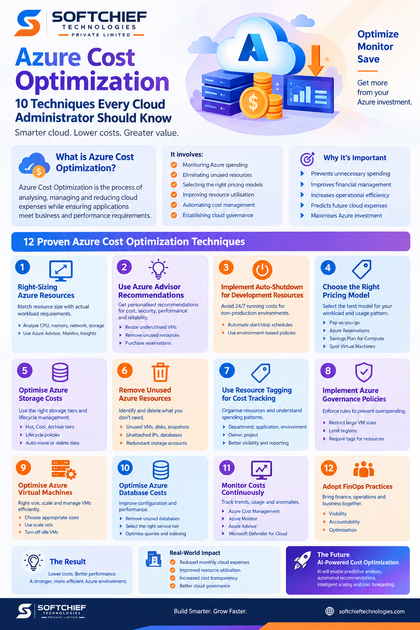
Azure Cost Optimization is the process of analysing, managing and reducing cloud expenses while ensuring applications continue to meet business and performance requirements.
It involves:
- Monitoring Azure spending
- Eliminating unused resources
- Selecting the right pricing models
- Improving resource utilisation
- Automating cost management
- Establishing cloud governance
The goal is not simply to reduce costs but to achieve the right balance between:
- Performance
- Scalability
- Security
- Availability
- Business requirements
Why Azure Cost Optimization is Important
Many organisations experience unexpected cloud costs due to:
- Over-provisioned virtual machines
- Unused resources
- Poor resource management
- Inefficient storage strategies
- Lack of monitoring
- Incorrect pricing models
For example, a development team may create multiple Azure Virtual Machines for testing purposes but forget to remove them after project completion. These unused resources continue generating charges.
Cost optimization helps organisations:
- Improve cloud financial management
- Increase operational efficiency
- Prevent unnecessary spending
- Predict future cloud expenses
- Maximise Azure investment
Understanding Azure Cost Management
Microsoft provides built-in tools to help organisations monitor and control Azure spending.
Azure Cost Management + Billing
Azure Cost Management provides capabilities to:
- Analyse spending patterns
- Create budgets
- Monitor usage trends
- Identify cost anomalies
- Generate reports
Organisations can track costs by:
- Subscription
- Resource group
- Department
- Application
- Environment
Example:
A company can analyse whether its production environment is consuming more resources than development environments and take corrective action.
1. Right-Sizing Azure Resources
One of the most effective Azure cost optimization techniques is resource right-sizing.
Right-sizing means selecting the appropriate resource configuration based on actual workload requirements.
Many organisations over-provision resources by choosing larger configurations than necessary.
Example:
A business application runs on:
- 16 CPU cores
- 64 GB RAM
But monitoring shows the application uses:
- 4 CPU cores
- 16 GB RAM
The organisation is paying for unused capacity.
By resizing the resource, costs can be significantly reduced without affecting performance.
Best Practices for Right-Sizing
Analyse:
- CPU utilisation
- Memory consumption
- Network usage
- Storage performance
Use tools such as:
- Azure Advisor
- Azure Monitor
- Application Insights
Regular reviews help identify optimisation opportunities.
2. Use Azure Advisor Recommendations
Azure Advisor is a free Azure service that provides personalised recommendations for improving Azure environments.
It analyses resources and provides suggestions across:
- Cost
- Security
- Performance
- Reliability
- Operational excellence
Cost recommendations may include:
- Resize underutilised virtual machines
- Remove unused resources
- Purchase reservations
- Optimise storage
Example:
Azure Advisor may identify that a virtual machine has been running at low utilisation for several weeks and recommend resizing or stopping it.
3. Implement Auto-Shutdown for Development Resources
Development and testing environments often do not need to run 24/7.
Leaving resources running continuously creates unnecessary costs.
Organisations can implement:
- Automated VM shutdown schedules
- Start/stop automation
- Environment-based policies
Example:
A development VM can automatically:
- Start at 8 AM
- Stop at 7 PM
- Remain offline during weekends
This simple strategy can significantly reduce compute costs.
4. Choose the Right Azure Pricing Model
Azure provides multiple pricing options depending on workload requirements.
Selecting the correct pricing model can dramatically reduce costs.
Pay-As-You-Go
Suitable for:
- Short-term workloads
- Testing environments
- Unpredictable usage
You pay only for what you consume.
Azure Reservations
Azure Reservations allow organisations to commit to using resources for one or three years in exchange for discounted pricing.
Suitable for:
- Stable production workloads
- Predictable applications
Examples:
- Virtual Machines
- SQL databases
- Azure Kubernetes Service resources
Azure Savings Plan for Compute
Azure Savings Plan provides flexible savings for organisations with consistent compute usage.
It is useful when workloads change frequently but require continuous compute capacity.
Spot Virtual Machines
Azure Spot VMs allow organisations to use unused Azure capacity at significantly reduced prices.
Suitable for:
- Batch processing
- Testing
- Data analysis
- Non-critical workloads
Not recommended for applications requiring guaranteed availability.
5. Optimise Azure Storage Costs
Storage costs can grow rapidly when organisations store large amounts of data.
Azure provides multiple storage optimisation strategies.
Use Appropriate Storage Tiers
Azure Blob Storage provides different access tiers:
Hot Tier
For frequently accessed data.
Examples:
- Application files
- Active documents
Cool Tier
For less frequently accessed data.
Examples:
- Monthly reports
- Backups
Archive Tier
For rarely accessed data.
Examples:
- Compliance records
- Long-term backups
Choosing the correct tier reduces storage expenses.
Implement Data Lifecycle Management
Azure Storage Lifecycle Management automatically moves or deletes data based on rules.
Example:
A company can configure:
- Move files older than 30 days to Cool Storage
- Move files older than 180 days to Archive Storage
- Delete unnecessary temporary files
This reduces long-term storage costs.
6. Remove Unused Azure Resources
Unused resources are one of the most common causes of cloud overspending.
Regularly identify and remove:
- Unused virtual machines
- Old snapshots
- Unattached disks
- Unused public IP addresses
- Unused databases
- Unnecessary storage accounts
Example:
A project team creates multiple testing environments during development. After project completion, these resources remain active.
Resource cleanup prevents unnecessary charges.
7. Use Resource Tagging for Cost Tracking
Azure tagging helps organisations organise resources and understand spending patterns.
Tags can include:
- Department
- Application name
- Environment
- Owner
- Project
Example:
Application: CustomerPortal
Environment: Production
Department: Sales
Owner: IT-Team
Benefits:
- Better cost visibility
- Easier reporting
- Improved accountability
8. Implement Azure Governance Policies
Azure Policy helps organisations enforce cost management rules.
Examples:
Prevent users from:
- Creating expensive VM sizes
- Deploying resources in unauthorised regions
- Creating resources without tags
Governance ensures cost optimisation becomes part of the organisation’s cloud strategy.
9. Optimise Azure Virtual Machines
Virtual Machines are one of the largest contributors to Azure spending.
Best practices include:
Select Appropriate VM Sizes
Avoid choosing larger VM configurations without analysing workload requirements.
Use Scale Sets
Azure Virtual Machine Scale Sets automatically adjust resources based on demand.
Example:
An online shopping application increases VM instances during sales events and reduces them during low traffic periods.
Turn Off Idle VMs
Non-production VMs should be stopped when not required.
10. Optimise Azure Database Costs
Database services can significantly impact cloud spending.
Optimisation techniques include:
Remove Unused Databases
Review databases regularly and delete inactive environments.
Select Appropriate Service Tiers
Choose based on:
- Performance requirements
- Availability needs
- Workload patterns
Optimise Queries
Poorly designed queries increase resource consumption.
Improve:
- Indexing
- Query performance
- Database design
11. Monitor Costs Continuously
Cost optimization is not a one-time activity.
Organisations should continuously monitor:
- Spending trends
- Resource utilisation
- Cost anomalies
- Forecasted expenses
Useful Azure tools include:
- Azure Cost Management
- Azure Monitor
- Azure Advisor
- Microsoft Defender for Cloud
12. Adopt FinOps Practices
FinOps combines financial management with cloud operations.
A FinOps approach encourages collaboration between:
- Finance teams
- Cloud engineers
- Application owners
- Business leaders
Key FinOps principles:
Visibility
Everyone understands cloud spending.
Accountability
Teams take ownership of resource costs.
Optimisation
Resources are continuously improved.
Real-World Example: Azure Cost Optimization Implementation
A global organisation migrated its applications to Azure.
After migration, monthly cloud costs increased due to:
- Large VM sizes
- Unused development resources
- Inefficient storage usage
The organisation implemented cost optimisation practices:
- Right-sized virtual machines
- Removed unused resources
- Introduced Azure Reservations
- Implemented storage lifecycle policies
- Created cost monitoring dashboards
Results:
- Reduced monthly cloud expenses
- Improved resource utilisation
- Increased cost transparency
- Better cloud governance
Azure Cost Optimization Best Practices Checklist
✔ Monitor Azure spending regularly
✔ Use Azure Advisor recommendations
✔ Right-size resources based on usage
✔ Remove unused resources
✔ Implement tagging strategies
✔ Choose appropriate pricing models
✔ Optimise storage tiers
✔ Automate resource management
✔ Establish governance policies
✔ Adopt FinOps practices
The Future of Azure Cost Optimization with AI
Artificial intelligence is improving cloud cost management.
Future Azure optimisation capabilities will increasingly use AI for:
- Predictive cost analysis
- Automated resource recommendations
- Intelligent workload scaling
- Anomaly detection
- Cloud spending forecasting
AI-driven optimisation will help organisations manage increasingly complex cloud environments.
Conclusion
Azure Cost Optimization is essential for organisations looking to maximise the value of their cloud investment.
Effective cost management requires more than reducing expenses. It requires understanding workloads, improving resource efficiency and implementing governance practices that support long-term cloud success.
By using techniques such as right-sizing, automation, pricing optimisation, storage management and continuous monitoring, businesses can build Azure environments that are secure, scalable and cost-efficient.
For organisations embracing cloud transformation, Azure Cost Optimization is a continuous journey that enables innovation while maintaining financial control.









