
Azure DevOps Best Practices Every Developer Should Follow in 2026 (Complete Expert Guide)
Introduction
Software development has evolved far beyond writing code and deploying applications. Modern development teams are expected to deliver new features rapidly, maintain high quality, respond quickly to production issues and continuously improve security—all while collaborating across distributed teams.
This shift has made DevOps one of the most important practices in modern software engineering. Organizations that successfully implement DevOps release software faster, recover from failures more quickly and deliver better customer experiences.
Among the leading DevOps platforms, Microsoft Azure DevOps has become the preferred choice for enterprises building cloud-native applications on Microsoft Azure and the broader Microsoft ecosystem.
However, simply using Azure DevOps isn’t enough. To maximize productivity, scalability and software quality, developers must adopt proven best practices that align with modern DevOps principles.
In this comprehensive guide, we’ll explore the Azure DevOps best practices every developer should follow in 2026, covering source control, CI/CD, Infrastructure as Code (IaC), DevSecOps, AI-assisted development, monitoring and much more.
What is Azure DevOps?
Azure DevOps is Microsoft’s cloud-based DevOps platform that provides a complete suite of tools for planning, developing, testing and deploying software.
The platform includes:
- Azure Repos
- Azure Pipelines
- Azure Boards
- Azure Test Plans
- Azure Artifacts
Together, these services help development teams automate the entire software development lifecycle (SDLC).
Why Azure DevOps Matters in 2026
Modern applications demand:
- Faster release cycles
- Higher availability
- Stronger security
- Continuous testing
- Automated deployments
- Cloud-native architecture
- AI-assisted development
- Infrastructure automation
Azure DevOps enables organizations to meet these demands while supporting collaboration between developers, testers, operations teams and security professionals.
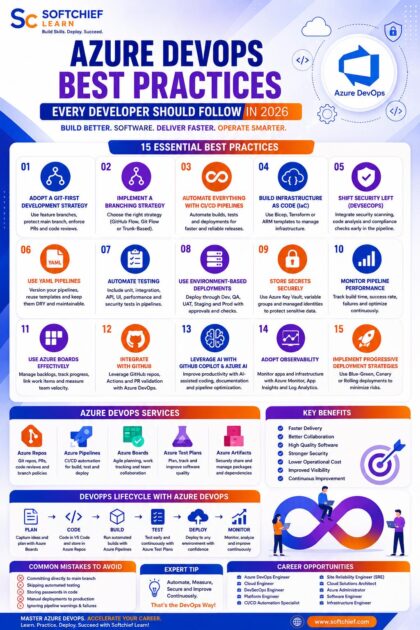
1. Adopt a Git-First Development Strategy
Source control is the foundation of every DevOps practice.
Azure Repos provides Git repositories with enterprise-grade capabilities.
Best practices include:
- Use feature branches for new development.
- Keep the
mainbranch production-ready. - Protect critical branches with policies.
- Require pull requests before merging.
- Enable mandatory code reviews.
- Use descriptive commit messages.
- Delete obsolete branches regularly.
A disciplined Git workflow reduces merge conflicts and improves collaboration.
2. Implement a Branching Strategy
A consistent branching model improves development efficiency.
Popular approaches include:
GitHub Flow
Ideal for:
- Cloud-native applications
- Agile teams
- Continuous deployment
Git Flow
Suitable for:
- Large enterprise projects
- Multiple release versions
- Long-term maintenance
Trunk-Based Development
Recommended for:
- High-frequency deployments
- CI/CD environments
- Microservices
Select a branching strategy that aligns with your team’s size, release frequency and deployment model.
3. Automate Everything with CI/CD Pipelines
One of Azure DevOps’ greatest strengths is Azure Pipelines.
Continuous Integration (CI) ensures every code change is automatically:
- Built
- Tested
- Validated
Continuous Delivery (CD) automates:
- Deployments
- Configuration
- Release approvals
- Rollbacks
Benefits include:
- Faster releases
- Reduced human error
- Consistent deployments
- Improved software quality
Manual deployments should become the exception rather than the standard practice.
4. Build Infrastructure as Code (IaC)
Modern cloud infrastructure should never be configured manually.
Infrastructure as Code enables developers to define cloud resources using version-controlled templates.
Common technologies include:
- Bicep
- ARM Templates
- Terraform
- Azure CLI
- PowerShell
Benefits include:
- Repeatable deployments
- Version control
- Disaster recovery
- Easier collaboration
- Reduced configuration drift
IaC is an essential component of modern DevOps.
5. Shift Security Left (DevSecOps)
Security should begin during development—not after deployment.
Azure DevOps supports DevSecOps through:
- Secret scanning
- Dependency analysis
- Code quality checks
- Security policies
- Vulnerability scanning
- Container image scanning
- Infrastructure validation
Integrating security into the CI/CD pipeline helps identify issues early, reducing remediation costs and minimizing production risks.
6. Use YAML Pipelines
Azure DevOps supports both classic pipelines and YAML pipelines.
YAML pipelines offer several advantages:
- Version-controlled configurations
- Easier collaboration
- Reusable templates
- Automated validation
- Improved maintainability
Example practices include:
- Modular pipeline templates
- Environment-specific variables
- Parameterized deployments
- Shared pipeline libraries
Keeping pipeline definitions in source control improves transparency and consistency.
7. Automate Testing
Automated testing is essential for maintaining software quality.
Include multiple testing stages in your pipelines:
- Unit testing
- Integration testing
- API testing
- UI testing
- Performance testing
- Security testing
- Regression testing
Failing builds should stop deployments automatically until issues are resolved.
8. Use Environment-Based Deployments
Applications typically progress through multiple environments before reaching production.
Common environments include:
- Development
- Testing
- QA
- UAT
- Staging
- Production
Azure DevOps environments enable:
- Deployment approvals
- Environment protection
- Resource tracking
- Deployment history
- Rollback management
This structured deployment process reduces production risks.
9. Store Secrets Securely
Never store sensitive information directly in source code.
Instead, use secure services such as:
- Azure Key Vault
- Variable Groups
- Managed Identities
- Secure Pipeline Variables
Examples of protected information include:
- API keys
- Database passwords
- Certificates
- Connection strings
- OAuth secrets
Proper secret management strengthens security and simplifies credential rotation.
10. Monitor Pipeline Performance
CI/CD pipelines should be monitored just like production applications.
Track metrics such as:
- Build duration
- Deployment success rate
- Failure frequency
- Queue time
- Test execution time
- Pipeline utilization
Regular optimization improves developer productivity and reduces deployment delays.
11. Use Azure Boards Effectively
Azure Boards helps teams manage work throughout the software development lifecycle.
Best practices include:
- Maintain a prioritized product backlog.
- Break work into manageable tasks.
- Define clear acceptance criteria.
- Link work items to commits and pull requests.
- Track sprint velocity.
- Review completed work regularly.
This improves traceability and project visibility.
12. Integrate with GitHub
Many organizations use Azure DevOps alongside GitHub.
Common integration scenarios include:
- GitHub repositories
- Azure Pipelines
- GitHub Actions
- Pull request validation
- Release automation
This hybrid approach allows teams to leverage the strengths of both platforms.
13. Leverage AI with GitHub Copilot and Azure AI
AI is transforming software development.
Developers can enhance productivity using:
- GitHub Copilot
- Azure AI Foundry
- Azure OpenAI Service
- Microsoft Copilot
AI assists with:
- Code generation
- Documentation
- Unit test creation
- Bug analysis
- Refactoring
- Pipeline optimization
Developers should treat AI as a productivity accelerator while continuing to review generated code carefully.
14. Adopt Observability
Deployment is only the beginning.
Applications should be monitored continuously using:
- Azure Monitor
- Application Insights
- Log Analytics
- OpenTelemetry
- Microsoft Sentinel
Monitor:
- Exceptions
- Performance
- Availability
- User behaviour
- API latency
- Infrastructure health
Observability enables faster troubleshooting and continuous improvement.
15. Implement Progressive Deployment Strategies
Modern deployment techniques reduce production risk.
Popular approaches include:
Blue-Green Deployment
Switch traffic between two identical production environments.
Canary Deployment
Release updates gradually to a small percentage of users before full deployment.
Rolling Deployment
Update application instances incrementally to maintain service availability.
These strategies minimize downtime and simplify rollback if issues occur.
Real-World Scenario
Consider a software company developing an enterprise CRM platform hosted on Microsoft Azure.
The development team:
- Uses Azure Repos with a trunk-based branching strategy.
- Builds and tests code automatically using Azure Pipelines.
- Deploys infrastructure using Bicep templates.
- Stores secrets in Azure Key Vault.
- Runs automated security scans during every build.
- Deploys to Development, QA, UAT and Production environments with approval gates.
- Monitors application health using Azure Monitor and Application Insights.
- Uses GitHub Copilot to accelerate development while enforcing peer reviews.
The result is faster releases, improved software quality, stronger security and greater confidence in production deployments.
Common Azure DevOps Mistakes
Avoid these common pitfalls:
- Committing directly to the main branch.
- Storing passwords in source code.
- Skipping automated testing.
- Ignoring failed pipeline warnings.
- Overcomplicating pipeline definitions.
- Deploying manually to production.
- Not reviewing pull requests.
- Failing to monitor deployments.
- Delaying security testing until after release.
- Neglecting documentation and knowledge sharing.
Best Practices Checklist
Before deploying any production application, ensure you:
- Protect your main branch with policies.
- Automate builds and deployments.
- Store infrastructure as code.
- Secure secrets using Azure Key Vault.
- Enable comprehensive automated testing.
- Review every pull request.
- Monitor deployments and application health.
- Apply DevSecOps principles throughout the pipeline.
- Version pipeline configurations using YAML.
- Continuously optimize delivery processes based on metrics and feedback.
Career Opportunities
Azure DevOps expertise is highly valued across industries embracing cloud and DevOps practices.
Career paths include:
- Azure DevOps Engineer
- Cloud Engineer
- Site Reliability Engineer (SRE)
- DevSecOps Engineer
- Platform Engineer
- Cloud Solutions Architect
- Azure Administrator
- Software Engineer
- Infrastructure Engineer
- CI/CD Automation Specialist
Professionals skilled in Azure DevOps, Azure, Kubernetes, Docker, GitHub and Infrastructure as Code are among the most in-demand technology specialists worldwide.
Learn Azure DevOps with Softchief Learn
At Softchief Learn, we provide practical, industry-oriented Azure DevOps training designed to prepare learners for real-world enterprise environments.
Our Azure DevOps learning programs include:
- Azure DevOps Fundamentals
- Azure Repos
- Azure Pipelines
- Azure Boards
- Azure Artifacts
- Infrastructure as Code with Bicep and Terraform
- Docker and Kubernetes
- Azure App Services
- Azure Kubernetes Service (AKS)
- Azure Monitor and Application Insights
- GitHub Integration
- GitHub Copilot
- DevSecOps Best Practices
- Microsoft Certification Preparation (AZ-400 and related certifications)
Our instructor-led training combines live demonstrations, hands-on labs, enterprise case studies and interview preparation to help professionals build confidence and accelerate their careers.
Conclusion
Azure DevOps has evolved into a comprehensive platform for managing the entire software delivery lifecycle. By adopting best practices such as Git-first development, automated CI/CD pipelines, Infrastructure as Code, DevSecOps, AI-assisted coding, secure secret management and continuous monitoring, development teams can deliver software that is faster, more reliable and more secure.
In 2026, successful developers are not only skilled programmers—they are automation experts, security advocates and continuous improvement champions. Mastering Azure DevOps equips professionals with the tools and practices needed to build high-quality applications, collaborate effectively and thrive in modern cloud-native environments.
Whether you’re just beginning your DevOps journey or looking to refine your existing workflows, following these best practices will help you deliver greater value to your organization and advance your career in today’s rapidly evolving software industry.









