
Business Central External Integration Architecture: Build Secure, Scalable Connections

Introduction
A sales order can touch five systems before it reaches a customer: Business Central, an online store, a payment service, a shipping provider, and a reporting tool. Business Central external integration architecture determines how those systems share data without creating connections that are brittle, hard to secure, or difficult to support.
The design affects data consistency, response times, troubleshooting, upgrades, and the cost of future changes. A quick connection may work for one task but become a maintenance burden as more systems and data flows are added.
Start by matching the interface to the work. Then decide whether systems can connect directly or need middleware or messaging, and build in security, error handling, and clear ownership.
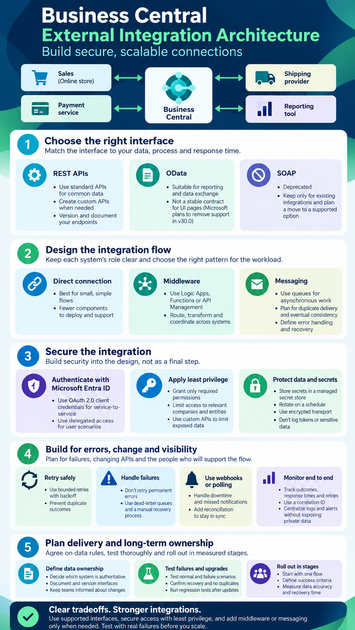
Choose Business Central external integration interfaces
Interface choice depends on the data, business process, expected delay, and support needs. A fast endpoint call might suit a sales lookup, while scheduled data exchange may work better for a nightly report. Check Microsoft Learn’s Business Central API documentation for current capabilities and supported interfaces before committing to a design.
Use REST APIs for supported business data
Business Central’s standard APIs cover common entities and operations. They’re a good starting point for new integrations, provided they expose the fields and actions your process needs. If they don’t, an AL extension can define a custom API page for a controlled, versioned data surface.
A custom API endpoint includes the environment, publisher, group, version, company, and entity path. For example, a route may use /api/<publisher>/<group>/<version>/companies(<company id>)/customers. Set and document the API version so external teams know how to handle future changes.
Use OData and SOAP only when they fit
OData can expose supported pages and queries, which may suit reporting or existing data exchange. But a user interface page isn’t a stable contract: Microsoft plans to remove the ability to expose Microsoft-owned pages as OData endpoints starting in version 30.0. SOAP is deprecated, so keep it only where an existing integration or compatibility need requires it, and plan a move to a supported option. Microsoft’s deprecation guidance tracks these changes.
For each flow, confirm which entities are required, how much data moves, what response time users expect, and whether one system must receive change notifications. Also decide whether each operation must complete in one request or can run later as a separate task.
Design the architecture around the integration flow
Keep each system’s role clear. Business Central should own its business records, while an external system should own data and actions that belong to its service. The connection between them can be direct, managed by middleware, or built around asynchronous messages.
Connect directly when the flow is small
A direct connection can work well when one external application reads or updates a limited set of Business Central data. It has fewer components to deploy and support, and it may be enough for a simple inventory lookup or customer sync.
The tradeoff is tighter coupling. Each new point-to-point link adds its own mapping, credentials, and error handling. If several systems need the same data, changes can become harder to coordinate.
Add middleware when flows span systems
Middleware can route requests, transform data, and coordinate steps across several applications. Azure Logic Apps or Azure Functions may fit workflows and custom processing; Azure API Management can help manage API access. Choose based on the actual workload and the team’s ability to run and monitor the service, not by default.
Use messages when work can happen later
A queue helps separate a sender from a receiver when either system may be unavailable or work can finish asynchronously. The sender records that a message was accepted; the consumer processes it and reports or stores the outcome.
Plan for duplicate delivery and eventual consistency. Give messages clear ownership, track their status, and define what happens when processing fails, such as a dead-letter queue and a manual recovery path.
Secure Business Central external integration architecture
Security decisions belong in the design, not as a final configuration task. Define which application or user connects, what data it can access, and where credentials and logs will live. Keep the exposed data limited to what the integration needs.
Authenticate with Microsoft Entra ID
For unattended service-to-service work, Business Central supports OAuth 2.0 client credentials, where the application authenticates without a signed-in user. Delegated access is different: a user signs in and the application acts on that user’s behalf. Microsoft’s service-to-service authentication guidance explains the application identity model and setup. Check current requirements for your Business Central version and hosting type.
Grant only the permissions the flow needs
Assign the integration application only the Business Central permissions required for its tasks. Limit access to the relevant companies and entities, and use a custom API when the standard surface exposes more data than needed. Review permissions whenever the integration adds a new operation or data set.
Store secrets in a managed secret store, rotate them on a set schedule, and use encrypted transport. Don’t write tokens or sensitive payloads to logs. Set a retention period for integration logs and remove data that no longer helps support or audit work.
Build for errors, change, and visibility
A successful test call doesn’t prove an integration is ready for daily use. Temporary service failures, invalid records, expired credentials, and request limits can all interrupt a flow. Microsoft’s Business Central online operational limits describe request limits and responses such as 429 throttling, so confirm current limits for the interface and environment you plan to use.
Retry safely and prevent duplicate outcomes
Use bounded retries with backoff for temporary failures, such as timeouts or throttling. Don’t keep retrying permanent validation errors; send them to a clear review process instead. Where a repeated request could create a second order or payment, use an idempotency key or another method to detect work already completed.
For queued work, add a dead-letter or manual recovery process. Staff need to see which message failed, why it failed, and whether it’s safe to replay.
Choose webhooks or polling with care
Webhooks can notify an external system when supported Business Central data changes. The receiver still needs to handle downtime, manage subscriptions, and read the changed record when it needs full details. Polling may fit when notifications aren’t available or when scheduled reconciliation is part of the process.
Microsoft’s deprecation guidance describes webhooks as the preferred change-tracking approach over API delta links. Check current webhook behavior and limits, then add reconciliation so missed or delayed notifications don’t leave systems out of sync.
Monitor the full path
Track outcomes, response times, retry counts, queue backlog, and authentication failures. Use a correlation identifier to follow one transaction across middleware, Business Central, and the external service. Central logs and alerts help staff find faults without exposing private data.
Plan delivery and long-term ownership
Agree on data rules before building. Decide which system is authoritative for each field, who owns transformations, and how teams will learn about changes to schemas or extensions. Document and version interfaces so consumers can plan updates.
Test failures and upgrades
Test normal requests and realistic failures: expired credentials, unavailable services, invalid records, throttling, and duplicate messages. Confirm that recovery works and that a replay won’t cause duplicate business activity. Run regression tests after Business Central updates, extension changes, or external API revisions.
Roll out in measured stages
Begin with one bounded flow and define what success means, including data accuracy and recovery time. For example, Microsoft documents Business Central and Dataverse integration, including one-way or two-way synchronization and mappings. That built-in pattern may fit a Business Central and Dynamics 365 Sales scenario; it won’t replace a custom design for every use case.
Conclusion: Build for clear tradeoffs
A sound Business Central external integration architecture uses supported interfaces, protects access with least privilege, and adds middleware or messaging only when the work calls for it. It also accounts for retries, duplicate delivery, changing APIs, and the people who will support the flow.
Inventory your systems and data flows first. Confirm current Microsoft support and limits, document identity and ownership, then test a production-like integration with both successful and failed requests before expanding it.









