
Reliable BC API Integrations: Keep Business Central Data in Sync

Introduction
A dependable BC API integration keeps finance, sales, inventory, and other systems working from consistent data. A fragile connection can delay work, create duplicate records, and leave support teams chasing errors. Reliability depends on more than a successful API call: access control, data design, error handling, monitoring, and planned updates all matter.
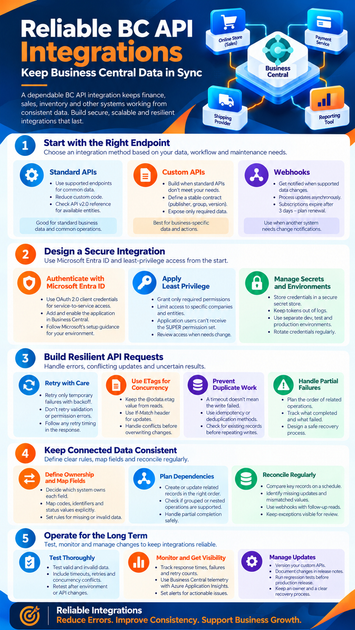
Reliable BC API integrations start with the right endpoint
Choose an integration method based on the data you need, the work it must support, and how you’ll maintain it. Business Central offers standard APIs, custom APIs, and webhook notifications for supported entities. Your choice should fit the workflow, not force the workflow to fit the endpoint.
Use standard APIs when they cover the need
Business Central’s standard APIs provide documented operations for supported entities. Check Microsoft’s Business Central API v2.0 reference to review available endpoints and operations before planning custom development. The API Overview page in Business Central can also help you inspect APIs available in your environment.
Standard APIs can reduce the code your team needs to own. But don’t assume they expose every field or business process your integration needs. Microsoft’s API reference notes that standard APIs can’t currently be extended with extra fields; when you need more, consider a custom API.
Build custom APIs for business-specific needs
A custom API uses an AL page with PageType = API. Its contract includes an API publisher, group, version, entity name, and entity set name. Microsoft’s custom API development guide explains how these properties shape the endpoint.
Use a custom API when standard endpoints don’t expose the required data or actions. Design it around what the other system needs, not around Business Central’s internal tables. Define stable field names, record identifiers, and rules for create and update operations so consumers can rely on the contract.
Match the pattern to the workflow
A request-and-response call suits work that needs an answer right away, such as looking up a record or submitting a change. Webhooks can notify a connected service when supported data changes, allowing that service to process the update asynchronously. Check that the entity supports webhooks before you build around them.
Notifications may arrive after a short delay, and a webhook message points to changed data rather than replacing a read from Business Central. Microsoft’s webhook guidance also says subscriptions expire after three days unless renewed. Plan for renewal, missed notifications, and the data volume your service must process.
Secure reliable BC API integrations from the start
An integration often runs without a person present, so its identity and access need careful setup. Microsoft Entra ID provides the authentication path for Business Central API access. Keep access limited to the tasks and data the integration needs.
Authenticate with Microsoft Entra ID
For unattended service-to-service access, Microsoft documents OAuth 2.0 client credentials. Set up the application in Microsoft Entra ID, then add and enable the matching application in Business Central. Microsoft’s service-to-service authentication guide covers the setup steps and requirements.
A valid token alone doesn’t grant access to every record or action. The Business Central application also needs permission sets for the objects it must use. Check the guide for the scope and setup details that apply to your environment and API.
Apply least-privilege permissions
Grant only the permissions needed for the integration’s work. Review permission sets, object access, and access to each target company and environment. Microsoft notes that application users can’t receive the SUPER permission set, so avoid designing an integration that depends on full access.
Test both allowed and denied actions. A permission failure should be visible to your team and should not trigger repeated retries. Recheck access when the integration’s purpose or data needs change.
Separate secrets and environments
Store credentials in a secure secret store supported by your hosting platform, not in source code or plain-text settings. Keep tokens and secrets out of logs, and replace credentials under a planned rotation process. Limit access to the people and services that need to manage them.
Use separate settings for development, test, and production. This helps prevent test activity from reaching live company data. Before release, verify the app registration, endpoint, company, and permissions for the target environment.
Build resilient Business Central API requests
Even a well-configured service can face temporary errors, conflicting changes, or an uncertain result after a timeout. Build the client to recognize those conditions and recover without creating extra work. Use the response status and body to decide what should happen next.
Retry temporary errors with care
Treat validation and permission errors differently from temporary failures. Retrying invalid data or denied access won’t fix the cause. For failures that may clear, use a limited retry count with increasing delays; follow any retry timing the response provides.
Avoid tight retry loops, which can add load while Business Central is already busy. Log the endpoint, status code, and a safe error summary for review. Don’t record access tokens or sensitive request data.
Use ETags to catch conflicting updates
Business Central API responses can include an @odata.etag value for a record. Keep that value when the integration reads data, then use the returned tag in an If-Match header for an update when the endpoint supports conditional requests. This helps detect when another process has changed the record since it was read.
If an update fails because the record has changed, fetch the latest data before deciding what to do. Your integration may need to merge values, ask for review, or apply a business rule. Don’t overwrite a newer change without checking it.
Prevent duplicate work after timeouts
A timeout doesn’t tell you whether a write completed. If the client sends the same create request again, it may create duplicate data unless the operation or API design prevents it. Don’t assume an endpoint supports idempotency unless its documentation says so.
Choose a deduplication or reconciliation method for each write operation. For example, keep an integration record of the external key and the Business Central record ID, then check for a completed write before repeating it. The right method depends on the operation and the identifiers available.
Keep connected-system data consistent
Reliable BC API integrations need clear field rules and a way to find gaps. Define what each system owns, how values map, and how the service handles partial completion. Reconciliation helps catch missed changes that normal request processing can’t resolve.
Define ownership and map fields
Document which system owns each field and which system may change it. Map codes, identifiers, dates, and status values explicitly instead of relying on matching labels. Set rules for missing, invalid, or differently formatted values.
Keep transformations and business rules close to the integration documentation. This gives support staff a clear path when a record fails validation. It also helps teams review changes before an upstream system alters a field or code.
Plan dependencies and transaction boundaries
Some records depend on others, so create or update them in a deliberate order. Check whether the specific endpoint supports a grouped or nested operation before relying on one request to handle related records. Separate API calls should not be treated as one transaction unless the API documentation confirms it.
Plan recovery for partial completion. If the first call succeeds and a later call fails, record what completed and what remains. A retry should resume safely rather than repeat every prior action.
Reconcile instead of assuming perfect delivery
Compare important records on a schedule or after a failure. A reconciliation process can flag missing updates, mismatched values, and records that need review. Keep exceptions visible in a queue or report so they don’t disappear into application logs.
For webhook-based designs, use the notification to learn that a change occurred, then verify the current record in Business Central. Notifications can be delayed, grouped, or missed if delivery fails. A follow-up read and a recovery check make the process safer.
Operate reliable BC API integrations over time
Reliability needs regular checks after launch. Test failure paths, watch useful signals, and review changes to the API contract and environment. These habits help teams spot issues before they become routine manual work.
Test data rules and failure paths
Test in a nonproduction Business Central environment before release. Cover valid and invalid permissions, missing or malformed data, timeouts, retries, and concurrency conflicts. Include partial failures and confirm that recovery doesn’t create duplicate records.
Retest after changes to the integration, custom API, or Business Central environment. A successful test call proves only that one request worked. It doesn’t show that the service can recover from a lost response or an outdated record.
Monitor outcomes and useful signals
Track request outcomes, response time, retry counts, and failures tied to your integration’s business rules. Avoid logging secrets and personal or financial data that isn’t needed for support. Set alerts for signals that require action, such as a rising failure count or an expired webhook subscription.
Business Central telemetry can help teams review environment activity and incoming web-service request execution time. Microsoft’s telemetry overview explains how Business Central telemetry can be sent to Azure Application Insights and reviewed there. Pair platform telemetry with your own integration logs so you can trace both sides of a failed exchange.
Manage API changes and releases
Give custom API contracts clear versions and record changes in release notes. Run regression tests when you change fields, permissions, or request logic. Review Microsoft’s API reference when Business Central updates, then validate the integration in a test environment before production release.
Keep an owner for each integration and a process for urgent failures. That owner should know how to pause writes, review queued work, and restart processing safely. Planned releases and clear recovery steps reduce the risk of a small change causing a long outage.
Conclusion: Make reliability part of the design
Dependable Business Central connections start with the right API and a clear contract. Secure access with Microsoft Entra ID and least-privilege permissions, handle retries and repeated requests with care, and reconcile data instead of assuming every update arrives. Testing, telemetry, and release reviews keep the integration useful after launch.
Before the next release, confirm the endpoint and permissions, document field ownership and mappings, test recovery from timeouts and partial failures, and set alerts for actionable issues. Make those checks part of your release process, not an afterthought.









