Microsoft Copilot Studio: How to Design Conversations That Collect Missing Information Before Taking Action
Introduction
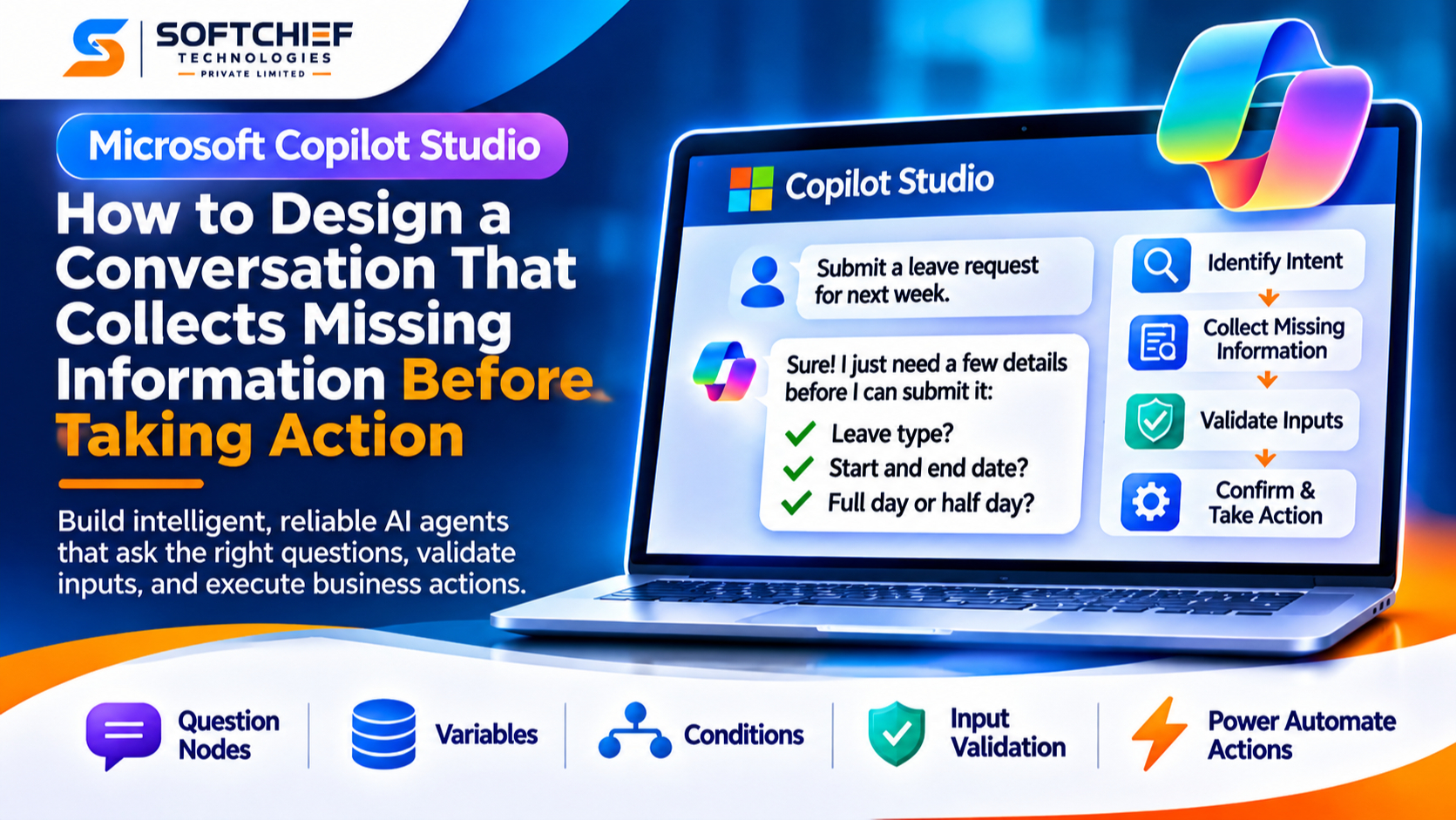
Copilot Studio conversation design is essential for building intelligent AI agents that understand user intent, identify missing information, ask relevant follow-up questions, validate responses, and execute business actions accurately. In enterprise environments, a well-designed conversation ensures that automation does not proceed with incomplete or incorrect information.
An AI agent can understand a user’s request, identify the intended business operation, and initiate an automated workflow. But what happens when the user does not provide all the information required to complete that operation?
Consider a simple business scenario.
An employee tells an internal HR assistant:
“Please submit a leave request for next week.”
The request sounds straightforward. However, several important details are missing:
- Which dates does the employee want to take leave?
- What type of leave should be applied?
- Is the request for a full day or a half day?
- Is there any additional information required by the organization’s leave policy?
If the agent immediately invokes a Power Automate flow without collecting these details, the automation may fail, create incomplete records, or require manual intervention.
This is not simply a conversational design problem. It is an important aspect of enterprise automation architecture.
With Microsoft Copilot Studio, developers can design conversations that identify missing information, ask targeted questions, validate responses, maintain context, and execute business actions only when the required information is available.
The objective is to build an agent that does not merely respond to users but reliably completes business processes.
1. Why Collecting Missing Information Is Critical in Enterprise AI Agents
In enterprise applications, business operations usually require structured information.
For example:
| Business operation | Information required |
|---|---|
| Create a purchase request | Item, quantity, department, budget |
| Submit a leave request | Employee, leave type, start date, end date |
| Create a customer record | Customer name, contact details, required identifiers |
| Raise a support ticket | Issue category, description, priority |
| Schedule a service appointment | Customer, location, preferred date, service type |
Users rarely provide every required field in their initial message.
A poorly designed agent may respond in one of three ways:
- Execute an action using incomplete information.
- Ask the user to repeat the entire request.
- Return an error because the downstream automation cannot process the missing values.
A well-designed agent follows a different approach.
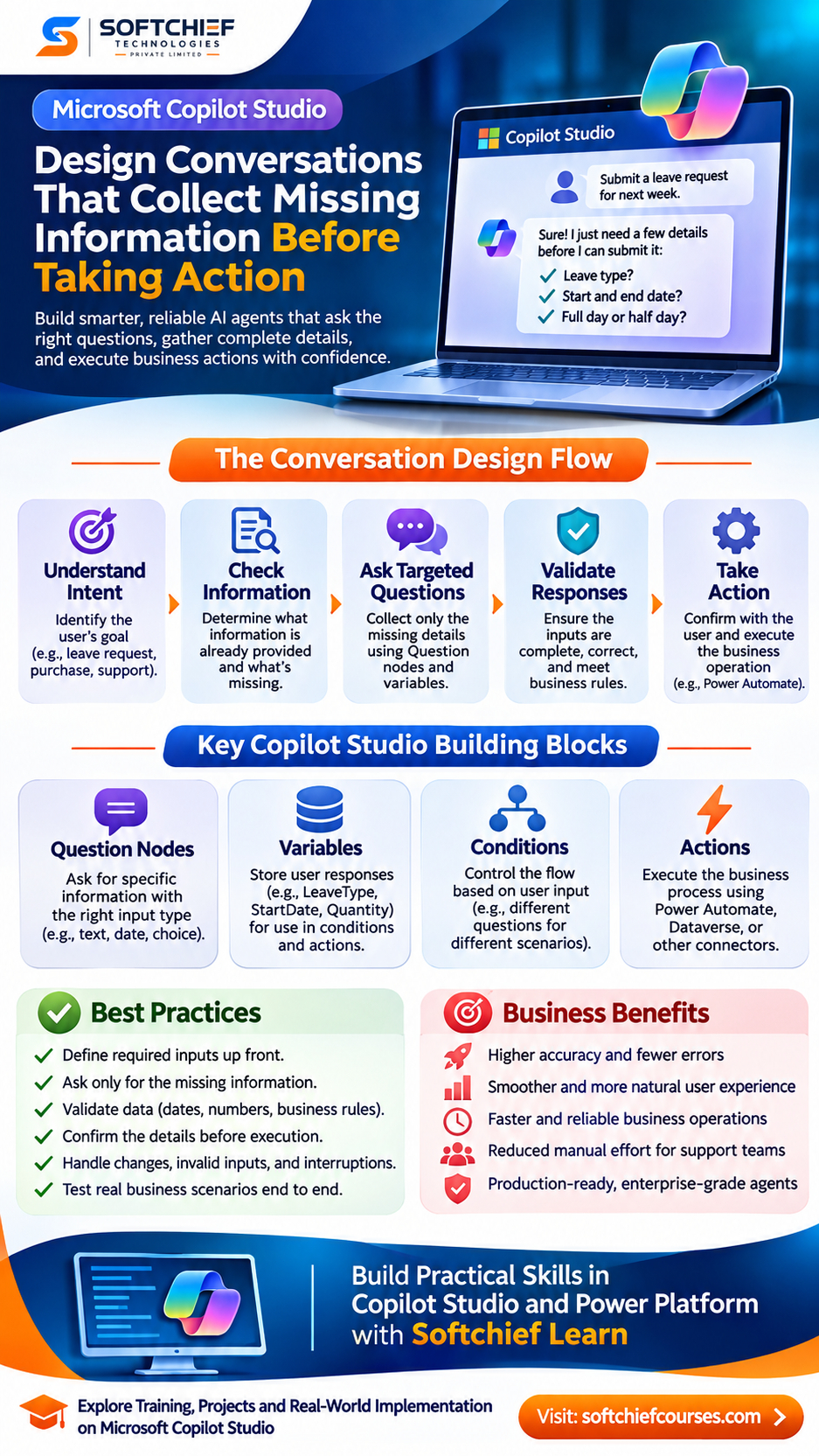
It identifies what the user has already provided, determines which mandatory fields are missing, collects only the missing information, validates the responses, and proceeds with the requested action.
This approach is commonly implemented through conversational slot filling and structured input collection.
2. Understand the Conversation Before Executing an Action
The first architectural requirement is to separate user intent from the information needed to execute that intent.
Consider this request:
“Create a purchase request for 10 laptops for our Hyderabad development team.”
The agent can identify several details immediately:
- Operation: Create purchase request.
- Item: Laptop.
- Quantity: 10.
- Department or team: Development.
- Location: Hyderabad.
However, the agent may still need:
- Required delivery date.
- Estimated budget.
- Cost centre.
- Business justification.
Instead of asking the user to provide all information again, the agent should retain the available values and request only the missing details.
This is an important conversational design principle:
Collect information incrementally without losing the context of the original request.
Before designing the conversation, define the required input contract for the business operation.
For example:
PurchaseRequest
    ItemName
    Quantity
    Department
    Location
    DeliveryDate
    EstimatedBudget
    BusinessJustification
Each field should have a clear definition, data type, and validation requirement.
This input contract becomes the foundation for the conversation and the downstream automation.
3. Use Question Nodes to Collect Missing Information
Microsoft Copilot Studio provides Question nodes that allow an agent to ask users for specific information and store their responses in variables.
Developers can configure the type of information to collect using the Identify option.
For example, when collecting a leave type, the agent can provide multiple-choice options such as:
- Annual Leave
- Sick Leave
- Personal Leave
- Unpaid Leave
For a date, the agent can collect a date-based response.
For a free-text business justification, it can capture the user’s response as text.
Consider the following conversation:
User:
“Submit a leave request for next Monday.”
Agent:
“Sure. Which type of leave would you like to apply for?”
User:
“Annual leave.”
Agent:
“Would you like to apply for a full day or a half day?”
User:
“Full day.”
The agent now has additional information required to prepare the request.
In the topic authoring canvas, developers can use:
- Question nodes to collect information.
- Variables to store responses.
- Condition nodes to evaluate collected values.
- Message nodes to communicate with users.
- Tool nodes to invoke Power Automate flows or other supported actions.
The important implementation decision is to use meaningful variable names such as:
Topic.EmployeeId
Topic.LeaveType
Topic.StartDate
Topic.EndDate
Topic.LeaveDuration
Meaningful variable names make conversations easier to maintain, troubleshoot, and extend.
4. Validate User Responses Before Moving Forward
Collecting information does not automatically mean that the information is valid.
Consider the following responses:
- Leave start date: 15 December.
- Leave end date: 12 December.
Both values may be valid dates individually, but the overall request is logically incorrect.
Similarly, an employee might enter a purchase quantity of -5 or provide an estimated budget that exceeds the department’s permitted limit.
A production-ready agent should validate both individual inputs and relationships between inputs.
Important validation scenarios include:
- Mandatory field validation.
- Data type validation.
- Date and range validation.
- Business rule validation.
- Duplicate request validation.
- Authorization and eligibility validation.
Copilot Studio supports additional entity validation in Question nodes, including conditions expressed through Power Fx.
For example, a basic date validation could be:
Topic.EndDate >= Topic.StartDateThis ensures that the end date is not earlier than the start date.
For more complex business rules, validation can also be implemented in Power Automate, Dataverse, or the downstream business application.
A useful design principle is to validate data as early as possible, but always enforce critical business rules at the system performing the actual transaction.
Conversational validation improves user experience. Backend validation protects business data.
5. Use Conditional Branching to Control the Conversation
Not every response requires the same follow-up question.
For example, consider a service request agent.
If a customer selects “Technical Issue”, the agent may ask for the affected application and error details.
If the customer selects “Billing Issue”, it may ask for the invoice number and billing period.
This can be implemented using Condition nodes.
A simplified conversation structure might look like this:
User Request
     |
     v
Identify Business Intent
     |
     v
Collect Required Information
     |
     v
Validate Responses
     |
     v
Evaluate Conditions
     |
     +----------------------+
     |                      |
     v                      v
Technical Issue        Billing Issue
     |                      |
     v                      v
Collect Error Details  Collect Invoice Details
     |                      |
     +----------+-----------+
                |
                v
       Validate All Required Data
                |
                v
        Confirm Business Action
                |
                v
         Execute Automation
                |
                v
         Return Result
Conditional branching prevents the agent from asking irrelevant questions.
It also helps developers create reusable conversation components instead of building one large topic containing every possible business scenario.
6. Design Conversations That Ask Only What Is Missing
One of the biggest mistakes in conversational design is asking users to repeat information they have already provided.
For example:
User:
“Create a support ticket for my Dynamics 365 application. The Sales module is returning an error when I open customer records.”
A poorly designed agent might ask:
“What application are you using?”
The user has already provided that information.
A better agent should recognize:
- Application: Dynamics 365.
- Module: Sales.
- Issue: Error when opening customer records.
It should then ask:
“Could you share the exact error message or screenshot so our support team can investigate?”
This makes the conversation more natural and reduces unnecessary interaction.
A practical implementation approach is to maintain a list of required fields and evaluate which values are already available.
For example:
Required Fields:
    Application
    Module
    IssueDescription
    ErrorDetails
    Priority

Available Fields:
    Application
    Module
    IssueDescription

Missing Fields:
    ErrorDetails
    Priority
The agent should ask for ErrorDetails and Priority rather than restarting the entire conversation.
For agents using generative orchestration, topic and tool input descriptions are particularly important because the agent can use those definitions to determine what information is missing and generate follow-up questions automatically.
For deterministic topic-based conversations, developers can explicitly control this behavior using Question nodes and conditions.
These are two different conversation design approaches, and the implementation should reflect the orchestration mode used by the agent.
7. Design for Generative Orchestration and Structured Inputs
Modern Copilot Studio agents can use generative orchestration to determine which topics and tools are appropriate for a user’s request.
This introduces an important design consideration.
Instead of manually asking every question through a fixed sequence, developers can define clear inputs for topics and tools.
For example, a purchase request action may require:
Tool: CreatePurchaseRequest

Inputs:
    ItemName
    Quantity
    Department
    DeliveryDate
    EstimatedBudget
Each input should have a meaningful name and description.
For example:
Quantity:
The number of items requested.
Must be a positive whole number.

DeliveryDate:
The date by which the requested items
must be delivered.
When required input values are missing, generative orchestration can prompt the user to provide them.
Developers can also configure custom prompts for inputs when more precise wording is required.
This is especially useful when building enterprise agents that support multiple business processes.
However, automatically generated follow-up questions should still be tested for clarity, validation, and consistency with business rules.
8. Confirm the Request Before Executing Business Actions
Collecting all required information is not always sufficient.
For important business operations, the agent should summarize the information and ask the user to confirm before executing the action.
Consider this conversation:
Agent:
“I have collected the following details for your purchase request:
- Item: Laptop
- Quantity: 10
- Department: Development
- Location: Hyderabad
- Estimated budget: ₹7,50,000
Would you like me to submit this purchase request?”
User:
“Yes, submit it.”
Only after confirmation should the agent proceed with the action, subject to the user’s authorization and the organization’s approval rules.
This is particularly important for:
- Financial transactions.
- Purchase requests.
- Employee leave submissions.
- Customer record creation.
- Account updates.
- Service cancellations.
Confirmation reduces accidental execution, but it does not replace authorization.
The backend must still verify that the requesting user is permitted to perform the operation.
For reliable enterprise automation, also consider duplicate-submission protection and transaction-status handling.
For example, if the user clicks submit twice or the agent retries after a timeout, the system should not create two identical purchase requests.
9. Handle Interruptions, Invalid Responses, and Incomplete Conversations
Real conversations are rarely linear.
A user might change their mind, provide an incorrect response, ask another question, or abandon the conversation halfway through.
A robust Copilot Studio agent should account for these situations.
Consider the following cases:
| Situation | Recommended agent behavior |
|---|---|
| User provides an invalid date | Explain the expected date format and ask again |
| Mandatory information is missing | Ask for the specific missing field |
| User changes a previously supplied value | Update the relevant variable and revalidate |
| User changes the requested operation | Reassess intent and required inputs |
| User does not respond | Follow the configured timeout or conversation handling behavior |
| Automation fails | Explain the failure and provide a recovery or escalation path |
Developers should also be careful about maintaining conversation state.
If a user corrects a previously supplied value, the relevant variable must be updated explicitly.
In complex conversations, it is useful to separate the collection of information from the execution of the business operation.
This prevents incomplete or outdated information from reaching downstream systems.
10. Practical Enterprise Implementation: Building a Purchase Request Agent
Let’s combine these concepts into a practical Copilot Studio implementation.
Business Requirement:
An organization wants an AI-powered procurement assistant that allows employees to create purchase requests through natural conversation.
The agent must collect missing information, validate the request, confirm the details, and submit the request through Power Automate.
Step 1: Define the required inputs
Create a structured request containing:
- Employee ID.
- Item name.
- Quantity.
- Department.
- Delivery location.
- Required delivery date.
- Estimated budget.
- Business justification.
Step 2: Identify the user’s intent
The employee might say:
“I need five monitors for the Hyderabad development team.”
The agent identifies the purchase request intent and captures the available values.
Step 3: Collect missing information
The agent asks targeted follow-up questions:
“What is the estimated budget for these monitors?”
“When do you need them delivered?”
“Could you provide a business justification for this request?”
Step 4: Validate the collected information
Validate quantity, budget, delivery date, mandatory fields, and applicable procurement policies.
Step 5: Present a summary
Display the complete purchase request and ask the employee to confirm submission.
Step 6: Execute the Power Automate flow
After confirmation, invoke the configured Power Automate flow through the appropriate Copilot Studio tool integration.
The flow should:
- Validate the request against organizational rules.
- Verify the user’s authorization.
- Create the purchase request record.
- Initiate the appropriate approval process.
- Return a transaction reference or meaningful error response.
Step 7: Return the result
The agent provides a clear response:
“Your purchase request has been submitted successfully. Request Reference: PR-2026-1045. It is currently awaiting manager approval.”
The reference above is illustrative.
This approach transforms a simple conversational interface into a structured business automation process.
11. Best Practices for Production-Ready Copilot Studio Conversations
When designing enterprise agents, consider the following principles:
- Define mandatory inputs before building the conversation.
- Capture information already provided by the user.
- Ask only relevant follow-up questions.
- Use meaningful variables and structured data types.
- Apply validation at both conversation and backend levels.
- Use conditional branching to avoid unnecessary questions.
- Separate data collection from business action execution.
- Confirm high-impact actions before submission.
- Enforce authorization in the backend.
- Handle retries, duplicate submissions, and integration failures.
- Protect sensitive information and collect only what the business process requires.
- Test incomplete inputs, interruptions, corrections, and unexpected responses.
A successful agent is not measured by how many questions it asks. It is measured by how accurately it gathers the information needed to complete a business process.
Conclusion: Build AI Conversations That Understand Before They Act
The real value of Microsoft Copilot Studio is not simply creating an agent that can answer questions. It is building an agent that can understand business intent, collect structured information, validate user responses, and execute business operations reliably.
Question nodes, variables, conditions, structured inputs, generative orchestration, and Power Automate integrations provide developers with the building blocks required to implement these experiences.
The most important architectural principle is to ensure that an agent never treats an incomplete conversation as a completed business request.
When conversation design and backend validation work together, organizations can build AI agents that reduce manual effort, improve data quality, and make enterprise automation more dependable.
Strengthen Your Copilot Studio and Power Platform Expertise with Softchief Learn
Building production-ready AI agents requires more than understanding conversational prompts. Professionals need practical knowledge of Copilot Studio, Power Automate, Dataverse, Power Fx, integrations, and enterprise automation architecture.
Softchief Learn provides Microsoft technology learning opportunities designed to help professionals develop practical implementation skills.
Join Softchief Learn’s live technical webinars to explore real-world Microsoft technologies, implementation scenarios, and expert insights from industry professionals.
Learn how to design intelligent business workflows, build conversational agents, and implement Microsoft Power Platform solutions for real-world enterprise requirements.
Frequently Asked Questions
1. How does Microsoft Copilot Studio collect missing information from users?
Copilot Studio can collect information using Question nodes, variables, and structured topic or tool inputs. Depending on the agent’s orchestration mode, developers can implement predefined questions or allow generative orchestration to prompt users for missing input values.
2. What is the role of variables in Copilot Studio?
Variables store information collected during a conversation. They can be used in messages, conditions, topic logic, and tool or Power Automate integrations.
3. How can developers validate user input in Copilot Studio?
Developers can use entity identification, additional entity validation, Power Fx conditions, and backend validation to ensure that collected information satisfies business requirements.
4. Can Copilot Studio ask follow-up questions automatically?
Yes. Agents using generative orchestration can prompt users for missing topic or tool inputs based on their names and descriptions. Developers can also configure custom prompts or implement explicit Question nodes.
5. How does Copilot Studio execute business actions after collecting information?
Copilot Studio can invoke configured tools, connectors, and Power Automate flows. The collected values are passed as inputs to the relevant operation, which processes the request and returns a result to the agent.
6. Why should an agent confirm information before executing an action?
Confirmation allows users to review the collected information and correct mistakes before a business operation is submitted. It is particularly useful for financial, procurement, account-management, and other high-impact operations.