
Dynamics 365 + Copilot: The Future of CRM and ERP Automation
Introduction
Artificial Intelligence has moved beyond being a futuristic concept—it is now a practical business necessity. Organisations across industries are looking for ways to improve productivity, automate repetitive tasks, deliver exceptional customer experiences and make faster, data-driven decisions. Microsoft is addressing these needs by embedding AI directly into its business applications through Dynamics 365 Copilot.
Dynamics 365 has long been recognised as one of the leading enterprise platforms for Customer Relationship Management (CRM) and Enterprise Resource Planning (ERP). With the introduction of Copilot, Microsoft has transformed Dynamics 365 from a system that manages business data into an intelligent platform that actively assists employees, recommends actions and automates complex business processes.
Whether you’re managing sales pipelines, customer support, financial operations, supply chains or field service teams, Dynamics 365 Copilot helps organisations work smarter, faster and more efficiently.
In this comprehensive guide, we’ll explore how Dynamics 365 Copilot is redefining CRM and ERP automation, its key capabilities, business benefits, implementation strategies and why it is becoming an essential technology for modern enterprises.
Understanding Dynamics 365
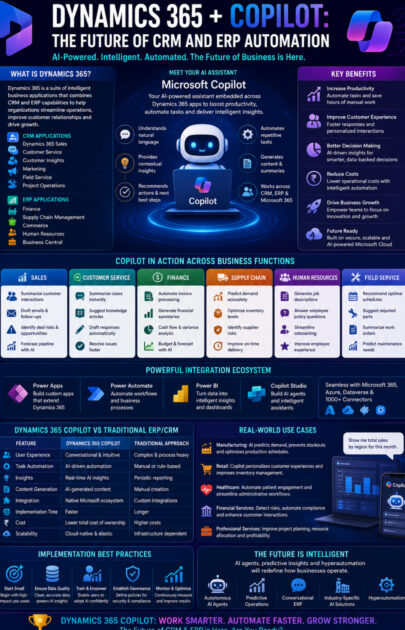
Microsoft Dynamics 365 is a cloud-based suite of intelligent business applications that combines CRM and ERP into a unified ecosystem.
Instead of maintaining separate systems for sales, finance, operations and customer service, organisations can manage everything through an integrated platform connected with Microsoft 365, Azure and the Power Platform.
Dynamics 365 CRM Applications
- Dynamics 365 Sales
- Dynamics 365 Customer Service
- Dynamics 365 Customer Insights
- Dynamics 365 Customer Insights – Journeys (Marketing)
- Dynamics 365 Field Service
- Dynamics 365 Project Operations
Dynamics 365 ERP Applications
- Dynamics 365 Finance
- Dynamics 365 Supply Chain Management
- Dynamics 365 Commerce
- Dynamics 365 Human Resources
- Dynamics 365 Business Central
Together, these applications provide end-to-end visibility across the entire business.
What Is Microsoft Copilot?
Microsoft Copilot is an AI-powered assistant embedded across Microsoft business applications.
Unlike traditional automation tools that rely on predefined rules, Copilot combines large language models (LLMs), enterprise data and business context to help users perform tasks using natural language.
Rather than searching through multiple screens or manually creating reports, users can simply ask questions such as:
- “Summarise this customer’s purchase history.”
- “Draft a follow-up email after today’s meeting.”
- “Which invoices are overdue this month?”
- “Forecast next quarter’s sales.”
- “Show products that are likely to run out of stock.”
Copilot retrieves relevant information, analyses it and presents actionable insights within seconds.
Why AI Is Transforming CRM and ERP
Traditional CRM and ERP systems require significant manual effort:
- Entering customer information
- Updating sales opportunities
- Preparing reports
- Analysing financial data
- Managing inventory
- Responding to customer enquiries
- Creating documentation
Although these systems centralise business information, employees still spend considerable time navigating applications and performing repetitive tasks.
Dynamics 365 Copilot reduces this workload by automating routine activities, surfacing relevant information proactively and helping employees focus on higher-value work.
How Dynamics 365 Copilot Works
Dynamics 365 Copilot combines several Microsoft technologies:
- Large Language Models (LLMs) for natural language understanding and generation.
- Microsoft Dataverse as a secure data platform.
- Microsoft Graph to provide business context from Microsoft 365.
- Azure AI for enterprise-grade AI services.
- Power Platform for automation and application extensibility.
- Role-based security through Microsoft Entra ID.
This architecture enables Copilot to provide contextual, secure and role-specific assistance across business functions.
Key Capabilities of Dynamics 365 Copilot
1. AI-Powered Sales Assistance
Sales professionals spend a significant amount of time preparing emails, updating CRM records and researching customer history.
Dynamics 365 Copilot helps by:
- Drafting personalised emails
- Summarising meetings
- Analysing customer interactions
- Suggesting next-best actions
- Predicting sales opportunities
- Highlighting deal risks
- Preparing meeting briefs
Example
Before meeting a client, a salesperson asks:
“Summarise all interactions with Contoso over the last six months.”
Copilot instantly generates:
- Previous meetings
- Open opportunities
- Support issues
- Purchase history
- Recommended discussion points
This improves preparation while reducing administrative effort.
2. Intelligent Customer Service
Customer support teams often manage hundreds of cases every day.
Copilot assists agents by:
- Summarising support cases
- Recommending knowledge articles
- Drafting responses
- Identifying similar issues
- Suggesting escalation paths
- Updating case notes automatically
The result is faster issue resolution and improved customer satisfaction.
3. Smarter Financial Operations
Finance teams frequently deal with repetitive administrative tasks.
Copilot helps automate:
- Invoice processing
- Financial reconciliations
- Cash flow forecasting
- Expense analysis
- Budget planning
- Variance reporting
- Executive summaries
Instead of manually compiling reports, finance professionals receive AI-generated insights that support strategic decision-making.
4. Supply Chain Optimisation
Supply chain disruptions can significantly affect profitability.
Copilot analyses business data to:
- Forecast demand
- Identify inventory shortages
- Predict supplier risks
- Recommend replenishment levels
- Optimise warehouse operations
- Improve procurement planning
These capabilities enable businesses to become more proactive and resilient.
5. Field Service Intelligence
Field service organisations benefit from AI-assisted scheduling and diagnostics.
Copilot can:
- Recommend optimal technician schedules
- Suggest replacement parts
- Summarise work orders
- Predict maintenance requirements
- Generate customer reports
This helps improve first-time fix rates and technician productivity.
6. AI-Driven Marketing
Marketing teams can use Copilot to:
- Generate campaign content
- Draft email sequences
- Build audience segments
- Analyse customer behaviour
- Recommend campaign improvements
- Create performance summaries
By reducing manual effort, marketers can focus more on strategy and creativity.
Dynamics 365 Copilot Across Business Functions
| Department | How Copilot Adds Value |
|---|---|
| Sales | Opportunity scoring, email generation, meeting summaries, pipeline forecasting |
| Customer Service | Case summarisation, response suggestions, knowledge recommendations |
| Finance | Invoice automation, forecasting, financial analysis, reporting |
| Supply Chain | Inventory optimisation, demand forecasting, procurement recommendations |
| Human Resources | Job descriptions, onboarding support, employee policy assistance |
| Marketing | Campaign generation, segmentation, content creation |
| Business Central | Financial insights, purchasing recommendations, operational reporting |
| Field Service | Scheduling, maintenance insights, work order summaries |
Real-World Business Scenario
Imagine a manufacturing company receives a complaint regarding delayed deliveries.
Traditional Process
The customer service team checks the CRM.
↓
Finance verifies payment status.
↓
Warehouse confirms inventory.
↓
Logistics reviews shipment details.
↓
Sales contacts the customer.
↓
Managers prepare reports.
This process often involves multiple teams and considerable manual effort.
With Dynamics 365 Copilot
The customer service agent asks:
“Summarise the customer’s issue and recommend the best resolution.”
Copilot:
- Retrieves the customer record.
- Reviews payment history.
- Checks inventory.
- Identifies shipment delays.
- Drafts a response email.
- Creates follow-up tasks.
- Suggests compensation options.
- Updates the CRM automatically.
A process that previously required coordination across departments can now be completed much more efficiently, with employees reviewing and approving AI-generated recommendations where appropriate.
Dynamics 365 Copilot and the Power Platform
One of Microsoft’s greatest strengths is ecosystem integration.
Dynamics 365 works seamlessly with:
Power Apps
Create custom applications that extend CRM and ERP functionality.
Example
A warehouse manager builds a mobile inventory application connected directly to Dynamics 365.
Power Automate
Automate repetitive business processes.
Examples include:
- Invoice approvals
- Customer onboarding
- Purchase requests
- Employee notifications
- Document approvals
Power BI
Transform Dynamics 365 data into interactive dashboards.
Business leaders can:
- Monitor KPIs
- Track sales
- Analyse financial performance
- Forecast demand
Copilot Studio
Build custom AI assistants capable of:
- Answering employee questions
- Accessing enterprise data
- Executing workflows
- Supporting customers
- Automating internal processes
Together, these tools create a comprehensive platform for intelligent business automation.
Business Benefits of Dynamics 365 Copilot
Organisations implementing Dynamics 365 Copilot can achieve:
- Higher employee productivity
- Faster customer response times
- Reduced manual data entry
- Better decision-making
- Improved sales performance
- Greater forecasting accuracy
- Increased operational efficiency
- Enhanced employee experiences
- Lower administrative costs
- Accelerated digital transformation
Best Practices for Successful Adoption
To maximise the value of Dynamics 365 Copilot:
Start with High-Impact Processes
Identify repetitive tasks where AI can deliver measurable improvements.
Ensure High-Quality Data
Accurate and consistent business data leads to better AI recommendations.
Train Employees
Provide guidance on how to use Copilot effectively and validate AI-generated outputs.
Implement Strong Governance
Define policies for AI usage, security, compliance and data access.
Monitor Performance
Track adoption, productivity improvements and user feedback to continuously refine AI experiences.
Common Challenges
Successful AI adoption also requires addressing potential challenges.
Data Quality
Incomplete or outdated data can reduce the accuracy of AI-generated insights.
Change Management
Employees may need support and training to build confidence in AI-assisted workflows.
Governance
Organisations should establish clear policies for responsible AI use, privacy and compliance.
Human Oversight
AI recommendations should complement professional judgement rather than replace it, particularly in high-impact business decisions.
Future Trends
The future of Dynamics 365 Copilot is moving towards increasingly intelligent and autonomous capabilities.
AI Agents
Specialised agents capable of completing end-to-end business processes.
Predictive Business Operations
AI identifying risks and opportunities before they impact the business.
Hyperautomation
Combining AI with workflow automation to streamline complex processes across departments.
Conversational ERP
Employees interacting with ERP systems through natural language instead of navigating complex menus.
Industry-Specific AI
Tailored Copilot experiences for manufacturing, healthcare, retail, finance, logistics and professional services.
Who Should Learn Dynamics 365 Copilot?
This technology is highly valuable for:
- Dynamics 365 Functional Consultants
- Dynamics 365 Technical Consultants
- Power Platform Developers
- Solution Architects
- Business Analysts
- ERP Consultants
- CRM Consultants
- AI Engineers
- Project Managers
- Digital Transformation Specialists
As AI becomes central to enterprise software, expertise in Dynamics 365 Copilot is increasingly sought after across industries.
Conclusion
The evolution of Dynamics 365 with Microsoft Copilot marks a significant milestone in enterprise business applications. Organisations are no longer limited to systems that simply record transactions—they can now leverage AI to understand business context, automate routine work and support better decision-making across CRM and ERP processes.
From sales and customer service to finance, supply chain and field service, Dynamics 365 Copilot helps employees work more efficiently while enabling organisations to respond faster to changing business needs. Its seamless integration with the Microsoft ecosystem—including Azure, Microsoft 365 and the Power Platform—makes it a compelling choice for businesses seeking a secure, scalable and intelligent digital transformation platform.
However, successful implementation goes beyond deploying AI. It requires high-quality data, thoughtful governance, employee training and ongoing optimisation. When these elements come together, Dynamics 365 Copilot becomes more than an AI assistant—it becomes a strategic partner that enhances productivity, drives innovation and supports long-term business growth.
As enterprise AI continues to evolve, organisations that invest in Dynamics 365 Copilot today will be well positioned to adapt, compete and thrive in the intelligent workplace of tomorrow.









