
Employee Onboarding Solution: Build a Faster, More Consistent New-Hire Experience
Introduction
A new hire can arrive ready to contribute and still spend the first day waiting for a laptop, account access, or clear instructions. An employee onboarding solution brings tasks, information, training, and key conversations into a coordinated process that starts after offer acceptance and continues through the first months on the job. The right system can make responsibilities clearer and reduce avoidable delays, while managers and teammates provide the personal support software can’t. Here’s what these solutions do, which features to assess, and how to track results.
How an employee onboarding solution creates a clear path to contribution
An employee onboarding solution is software that organizes the steps involved in welcoming, preparing, and training a new employee. It can be a standalone product or a feature within a broader human resources platform. A well-planned process covers preboarding, the first day, role training, and regular check-ins.
What an employee onboarding solution does
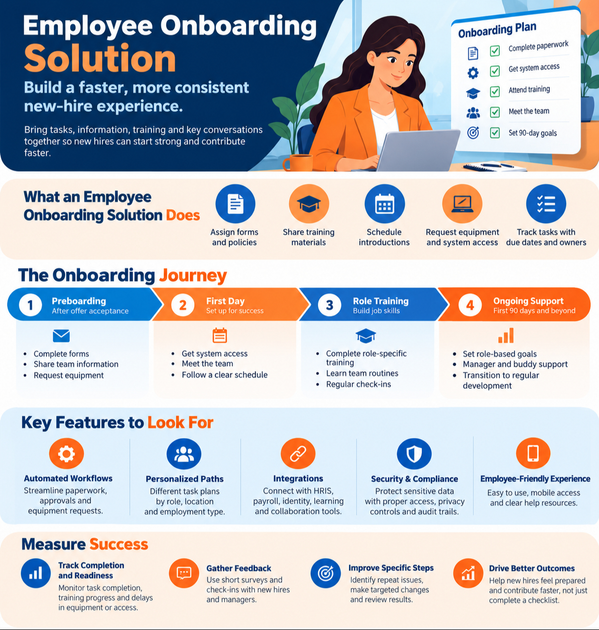
The solution can assign forms and policies, share training materials, schedule introductions, and request equipment or system access. Tasks can be grouped into a workflow with due dates and clear owners. For example, HR may handle required documents, IT may set up accounts, and the manager may plan role training.
How onboarding differs from orientation and HR administration
Orientation is often a short event focused on policies, benefits, and basic paperwork. Onboarding is broader and longer: it helps people understand their role, tools, team, and workplace norms. The Society for Human Resource Management’s onboarding guide describes onboarding as a process that can span months, rather than a single welcome session.
Where onboarding fits in the employee lifecycle
The process starts when a candidate accepts an offer. Preboarding can cover forms, team information, and equipment requests; the first day can focus on access, introductions, and a clear schedule. Role training and manager check-ins follow, then the employee moves into regular performance and development processes.
Reduce delays with employee onboarding solution workflows
A shared workflow replaces scattered emails and documents with visible tasks, owners, and due dates. This can make handoffs easier to manage, but software alone won’t create a welcoming or useful experience. Gallup reported that only 12% of employees strongly agree their organization does a great job onboarding new employees in its 2019 report, Creating an Exceptional Onboarding Journey for New Employees.
Automate paperwork, approvals, and equipment requests
A workflow can send forms to new hires, route approvals to the right people, and alert IT or facilities when a request comes in. HR can see which tasks remain open before the start date, such as a missing tax form or an unassigned laptop. Automation helps teams catch process gaps early, so a new employee is less likely to spend day one waiting for basic access.
Personalize onboarding by role, location, and employment type
A new sales hire may need product training and customer tools, while a warehouse employee may need safety instruction and site access. Onboarding software can assign different task paths by department, seniority, office, or remote status. Keep required policies consistent, then adapt schedules, training, and team introductions to fit each role.
Keep managers and HR aligned
Task assignments show who is responsible for each part of onboarding. Reminders and dashboards can help HR spot overdue steps, while escalation rules can flag items that risk delaying a start. Managers still need time with each new hire; the system makes their commitments visible rather than replacing their involvement.
Choose an employee onboarding solution that supports people
A good system should make common tasks easier without turning the whole experience into a checklist. Evaluate how employees, managers, and HR staff will use it day to day. Look for a balance of clear workflows, useful information, and space for real conversations.
Look for an employee-friendly experience
New hires should be able to find their tasks, due dates, and key resources without searching through a maze of menus. Mobile access can help employees complete forms or review schedules on the go, while accessible content supports different needs and devices. A clear help page can answer basic questions, but employees should also know which person to contact when they need human help.
Connect with the systems employees already use
Check whether the solution connects with your HR information system, payroll, identity and access tools, learning platform, collaboration apps, and e-signature service. Useful integrations can reduce duplicate data entry and keep information aligned between systems. Before choosing a product, map the data that needs to move and confirm how each connection works.
Protect information and support access needs
Onboarding records can include personal, payroll, and identity details. Review user permissions, privacy controls, security practices, and audit trails, and ask how the vendor stores and handles sensitive data. Also check accessibility features and language options if your workforce needs them.
Build an onboarding program that works beyond software
Software can assign tasks and share resources, but it can’t explain team habits or coach someone through a new role. A useful program gives new hires a clear plan and connects that plan to people who can answer questions. Set goals based on the work, not just the forms completed.
Plan milestones for the first day, month, and 90 days
Give the first day a manageable focus: access, introductions, and an overview of the role. In the first month, add core training, team routines, and a check-in about questions or missing support. By 90 days, set role-specific goals and review progress with the manager; complex jobs may need a longer ramp-up plan.
Define roles for managers, buddies, and HR
HR can explain policies and benefits, while IT handles devices and access. Managers should set expectations, coach job skills, and check in on progress; a buddy can answer everyday questions and introduce team practices. Write down these roles so the new hire knows who to ask, and each helper knows what they own.
Make remote and hybrid onboarding feel connected
Ship equipment early, confirm account access, and share a clear schedule before the start date. Plan video introductions, document team norms, and set regular manager check-ins so remote hires aren’t left to piece together how work gets done. GitLab’s public remote onboarding handbook describes its use of written tasks, self-guided resources, team training, and social connections for distributed employees.
Measure whether your employee onboarding solution is working
Task completion shows whether the process ran, but it doesn’t show whether a new hire feels prepared. Pair workflow data with feedback from employees and managers. Review results by role, team, location, or hiring group to find patterns that a company-wide average might hide.
Track completion, readiness, and delays
Monitor required task completion, training progress, and delays in equipment or account access. Ask hiring managers to define what “ready” means for each role, such as handling a common task with limited support. Compare progress against that standard instead of expecting every employee to reach the same level at the same time.
Gather feedback from new hires and managers
Use brief surveys and check-ins at useful points, such as the end of week one and the end of the first month. Ask whether expectations are clear, tools work, training fits the role, and the employee knows where to get help. Managers can flag missing resources or steps that take too long.
Use results to improve specific steps
Look for repeat issues, such as delayed access for one location or unclear training for a job group. Choose a targeted change, then review later feedback and workflow data to see whether it helped. Keep what works, revise what doesn’t, and update the process when roles or systems change.
Turn onboarding into a repeatable employee experience
A strong employee onboarding solution brings tasks, training, and communication into one clear process, but people make the experience meaningful. Treat onboarding as a longer transition, fit the plan to the role, and make ownership clear across HR, managers, IT, and teammates. Track whether employees feel prepared and can take on their work, not only whether every task has a check mark.
Start by mapping your current process from offer acceptance through the first 90 days. Identify where new hires wait, where ownership is unclear, and where they need more support. Then choose a solution that fits your systems, test the process with a new-hire group, and use their feedback to make the next start better.









