
How to read Local Choice/Optionset Metadata from Dataverse from Power Automate using HTTP Dataverse WebAPI Call

In this blog You will learn How to read Local Choice/Optionset Metadata from Dataverse from Power Automate using HTTP Dataverse WebAPI Call.
Watch Video below or scroll to read.
Follow the steps below.
Step 1: Set up Power Automate Trigger
First if all you need to define a trigger to initiate the flow. For our case, it is on-demand and manual trigger.

Step 2 : Create an Azure Entra ID App User
Follow this blog to create a Azure APP user using Microsoft Entra ID and capture Client ID, Tenant ID, CLient Secret.
Refer my Blog below to complete this step:
Step 3 : Use HTTP Action in Power Automate to call Dataverse API
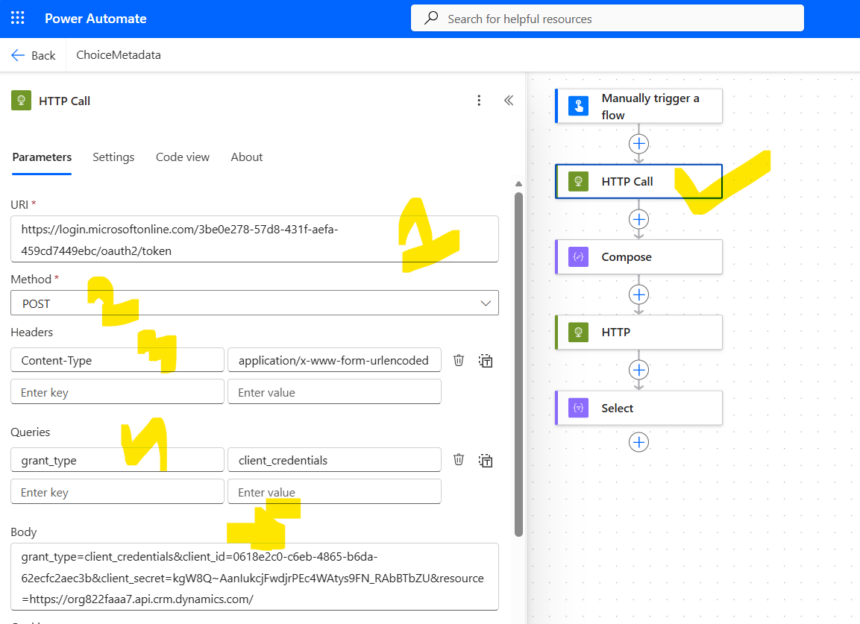
Add a new action called HTTP and provide below information.
| Parameters | Value | Notes |
|---|---|---|
| URI | https://login.microsoftonline.com/3be0e278-57d8-431f-aefa-459cd7449ebc/oauth2/token | NOTE : The GUID is Tenant ID Format is : https://login.microsoftonline.com/<tenant_id>/oauth2/token |
| Method | Post | |
| Header | Content-Type | application/x-www-form-urlencoded |
| Queries | grant_type | client_credentials |
| Body | grant_type=client_credentials&client_id=0618e2c0-c6eb-4865-b6da-62ecfc2aec3b&client_secret=kgW8Q~AanIukcjFwdjrPEc4WAtys93N_RAbBTbZU&resource=https://org822faaa7.api.crm.dynamics.com/ |
Step 4 : Store Access Token
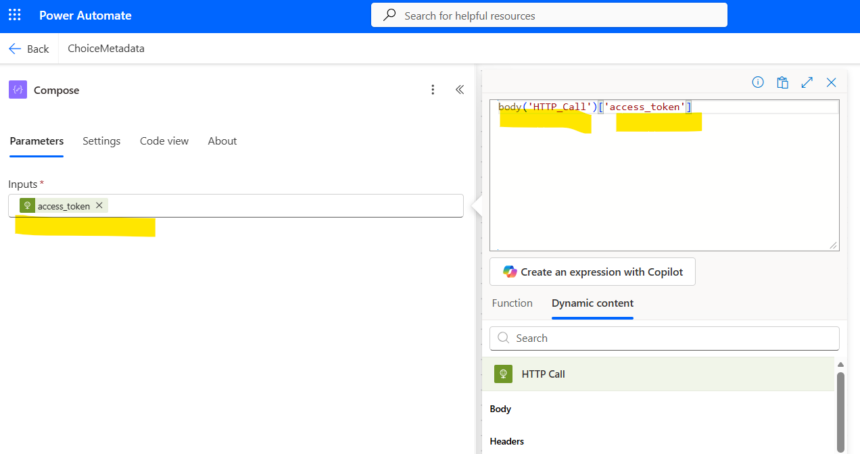
In the above HTTP Call you will receive access token which will be used further interacting with dataverse data queries.
Create a Compose Step and Assign the Dynamic Content From previous step. Use Expression to use the dynamic content as you cant get access token dynamic content directly. In Expression click Body Dynamic Content and manually mention access_token as given below.
body(‘HTTP_Call’)[‘access_token’]
Step 5 : Use another HTTP call to get Metadata of Choice Field
Now at this step you can send any type of HTTP call to Dataverse WEB API to get data or metadata. Here we are reading metada of a Local Choice field whose name is hsbc_hsbccardtype present in a table name hsbc_hsbccard. Refering logical name here.
Add a new HTTP action and provide below details.
| Parameters | Value | Notes | Extra |
|---|---|---|---|
| URI | https://org822faaa7.api.crm.dynamics.com/api/data/v9.2/EntityDefinitions(LogicalName=’hsbc_hsbccard‘)/Attributes(LogicalName=’hsbc_hsbccardtype‘)/Microsoft.Dynamics.CRM.PicklistAttributeMetadata?$expand=OptionSet | ||
| Method | Get | ||
| Header | Content-Type | application/json | |
| Authorization | Bearer @{outputs(‘Compose’)} | Format : Bearer <access_token> |
Step 6 : Testing
Now you can run the flow and check the Return Result.
You will get the below JSON in output.
{
  "@odata.context": "https://org822faaa7.api.crm.dynamics.com/api/data/v9.2/$metadata#EntityDefinitions('hsbc_hsbccard')/Attributes/Microsoft.Dynamics.CRM.PicklistAttributeMetadata(OptionSet())/$entity",
  "MetadataId": "0dc37828-3ca3-f011-bbd2-0022480be5ab",
  "HasChanged": null,
  "AttributeOf": null,
  "AttributeType": "Picklist",
  "ColumnNumber": 38,
  "DeprecatedVersion": null,
  "IntroducedVersion": "1.0.0.0",
  "EntityLogicalName": "hsbc_hsbccard",
  "IsCustomAttribute": true,
  "IsPrimaryId": false,
  "IsValidODataAttribute": true,
  "IsPrimaryName": false,
  "IsValidForCreate": true,
  "IsValidForRead": true,
  "IsValidForUpdate": true,
  "CanBeSecuredForRead": true,
  "CanBeSecuredForCreate": true,
  "CanBeSecuredForUpdate": true,
  "IsSecured": false,
  "IsRetrievable": false,
  "IsFilterable": false,
  "IsSearchable": false,
  "IsManaged": false,
  "LinkedAttributeId": null,
  "LogicalName": "hsbc_hsbccardtype",
  "IsValidForForm": true,
  "IsRequiredForForm": false,
  "IsValidForGrid": true,
  "SchemaName": "hsbc_HSBCCardType",
  "ExternalName": null,
  "IsLogical": false,
  "IsDataSourceSecret": false,
  "InheritsFrom": null,
  "CreatedOn": "2025-10-07T05:12:11Z",
  "ModifiedOn": "2025-10-07T05:12:11Z",
  "SourceType": 0,
  "AutoNumberFormat": null,
  "DefaultFormValue": -1,
  "FormulaDefinition": "",
  "SourceTypeMask": 0,
  "ParentPicklistLogicalName": null,
  "ChildPicklistLogicalNames": [],
  "AttributeTypeName": {
    "Value": "PicklistType"
  },
  "Description": {
    "LocalizedLabels": [
      {
        "Label": "",
        "LanguageCode": 1033,
        "IsManaged": false,
        "MetadataId": "020f1736-615b-4c6b-98e0-7b7e80eac8a9",
        "HasChanged": null
      }
    ],
    "UserLocalizedLabel": {
      "Label": "",
      "LanguageCode": 1033,
      "IsManaged": false,
      "MetadataId": "020f1736-615b-4c6b-98e0-7b7e80eac8a9",
      "HasChanged": null
    }
  },
  "DisplayName": {
    "LocalizedLabels": [
      {
        "Label": "HSBC Card Type",
        "LanguageCode": 1033,
        "IsManaged": false,
        "MetadataId": "53caa1fa-0e8d-4b63-8029-0878212a0468",
        "HasChanged": null
      }
    ],
    "UserLocalizedLabel": {
      "Label": "HSBC Card Type",
      "LanguageCode": 1033,
      "IsManaged": false,
      "MetadataId": "53caa1fa-0e8d-4b63-8029-0878212a0468",
      "HasChanged": null
    }
  },
  "IsAuditEnabled": {
    "Value": true,
    "CanBeChanged": true,
    "ManagedPropertyLogicalName": "canmodifyauditsettings"
  },
  "IsGlobalFilterEnabled": {
    "Value": false,
    "CanBeChanged": true,
    "ManagedPropertyLogicalName": "canmodifyglobalfiltersettings"
  },
  "IsSortableEnabled": {
    "Value": false,
    "CanBeChanged": true,
    "ManagedPropertyLogicalName": "canmodifyissortablesettings"
  },
  "IsCustomizable": {
    "Value": true,
    "CanBeChanged": true,
    "ManagedPropertyLogicalName": "iscustomizable"
  },
  "IsRenameable": {
    "Value": true,
    "CanBeChanged": true,
    "ManagedPropertyLogicalName": "isrenameable"
  },
  "IsValidForAdvancedFind": {
    "Value": true,
    "CanBeChanged": true,
    "ManagedPropertyLogicalName": "canmodifysearchsettings"
  },
  "RequiredLevel": {
    "Value": "None",
    "CanBeChanged": true,
    "ManagedPropertyLogicalName": "canmodifyrequirementlevelsettings"
  },
  "CanModifyAdditionalSettings": {
    "Value": true,
    "CanBeChanged": true,
    "ManagedPropertyLogicalName": "canmodifyadditionalsettings"
  },
  "Settings": [],
  "OptionSet": {
    "MetadataId": "0ec37828-3ca3-f011-bbd2-0022480be5ab",
    "HasChanged": null,
    "IsCustomOptionSet": true,
    "IsGlobal": false,
    "IsManaged": false,
    "Name": "hsbc_hsbccard_hsbc_hsbccardtype",
    "ExternalTypeName": "",
    "OptionSetType": "Picklist",
    "IntroducedVersion": "1.0.0.0",
    "ParentOptionSetName": null,
    "Description": {
      "LocalizedLabels": [
        {
          "Label": "",
          "LanguageCode": 1033,
          "IsManaged": false,
          "MetadataId": "10c37828-3ca3-f011-bbd2-0022480be5ab",
          "HasChanged": null
        }
      ],
      "UserLocalizedLabel": {
        "Label": "",
        "LanguageCode": 1033,
        "IsManaged": false,
        "MetadataId": "10c37828-3ca3-f011-bbd2-0022480be5ab",
        "HasChanged": null
      }
    },
    "DisplayName": {
      "LocalizedLabels": [
        {
          "Label": "HSBC Card Type",
          "LanguageCode": 1033,
          "IsManaged": false,
          "MetadataId": "0fc37828-3ca3-f011-bbd2-0022480be5ab",
          "HasChanged": null
        }
      ],
      "UserLocalizedLabel": {
        "Label": "HSBC Card Type",
        "LanguageCode": 1033,
        "IsManaged": false,
        "MetadataId": "0fc37828-3ca3-f011-bbd2-0022480be5ab",
        "HasChanged": null
      }
    },
    "IsCustomizable": {
      "Value": true,
      "CanBeChanged": true,
      "ManagedPropertyLogicalName": "iscustomizable"
    },
    "Options": [
      {
        "Value": 768280000,
        "Color": null,
        "IsManaged": false,
        "ExternalValue": "",
        "ParentValues": [],
        "Tag": null,
        "IsHidden": false,
        "MetadataId": null,
        "HasChanged": null,
        "Label": {
          "LocalizedLabels": [
            {
              "Label": "Credit Card",
              "LanguageCode": 1033,
              "IsManaged": false,
              "MetadataId": "a5979849-8117-410f-9441-784c2824833b",
              "HasChanged": null
            }
          ],
          "UserLocalizedLabel": {
            "Label": "Credit Card",
            "LanguageCode": 1033,
            "IsManaged": false,
            "MetadataId": "a5979849-8117-410f-9441-784c2824833b",
            "HasChanged": null
          }
        },
        "Description": {
          "LocalizedLabels": [
            {
              "Label": "",
              "LanguageCode": 1033,
              "IsManaged": false,
              "MetadataId": "d1bd72da-94f6-479a-8526-7ff21bd0b025",
              "HasChanged": null
            }
          ],
          "UserLocalizedLabel": {
            "Label": "",
            "LanguageCode": 1033,
            "IsManaged": false,
            "MetadataId": "d1bd72da-94f6-479a-8526-7ff21bd0b025",
            "HasChanged": null
          }
        }
      },
      {
        "Value": 768280001,
        "Color": null,
        "IsManaged": false,
        "ExternalValue": "",
        "ParentValues": [],
        "Tag": null,
        "IsHidden": false,
        "MetadataId": null,
        "HasChanged": null,
        "Label": {
          "LocalizedLabels": [
            {
              "Label": "Debit Card",
              "LanguageCode": 1033,
              "IsManaged": false,
              "MetadataId": "ab595f63-963f-472b-a016-7d9a9f04b3e2",
              "HasChanged": null
            }
          ],
          "UserLocalizedLabel": {
            "Label": "Debit Card",
            "LanguageCode": 1033,
            "IsManaged": false,
            "MetadataId": "ab595f63-963f-472b-a016-7d9a9f04b3e2",
            "HasChanged": null
          }
        },
        "Description": {
          "LocalizedLabels": [
            {
              "Label": "",
              "LanguageCode": 1033,
              "IsManaged": false,
              "MetadataId": "88cd6777-5201-486c-b089-72b491ad2aa1",
              "HasChanged": null
            }
          ],
          "UserLocalizedLabel": {
            "Label": "",
            "LanguageCode": 1033,
            "IsManaged": false,
            "MetadataId": "88cd6777-5201-486c-b089-72b491ad2aa1",
            "HasChanged": null
          }
        }
      }
    ]
  }
}Bonus
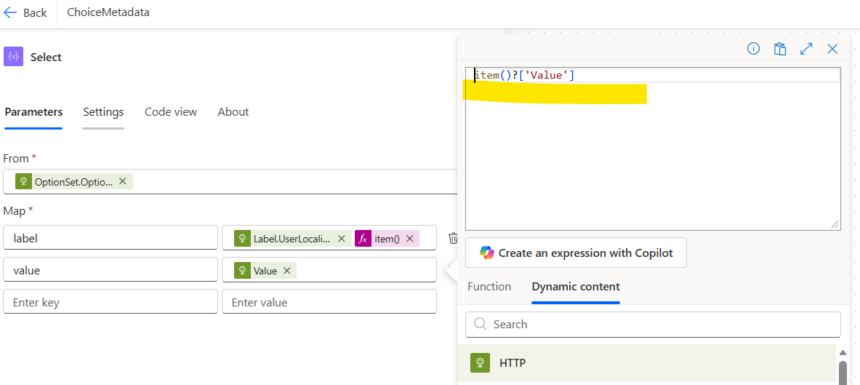
If you want to extract the labels to an array so that you can return to other calling party, you can use Select action.
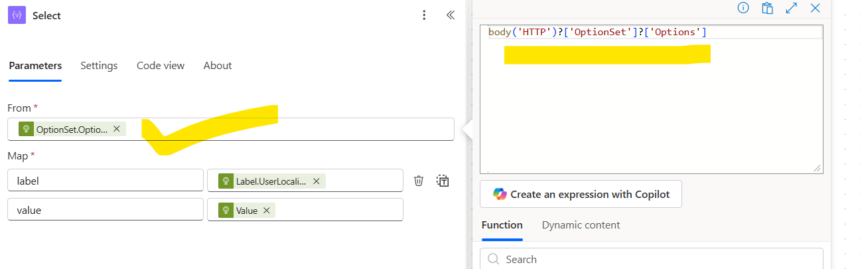
use below parameters.
| Parameter | Value | Note |
|---|---|---|
| From | body(‘HTTP’)?[‘OptionSet’]?[‘Options’] | Use JSON Traversing to get the node |
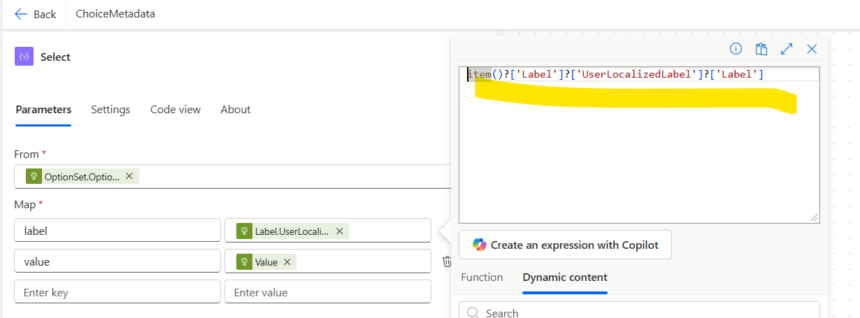
| Map | label | item()?[‘Label’]?[‘UserLocalizedLabel’]?[‘Label’] |
| value | item()?[‘Value’] |
Hope it helps.








