

Microsoft Power Apps vs Traditional App Development in 2026: Which Approach Wins for Modern Businesses?
Introduction
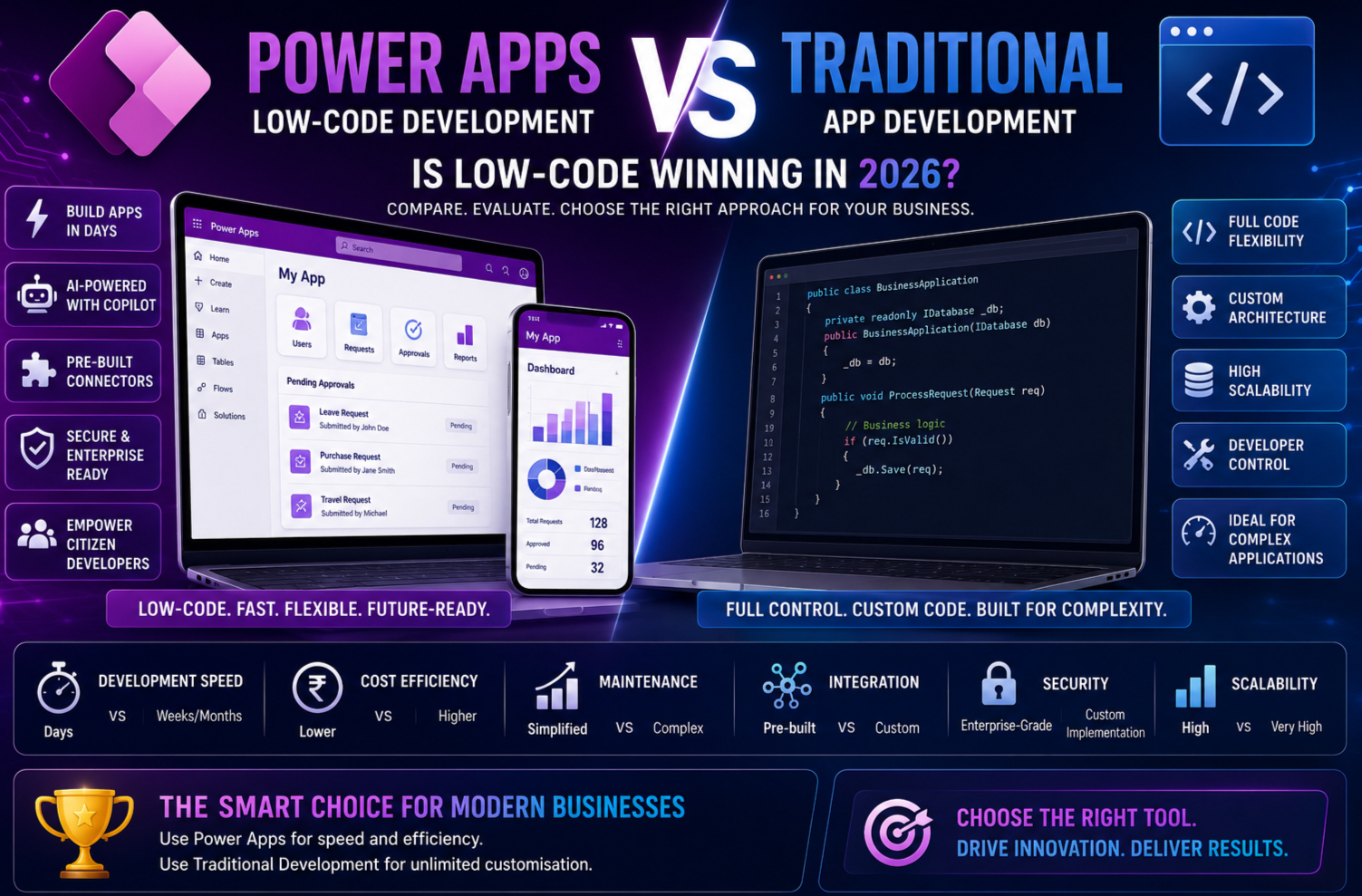
The software development landscape has changed dramatically over the last few years. Businesses that once relied exclusively on professional software developers are now embracing low-code platforms to build applications faster, reduce costs and accelerate digital transformation.
At the centre of this transformation is Microsoft Power Apps, a leading low-code platform that empowers organisations to create powerful business applications with minimal coding. Combined with AI-powered features such as Microsoft Copilot, AI Builder and Copilot Studio, Power Apps has become a game-changer for modern enterprises.
However, traditional software development using technologies such as C#, .NET, Java, Python, React and Angular remains the preferred approach for many complex applications.
So, which development approach is the better choice in 2026?
In this comprehensive guide, we’ll compare Microsoft Power Apps and traditional app development across key factors including speed, cost, scalability, AI capabilities, security and business value to help you make the right decision.
Understanding Microsoft Power Apps
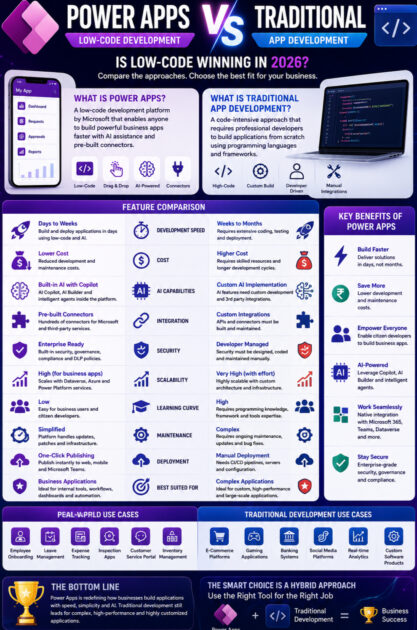
Microsoft Power Apps is part of the Microsoft Power Platform and enables users to create business applications using visual development tools rather than writing thousands of lines of code.
Power Apps integrates seamlessly with:
- Microsoft 365
- Microsoft Teams
- SharePoint
- Microsoft Dataverse
- Dynamics 365
- Azure
- SQL Server
- Excel
- Power BI
- Power Automate
- Hundreds of third-party applications
With the addition of Microsoft Copilot, developers and business users can now generate applications simply by describing their requirements in natural language.
Understanding Traditional App Development
Traditional app development involves building software using programming languages and development frameworks.
Common technologies include:
Backend Technologies
- C#
- ASP.NET Core
- Java
- Python
- Node.js
Frontend Technologies
- React
- Angular
- Vue.js
- Blazor
Database Technologies
- SQL Server
- MySQL
- PostgreSQL
- MongoDB
Traditional development offers complete control over architecture, performance and user experience but generally requires larger teams, longer timelines and higher budgets.
Side-by-Side Comparison
| Feature | Microsoft Power Apps | Traditional App Development |
|---|---|---|
| Development Speed | Days or Weeks | Months |
| Coding Required | Low-Code | Extensive Coding |
| AI Integration | Built-in Copilot & AI Builder | Custom Implementation |
| Cost | Lower | Higher |
| Maintenance | Microsoft Managed Platform | Developer Managed |
| Deployment | One-Click Publishing | CI/CD Pipelines |
| Learning Curve | Beginner Friendly | Steeper Learning Curve |
| Enterprise Security | Built-In | Custom Configuration |
| Best For | Internal Business Apps | Custom Software Products |
| Microsoft Integration | Native | Custom APIs |
1. Development Speed
One of the biggest advantages of Microsoft Power Apps is rapid development.
Traditional Development Workflow
A typical software project includes:
- Business analysis
- UI/UX design
- Database modelling
- Backend coding
- Frontend development
- API development
- Testing
- Deployment
This process often takes several months.
Power Apps Workflow
With Power Apps and Copilot, users can:
- Describe the application using natural language
- Automatically generate screens
- Create data tables
- Build workflows
- Connect to Microsoft services
- Publish instantly
Applications that once required months can now be delivered in weeks—or even days.
Winner: Microsoft Power Apps
2. Cost of Development
Traditional development often requires:
- Solution Architects
- Backend Developers
- Frontend Developers
- UI/UX Designers
- QA Engineers
- DevOps Engineers
- Project Managers
This increases both development and maintenance costs.
Power Apps significantly reduces these expenses by enabling smaller teams and even citizen developers to build business applications.
Example
Traditional Development
- Timeline: 4–6 months
- Team: 6–10 professionals
- Estimated Cost: ₹15–30 Lakhs
Power Apps
- Timeline: 2–6 weeks
- Team: 1–3 professionals
- Estimated Cost: ₹2–5 Lakhs
Winner: Microsoft Power Apps
3. Artificial Intelligence Capabilities
AI has become one of the defining features of modern application development.
Power Apps Includes
- Microsoft Copilot
- AI Builder
- Copilot Studio
- AI Agents
- Natural language app creation
- Formula generation
- Document processing
- Predictive AI models
Traditional Development
Developers must integrate AI services manually using APIs and machine learning frameworks, which requires additional expertise and effort.
Winner: Microsoft Power Apps
4. Ease of Learning
Power Apps is designed for a broad audience.
Ideal users include:
- Business Analysts
- HR Professionals
- Finance Teams
- Project Managers
- Citizen Developers
- Students
Traditional development requires proficiency in programming languages, frameworks and software engineering concepts.
Winner: Microsoft Power Apps
5. Flexibility and Customisation
This is where traditional development still excels.
Developers have complete control over:
- User interfaces
- Performance optimisation
- System architecture
- Custom integrations
- Advanced algorithms
- Unique business logic
Power Apps is highly flexible for business applications but may not meet the needs of highly specialised software products.
Winner: Traditional Development
6. Scalability
Power Apps is well suited for enterprise business applications such as:
- Employee portals
- Approval systems
- Inventory management
- CRM extensions
- Field service apps
- Inspection solutions
Traditional development is better for:
- Social media platforms
- Banking systems
- Streaming services
- E-commerce marketplaces
- Gaming applications
- Large-scale SaaS products
Winner: Depends on the use case
7. Security and Compliance
Microsoft Power Apps provides enterprise-grade security features out of the box, including:
- Microsoft Entra ID authentication
- Role-based access control
- Data Loss Prevention (DLP) policies
- Audit logging
- Environment management
- Compliance with Microsoft standards
Traditional applications require developers to implement and maintain these capabilities.
Winner: Microsoft Power Apps
8. Integration with Microsoft Ecosystem
Power Apps offers native integration with:
- Microsoft Teams
- Outlook
- SharePoint
- Excel
- Power BI
- Dynamics 365
- Azure
- Dataverse
Traditional applications often require custom APIs and additional development effort for the same integrations.
Winner: Microsoft Power Apps
9. Real-World Business Scenario
Imagine a manufacturing company that needs a quality inspection application.
Using Microsoft Power Apps
Employees can:
- Scan QR codes
- Capture images
- Complete inspection forms
- Work offline
- Submit reports
- Trigger automated workflows
- View dashboards in Power BI
Development time: 3 weeks
Using Traditional Development
The project would require:
- Backend APIs
- Mobile app development
- Database design
- Authentication setup
- Testing
- Deployment
Development time: 5–6 months
For internal business solutions, Power Apps provides significantly faster time to value.
Where Traditional Development Still Leads
Despite the rise of low-code platforms, traditional development remains essential for:
- Consumer-facing applications
- Custom SaaS platforms
- High-performance systems
- Real-time gaming
- Streaming services
- Financial trading applications
- Machine learning platforms
- Complex software products
These scenarios demand complete architectural control and performance optimisation.
Why Modern Businesses Are Choosing a Hybrid Approach
Rather than replacing traditional development, many organisations are combining both approaches.
Use Power Apps For
- Internal business applications
- Workflow automation
- Departmental solutions
- Employee self-service portals
- Operational dashboards
Use Traditional Development For
- Customer-facing products
- Large-scale web applications
- High-performance systems
- Commercial software platforms
- Highly customised user experiences
This hybrid strategy allows businesses to maximise agility while maintaining flexibility.
Emerging Trends in 2026
Several trends are shaping the future of application development:
AI-Assisted Development
Natural language app creation is becoming the standard.
Citizen Development
Business users are building solutions independently with IT oversight.
Fusion Teams
Professional developers and citizen developers collaborate to deliver faster innovation.
Autonomous AI Agents
Applications are evolving from data-entry tools into intelligent assistants capable of completing business tasks.
Hyperautomation
Organisations are combining Power Apps, Power Automate, AI Builder and Copilot Studio to automate end-to-end business processes.
Which Approach Should Your Business Choose?
Choose Microsoft Power Apps if you need:
- Rapid application development
- Lower development costs
- Microsoft ecosystem integration
- Internal business applications
- Workflow automation
- AI-powered productivity
- Citizen developer enablement
Choose Traditional Development if you need:
- Highly customised software
- Consumer-facing applications
- Maximum performance
- Unique architectures
- Commercial software products
- Complex graphics or gaming
- Advanced algorithm development
Final Verdict
In 2026, there is no single winner for every scenario—but there is a clear winner for most business applications.
Microsoft Power Apps has fundamentally changed how organisations approach software development. Its low-code environment, AI-powered Copilot, enterprise security and seamless Microsoft integration make it the ideal platform for rapidly building internal business applications and automating everyday processes.
Traditional development, however, remains indispensable for projects that demand complete control, high performance and extensive customisation. Consumer applications, SaaS platforms and complex software products will continue to rely on full-code development.
The most successful organisations are adopting a hybrid development strategy. They leverage Microsoft Power Apps to accelerate innovation and reduce development costs while using traditional technologies for specialised solutions.
The future of software development is not about choosing low-code or traditional development—it is about selecting the right approach for each business need and combining the strengths of both.
Conclusion
As businesses continue to embrace AI and digital transformation, Microsoft Power Apps has become one of the most powerful platforms for building modern business applications quickly and efficiently. Its low-code approach, combined with AI-driven tools like Copilot and AI Builder, empowers organisations to innovate faster while reducing development costs.
Traditional development remains a critical part of the technology landscape, especially for building sophisticated software products and high-performance systems. Rather than viewing these approaches as competitors, forward-thinking organisations are using them together to create flexible, scalable and future-ready solutions.
Whether you’re a business leader planning your next digital initiative, a developer exploring new technologies or a student preparing for a career in the Microsoft ecosystem, understanding both Power Apps and traditional development will help you make smarter technology decisions in 2026 and beyond.









