
Top 25 Real-World Power Apps Projects Every Fresher Should Build Before Applying for Jobs
Introduction
One of the biggest mistakes fresh graduates make while preparing for Microsoft Power Platform Developer interviews is focusing only on certifications and theory.
Recruiters today don’t just ask, “What is Power Apps?” They ask:
- “What applications have you built?”
- “Can you explain a real business problem you’ve solved?”
- “How did you use Dataverse?”
- “Did you integrate Power Automate or SharePoint?”
- “Can you demonstrate your project?”
This is why hands-on projects are one of the most important factors in getting shortlisted for interviews.
Whether you’re a B.Tech graduate, MCA student, career switcher, or aspiring Power Platform Developer, building a portfolio of real-world applications will significantly improve your confidence and employability.
In this guide, we’ll explore 25 practical Power Apps projects inspired by real business scenarios that employers commonly implement.
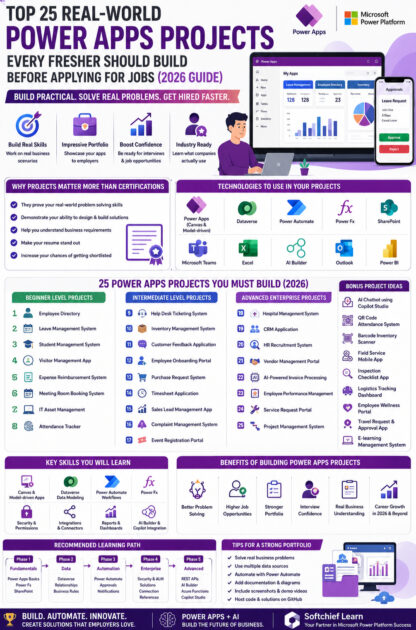
Why Projects Matter More Than Certifications
Microsoft certifications such as PL-900 and PL-400 validate your knowledge, but employers also want proof that you can apply those skills.
Projects demonstrate that you can:
- Design business applications
- Model data using Dataverse
- Automate workflows
- Solve real-world problems
- Build user-friendly interfaces
- Integrate Microsoft services
- Handle security and permissions
A well-documented portfolio often has a greater impact than certifications alone.
Technologies You Should Use in Your Projects
Aim to incorporate these technologies across your portfolio:
- Power Apps (Canvas & Model-driven)
- Microsoft Dataverse
- Power Automate
- Power Fx
- SharePoint
- Microsoft Teams
- Outlook Connector
- Excel
- SQL Server
- Azure Functions (optional)
- REST APIs
- Power BI
- AI Builder
- Copilot Studio (where appropriate)
The more business scenarios you cover, the stronger your portfolio becomes.
Beginner-Level Projects
These projects help you understand forms, galleries, data sources, validation, and Power Fx.
1. Employee Directory
Business Problem
Employees struggle to find colleague information.
Features
- Search employees
- Department filter
- Contact details
- Profile photos
Skills Learned
- Galleries
- Search
- Filtering
- SharePoint or Dataverse
2. Leave Management System
One of the most popular interview projects.
Features
- Apply leave
- Manager approval
- Email notifications
- Leave balance
- Dashboard
Technologies:
- Power Apps
- Power Automate
- Dataverse
3. Student Management System
Manage:
- Students
- Courses
- Attendance
- Results
Learn:
- Relationships
- Forms
- Validation
4. Visitor Management App
Features:
- Visitor Registration
- QR Code
- Security Approval
- Entry & Exit Time
- Notifications
5. Expense Reimbursement System
Employees can:
- Submit expenses
- Upload bills
- Track approvals
- Receive notifications
6. Meeting Room Booking System
Features:
- Calendar view
- Room availability
- Booking approval
- Outlook integration
7. IT Asset Management
Track:
- Laptops
- Monitors
- Mobile Devices
- Printers
Includes asset assignment and return tracking.
8. Attendance Tracker
Build an app for:
- Daily attendance
- Check-in
- Check-out
- Reports
- Monthly summaries
Intermediate-Level Projects
These projects introduce automation, Dataverse relationships, APIs, and enterprise workflows.
9. Help Desk Ticketing System
Features:
- Raise tickets
- Assign engineers
- SLA tracking
- Status updates
- Email alerts
10. Inventory Management System
Manage:
- Products
- Suppliers
- Stock
- Purchase Orders
- Low-stock alerts
11. Customer Feedback Application
Collect:
- Ratings
- Feedback
- Comments
- Reports
- Analytics
12. Employee Onboarding Portal
Automate:
- HR approvals
- Document collection
- Equipment requests
- Welcome emails
13. Purchase Request System
Workflow:
Employee → Manager → Finance → Procurement
14. Timesheet Application
Features:
- Daily entries
- Weekly reports
- Project hours
- Manager approvals
15. Sales Lead Management App
Track:
- Leads
- Opportunities
- Customers
- Activities
- Sales pipeline
Excellent preparation for Dynamics 365 and CRM roles.
16. Complaint Management System
Used in:
- Municipal Corporations
- Colleges
- IT Companies
- Customer Support Teams
Features:
- Complaint submission
- Assignment
- Resolution
- Escalation
17. Event Registration Portal
Manage:
- Events
- Registrations
- Attendees
- Certificates
- Feedback
Advanced Enterprise Projects
These projects demonstrate enterprise-level thinking and integration skills.
18. Hospital Management System
Modules:
- Patient Registration
- Appointments
- Doctors
- Billing
- Pharmacy
19. CRM Application
Create your own lightweight CRM.
Features:
- Leads
- Accounts
- Contacts
- Opportunities
- Activities
This project closely mirrors real Dynamics 365 concepts.
20. HR Recruitment System
Track:
- Job openings
- Candidates
- Interviews
- Offer Letters
- Hiring status
21. Vendor Management Portal
Manage:
- Vendor registration
- Documents
- Approvals
- Contracts
- Performance
22. AI-Powered Invoice Processing
Use:
- AI Builder
- Power Automate
Extract:
- Vendor Name
- Invoice Number
- Amount
- Due Date
Automatically populate Dataverse.
23. Employee Performance Management
Modules:
- Goal setting
- Reviews
- Ratings
- Feedback
- Promotions
24. Service Request Portal
Departments:
- IT
- HR
- Admin
- Facilities
Track request lifecycle from submission to closure.
25. Project Management System
Features:
- Projects
- Tasks
- Resources
- Deadlines
- Gantt-style timeline
- Dashboards
Integrate with Microsoft Teams for collaboration.
Bonus Projects That Make Your Resume Stand Out
If you want to go beyond the basics, consider these:
- AI Chatbot using Copilot Studio
- Power Apps + Azure OpenAI Integration
- QR Code Attendance System
- Barcode Inventory Scanner
- Field Service Mobile App
- Inspection Checklist App
- Logistics Tracking Dashboard
- Employee Wellness Portal
- Travel Request & Approval App
- E-learning Management System
These projects demonstrate your ability to work with modern Microsoft technologies.
Skills You’ll Learn Across These Projects
By completing these applications, you’ll gain experience in:
Power Apps
- Canvas Apps
- Model-driven Apps
- Responsive layouts
- Component libraries
Dataverse
- Tables
- Relationships
- Business Rules
- Security Roles
Power Automate
- Approval workflows
- Email notifications
- Scheduled flows
- HTTP actions
Power Fx
- Variables
- Collections
- Delegation
- Formulas
- Error handling
Integration
- SharePoint
- SQL Server
- Excel
- Outlook
- Teams
- REST APIs
- Custom Connectors
Reporting
- Power BI dashboards
- Charts
- KPIs
- Business insights
How to Showcase Your Projects
Don’t just build apps—present them professionally.
For each project, include:
- Project title
- Business problem
- Solution overview
- Technologies used
- Architecture diagram
- Screenshots
- Demo video
- GitHub repository (where applicable)
- Challenges faced
- Lessons learned
A polished portfolio can significantly strengthen your profile during interviews.
Common Interview Questions Based on Projects
Be prepared to answer:
- Why did you choose Dataverse instead of SharePoint?
- How did you design your data model?
- What Power Fx formulas did you use?
- How did you implement approvals?
- How did you secure sensitive data?
- Did you encounter delegation issues?
- How did you optimize app performance?
- How would you scale this application for thousands of users?
Practice explaining your design decisions and trade-offs.
Common Mistakes Freshers Make
Avoid these pitfalls:
- Building only tutorial-based projects.
- Using a single data source for every app.
- Ignoring responsive design.
- Not documenting projects.
- Skipping error handling.
- Avoiding Power Automate.
- Not understanding business requirements.
- Creating apps without user-friendly interfaces.
Employers value thoughtful solutions over flashy designs.
Recommended Learning Path
Follow this progression to build your skills:
Phase 1: Fundamentals
- Power Apps basics
- Power Fx
- SharePoint integration
Phase 2: Data
- Dataverse
- Relationships
- Business Rules
Phase 3: Automation
- Power Automate
- Approvals
- Notifications
Phase 4: Enterprise
- Security
- ALM
- Managed Solutions
- Connection References
Phase 5: Advanced
- REST APIs
- Azure Functions
- AI Builder
- Copilot Studio
This roadmap ensures you build a balanced skill set.
Why Learn Power Apps with Softchief Learn?
At Softchief Learn, we emphasize project-based learning that mirrors real enterprise implementations.
What You’ll Learn
- Live instructor-led sessions
- 25+ hands-on projects
- Canvas & Model-driven Apps
- Dataverse architecture
- Power Automate workflows
- AI Builder and Copilot integration
- Azure integration
- Resume preparation
- Mock interviews
- Placement assistance
- Community support
- Updated curriculum aligned with the latest Microsoft technologies
Our objective is to help you become job-ready by building solutions that employers actually look for.
Conclusion
Power Apps has transformed how organizations build business applications, making it one of the most valuable skills in the Microsoft ecosystem. While certifications provide a strong foundation, practical projects are what truly demonstrate your capabilities to employers.
By completing a diverse portfolio of beginner, intermediate, and advanced projects, you’ll develop technical expertise, strengthen your problem-solving skills, and gain the confidence to discuss real-world implementations during interviews.
Start with smaller applications, gradually take on more complex business scenarios, and continuously refine your portfolio. Every project you complete brings you one step closer to becoming a confident and job-ready Power Platform Developer.









