
Building Secure REST APIs with JWT Authentication in .NET: A Complete Guide for Enterprise Developers

Introduction
Modern businesses depend heavily on APIs to connect applications, mobile platforms, cloud services and enterprise systems. Whether it is a customer portal, banking application, CRM platform or enterprise automation solution, APIs act as the communication layer between different systems.
However, as APIs expose business data and critical operations, security becomes one of the most important considerations during application development.
Traditional authentication approaches based on server-side sessions are no longer ideal for modern distributed applications. Cloud-native applications, microservices architectures and mobile applications require a scalable and stateless authentication mechanism.
This is where JWT (JSON Web Token) Authentication becomes a powerful solution.
In this article, we will explore how to build secure REST APIs using JWT Authentication in .NET, understand JWT architecture, implement authentication in ASP.NET Core Web API and follow enterprise-level security best practices.
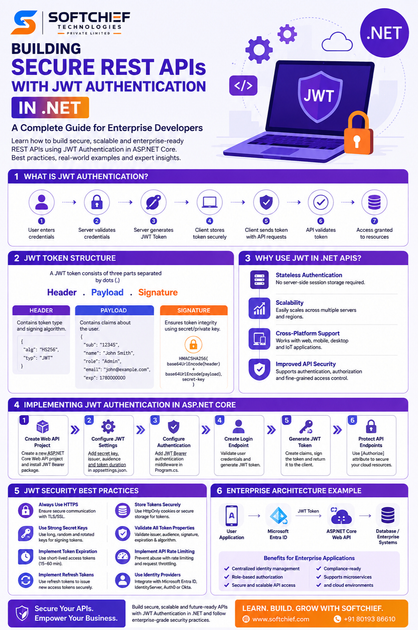
What is JWT Authentication?
JWT (JSON Web Token) is an open standard used for securely transmitting information between parties as a JSON object.
A JWT token contains user identity information and additional claims that allow applications to authenticate and authorize users without maintaining server-side session data.
Instead of storing authentication details on the server, the client receives a digitally signed token after successful login. The client then sends this token with every API request.
The API validates the token before allowing access to protected resources.
A typical authentication flow looks like this:
- User enters username and password.
- Application validates credentials.
- Server generates a JWT token.
- Client stores the token securely.
- Client sends the token with every API request.
- API validates the token.
- User receives access to authorized resources.
Example:
Client Application
        |
        | Login Request
        ↓
Authentication Server
        |
        | Generates JWT Token
        ↓
Client Stores Token
        |
        | Sends Token with API Requests
        ↓
.NET Web API
        |
        | Validates Token
        ↓
Access Granted
Understanding JWT Token Structure
A JWT token consists of three main parts:
Header.Payload.SignatureEach section is separated by a dot (.).
Example:
xxxxx.yyyyy.zzzzz1. JWT Header
The header contains information about the token type and encryption algorithm.
Example:
{
  "alg": "HS256",
  "typ": "JWT"
}
Where:
- alg represents the signing algorithm.
- typ defines the token type.
Common algorithms include:
- HS256 (HMAC SHA-256)
- RS256 (RSA Signature)
- ES256 (Elliptic Curve)
Enterprise applications generally prefer asymmetric algorithms such as RS256 because they provide better security for distributed environments.
2. JWT Payload
The payload contains claims about the user.
Example:
{
 "sub": "12345",
 "name": "John Smith",
 "role": "Admin",
 "email": "john@example.com",
 "exp": 1780000000
}
Common claims include:
| Claim | Description |
|---|---|
| sub | User identifier |
| name | User name |
| User email | |
| role | User role |
| iss | Token issuer |
| aud | Token audience |
| exp | Expiration time |
Important:
JWT payload information is encoded, not encrypted.
Therefore, sensitive information such as passwords, financial details or confidential business data should never be stored inside JWT tokens.
3. JWT Signature
The signature ensures that the token has not been modified.
The server creates the signature using:
- Header
- Payload
- Secret key or private key
Example:
HMACSHA256(
base64UrlEncode(header)
+
base64UrlEncode(payload),
secret-key
)
When the API receives the token, it validates the signature before trusting the information.
Why Use JWT Authentication in .NET Applications?
JWT authentication provides several advantages for modern application development.
1. Stateless Authentication
The server does not need to maintain user sessions.
This makes JWT ideal for:
- Microservices
- Cloud applications
- Mobile applications
- Distributed systems
2. Scalability
Because authentication information is stored inside the token, multiple servers can validate requests without sharing session data.
Example:
A global e-commerce platform running APIs across multiple Azure regions can authenticate users without maintaining centralized session storage.
3. Cross-Platform Support
JWT works across:
- Web applications
- Mobile applications
- Desktop applications
- IoT devices
- Third-party integrations
4. Improved API Security
JWT supports:
- User authentication
- Role-based authorization
- Permission management
- Secure API communication
Implementing JWT Authentication in ASP.NET Core Web API
Let’s understand how to implement JWT authentication in a .NET application.
Step 1: Create ASP.NET Core Web API Project
Create a new Web API project:
dotnet new webapi -n SecureApiNavigate into the project:
cd SecureApiInstall JWT authentication package:
dotnet add package Microsoft.AspNetCore.Authentication.JwtBearerThis package provides JWT authentication middleware for ASP.NET Core.
Step 2: Configure JWT Settings
Add JWT configuration in:
appsettings.json
{
  "Jwt": {
    "Key": "YourSuperSecretSecurityKey",
    "Issuer": "SecureApi",
    "Audience": "SecureApiUsers",
    "Duration": 60
  }
}
Enterprise applications should never store secrets directly in configuration files.
Recommended approaches:
- Azure Key Vault
- AWS Secrets Manager
- Environment variables
- Managed identities
Step 3: Configure Authentication Middleware
In:
Program.cs
Configure JWT authentication:
builder.Services.AddAuthentication(options =>
{
    options.DefaultAuthenticateScheme =
    JwtBearerDefaults.AuthenticationScheme;

    options.DefaultChallengeScheme =
    JwtBearerDefaults.AuthenticationScheme;
})
.AddJwtBearer(options =>
{
    options.TokenValidationParameters =
    new TokenValidationParameters
    {
        ValidateIssuer = true,
        ValidateAudience = true,
        ValidateLifetime = true,
        ValidateIssuerSigningKey = true,

        ValidIssuer = "SecureApi",
        ValidAudience = "SecureApiUsers",

        IssuerSigningKey =
        new SymmetricSecurityKey(
        Encoding.UTF8.GetBytes("YourSecretKey"))
    };
});
Enable authentication middleware:
app.UseAuthentication();

app.UseAuthorization();
Step 4: Creating a Login Endpoint
A login API validates user credentials and generates a JWT token.
Example:
[HttpPost("login")]
public IActionResult Login(LoginRequest request)
{
    if(request.Username=="admin"
       && request.Password=="password")
    {
        var token = GenerateToken();

        return Ok(new
        {
            token
        });
    }

    return Unauthorized();
}
Step 5: Generate JWT Token
Example token generation:
private string GenerateToken()
{
    var claims = new[]
    {
        new Claim(
        JwtRegisteredClaimNames.Sub,
        "123"),

        new Claim(
        ClaimTypes.Role,
        "Admin")
    };


    var key = new SymmetricSecurityKey(
    Encoding.UTF8.GetBytes("YourSecretKey"));


    var credentials =
    new SigningCredentials(
    key,
    SecurityAlgorithms.HmacSha256);


    var token =
    new JwtSecurityToken(
        issuer:"SecureApi",
        audience:"SecureApiUsers",
        claims:claims,
        expires:
        DateTime.Now.AddMinutes(60),
        signingCredentials:credentials);


    return new JwtSecurityTokenHandler()
    .WriteToken(token);
}
Protecting API Endpoints Using JWT
Once authentication is configured, secure API controllers using the:
[Authorize]attribute.
Example:
[Authorize]
[HttpGet]
public IActionResult GetCustomers()
{
    return Ok(customerList);
}
Now only authenticated users with valid JWT tokens can access this endpoint.
Role-Based Authorization with JWT
Enterprise applications require different access levels.
Example:
- Administrator
- Manager
- Employee
- Customer
JWT supports role-based authorization.
Example:
[Authorize(Roles="Admin")]
[HttpDelete("{id}")]
public IActionResult DeleteCustomer(int id)
{
    return Ok();
}
Only users with the Admin role can access this API.
JWT Security Best Practices for Enterprise Applications
Building a secure API requires more than simply adding JWT authentication.
Let’s explore important security practices.
1. Always Use HTTPS
JWT tokens contain authentication information.
Never transmit tokens over unsecured HTTP connections.
Use:
- HTTPS
- TLS certificates
- Secure communication channels
2. Use Strong Secret Keys
Weak keys can allow attackers to generate fake tokens.
Recommended:
- Minimum 256-bit keys
- Secure random generation
- Key rotation strategy
3. Implement Token Expiration
Never create unlimited lifetime tokens.
Example:
Access Token:
15-60 minutes

Refresh Token:
Days or weeks
Short-lived access tokens reduce security risks.
4. Store Tokens Securely
Avoid storing JWT tokens in unsafe browser locations.
Recommended:
- HttpOnly cookies
- Secure cookies
- Mobile secure storage
Avoid:
- Local storage for highly sensitive applications
5. Implement Refresh Tokens
Enterprise applications commonly use refresh tokens.
Flow:
Access Token Expired
        |
        ↓
Refresh Token Sent
        |
        ↓
New Access Token Generated
This provides better user experience while maintaining security.
6. Validate All Token Properties
Always validate:
- Issuer
- Audience
- Signature
- Expiration
- Algorithm
Never trust incoming tokens without validation.
7. Implement API Rate Limiting
JWT protects authentication but does not prevent abuse.
Implement:
- Rate limiting
- Request throttling
- IP monitoring
Example:
Azure API Management provides enterprise API security controls.
8. Use Identity Providers
For enterprise applications, avoid building authentication from scratch.
Popular identity platforms include:
- Microsoft Entra ID
- IdentityServer
- Auth0
- Okta
These platforms provide:
- Multi-factor authentication
- Single sign-on
- Identity management
- Compliance support
JWT Authentication in Microservices Architecture
JWT is widely used in microservices environments.
Example:
User
 |
 |
API Gateway
 |
 -----------------
 |       |       |
Order   CRM    Payment
API     API     API
The API Gateway validates the JWT token and forwards authenticated requests to individual services.
Benefits:
- Centralized authentication
- Improved scalability
- Independent services
- Better security control
JWT Authentication with Azure and .NET
Microsoft Azure provides enterprise-grade identity services for .NET applications.
Common integrations include:
- Microsoft Entra ID
- Azure API Management
- Azure App Service Authentication
- Azure Functions Authentication
A typical enterprise architecture:
User Application

        |

Microsoft Entra ID

        |

JWT Token

        |

ASP.NET Core API

        |

Azure SQL Database
This approach provides secure identity management with enterprise compliance.
Real-World Example: Secure CRM API
Consider a CRM platform built using ASP.NET Core.
Users:
- Sales Representatives
- Sales Managers
- Administrators
Requirements:
Sales representatives:
- View customer records
Managers:
- Approve opportunities
Administrators:
- Manage users
JWT implementation:
- User logs in.
- Identity system generates JWT token.
- Token contains role claims.
- API validates token.
- Role-based authorization controls access.
This ensures every user accesses only authorized business data.
Common JWT Implementation Mistakes
Many developers make security mistakes while implementing JWT.
Avoid:
❌ Storing passwords inside tokens
❌ Creating tokens without expiration
❌ Using weak encryption keys
❌ Skipping HTTPS
❌ Ignoring token validation
❌ Allowing unlimited API access
❌ Hardcoding secrets in source code
Future of API Security with .NET
As organizations move towards:
- Cloud-native applications
- AI-powered applications
- Microservices
- Digital transformation platforms
API security will become increasingly important.
Modern .NET developers need strong knowledge of:
- JWT authentication
- OAuth 2.0
- OpenID Connect
- Identity management
- Zero Trust security principles
Secure API development is no longer optional; it is a core enterprise development skill.
Conclusion
JWT Authentication provides a secure, scalable and flexible approach for protecting REST APIs built with .NET.
By combining ASP.NET Core Web API capabilities with JWT-based authentication, developers can build enterprise applications that support secure user access, role-based permissions and modern cloud architectures.
However, successful API security requires more than implementing authentication. Developers must follow security best practices including secure token storage, proper validation, HTTPS communication, identity provider integration and continuous monitoring.
For organizations building modern applications with .NET, mastering JWT Authentication is an essential step toward creating secure and scalable enterprise solutions.









