

Dependency Injection in ASP.NET Core: Best Practices for Building Scalable Applications

Introduction
Modern enterprise applications require software architectures that are maintainable, testable and scalable. As applications grow in complexity, managing dependencies between different components becomes increasingly challenging.
In traditional application development, classes often create and manage their own dependencies directly. While this approach may work for small applications, it creates tightly coupled code that becomes difficult to maintain, test and extend.
This is where Dependency Injection (DI) plays a critical role.
Dependency Injection is one of the core architectural principles built into ASP.NET Core, enabling developers to create loosely coupled applications with better flexibility and maintainability.
ASP.NET Core provides a built-in Dependency Injection container that simplifies the process of registering, managing and injecting application services.
In this comprehensive guide, we will explore:
- What Dependency Injection is
- How DI works in ASP.NET Core
- Types of Dependency Injection
- Service lifetimes
- Registration techniques
- Best practices
- Common mistakes
- Real-world enterprise scenarios
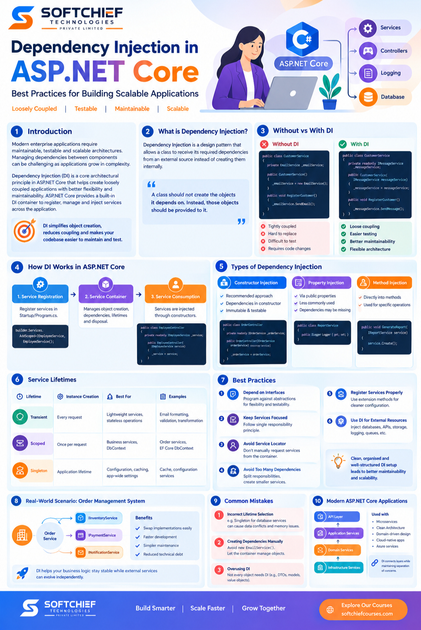
What is Dependency Injection?
Dependency Injection is a software design pattern that allows a class to receive its required dependencies from an external source instead of creating them internally.
In simple terms:
A class should not create the objects it depends on. Instead, those objects should be provided to it.
This reduces dependency between components and improves application flexibility.
Understanding Dependency Without Dependency Injection
Consider a simple example.
A customer service class directly creates an email service:
public class CustomerService
{
    private EmailService _emailService;

    public CustomerService()
    {
        _emailService = new EmailService();
    }

    public void RegisterCustomer()
    {
        _emailService.SendEmail();
    }
}
Although this code works, it creates a strong dependency.
Problems:
- CustomerService is tightly coupled with EmailService
- Difficult to replace EmailService
- Difficult to perform unit testing
- Changes require modifying existing classes
For example, if the organisation decides to replace email notifications with SMS notifications, the CustomerService class must be changed.
Dependency Injection Approach
With Dependency Injection, dependencies are provided externally.
Example:
public class CustomerService
{
    private readonly IMessageService _messageService;

    public CustomerService(IMessageService messageService)
    {
        _messageService = messageService;
    }

    public void RegisterCustomer()
    {
        _messageService.SendMessage();
    }
}
Now CustomerService depends on an interface rather than a specific implementation.
Benefits:
- Loose coupling
- Easier testing
- Better maintainability
- Flexible architecture
Why Dependency Injection is Important in ASP.NET Core
ASP.NET Core applications are designed around Dependency Injection.
The framework uses DI extensively for:
- Controllers
- Middleware
- Authentication services
- Logging
- Configuration
- Database contexts
- Custom business services
Instead of manually creating objects, ASP.NET Core manages object creation through its built-in service container.
How Dependency Injection Works in ASP.NET Core
ASP.NET Core DI works through three main components:
1. Service Registration
Services are registered inside the application startup configuration.
Example:
builder.Services.AddScoped<IEmployeeService, EmployeeService>();This tells ASP.NET Core:
“When an application requires IEmployeeService, provide EmployeeService.”
2. Service Container
The built-in DI container manages:
- Object creation
- Dependencies
- Service lifetimes
- Disposal
3. Service Consumption
Services are injected into classes through constructors.
Example:
public class EmployeeController : ControllerBase
{
    private readonly IEmployeeService _service;

    public EmployeeController(IEmployeeService service)
    {
        _service = service;
    }
}
Types of Dependency Injection in ASP.NET Core
There are three common types of Dependency Injection.
1. Constructor Injection
Constructor Injection is the recommended approach in ASP.NET Core.
Dependencies are provided through the class constructor.
Example:
public class OrderController
{
    private readonly IOrderService _orderService;

    public OrderController(IOrderService orderService)
    {
        _orderService = orderService;
    }
}
Advantages:
- Dependencies are clearly defined
- Supports immutability
- Easy unit testing
- Preferred by Microsoft
2. Property Injection
Dependencies are assigned through public properties.
Example:
public class ReportService
{
    public ILogger Logger { get; set; }
}
However, property injection is less commonly used because:
- Dependencies can be missing
- Classes become less predictable
3. Method Injection
Dependencies are provided directly into methods.
Example:
public void GenerateReport(IReportService service)
{
    service.Create();
}
Useful when a dependency is required only for a specific operation.
Understanding Service Lifetimes in ASP.NET Core
One of the most important concepts in Dependency Injection is service lifetime.
ASP.NET Core provides three service lifetimes:
- Transient
- Scoped
- Singleton
Choosing the correct lifetime impacts application performance and behaviour.
1. Transient Lifetime
Transient services create a new instance every time they are requested.
Registration:
builder.Services.AddTransient<IEmailService, EmailService>();Example usage:
Every request creates a new EmailService object.
Best suited for:
- Lightweight services
- Stateless operations
- Utility classes
Examples:
- Email formatting
- Data transformation
- Validation services
2. Scoped Lifetime
Scoped services create one instance per client request.
Registration:
builder.Services.AddScoped<IOrderService, OrderService>();For web applications:
One HTTP request = One service instance
Commonly used for:
- Database operations
- Business services
- Entity Framework Core DbContext
Example:
builder.Services.AddDbContext<ApplicationDbContext>();3. Singleton Lifetime
Singleton services create only one instance throughout the application’s lifetime.
Registration:
builder.Services.AddSingleton<ICacheService, CacheService>();Suitable for:
- Configuration services
- Caching
- Application-wide settings
Example:
A global application cache.
Service Lifetime Comparison
| Lifetime | Instance Creation | Common Usage |
|---|---|---|
| Transient | Every request | Lightweight services |
| Scoped | Once per request | Business services, DbContext |
| Singleton | Application lifetime | Cache, configuration |
Dependency Injection Best Practices in ASP.NET Core
1. Depend on Interfaces, Not Concrete Classes
A major DI principle is programming against abstractions.
Avoid:
private PaymentService _service;Prefer:
private readonly IPaymentService _service;Benefits:
- Easier testing
- Flexible implementations
- Better architecture
2. Keep Services Focused
A service should have a single responsibility.
Avoid creating large services that handle:
- Database operations
- Email notifications
- Business rules
- Logging
Instead create separate services:
Example:
CustomerService
EmailService
PaymentService
NotificationService
This follows the Single Responsibility Principle.
3. Avoid Service Locator Pattern
Avoid manually requesting services from the container.
Example:
var service = provider.GetService<IEmailService>();Why?
- Hides dependencies
- Makes testing harder
- Reduces code clarity
Constructor injection is preferred.
4. Avoid Injecting Too Many Dependencies
A class requiring many dependencies may indicate poor design.
Example:
public ReportService(
IDatabaseService database,
IEmailService email,
ILogger logger,
ICache cache,
IFileService file)
This suggests the class may have too many responsibilities.
Consider:
- Splitting responsibilities
- Creating smaller services
5. Register Services Properly
Organise service registration.
Instead of putting everything in Program.cs:
builder.Services.AddScoped<IUserService, UserService>();
builder.Services.AddScoped<IOrderService, OrderService>();
builder.Services.AddScoped<IProductService, ProductService>();
Create extension methods:
builder.Services.AddApplicationServices();Benefits:
- Cleaner configuration
- Easier maintenance
- Better project organisation
6. Use Dependency Injection for External Resources
External dependencies should be injected.
Examples:
- Database connections
- APIs
- File storage
- Logging services
- Message queues
Example:
public class AzureStorageService
{
    private readonly BlobServiceClient _client;

    public AzureStorageService(
        BlobServiceClient client)
    {
        _client = client;
    }
}
Dependency Injection with Entity Framework Core
ASP.NET Core applications commonly use DI with Entity Framework Core.
Example:
builder.Services.AddDbContext<ApplicationDbContext>(
options =>
options.UseSqlServer(connectionString));
Now controllers and services can consume the database context.
Example:
public class ProductService
{
    private readonly ApplicationDbContext _context;

    public ProductService(
    ApplicationDbContext context)
    {
        _context = context;
    }
}
Benefits:
- Automatic database management
- Request-based lifetime
- Improved testing
Dependency Injection and Unit Testing
DI makes applications easier to test.
Without DI:
var service = new PaymentService();Testing requires real dependencies.
With DI:
var mockPayment = new Mock<IPaymentService>();

var orderService =
new OrderService(mockPayment.Object);
Developers can test business logic independently.
Real-World Example: Enterprise Order Management System
A retail organisation builds an order management application using ASP.NET Core.
The system contains:
- Order processing
- Payment handling
- Inventory updates
- Email notifications
Using Dependency Injection:
Order Service depends on:
IInventoryService
IPaymentService
INotificationService
Different implementations can be introduced.
Example:
Payment provider changes from one vendor to another.
Only the payment implementation changes.
The business logic remains unchanged.
Benefits:
- Faster development
- Easier maintenance
- Reduced technical debt
Common Dependency Injection Mistakes
1. Incorrect Service Lifetime Selection
Example:
Using Singleton for database services can cause:
- Data conflicts
- Memory issues
- Unexpected behaviour
2. Creating Dependencies Manually
Avoid:
new EmailService()inside business classes.
Allow the DI container to manage objects.
3. Overusing Dependency Injection
Not every object requires DI.
Simple objects such as:
- DTO classes
- Data models
- Value objects
usually do not need dependency injection.
Dependency Injection in Modern ASP.NET Core Applications
Enterprise applications increasingly use DI with:
- Microservices architecture
- Clean Architecture
- Domain-driven design
- Cloud-native applications
- Azure services
A typical architecture:
API Layer
    |
Application Services
    |
Domain Services
    |
Infrastructure Services
Dependency Injection connects these layers while maintaining separation of concerns.
Conclusion
Dependency Injection is one of the most important architectural features in ASP.NET Core development.
It helps developers build applications that are:
- Loosely coupled
- Testable
- Maintainable
- Scalable
- Easier to evolve
By following best practices such as using constructor injection, selecting correct service lifetimes, depending on abstractions and avoiding tightly coupled designs, developers can create enterprise-grade ASP.NET Core applications.
Whether you are building APIs, microservices or cloud-native solutions with Azure, mastering Dependency Injection is essential for becoming a professional .NET developer.









