
Azure Administrator Skills Checklist 2026: What You Need to Become Job-Ready
Introduction
Passing an Azure exam and managing production systems are different tests. The Azure administrator skills checklist 2026 must cover identity, networking, security, monitoring, automation, cost control, and troubleshooting, not memorized service names. Employers want evidence that you can protect systems and fix issues under pressure.
This checklist suits aspiring Azure administrators, IT staff moving from on-premises infrastructure, help desk technicians, systems administrators, and cloud support engineers. “Job-ready” means you can deploy, secure, monitor, document, and troubleshoot Azure resources while controlling cost and operational risk.
Microsoft Azure Administrator certification preparation remains useful, especially for the skills covered by AZ-104. Microsoft’s current AZ-104 study guide lists identity, governance, storage, compute, networking, monitoring, and recovery skills. Check that page for the latest 2026 objectives before studying. The path ahead is clear: build the baseline, manage infrastructure, secure the environment, automate daily work, and prove your ability with practical projects.
Build the Azure Administrator Skills Checklist 2026
Connect traditional IT skills to Azure
Server management, DNS, TCP/IP, virtualization, Active Directory, storage, backups, patching, incident response, change control, and documentation all transfer well. Azure adds resource-based management, consumption billing, regional design, and shared responsibility.
You must know the difference between infrastructure as a service, platform as a service, and software as a service. You also need to understand what Microsoft manages and what your team must secure, patch, configure, and monitor.
Organize Azure architecture and resources
Learn the hierarchy: Microsoft Entra tenant, management groups, subscriptions, resource groups, and resources. Understand regions, availability zones, region pairs, paired services, and service availability before choosing a design.
Azure Resource Manager controls deployment and access. Practice resource providers, locks, tags, naming standards, and consistent metadata. Before building a lab, create a naming rule such as env-region-workload-type-number and tags for owner, cost center, environment, and data class.
Use the daily administration tools
Use the Azure portal for visual work and quick checks. Use Cloud Shell, Azure CLI, and Azure PowerShell for repeatable tasks, reporting, cleanup, and access reviews. Practice the same operation through the portal, CLI, and PowerShell.
Know where to find the Microsoft Entra admin center, Azure Monitor, Microsoft Defender for Cloud, Azure Service Health, Microsoft Learn, product documentation, and Azure status information. Good administrators verify current behavior in Microsoft documentation instead of trusting old commands or exam dumps.
Manage Azure Compute, Networking, and Storage Reliably
Administer compute workloads
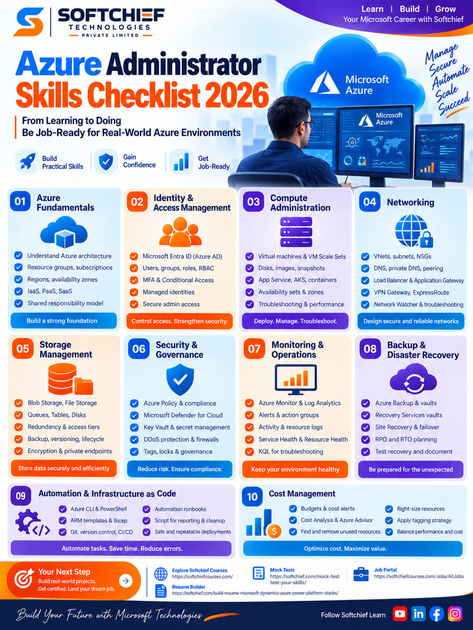
You should be able to create, resize, start, stop, redeploy, and delete virtual machines. Manage disks, images, snapshots, extensions, boot diagnostics, availability sets, availability zones, and VM Scale Sets. Understand autoscaling, load balancing, and the cost impact of running larger or more available systems.
Know when App Service, containers, Container Apps, or AKS fit better than a VM. You need administrator-level awareness, not the same depth as an application developer or platform engineer. Practice failed deployments, unreachable VMs, full disks, bad extensions, and incorrect security rules.
Design and troubleshoot virtual networks
Create virtual networks, subnets, network interfaces, public and private IP addresses, route tables, and network security groups. Learn DNS, custom DNS, private DNS zones, peering, hub-and-spoke designs, segmentation, ingress, egress, and least-exposure rules.
Understand the purpose of Load Balancer, Application Gateway, Bastion, VPN Gateway, ExpressRoute, Private Link, and service endpoints. Use Network Watcher for connection troubleshooting, IP flow verification, packet capture, topology views, and Connection Monitor.
Protect and recover storage
Compare Blob Storage, Azure Files, queues, tables, managed disks, and storage account types. Select performance tiers, redundancy, replication, access tiers, lifecycle rules, soft delete, snapshots, and versioning based on access patterns and recovery needs.
Secure data with Microsoft Entra authorization, shared access signatures, access keys, firewalls, private endpoints, and encryption. Build one exercise where you choose a storage design for a file share, archive data, or application uploads, then explain the security, recovery, performance, and budget trade-offs.
Secure Azure Environments Through Identity and Governance
Manage Microsoft Entra identities and access
Create users, groups, guests, administrative units, custom domains, app registrations, service principals, and managed identities. Distinguish Microsoft Entra roles from Azure resource roles, then apply RBAC at the narrowest useful scope.
Practice multifactor authentication, Conditional Access, self-service password reset, and identity protection concepts. Audit a lab for excessive permissions and replace broad assignments with scoped roles. Never store credentials in scripts, repositories, notes, or shared documents.
Enforce governance and cost control
Use Azure Policy definitions, initiatives, assignments, exemptions, and remediation tasks. Apply locks, tags, naming rules, allowed locations, approved SKUs, and deployment standards.
Management groups and subscriptions organize access and billing. Review budgets, cost alerts, Cost Analysis, Azure Advisor recommendations, unused resources, and oversized resources. The Cloud Adoption Framework landing-zone guidance connects management groups, subscriptions, networking, and governance controls.
Reduce security risks
Review Microsoft Defender for Cloud recommendations, secure score concepts, workload protections, and regulatory compliance dashboards. Learn encryption at rest, Key Vault, secret and certificate rotation, DDoS Protection, firewall choices, endpoint protection, and vulnerability management.
Keep administrative access private and record useful logs for audits and investigations. Security work includes proving who changed what, when the change happened, and how the team responded.
Operate Azure Environments With Monitoring, Backup, and Automation
Monitor health and performance
Configure Azure Monitor, Log Analytics workspaces, metrics, diagnostic settings, activity logs, resource logs, alerts, action groups, and alert processing rules. Learn enough Kusto Query Language to find failed sign-ins, VM errors, network blocks, and resource changes.
Monitor Service Health, Resource Health, planned maintenance, quotas, capacity, storage, VMs, and networks. Each alert needs a purpose, threshold, owner, severity, and response procedure. Application Insights helps with application incidents but does not replace infrastructure monitoring.
Back up and test recovery
Use Azure Backup, Backup vaults, Recovery Services vaults, backup policies, restore points, retention settings, and restore operations. Azure Site Recovery supports replication, failover, failback, and recovery plans; its official overview explains these functions.
Recovery point objective means how much recent data the business can lose. Recovery time objective means how long recovery may take. Document protected workloads, dependencies, recovery order, owners, and test results, then perform restore and disaster recovery drills.
Automate repeatable administration
Write Azure CLI and PowerShell scripts for deployment, reporting, access reviews, patching, and cleanup. Use parameters, variables, error handling, logging, confirmation prompts, and safe defaults. Destructive scripts should report planned changes before they apply them.
Learn ARM templates, Bicep, infrastructure as code, Git, pull requests, peer review, and separate development, test, and production environments. Azure Automation runbooks and scheduled tasks can handle recurring work, including update management.
Prove Job Readiness With Hands-On Azure Projects
Build a production-style lab
Create separate resource groups or subscriptions for lab environments where possible. Deploy a segmented virtual network, VM, secure administrative access, storage, monitoring, backup, tags, managed identity, RBAC, Azure Policy, and a budget alert.
Add a failure scenario such as an inaccessible VM, invalid NSG rule, failed deployment, or missing diagnostic setting. Record the symptoms, commands, screenshots, root cause, fix, cleanup steps, and cost controls.
Create evidence employers can review
Include an architecture diagram showing networks, identities, compute, storage, monitoring, and security boundaries. Add a deployment guide, operations runbook, backup plan, security review, cost notes, and scripts or Bicep files.
A strong portfolio explains decisions instead of listing services. Remove secrets, tenant IDs, personal data, and sensitive settings before publishing. Show one incident with symptoms, investigation, remediation, and prevention.
Prepare for interviews
Practice scenarios involving VM connectivity, RBAC scope, storage access, DNS failures, failed deployments, backup restoration, and unexpected charges. Explain choices using security, reliability, performance, maintainability, and cost.
Use a clear troubleshooting pattern: confirm the symptom, define the scope, inspect health and activity data, test assumptions, fix the cause, and document the result. Use STAR examples for incidents, automation, access control, change control, documentation, and teamwork.
Turn the Azure Administrator Skills Checklist 2026 Into a Career Plan
Prioritize skills by job impact
Must-have skills include identity and RBAC, networks, compute, storage, monitoring, backup, CLI or PowerShell, troubleshooting, and governance. High-value additions include Bicep, KQL, cost reviews, security hardening, disaster recovery testing, and clear documentation.
Supporting skills include ticket handling, IT service management, Git, change control, networking basics, and communication with application and security teams. Compare this checklist with several current job postings to spot repeated requirements.
Follow a staged learning sequence
Start with Azure architecture, resource management, networking, identity, and the portal. Add compute, storage, monitoring, backup, governance, and security. Then repeat the work with CLI, PowerShell, Bicep, and version-controlled deployments.
Finish with an integrated project and deliberate failure tests. Review the current AZ-104 objectives, but validate knowledge through labs rather than practice questions alone.
Measure observable readiness
You are ready to apply when you can deploy and secure a small environment without step-by-step instructions. You should explain service choices, diagnose common failures, automate safe tasks, and document the environment for another administrator.
Track each skill as studied, practiced, or demonstrated. The third status requires evidence, such as a working lab, script, incident report, recovery test, or interview explanation.
Conclusion
A job-ready Azure administrator combines infrastructure knowledge with identity, security, governance, monitoring, backup, automation, troubleshooting, cost control, and communication. Azure Administrator Associate certification can support your credibility, but practical projects show whether you can reason through real operational problems.
Build one integrated Azure administration lab. Document it professionally, test failure and recovery scenarios, remove all secrets, and use the results to guide certification study and job applications.









