

Dataverse vs SharePoint Lists: Key Differences, Features, and Which One Should You Choose?

Introduction
A SharePoint List can launch a working tracker in minutes. Dataverse can support a multi-department business app for years. Both store structured data, but Dataverse vs SharePoint Lists is less about which tool is “better” and more about complexity, security, growth, and app needs.
Choosing based only on familiarity can create data-model limits, hard-to-manage permissions, Power Apps delegation errors, complex flows, and surprise licensing costs. This Power Apps data source comparison explains architecture, features, security, performance, cost, migration, and the Microsoft Dataverse use cases that favor each platform.
Understand How Dataverse and SharePoint Lists Store Data
SharePoint Lists Fit Collaborative, List-Based Work
SharePoint Lists use columns, views, forms, sharing, and attachments to manage records. Common examples include task registers, issue logs, contact directories, inventories, approval queues, and content registers.
They fit naturally inside SharePoint sites, Microsoft Teams, Microsoft Lists, Power Automate, and basic Power Apps solutions. Teams that already use Microsoft 365 often face less training and setup work. Access still depends on tenant settings, user permissions, and the licensing terms for the services involved.
A list works well when each record can stand alone or has only a few lookups. It becomes harder to manage when many lists must act as one connected application.
Dataverse Provides a Relational App Foundation
Dataverse stores data in tables with typed columns, relationships, choices, calculated fields, primary keys, and alternate keys. It also supports business rules, workflows, business process flows, and server-side validation. Microsoft’s Dataverse overview describes how these tables support Power Apps, Power Automate, Power BI, and Dynamics 365 data.
Dataverse is built for model-driven apps and complex canvas apps. Business units, security roles, teams, ownership, row access, and column security can control how people use business data.
Dataverse for Teams is a separate, team-focused option. It has a different environment and governance model, with a path to upgrade to full Dataverse. Treat that upgrade path as an architecture decision, not an automatic promise that every enterprise feature is available on day one.
Your Data Model Usually Decides the Winner
A flat issue list is a good SharePoint candidate. A service system with customers, contracts, assets, cases, activities, and invoices needs a relational model. Parent-child, many-to-many, and cross-department relationships are easier to maintain in Dataverse than through a web of SharePoint lookups.
Before choosing, document the tables or lists you need, their relationships, record owners, business rules, expected growth, and future apps. The data-entry screen matters less than the structure underneath it.
Compare Power Apps, Forms, and Automation
Dataverse Supports Deeper Power Apps Development
Dataverse supports model-driven apps with customizable forms, views, dashboards, business process flows, business rules, command bars, and role-based experiences. Multiple apps can use the same tables and rules, which reduces the risk of each app handling the same process differently.
It also connects with Power Automate, Power BI, Dynamics 365, APIs, plug-ins, and virtual tables where supported. This makes Dataverse a stronger choice when several departments, apps, or outside systems need the same trusted data.
SharePoint Lists Enable Fast Prototypes
SharePoint provides familiar list forms, views, alerts, Power Automate approvals, and customized Power Apps forms. It works well for team-level tracking with simple workflows and limited relationships.
The risk appears when a prototype becomes a large application. Heavy lookup use, many approval stages, complex formulas, attachments, and multiple dependent apps can make a SharePoint design hard to test and support.
Integration also needs a close review. SharePoint connectors, Microsoft Graph, SharePoint APIs, Dataverse connectors, authentication, API limits, and premium licensing can affect the design. Test the exact connectors and environment plan before promising a feature.
Compare Security, Performance, and Scale
Dataverse Offers More Granular Business Security
Dataverse security can combine business units, roles, teams, ownership, row access, hierarchy, and column-level controls. This fits applications where users need different access based on job role, department, record owner, or sensitive fields.
That model can be easier to audit than a large collection of custom list and item permissions. Security still needs review against Microsoft’s current guidance, retention rules, identity setup, and compliance needs.
SharePoint Permissions Can Become Difficult
SharePoint supports site, list, folder, and item permissions. Users can inherit access from a site or group, while sharing links and broken inheritance provide more control.
Too many unique permissions create risk. Access can become inconsistent, sharing links can expose records, and audits can take time. Keep item-level permissions rare, define list owners, and review sharing and access policies before launch.
Performance Depends on Queries and Design
A SharePoint List can contain up to 30 million items, but views may hit the List View Threshold at about 5,000 items. Indexed columns, filtered views, folders, lookup count, attachments, and Power Apps delegation all affect performance. Microsoft’s list threshold guidance explains why large queries can be blocked.
Power Apps may process only the first 500 records by default, or up to 2,000 after a setting change, when a formula cannot be delegated. Microsoft’s delegation guidance warns that nondelegable queries can return incomplete results.
Dataverse still needs careful query design, relationship depth, API planning, environment capacity, and integration testing. Test with real record volumes and realistic concurrent users instead of comparing record counts alone.
Compare Cost and Total Ownership
SharePoint Often Has a Lower Starting Cost
SharePoint Lists and Microsoft Lists may be attractive when a company already has Microsoft 365. Users know the interface, and teams can build simple trackers without a new data platform.
The total cost can change when the solution needs premium Power Apps or Power Automate features, external users, advanced connectors, extra capacity, custom development, or long-term support. Licensing depends on the exact Microsoft 365, Power Platform, Dynamics 365, user, app, connector, and environment setup.
Dataverse Can Reduce Long-Term Risk
Dataverse may cost more, but its shared rules, security model, audit options, managed solutions, and application lifecycle tools can reduce rework. Those benefits matter when a system supports revenue, compliance, customer service, or several business units.
Compare five-year ownership, not only the first build. Include development, testing, training, monitoring, support, migration, security reviews, integration work, backup, recovery, and future changes. Confirm current prices and capacity rules with Microsoft licensing documentation before approval.
Match the Platform to Your Use Case
Choose SharePoint Lists for Simple Team Tracking
SharePoint Lists are a strong fit for event planning, task tracking, issue logs, straightforward inventories, content registers, and basic approval queues. Choose them when users already work in SharePoint or Teams and the data has few relationships.
Reassess the choice if the solution needs high transaction volume, complex permissions, many connected apps, or extensive automation. A quick start can become an expensive rebuild when the data model no longer fits.
Choose Dataverse for Governed Business Applications
Dataverse fits solutions with several related tables, complex business rules, audit needs, role-based access, model-driven apps, or shared data across departments. It also fits Power Platform and Dynamics 365 work where Dataverse already holds the core business data.
Use this matrix to score each requirement by business importance:
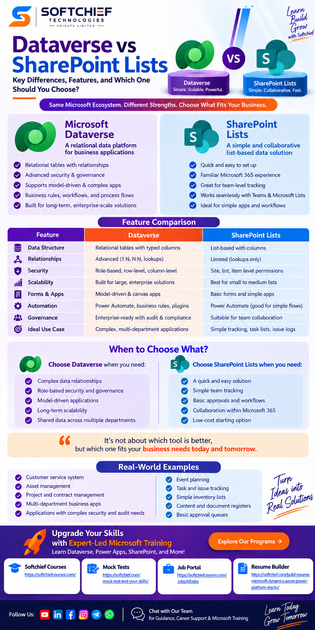
| Requirement | SharePoint Lists | Dataverse |
|---|---|---|
| Simple team tracking | Strong fit | Often more than needed |
| Complex relationships | Limited to moderate | Strong fit |
| Role-based security | Moderate | Strong |
| Fast prototype | Strong | Moderate |
| Model-driven app | Limited | Strong |
| Complex automation | Moderate | Strong |
| Microsoft 365 collaboration | Strong | Strong |
| Enterprise governance | Moderate | Strong |
| Premium licensing tolerance | Lower | Higher |
| Long-term app growth | Moderate | Strong |
Add a “not sure” score. That result should trigger a proof of concept or architecture review, not a rushed decision.
Plan Migration or a Hybrid Design
Assess Data and Processes First
Inventory existing lists, spreadsheets, forms, apps, flows, reports, integrations, owners, and permission groups. Record data types, required fields, lookups, duplicates, attachments, retention rules, and history needs.
Then separate temporary team tools from systems likely to become shared or enterprise-wide. This prevents a short-term tracker from becoming the accidental system of record.
Test Real Workloads Before Launch
Build a proof of concept with representative data volumes. Test search, filters, sorting, delegation, forms, permissions, automation failures, reporting, integrations, mobile use, accessibility, and recovery procedures.
A hybrid design can work well. Keep governed transactional data in Dataverse and use SharePoint for document collaboration when appropriate. Define one system of record, synchronization timing, error handling, security boundaries, and ownership. Avoid copying the same business data into both platforms without a clear reason.
Conclusion
SharePoint Lists are often the practical choice for simple, collaborative tracking inside Microsoft 365. Dataverse is better suited to relational, governed, application-focused solutions with complex security and long-term growth.
Choose based on the future state, not only the first working form. Before launch, map relationships, review security and compliance, estimate growth, test integrations, confirm licensing and capacity, run a realistic proof of concept, and assign ownership for support and recovery. The best platform is the one that matches the solution’s complexity without creating avoidable migration or maintenance work.









