

Power Apps vs Custom .NET Applications: Which Is Better for Business Applications?
Introduction
A slow approval process, manual spreadsheet, or poor field app can cost a business more than expected. Yet choosing the wrong development platform can create new problems through high costs, weak security, licensing limits, or hard-to-change code.
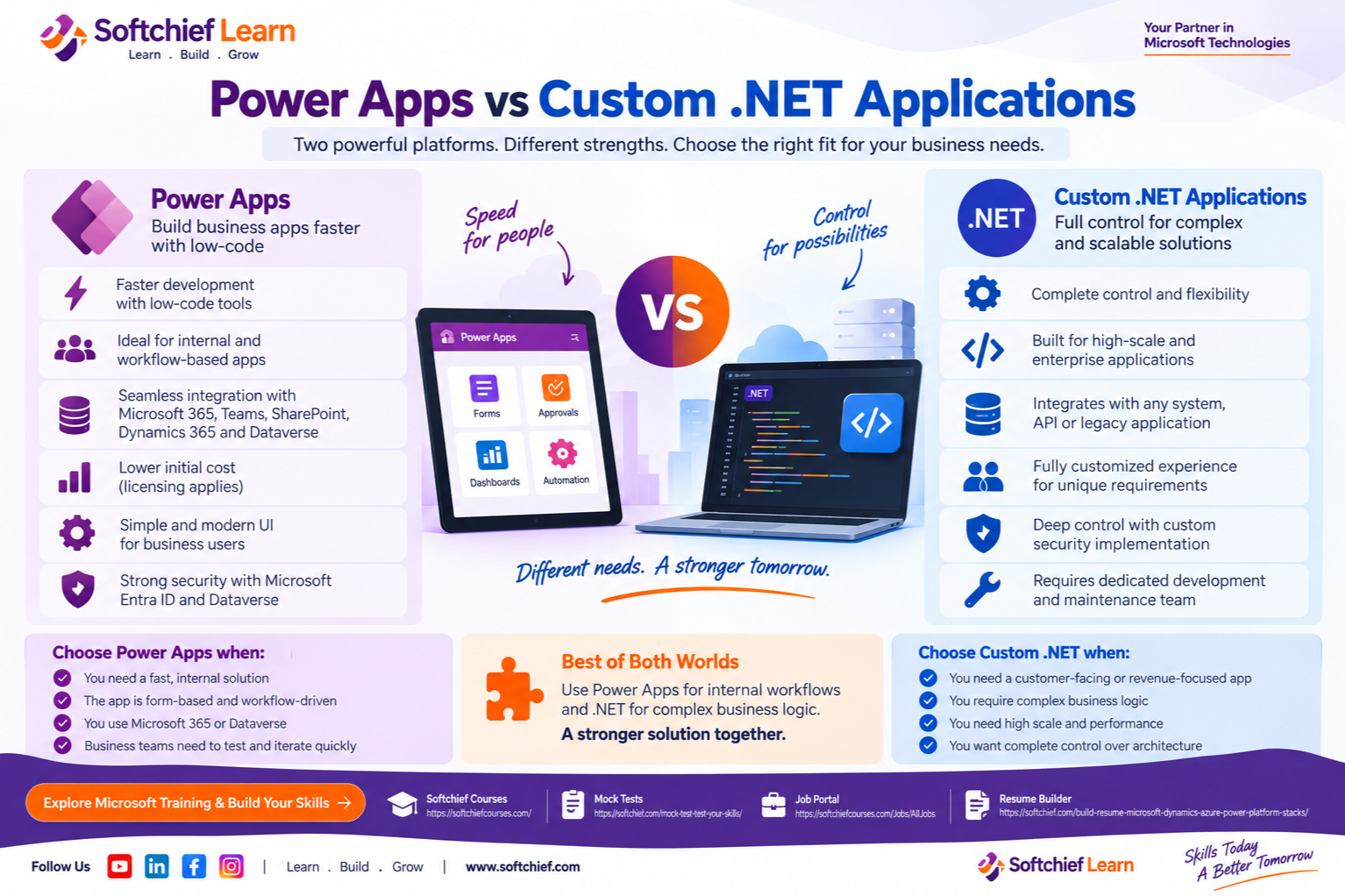
Power Apps vs custom .NET applications comes down to two different priorities. Power Apps focuses on speed, low-code development, and Microsoft 365 integration. Custom .NET applications focus on control, extensibility, and architecture built around your exact needs.
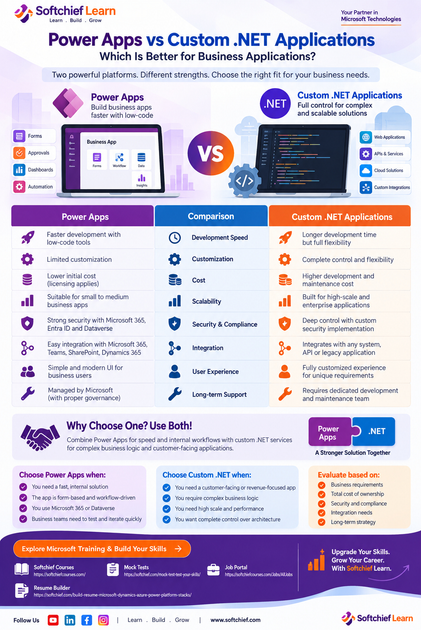
The right choice depends on development speed, total cost, customization, scale, security, integration needs, user experience, and long-term support. Neither platform wins every project.
Match the Platform to the Business Problem
What Power Apps delivers for business teams
Power Apps is a low-code platform within Microsoft Power Platform. Teams can build canvas apps, model-driven apps, and data solutions with Dataverse, connectors, and Power Automate workflows. Microsoft describes Power Apps as a way to create apps that connect with business data and run in browsers or mobile apps through its official Power Apps documentation.
It fits internal workflow apps, inspections, approval requests, employee self-service tools, dashboards, and department systems. Microsoft 365, Teams, SharePoint, Excel, Dynamics 365, and Dataverse can reduce setup work when those services already support daily operations.
What custom .NET applications deliver
Custom .NET development supports web apps, APIs, mobile services, desktop software, and cloud systems. ASP.NET Core supports web APIs, MVC apps, Razor Pages, Blazor, SignalR, and gRPC, as shown in Microsoft’s ASP.NET Core documentation.
A .NET team can select its database, identity provider, hosting model, cloud services, front-end tools, and integration style. That flexibility suits customer portals, marketplaces, high-volume transaction systems, industry software, and workflows with complex rules.
The first decision should be based on the problem. Choose Power Apps when standard workflows and quick delivery matter most. Choose .NET when the application is a strategic product, needs a unique experience, or has demanding technical requirements. Record user volume, data sensitivity, integrations, offline needs, reporting, and expected lifespan before selecting a platform.
Compare Speed, Customization, and User Experience
Why Power Apps can shorten delivery
Visual design tools, templates, reusable components, connectors, Dataverse, and Power Automate can remove much of the repeated work in an internal application. Business users can help test screens and workflows early, which supports quick changes before a large build begins.
Create a small proof of concept with real user roles and representative data. Test connector access, delegation behavior, mobile use, and the main workflow before approving a wider rollout. Avoid relying on broad claims about development speed; project results depend on requirements and team skill.
Where Power Apps can become restrictive
Power Apps may struggle with unusual interfaces, advanced front-end interactions, complex state management, custom algorithms, or demanding offline behavior. Delegation limits can affect how data operations run, while connector availability and API limits can shape the design.
Licensing also matters. Premium connectors, Dataverse capacity, Power Automate usage, and per-app or per-user plans can change the business case. Microsoft’s Power Platform licensing documentation should be checked before development, not after the app is built.
Custom .NET provides more control over screens, business rules, APIs, background work, data access, caching, and infrastructure. Teams can build reusable services and tune performance for known workloads. That freedom requires architecture records, automated tests, clear documentation, and skilled developers.
Evaluate Cost, Scale, and Ownership
Calculate the full cost of Power Apps
Power Apps may lower the initial build cost when the solution uses common forms, workflows, and Microsoft services. It can also reduce the need to build identity, data forms, and routine automation from scratch.
The full cost may include user or app licenses, premium connectors, Dataverse storage, Power Automate consumption, environments, governance, consulting, and support. Microsoft’s licensing page explains that Power Platform plans can include access to Dataverse, while Microsoft 365 access has important limits. Review current pricing instead of using old figures.
Calculate the full cost of custom .NET
A custom .NET estimate should include discovery, design, engineering, testing, hosting, databases, monitoring, security reviews, support, and future changes. Five-year total cost of ownership is more useful than comparing two initial build estimates.
.NET may offer better long-term value when the app drives revenue, needs high scale, or depends on a differentiated customer experience. It may be wasteful for a small internal tool when standard Microsoft services already meet the need and no maintenance team exists.
For Power Apps, test Dataverse capacity, service limits, connectors, API use, environment strategy, solution deployment, and citizen-maker controls. For .NET, plan database performance, horizontal scaling, caching, asynchronous jobs, observability, automated infrastructure, and framework upgrades.
Compare Security, Compliance, and Integration Control
How Power Apps supports Microsoft-centered security
Power Apps works well for organizations using Microsoft Entra ID, Microsoft 365, Dataverse, and Microsoft security tools. Dataverse security roles, environment permissions, data loss prevention policies, audit logs, and conditional access can support controlled access.
Misconfigured sharing, broad permissions, unmanaged connectors, and uncontrolled apps can still expose data. Microsoft’s Power Platform governance guidance recommends environment planning, access controls, data policies, monitoring, and clear administration.
How custom .NET enables deeper control
Custom .NET can use Entra ID or another identity provider, custom claims, private networks, detailed audit logs, encryption rules, and organization-specific deployment controls. Security checks can run throughout the software development lifecycle.
Control does not guarantee safety. Teams still need threat modeling, dependency updates, code review, penetration testing, and secure configuration. The OWASP Application Security Verification Standard provides requirements for testing web application security controls.
Integration choice should match the data landscape. Map each system by owner, data direction, authentication method, frequency, failure behavior, and monitoring duty. Power Apps connectors may fit routine business data, while .NET may be better for real-time APIs, message queues, event-driven systems, legacy systems, or high-volume transfers.
Decide Between Power Apps, .NET, or Both
Choose Power Apps for speed and standard workflows
Power Apps is a strong fit when the app is internal, form-based, workflow-driven, and connected to Microsoft 365 or Dataverse. Confirm licensing, connectors, data volume, delegation, offline needs, environment governance, and support ownership before launch.
It also works well when business teams need to test changes during development. A small proof of concept can reveal whether the platform handles the real process without costly assumptions.
Choose custom .NET for control and differentiation
Custom .NET is usually better for customer-facing, revenue-producing, highly specialized, or high-volume applications. Define nonfunctional needs for performance, availability, security, accessibility, scale, and recovery before choosing the architecture.
Plan engineering capacity for design, testing, monitoring, incident response, dependency updates, and technical debt. A custom application remains a long-term software asset, not a one-time project.
Use a hybrid architecture when needs differ
The platforms can work together. Power Apps can handle internal forms and approvals while .NET APIs manage complex rules. A custom customer portal can connect with Dataverse, while Power Automate handles routine notifications beside Azure Functions or ASP.NET Core services.
Document which platform owns each business rule, data entity, integration, and user experience. Also define API authentication, data ownership, versioning, monitoring, failure handling, and support duties.
Build a Defensible Platform Decision
Score both options against weighted criteria such as time to market, functional fit, customization, user experience, scale, security, integration difficulty, internal skills, five-year cost, vendor dependence, and maintenance. Give higher weights to risks tied to revenue, compliance, or customer trust.
Then test the leading option with realistic data and users. The proof of concept should cover authentication, permissions, integrations, errors, reports, mobile or offline behavior, accessibility, and usability. Include business owners, end users, security staff, and IT administrators.
Governance must continue after launch. Power Apps needs environment strategy, solution management, maker training, data policies, app inventory, and support ownership. .NET needs source control, CI/CD, dependency updates, infrastructure management, monitoring, automated tests, and technical debt planning.
Conclusion
Power Apps is often the better choice for fast, internal, workflow-based business applications that use Microsoft services. Custom .NET is often stronger for complex, scalable, customer-facing, and strategically differentiated systems.
Power Apps still requires careful review of licensing, connectors, governance, security, and service limits. .NET provides greater control, but it demands more engineering, architecture work, testing, and long-term maintenance.
A hybrid approach can combine low-code speed with custom services where deeper control is needed. Select the platform that matches the application’s complexity, strategic value, expected scale, security needs, available skills, and total cost of ownership.










